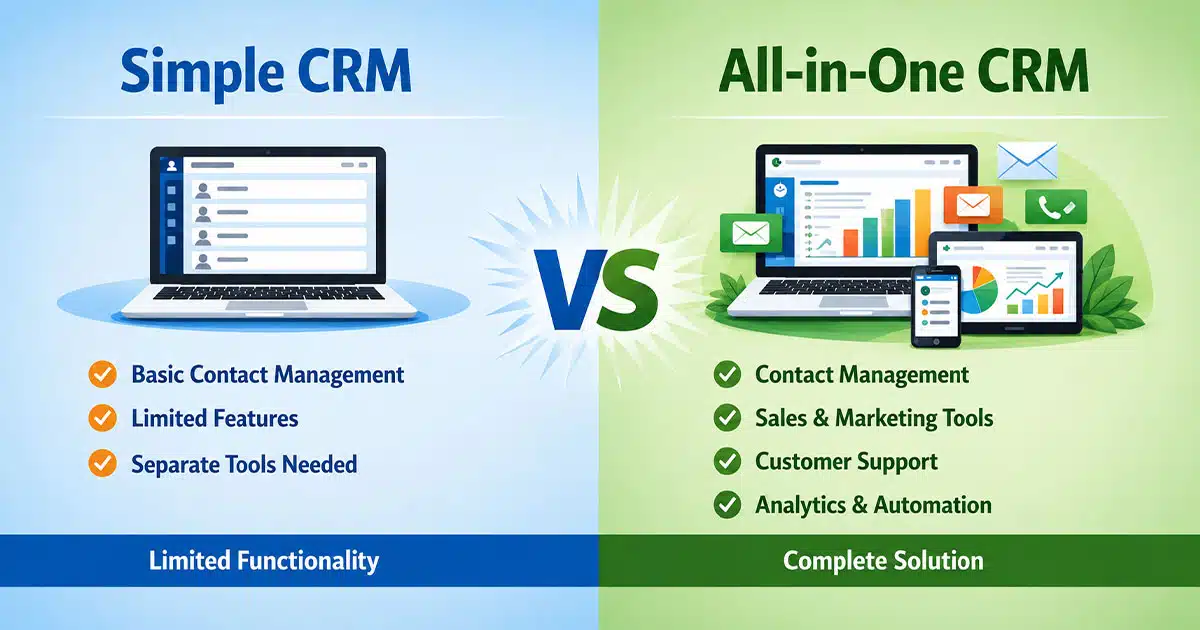
Choosing between a simple CRM vs all-in-one CRM can feel overwhelming when your business is growing fast. Sales teams want tools that help them close deals, not software that takes weeks to learn. The reality is that many small businesses either overbuy on features they never use or underbuy and struggle to manage customer relationships properly.
This guide breaks down how simple CRM and all-in-one CRM solutions differ in daily operations, cost, and scalability. You will learn which option fits different business stages and what challenges to expect with each type. By the end, you will have a clear picture of which crm software direction makes sense for your team right now.
What Is A Simple CRM
A simple CRM is a lightweight customer relationship management tool built around the essentials. It handles contact management, basic deal tracking, activity logs, and communication history without overwhelming users with features they do not need yet.
These crm systems work best for early-stage startups, small sales teams, and businesses replacing spreadsheets for managing customer relationships. A typical simple CRM offers a visual sales pipeline, email integration, task reminders, and straightforward dashboards. Setup usually takes hours instead of weeks.
The design philosophy is intentional. Simple CRMs avoid complex custom objects, advanced marketing automation, and enterprise workflows. They focus on helping sales teams track leads, log customer interactions, and move deals forward. For many small businesses, this approach delivers faster time to value because teams actually use the tool instead of avoiding it.
What Is An All-In-One CRM
An all-in-one CRM combines sales, marketing, and customer support into a single crm platform. Instead of using separate tools for each function, teams log into one system that handles everything from lead capture to email campaigns to service tickets.
Platforms like Zoho CRM and monday CRM represent this approach. They offer native marketing automation, landing page builders, customer service modules, predictive analytics, and cross-department reporting. The promise is a unified view of the entire customer lifecycle without jumping between applications.
All-in-one crm solutions appeal to mid-sized companies with dedicated marketing teams, formal customer service teams, and complex sales processes. These platforms require more setup time, training, and often higher costs. But for organizations that can invest in proper implementation, they deliver deep insights across marketing and sales processes that simpler tools cannot match.
Why Businesses Compare Simple CRM Vs All-In-One CRM
Understanding why this comparison matters helps you make a smarter decision for your specific situation. The following factors drive most businesses to evaluate their crm solutions carefully.
Cost And Budget Planning
Budget reality shapes every software decision. Simple CRMs typically cost between $20 and $40 per user monthly, with minimal onboarding expenses. All-in-one platforms often start higher and scale up quickly as you add modules.
Hidden costs matter too. All-in-one systems may require consultant fees, longer implementation timelines, and dedicated admin resources. A simple CRM paired with specialized tools sometimes costs less overall while delivering better results for each function.
Ease Of Use Expectations
Simple CRMs prioritize a user friendly interface that sales reps can navigate within their first day. Training sessions are short, and adoption rates tend to be high because the learning curve stays manageable.
All-in-one platforms often carry a steep learning curve. More features mean more menus, more configuration options, and more time before teams feel comfortable. Some organizations see reps reverting to spreadsheets because the CRM feels too complex for daily sales tasks.
Feature Depth Concerns
Simple CRMs handle core sales activities well but may lack advanced reporting capabilities, deep customization, or sophisticated workflow automation. Teams focused on contact management and deal management find these tools sufficient.
All-in-one CRMs offer comprehensive solution packages including lead scoring, ai powered insights, marketing journeys, and service ticketing. The question becomes whether your team will actually use these features or just pay for them.
Team Skill Level Impact
Smaller teams without dedicated IT support benefit from simple CRMs that require minimal technical knowledge. These platforms let founders and sales reps manage customer data without calling for help.
Larger organizations with technical staff can leverage all-in-one platforms more effectively. Custom automations, integrations with other business tools, and advanced data analysis become possible when someone owns the system full-time.
Growth Readiness Factors
Your 12 to 24 month growth projection influences this choice. Teams expecting to triple in size may want a platform that scales without migration. Teams focused on near-term wins might prefer starting simple and evaluating later.
Some simple CRMs offer modular growth paths where you add capabilities as needed. All-in-one platforms provide growth readiness upfront but require you to pay for and manage that capacity from day one.
How Simple CRM And All-In-One CRM Work In Daily Operations
The real test of any crm software comes in daily use. Here is how these two approaches differ when sales teams sit down to work.
Sales And Lead Management
Simple CRMs excel at straightforward lead management. Reps see their pipeline, update deal stages, and log activities without navigating multiple modules. OnePageCRM users report stronger client relationships by focusing on timely follow ups rather than data entry overload.
All-in-one platforms offer deeper sales pipeline management with custom stages, multi-product tracking, and subscription management. Teams with complex sales cycles benefit from this depth. The trade-off is more clicks and more fields for every update.
Task And Activity Tracking
Task management in simple CRMs stays focused on sales follow ups, reminders, and deal-related actions. Reps see what needs attention today and act quickly. This approach helps eliminate repetitive tasks through basic automation without overwhelming users.
All-in-one systems connect sales tasks to marketing activities and service requests. A rep might see that marketing sent a nurture email yesterday before making a call. This context helps but requires more screen time to absorb.
Automation Capability Differences
Simple CRMs offer sales automation for common workflows like follow up sequences, task creation triggers, and basic sales triggers for stage changes. These automations cover most small team needs without requiring technical setup.
All-in-one platforms provide cross-functional automation spanning sales marketing and service. Lead scoring adjusts based on email engagement, deals trigger onboarding sequences automatically, and support tickets can update account health scores. Power comes with complexity.
Reporting And Insights Access
Simple CRMs deliver pipeline reports, activity dashboards, and sales performance metrics that cover essential business intelligence. Teams get visibility into what matters without drowning in data.
All-in-one CRMs offer advanced reporting capabilities including multi-touch attribution, customer satisfaction trends, revenue forecasting, and marketing ROI analysis. These data driven decisions require someone to build and maintain the reports, but the insights run deeper.
Cross Team Visibility
Simple CRMs keep sales data visible to sales teams. Integration with other business tools like support platforms creates cross-team visibility when needed. This separation can actually improve focus.
All-in-one platforms provide native cross-team visibility. Customer service teams see sales history, marketing sees deal progress, and leadership gets unified dashboards. Streamlined workflows emerge when everyone works from the same customer information.
What Are The Key Differences Between Simple CRM And All-In-One CRM
Choosing the right crm solution requires understanding where these options truly diverge. Let us break down the core differences that affect your daily operations and long-term success.
Feature Scope And Depth
Simple CRMs concentrate on contact management, pipeline management, email integration, and basic reporting. They handle unlimited contacts in many cases and give sales teams exactly what they need to track leads and close deals. The focused feature set means less distraction.
All-in-one CRMs bundle sales with marketing automation, customer support modules, advanced analytics, and sometimes project management tools. Zoho CRM includes AI through Zia for lead prediction and conversion insights. This depth supports complex business strategies but demands more attention to master.
Ease Of Setup And Daily Use
Simple CRMs typically launch within a day. Import contacts, connect email, set up pipeline stages, and start working. This speed helps teams build stronger customer relationships immediately rather than waiting through extended implementation.
All-in-one platforms require phased rollouts spanning weeks or months. Sales modules come first, then marketing configuration, then service setup. Each phase needs training and testing. The investment pays off for some organizations but delays value for others.
Customization And Flexibility
Simple CRMs offer enough flexibility for standard sales processes through configurable pipelines, custom fields, and basic workflow adjustments. A flexible crm of this type adapts to most small business needs without requiring a developer.
All-in-one systems provide deep customization including custom objects, complex field relationships, and tailored automation logic. This flexibility supports unique business processes but requires expertise to build and maintain.
Automation And Workflow Control
Sales automation in simple CRMs handles follow ups, task creation, deal stage notifications, and email sequences. These manual tasks disappear without complex configuration. Teams save hours weekly on repetitive tasks.
All-in-one platforms automate across the entire customer lifecycle. Marketing leads flow into sales with scores attached, closed deals trigger onboarding workflows, and churn signals appear automatically. This end-to-end automation requires more setup but delivers comprehensive process control.
Cost Structure And Total Ownership
Simple CRMs keep costs predictable with straightforward per-user pricing. Many offer free crm tiers for up to three users, making them accessible for startups. Maintenance and administration costs stay minimal because complexity stays low.
All-in-one platforms carry higher license fees plus implementation costs, training investments, and ongoing admin overhead. Organizations often discover unused modules costing money each month. Total ownership extends well beyond the subscription price.
Scalability And Long Term Fit
Simple CRMs scale for growing sales teams but may hit limits around advanced analytics, complex product catalogs, or enterprise security requirements. Migration becomes necessary at some point for many rapidly scaling companies.
All-in-one platforms scale extensively but carry complexity from day one. The question is whether you grow into the platform fast enough to justify the upfront investment. Some teams never use the capacity they pay for.
Which CRM Fits Different Business Stages
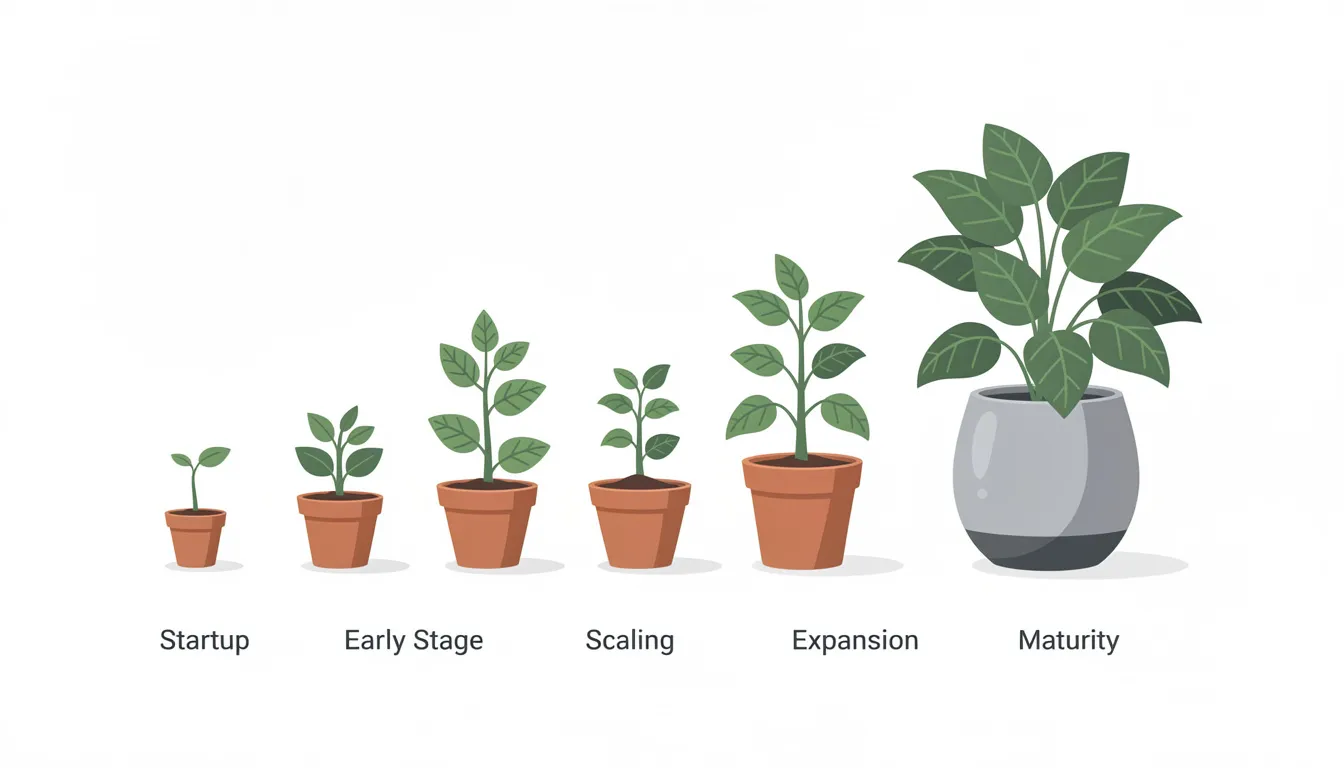
Your current business stage influences which crm software type makes sense. Here is how different team profiles typically align with each option.
Early Stage And Small Teams
Teams under 15 people with single products and short sales cycles thrive with simple CRMs. These small businesses need to track leads, manage deals, and build customer relationships without administrative overhead. Quick wins matter more than comprehensive solutions at this stage.
A solo realtor or 4-person SaaS startup fits this profile perfectly. Spreadsheet replacement is the goal, and simple CRMs deliver immediate improvement. The business goals focus on revenue generation, not platform mastery.
Growing And Mid Size Teams
Teams adding dedicated marketing functions, expanding sales territories, or launching multiple products start needing more from their CRM. Cross-team coordination becomes important as customer information needs to flow between departments.
This transition point creates the most difficulty. Some teams upgrade to all-in-one platforms successfully. Others find that a simple sales crm paired with specialized tools for marketing and support delivers better results without the steep learning curve.
Large And Enterprise Teams
Organizations with formal SDR, AE, and CS structures, multiple regions, and complex product catalogs typically require all-in-one capabilities. The enabling businesses at this scale need unified data, advanced automation, and comprehensive reporting.
Enterprise teams can invest in implementation, training, and ongoing administration. The return on that investment comes through tighter process control and deeper data analysis across the entire customer lifecycle.
Remote And Distributed Teams
Remote teams benefit from mobile apps and cloud-based access regardless of CRM type. Simple CRMs often provide cleaner mobile experiences because fewer features mean simpler interfaces.
All-in-one platforms offer more collaboration features but may overwhelm remote users who lack in-person training support. The choice depends on how much technical support your distributed team can access.
Industry Specific Needs
Regulated industries like healthcare or finance may require all-in-one platforms with built-in compliance features and custom security configurations. Simple CRMs may lack the audit trails and access controls these environments demand.
Service businesses, agencies, and consultancies often find simple CRMs plus specialized tools more effective than forcing their workflows into all-in-one modules designed for different industries.
Common Challenges Teams Face With Each CRM Type
Every crm platform brings trade-offs. Understanding common challenges helps you avoid surprises after you commit to a direction.
Feature Limitations In Simple CRM
Simple CRMs intentionally skip advanced features. Teams needing deep marketing automation, complex product configurations, or sophisticated lead scoring hit walls. The essential features that made these tools appealing become limiting as needs evolve.
Basic reporting in simple CRMs may frustrate teams wanting detailed data driven decisions. Pipeline and activity reports cover fundamentals, but attribution analysis, predictive analytics, and cross-channel insights require other business tools.
Complexity Overload In All-In-One CRM
All-in-one platforms overwhelm teams that do not have admin capacity. Configuration options multiply, training takes longer, and daily use requires navigating features you do not actually need. Some reps avoid the system entirely.
Module sprawl creates a maintenance burden. Each capability requires updates, monitoring, and potential troubleshooting. Teams without dedicated operations staff struggle to keep everything running smoothly.
User Adoption Resistance
Simple CRMs generally see higher adoption because the learning curve stays short. Sales reps use tools that feel intuitive and help them do their jobs faster. Low adoption kills any CRM investment.
All-in-one CRMs face adoption challenges when complexity exceeds team capability. Signs include reps reverting to spreadsheets, low data completeness, and constant requests to simplify the system. Engagement with customers suffers when reps avoid the CRM.
Tool Switching And Migration
Outgrowing a simple CRM means migration hassle. Contacts, deals, and activity history need to move to a new platform. Clean data practices from day one reduce this pain, but the disruption still costs time.
Moving away from an all-in-one platform proves even harder. Marketing workflows, automation logic, and service configurations create dependencies. Untangling these systems takes months in some cases.
Long Term Cost Issues
Simple CRM costs stay predictable but may require adding multiple tools as needs grow. The combined expense of several specialized tools sometimes exceeds a single all-in-one platform.
All-in-one platforms carry high costs from the start with modules that sit unused. Organizations paying for comprehensive solution packages often discover they only need 30% of the capabilities they licensed.
How Gain.io Supports The Right CRM Choice For Growing Teams
Gain.io offers a focused sales crm designed specifically for teams that want pipeline clarity without unnecessary complexity. Here is how it addresses the common challenges discussed above.
Balanced Feature Architecture
Gain.io provides contact management, visual sales pipelines, deal management, and activity tracking without bundling features your sales teams will never use. The crm features concentrate on helping reps manage leads, track deals, and close revenue.
This balanced approach means you get what you need for effective customer management without paying for marketing modules or service features that belong in specialized tools.
Fast Setup And Adoption
Teams get operational quickly with Gain.io. Import contacts, configure pipeline stages, connect email, and start working within hours. The user friendly crm design means reps adopt the system rather than avoiding it.
Short training sessions cover everything needed for daily use. New hires become productive faster because the interface guides them through sales tasks naturally.
Scalable Without Complexity
Gain.io grows with your team without forcing you into enterprise complexity. Add users, expand pipelines, and track more deals without requiring dedicated admin staff or consultant support.
The platform adapts to evolving sales processes while maintaining the streamlined workflows that make daily use efficient.
Clear Visibility Across Teams
Sales leadership gets pipeline visibility, activity tracking, and sales performance metrics that support informed decisions. Reps see their deals, tasks, and customer details in one clean view.
Integration capabilities let you connect Gain.io with other business tools as needed, creating cross-team visibility without building everything into a single overwhelming platform.
Flexible Growth Path
When your business needs change, Gain.io data exports cleanly. Clean contact and deal structures mean future migration stays manageable if your growth demands different capabilities.
This flexibility lets you start with what works now and evolve your tool stack based on actual needs rather than hypothetical future requirements.
FAQs
What Is The Main Difference Between Simple CRM And All-In-One CRM
Simple CRMs focus on core sales functions like contact management, pipeline tracking, and activity logging. All-in-one CRMs bundle sales with marketing automation, customer service, and advanced analytics in a single platform. The difference comes down to scope and complexity, not quality.
Which CRM Type Works Better For Small Teams
Simple CRMs typically work better for teams under 15 people. Faster setup, lower costs, and easier adoption help small businesses build customer relationships without getting bogged down in configuration. The focused approach lets sales reps spend time selling rather than learning software.
When Should A Business Switch From Simple CRM
Consider switching when you need cross-department automation, advanced marketing integration, or analytics that span the entire customer lifecycle. Signs include your team hitting feature limits regularly, needing complex lead scoring, or running multi-touch marketing campaigns that require native CRM integration.
Does All-In-One CRM Replace Other Tools
All-in-one CRMs aim to replace separate sales, marketing, and support tools. However, many organizations still pair them with specialized tools for functions that need deeper capability. A dedicated support platform alongside an all-in-one CRM is common because generic service modules often lack the depth customer service teams need.
Which CRM Option Offers Better Long Term Value
Long term value depends on your growth trajectory and team capabilities. Simple CRMs offer excellent value when combined with specialized tools because each function gets purpose-built features. All-in-one platforms deliver value when organizations can fully utilize the integrated capabilities they pay for.
How Does CRM Choice Affect Team Productivity
Simple CRMs boost productivity quickly through easy adoption and focused workflows. Reps spend less time on data entry and navigation, more time on engage customers and closing deals. All-in-one CRMs can increase productivity through automation and unified data, but only if teams invest in proper implementation and training.
