A CRM system should help your sales team stay focused on opportunities, conversations, and closing deals. But many companies are still running CRM software chosen years ago, before remote selling, heavier automation, and AI-supported workflows became standard. The result is familiar: sales reps update records at the last minute, managers export spreadsheets for forecasts, and leaders question whether the data can be trusted.
The question is not whether a newer tool has more features. The real question is when to switch CRM platform because your current CRM system no longer supports your business goals. This guide breaks down the seven signals, how to decide whether to fix or replace your current CRM, and how to plan a lower-risk move.
When CRM Platforms Become A Growth Bottleneck
A CRM bought 3 to 5 years ago may have been perfect when the company needed basic contact management, email logging, and a simple sales pipeline. Today, growing businesses often need stronger automation, real time analytics, marketing integration, cleaner data flows, and better visibility across the customer journey.
Research shows the problem is widespread. CRM projects often underdeliver, with many studies estimating failure or underperformance rates between 30% and 60%. CSO Insights has also found that fewer than 40% of CRM users adopt the system fully, which makes poor adoption one of the main reasons customer relationship management software fails.
The gap gets wider as teams scale. Generating basic monthly sales forecasts or tracking pipeline conversion should not take days or require exporting to pivot tables. If leaders spend hours cleaning reports before every board meeting, the crm platform is no longer acting as the source of truth.
When To Switch CRM Platform- 7 Signals
If three or more of these signals are present, the total cost of staying may be higher than the cost of a new crm. The strongest indicators that it’s time to switch CRM platforms include low user adoption, unreliable data, and a lack of scalability as business needs evolve.
Signal One: Teams Avoid The CRM Or Only Update It Before Meetings
Low adoption is easy to spot. Deals live in spreadsheets, customer data sits in personal notes, and sales reps update the system only before pipeline reviews. Indicators of low user adoption include teams reverting to spreadsheets or external notes because the CRM is too complex or lacks essential mobile access.
A practical benchmark helps: if fewer than about 70% to 75% of expected calls, emails, meetings, and follow ups are logged within 24 hours, forecasts become unreliable. Nearly 75% of CRM users value ease of use over robust functionality, highlighting the need for a user-friendly, intuitive interface.
This usually happens because the user interface is cluttered, the mobile version is weak, fields feel irrelevant, or data entry takes too long. User experience can make or break CRM adoption within a team; complicated dashboards and interfaces can hinder productivity and discourage use. When the CRM feels like admin work instead of a daily workspace, more training rarely fixes the core issue.
Signal Two: Your CRM Does Not Integrate Cleanly With The Rest Of Your Stack
A lack of seamless integration with the wider tech stack forces manual data entry and creates departmental information gaps. Sales conversations may sit in email, campaign context may sit with marketing teams, and billing or product signals may live in other tools.
The integration problem is not rare. CIOReview reported that 89% of organizations struggle with a backlog of data or system integration tasks. Before migrating, map all third-party integrations to ensure they are fully compatible with your target platform.
A modern CRM should connect cleanly with email, calendar, marketing tools, sales engagement platforms, analytics, and collaboration apps. Choosing a CRM with email integration to streamline communication helps ensure activity data stays accurate without extra admin work. If your current solution depends on fragile exports, copy-paste updates, or custom scripts that keep breaking, the CRM tools are slowing revenue execution.
Signal Three: Reporting, Forecasting, And Customer Data Quality Are Unreliable
Poor data hygiene characterized by duplicate records, outdated contacts, and “junk” data undermines decision-making and forecasting. If your CRM’s data isn’t aligning with business decisions, such as dealing with duplicate entries or spending hours cleaning up data, your CRM is failing to do its job.
B2B contact data often decays by roughly 20% to 30% per year as people change jobs, titles, companies, and email addresses. Tools that provide dynamic contact management for smarter relationship tracking can reduce the impact of this decay. Apollo has reported average B2B data decay around 22.5% annually, with much higher rates in fast-moving sectors.
When reports never match finance numbers, pipeline stages are outdated, and leaders export more data every month to fix dashboards by hand, the current system is no longer reliable. A new CRM system with better validation, deduplication, and user workflows may be faster than trying to rebuild trust in an old CRM.
Signal Four: The CRM Cannot Keep Up With Headcount Growth Or New Business Models
A CRM platform that worked for 5 reps can fail at 30. For startups and small teams, choosing a CRM for startups and small sales teams early can delay painful upgrades later. Limits appear as slow page loads, field caps, record restrictions, confusing permissions, or pricing that makes every new seat painful.
The problem gets bigger when business needs evolve. A company may add new regions, account-based selling, channel partners, or multiple product lines. If the current CRM cannot model those changes clearly, teams create workarounds outside the system.
If you often find yourself saying, ‘I wish these features were available in my CRM’, or creating workarounds because it doesn’t have the features you need, it’s time for a change. If operations teams spend more time patching workflows than improving the sales cycle, the CRM hold on growth is real.
Signal Five: Support, Security, And Compliance Have Become Risky
Older systems may lack built-in tools for global data privacy regulations like GDPR or CCPA. That matters when teams handle more customer data, enter new regions, or need tighter access controls.
Warning signs include slow CRM vendor responses, unclear data recovery processes, weak audit logs, and limited role-based permissions. If legal or security teams need parallel spreadsheets or external logs because the CRM cannot support required governance, risk is spreading across the business.
A modern platform should protect data, support clear permissions, and give leaders confidence that sales and marketing teams are using customer information responsibly.
Signal Six: Your CRM Lacks Modern Automation And AI Capabilities
By 2026, a CRM’s inability to integrate AI-driven automation and modern communication tools has become a critical performance bottleneck. SearchLab reports that many CRMs now include predictive analytics, automated enrichment, and conversational AI features, while Gartner expects AI agents to become common across enterprise apps.
If your CRM lacks AI-powered features like predictive analytics and automated lead scoring, you’re missing out on competitive advantages that can drive growth. Applying sales workflow automation strategies alongside these capabilities helps teams turn data into consistent, scalable execution. AI capabilities in CRMs can enhance customer experiences through predictive analytics, automated lead scoring, and personalized marketing efforts, which are crucial for competitive advantage.
Modern CRMs now require AI-driven predictive analytics, automated ticket routing, and voice-to-action features to maintain competitive efficiency. Choosing a sales automation CRM for growing teams ensures those capabilities actually improve day-to-day selling. For sales teams, the most useful automation often includes lead routing, activity reminders, next-step prompts, and follow-up support tied to real sales conversations. Platforms that automate sales tasks to keep teams focused and organized usually see higher adoption and more consistent execution.
Signal Seven: The Total Cost Of Staying Has Quietly Overtaken The Cost Of Switching
Switching CRM systems can incur direct costs such as implementation, import assistance, and training, as well as indirect costs like lost productivity during onboarding and potential downtime during the switch. Companies that switch to a new CRM often face hidden costs, including the time spent by top sales representatives focusing on the rollout instead of their sales pipeline.
But staying also has hidden costs. These include hours spent fixing reports, missed sales opportunities from poor follow ups, technical issues, add-ons used to patch missing functionality, and managers losing confidence in forecasts.
If your CRM is slow, clunky, or keeps crashing, it’s doing more harm than good, leading to lost productivity and missed opportunities. A well-designed platform should clearly show how CRM improves sales productivity by removing friction from daily work. If your team is spending more time fixing problems with the CRM than actually using it to close deals or collaborate, it’s a sign that the system is no longer effective.
When To Switch Or Fix Your Current CRM System
Not every frustration justifies an immediate CRM migration. Sometimes the current crm system needs cleanup, not replacement. The decision should separate configuration drift from true platform limits. Teams running complex account-based motions may benefit from a dedicated B2B sales CRM guide for revenue teams to clarify what their next platform must support.
Many businesses continue using outdated workflows without reviewing whether the issue comes from poor setup, weak adoption, or actual platform limitations. A structured evaluation helps teams avoid unnecessary migration costs and operational disruption.
Assessing The Gap Between Strategy And Your Current CRM Platform
Start by mapping your sales process, business goals, and customer journey against what the current CRM can actually support. If your team has moved into account-based selling, multi-product deals, or a more complex revenue model, your sales pipeline CRM for visibility and performance may need to support more nuanced stages, roles, and handoffs.
Document gaps clearly: missing fields, broken data flows, weak marketing integration, limited reporting, or no way to automate workflows. This gives leaders a grounded reason to consider a CRM switch rather than a vague complaint that the crm feels outdated.
Sales workflows often evolve faster than CRM configurations. Simplifying sales processes and adopting a simpler sales workflow in your CRM can often restore alignment without a full rebuild. Without regular audits, businesses face inaccurate reporting, duplicate records, disconnected customer data, and slower decision-making across sales, marketing, and customer service operations.
When Optimizing Your Current System Is The Better Move
Staying put can make sense for small businesses with limited data, teams under strict budget pressure, or companies locked into a contract. Before switching CRMs, try high-impact fixes: simplify layouts, remove unused fields, standardize stages, improve permissions, and clarify ownership.
Measure the results. Track adoption, time to update a deal, report accuracy, and whether reps can complete common tasks faster. Even if you later choose a new platform, this cleanup reduces data migration risk.
Many CRM systems underperform because teams never establish clear processes or governance rules. Improving user training, field consistency, and automation logic often delivers measurable efficiency gains without changing platforms completely.
Building An Internal Business Case For A CRM Switch
A strong business case includes quantified pain, target outcomes, estimated cost, and timeline. Show how the current solution affects revenue, forecast accuracy, collaboration, and closing deals.
Interview power users, sales leaders, marketing teams, and finance. Ask where the old system blocks work, creates duplicate effort, or hides sales opportunities. The case is stronger when it connects CRM problems to revenue outcomes.
Leadership teams usually approve CRM migration projects faster when the proposal includes operational impact, financial risk, expected productivity improvements, customer retention goals, and realistic implementation timelines backed by measurable business data.
Setting A Realistic Timeline And Budget For Change
Small and midsize teams usually need 8 to 12 weeks from kickoff to primary go-live, with more time for complex data or multiple regions. Begin planning migration 9 to 12 months before your current CRM contract expires.
Budget for licenses, implementation, import support, integration work, data migration, training, and internal time. Creating a migration strategy with clear timelines and assigned responsibilities is essential for a successful CRM migration.
Unexpected costs commonly appear during CRM implementation projects. Investing early in sales task automation tools to boost productivity can offset some of these costs by freeing capacity during implementation. Businesses should reserve additional budget for custom integrations, workflow adjustments, data cleanup, user onboarding, testing phases, and post-launch technical support requirements.
Aligning Stakeholders Around The Decision To Move
CRM decisions affect more than sales operations. Sales and marketing teams, finance, leadership, and administrators all rely on accurate data.
Assign an executive sponsor, project owner, data owner, and department champions. Clear ownership reduces confusion during the implementation process and helps CRM users understand what will change in the new system.
Cross-functional alignment reduces implementation resistance and improves adoption after launch. Teams that communicate expectations early usually experience smoother transitions, stronger user engagement, faster onboarding, and fewer operational disruptions during migration.
How To Choose A New CRM Platform
The right crm is not always the one with the longest feature list. The better choice is the platform that helps your team productive, keeps data accurate, and supports how you actually sell. For many teams, a Gain.io vs Salesforce CRM comparison clarifies whether they need a heavyweight enterprise suite or a leaner sales-focused tool.
Businesses should evaluate how the CRM platform handles customer interactions, reporting accuracy, workflow automation, and collaboration across departments. A crm that matches real business needs usually delivers stronger adoption and long-term operational stability.
User Experience, Adoption, And Mobile Access
Ease of use should be tested, not assumed. Ask sales reps to update a deal, add notes, schedule a meeting, and log a call from a phone in under 60 seconds.
A user friendly interface matters because CRM success depends on daily use. If the new CRM is not user friendly, adoption will fall and the same shadow systems will return.
Poor user experience often causes low adoption, inconsistent data entry, delayed updates, and lost productivity. Teams usually avoid CRM systems that require excessive clicks, confusing navigation, or difficult onboarding process steps.
Data Model Flexibility And Integration Depth
Your new CRM system should reflect real selling relationships: leads, contacts, accounts, opportunities, partners, and more data as the company grows. It should also integrate with other tools your team already uses.
Do not wait until after purchase to test integrations. Confirm that your email, calendar, reporting, and marketing systems can connect without creating brittle workflows.
Strong marketing integration improves campaign tracking, lead routing, attribution reporting, and customer journey visibility. Businesses using disconnected systems often struggle with duplicate customer interactions, reporting gaps, and fragmented sales conversations.
Automation, AI Capabilities, And Analytics
Evaluate automation around lead assignment, sales task creation, reminders, email follow-ups, and record updates. Advanced reporting should help managers see conversion rates, deal movement, and pipeline risk without analyst support.
AI powered features should be judged by practical value, not buzzwords. Predictive scoring, summaries, and recommendations are useful only when they improve prioritization and action.
Advanced tools should simplify operations instead of creating unnecessary complexity. Well-implemented sales automation software to streamline workflows can automate workflows, reduce repetitive admin tasks, improve forecasting accuracy, and support faster decision-making across sales and marketing teams.
Security, Compliance, And Governance Features
Look for role-based access, audit logs, encryption, multifactor authentication, and field-level permissions. Teams operating in regulated regions should confirm consent tracking, data retention controls, and privacy workflows. Governance is especially important when CRM users span multiple teams, regions, or customer segments.
Weak CRM setup practices often create security risks, inconsistent permissions, broken data flows, and compliance problems. Clear governance policies help businesses maintain accurate records, secure customer data, and operational accountability.
Total Cost Of Ownership And Vendor Partnership
Compare full cost, not sticker price. Include licenses, add-ons, admin time, training, implementation, integrations, and future upgrades.
Ask each CRM vendor for multi-year pricing scenarios. A new platform should remain affordable as records, users, automations, and reporting needs expand.
Businesses should also evaluate vendor support quality, roadmap transparency, and long-term scalability. Some advanced features require additional costs later, creating hidden expenses that affect budget planning and overall CRM value.
Planning And Executing a Low-Risk CRM Migration
The complexity of data migration is a significant risk when switching CRMs, as it can lead to failed adoption, busted integrations, or confusing workflows if not managed properly. Treat migration as a structured project, not a weekend export.
Organizations that follow a phased migration strategy usually reduce operational disruption, protect customer data, improve onboarding outcomes, and maintain stronger business continuity throughout the transition process between the current CRM and the new CRM platform.
Designing Your Future State Before Touching Any Data
Define how leads, deals, activities, stages, and handoffs should work in the new CRM before moving data. Align field names, stage definitions, required inputs, and dashboard needs.
Decide what not to migrate. Old custom fields, dead pipelines, inactive contacts, and outdated reports can bring old problems into the new system.
A structured future-state design helps businesses avoid poor CRM setup decisions, inconsistent reporting structures, duplicate workflows, and unnecessary complexity. Clear planning improves sales pipeline visibility, automation logic, and collaboration across sales and marketing teams.
Cleaning, Mapping, And Migrating Customer Data
Auditing and cleaning your data before migration helps ensure that only accurate and relevant information is transferred to the new CRM system. Deduplicate contacts, standardize values, archive stale records, and confirm ownership.
Run at least one test migration before the final cutover. Keep backups of the current system and document how every object and field maps into the new CRM platform.
Customer data quality directly affects forecasting accuracy, reporting reliability, customer interactions, and workflow automation. Businesses that skip data validation often face broken integrations, inaccurate dashboards, duplicate records, and poor user experience after migration.
Rolling Out The New CRM To Teams
Start with a pilot group of power users, then expand once issues are resolved. Set a clear cutover date when new records move only into the new system, while the old CRM remains read-only for a limited time.
Use interactive training based on workflows, not feature tours. Training should cover sales meetings, notes, follow-ups, deal updates, and pipeline reviews.
Interactive training improves onboarding process efficiency and helps CRM users understand real workflows faster. Teams usually adopt modern crm systems more successfully when training reflects daily sales conversations, reporting tasks, and customer relationship management activities.
Ensuring Adoption And Measuring Early Wins
Monitoring and optimizing the new CRM post-launch is crucial to track user adoption rates and system performance, ensuring the migration meets business needs.
Track daily active users, activities logged, deal updates, and forecast accuracy. Leaders should use CRM dashboards in regular meetings so teams see that accurate data matters.
Businesses should also measure response times, workflow completion rates, pipeline movement, and reporting accuracy after launch. Early performance improvements help leadership validate CRM success, identify training gaps, and reinforce long-term adoption across growing businesses.
Reducing Risk During And After Migration
Avoid migrating during your industry’s busiest sales quarter, major marketing launches, or holiday seasons to minimize disruption. Maintain backups, exports, and fallback plans during the transition.
A formal review 60 to 90 days after launch helps identify technical issues, training gaps, and workflow changes needed to make the new CRM more effective.
Risk reduction plans should include rollback procedures, system monitoring, integration testing, and executive oversight. Businesses that review CRM performance regularly usually identify hidden costs, advanced feature gaps, and operational inefficiencies before they create larger problems.
Signs You Should Delay A CRM Switch
A crm switch will not fix unclear processes. If you move broken workflows into a new CRM, you will likely recreate the same problems at a higher cost.
Businesses should evaluate operational maturity, internal alignment, and workflow stability before starting CRM migration. Delaying implementation temporarily can reduce hidden costs, prevent poor adoption, and improve long-term CRM success across growing sales and marketing teams.
When Your Go-To Market Motion Is Still In Flux
If pricing, territories, packaging, or the sales cycle changes every few weeks, it may be too early to lock in a complex design. Use the time to document what is working and what should become standard.
Frequent operational changes often create unstable CRM setup requirements, inconsistent reporting structures, and weak automation planning. Businesses should first stabilize customer journey stages, sales pipeline definitions, and internal sales conversations before selecting a modern crm platform.
When You Lack Internal Ownership And Governance
A new tool needs an owner. Without clear rules for fields, stages, permissions, and reporting, the new CRM system will drift quickly. Assign ownership before migration. Vendors can help, but long-term CRM success depends on internal discipline.
Weak governance usually causes inconsistent customer data, duplicate workflows, broken data flows, and reporting confusion. Clear ownership structures help CRM users maintain data quality, improve accountability, and support long-term operational consistency across departments.
When Training Culture And Change Management Are Weak
If teams ignored past training or still use spreadsheets for core work, fix the adoption culture first. Build habits around clean notes, timely updates, and consistent opportunity stages. A stronger onboarding process will make any new system easier to adopt later.
Poor adoption often comes from weak interactive training, unclear expectations, and poor user experience. Businesses that improve coaching, workflow accountability, and daily CRM habits usually experience stronger adoption rates and better customer interactions after migration.
When Budget And Capacity Are Too Constrained
Switching requires money and attention. If top performers are needed for a major launch or critical quarter, delay the cutover and prepare in the background. Use the waiting period to clean data, document requirements, and compare platforms.
Limited resources can delay implementation timelines, reduce training quality, and increase migration risk. Businesses should avoid CRM transitions during periods of operational pressure, staffing shortages, or major revenue targets that require maximum team focus.
When Vendor Changes May Soon Alter The Equation
If the current CRM vendor is releasing major updates, changing pricing, or improving missing features, set a review date. Do not wait indefinitely, but give real changes a defined window to prove value.
Some CRM vendors release advanced features, integration upgrades, and automation improvements that solve existing limitations without requiring full migration. A structured review process helps businesses evaluate whether platform improvements support changing business needs effectively.
Why Teams Switched To Gain.io
Teams switch to Gain.io when they want a focused sales CRM that keeps opportunities, contacts, activities, and conversations organized without unnecessary complexity. This includes specialized use cases like CRM tools that help real estate agents save time while staying on top of fast-moving deals. Gain.io is built for sales teams that need smart CRM tools and features such as clear contact management, visual pipelines, sales task management, notes, collaboration, email integration, and calendar support.
Gain.io helps reps manage customers, manage contacts better and build stronger relationships, track sales conversations, schedule demos, plan follow ups, and move deals through the pipeline with less friction. It is a strong fit for teams that want an all-in-one CRM to grow sales and team centered on sales execution rather than a heavy system packed with features they will not use.
If your current CRM makes it harder to manage customer relationships, prioritize deals, or keep the sales pipeline current, Gain.io gives your team a cleaner way to manage leads with a practical CRM, stay organized, and close deals faster.
Frequently Asked Questions
How Long Does A Typical CRM Migration Take From Start To Finish?
Small to midsize teams usually need 8 to 12 weeks from kickoff to primary go-live, then another 4 to 8 weeks for stabilization. Larger companies with multiple databases, regions, or complex integrations should expect a phased rollout.
How Can We Minimize The Risk Of Losing Customer Data During A CRM Switch?
Start with a full backup, clean the data before moving it, and run test migrations with sample records. Keep the old CRM in read-only mode after cutover so teams can validate records and resolve exceptions.
What If Our Team Is In The Middle Of A Critical Sales Period Or Product Launch?
Do not cut over during peak sales activity if you can avoid it. Use that period for requirements, cleanup, and vendor evaluation, then schedule the actual move in a calmer window.
How Should We Handle Overlapping Contracts With Our Current CRM Vendor?
Review notice periods, data export rights, and early termination terms early. Propose negotiating shorter extensions or phased downsizing with the current vendor if needed, especially when moving off large multi-year agreements.
When Do AI Capabilities Justify Switching To A New CRM Platform?
AI capabilities justify a switch when manual prioritization is causing missed leads, weak follow-up timing, or poor forecasting. Evaluate AI based on proven use cases, safe data access, and whether the features help your team act faster in real sales workflows.
Choosing between a simple CRM and an enterprise CRM comes down to matching software complexity with your actual business needs. Small business CRM solutions handle contact management, basic sales pipelines, and straightforward reporting for teams that need quick wins. Enterprise CRM platforms support hundreds of users across multiple departments with advanced analytics, complex integrations, and robust compliance features.
The wrong choice creates real problems. Pick a simple system that cannot scale, and you face expensive migrations within two years. Select an enterprise platform before you need it, and you pay for features gathering dust while your sales team struggles with overwhelming complexity.
This simple CRM Vs enterprise CRM comparison breaks down the key differences in implementation, customization, cost, adoption, and security so you can identify which CRM system actually fits your team.
What Does Simple CRM Mean?
A simple CRM focuses on essential tools like contact management, basic sales pipelines, and simple reporting. These small business CRM systems serve teams of 5 to 50 users who need quick adoption with minimal setup. The emphasis falls on clean interfaces, fast onboarding, and transparent pricing rather than extensive customization capabilities.
Simple CRMs are designed for quick adoption with minimal setup. Most offer free tiers or straightforward per-user pricing between $10 and $30 per month. This approach protects profit margins by avoiding payment for advanced features small businesses do not need, and aligns with many recommendations in simple CRM guides for small teams.
What Does Enterprise CRM Mean?
Enterprise CRM software supports large companies with hundreds or thousands of users spanning multiple departments, regions, and business units. These platforms include advanced features like multi-level approval workflows, sophisticated territory management, and complex reporting hierarchies essential for managing large customer bases.
Enterprise CRM solutions from vendors like Microsoft Dynamics require extensive customization, integration with enterprise resource planning systems, and compliance with regulations such as GDPR, HIPAA, or SOX. The trade-off for this power is longer implementation timelines, higher total cost of ownership, and the need for specialized technical expertise, which is why some teams also compare simple CRM and all-in-one CRM options before committing.
Simple CRM Vs Enterprise CRM: Key Differences
The fundamental distinction centers on control versus simplicity. Simple CRMs prioritize user experience and speed of implementation, offering limited customization options that focus on essential features for small teams. Enterprise CRM platforms are built as relational databases with extensive customization capabilities for complex business processes.
Factor
Simple CRM
Enterprise CRM
Target Business Size
Best for startups and small businesses with simple sales processes
Designed for large organizations with complex business operations
User Capacity
Usually supports small teams with limited users
Supports hundreds or thousands of users across departments
Implementation Time
Deployment takes days to weeks
Implementation often takes several months
Setup Complexity
Minimal configuration with fast onboarding
Requires dedicated planning, customization, and technical expertise
Pricing Structure
Lower monthly subscription costs
Higher licensing, implementation, and maintenance costs
Customization Depth
Basic customization and workflows
Advanced customization with custom modules and workflows
Workflow Automation
Simple automation for repetitive tasks
Multi-level workflow automation with approvals and conditions
Data Migration
Basic import tools for existing data
Complex data migration across multiple systems
Integration Capabilities
Connects with common business tools
Supports ERP, finance, analytics, and enterprise integrations
Reporting And Analytics
Standard reports and pipeline visibility
Advanced analytics, forecasting, and executive dashboards
Security And Compliance
Basic security for small business needs
Enterprise-grade security, audit logs, and compliance controls
Scalability
Suitable for moderate business growth
Built for global operations and long-term scalability
The choice depends on team size, budget, technical requirements, and future growth plans. A manufacturing company with 30 employees has fundamentally different needs than a financial services firm with 2,000 users spread across multiple business units, which is why many small and mid-sized teams compare Gain.io vs Salesforce CRM to understand where simplicity or enterprise depth matters most.
Implementation And Setup Complexity
Implementation time varies significantly between simple and enterprise CRM systems. The table below summarizes the core differences before examining each approach in detail.
Factor
Simple CRM
Enterprise CRM
Timeline
Days to weeks
3 to 9 months
Technical Expertise
Minimal
Dedicated IT teams required
Data Migration
Basic import tools
Complex multi-system integration
Training
Self-guided
Extensive formal programs
Simple CRM Implementation
Simple CRMs can be deployed in days to weeks with minimal technical expertise required. Most simple CRM options offer instant credit card signup and immediate access, allowing teams to start using core features within hours of signup.
Basic data import tools handle contact migration from spreadsheets or existing systems without requiring external consultants. Reduced, intuitive workflows encourage daily usage among employees, preventing system underutilization that plagues more complex deployments.
Enterprise CRM Implementation
Enterprise CRMs often take months to implement, requiring specialized training and dedicated IT teams. Timelines span 3 to 9 months for standard deployments, with global operations sometimes extending to 12 months or longer.
The process requires dedicated project managers, external consultants, and extensive planning including data audits, security reviews, and integration with existing systems like ERP and financial platforms. Procurement involves lengthy legal reviews and contract negotiations that add weeks to the timeline before implementation even begins.
Customization And Feature Depth
Customization capabilities differ dramatically between simple and enterprise CRM platforms. Understanding these differences helps teams avoid both feature gaps and unnecessary complexity.
Factor
Simple CRM
Enterprise CRM
Custom Objects
Limited or none
Extensive with complex dependencies
Workflow Automation
Basic triggers
Multi-level approval workflows
Technical Requirements
None
Specialized programming knowledge
Configuration Risk
Low
High (technical debt)
Simple CRM Customization
Lightweight CRMs typically prioritize user experience and speed of implementation, offering limited customization options that focus on essential features for small teams. Basic field customization, simple workflow automation, and standard reporting cover most common business scenarios without technical expertise.
Small business CRMs are usually flexible, allowing for basic personalization that adapts to current processes without requiring expensive consultants. Pre-built templates and integrations provide opinionated data models that prevent over-customization while maintaining system simplicity, while strong contact management capabilities help teams build and maintain deeper customer relationships.
Enterprise CRM Customization
Enterprise CRM systems provide extensive customization capabilities, allowing organizations to create complex custom objects and intricate dependency rules essential for managing sophisticated workflows. Custom modules can address specific industry requirements that standard configurations cannot handle, but case studies on how teams close deals faster with Gain.io show that disciplined processes often matter more than sheer feature volume.
However, customization in enterprise CRMs often requires specialized knowledge, such as proprietary programming languages or complex declarative frameworks. This makes them more challenging to adapt without technical expertise and creates risk of accumulating technical debt through over-customization.
Cost And Pricing Structure
Pricing models and total cost of ownership vary dramatically between simple and enterprise CRM solutions. Small business CRM solutions typically have transparent, predictable pricing models, while enterprise CRM pricing can be complex, often involving custom pricing based on user volume and additional features, so it’s important to follow tips for choosing CRM tools that fit your workflow before committing.
Factor
Simple CRM
Enterprise CRM
License Cost
$10-$30 per user monthly
$150-$300+ per user monthly
Implementation Cost
Minimal
Significant (consultants, integration)
Training Cost
Self-service
Formal programs required
TCO vs License
Closely aligned
2-3x license cost
Simple CRM Pricing
Small business CRMs generally fall within the $10 to $30 per month range with transparent per-user pricing. Resources that compare the best CRM software for small sales teams can help you benchmark options in this range. Lightweight CRM tools generally have a total cost of ownership that closely aligns with their license cost since administration and training requirements remain minimal.
Small businesses can avoid paying for advanced features they do not need with simple CRMs, protecting profit margins. Annual contracts often provide 10 to 20 percent discounts compared to monthly billing, making budget planning straightforward.
Enterprise CRM Pricing
Enterprise solutions can exceed $300 per user per month for platforms like Salesforce Unlimited, with HubSpot Enterprise around $150 per user monthly. The total cost of ownership for enterprise CRM systems often includes not just the license fee, but also costs for implementation, training, and ongoing support.
Lightweight CRM tools generally have a total cost that closely aligns with their license cost, while enterprise systems can incur additional costs for administration, implementation partners, and ongoing training. For early-stage companies, CRM tools that help startups grow smarter often provide a better balance of cost and capability. Complex pricing tiers with feature restrictions drive users toward expensive plans, creating significant pricing discontinuities between tiers.
User Adoption And Learning Curve
User experience impacts team adoption and CRM success rates directly. As explored in CRM adoption best practices, CRM implementation failure rates hover between 30% and 60%, often due to a mismatch between organizational maturity and software complexity.
Factor
Simple CRM
Enterprise CRM
Time to Basic Proficiency
1-2 weeks
Weeks to months
Full Team Adoption
30-60 days
3-6 months
Training Requirements
Minimal
Extensive
Change Management
Light
Critical investment
Simple CRM User Experience
Lightweight CRMs are designed with a product-led philosophy, prioritizing user experience and speed of data entry. Intuitive interfaces designed for non-technical users require minimal training, leading to high CRM adoption rates due to familiar, consumer-app-like interfaces and simpler sales workflows that keep daily tasks straightforward.
Mobile-first design enables sales reps to update records easily from the field. Built-in onboarding guides and tooltips reduce time to productivity, with most teams reaching basic proficiency within one to two weeks and full adoption within 30 to 60 days, especially when the CRM is designed to help sales teams manage leads effectively.
Enterprise CRM User Experience
Enterprise platforms require extensive training and ongoing support due to complex interfaces. Enterprise CRM systems provide advanced features like multi-level approval workflows and complex reporting hierarchies, but these capabilities can overwhelm non-technical users.
Lower enterprise adoption rates among frontline users stem from overwhelming feature sets that obscure daily tasks. Investment in change management and user training becomes critical for success, and structured CRM adoption strategies can help, with full adoption typically requiring three to six months across the organization.
Team Size And Business Scale Considerations
Different CRM types align with specific business growth stages and organizational maturity levels. A simple CRM system is an excellent fit for small businesses as it delivers necessary features without overwhelming the team.
Startup teams under 20 employees benefit most from CRM for startups and small sales teams focused on basic contact management and sales pipeline visibility. The target market for these tools values speed and simplicity over depth.
Mid-market companies with 50 to 500 employees often reach a tipping point where simple systems become limiting. Multiple teams, complex reporting needs, and growing data volume push organizations toward enterprise features, especially when they want to layer in an AI sales assistant for pipeline efficiency. Small business CRM solutions often face scalability issues as they are designed for immediate productivity and ease of use, but may lack capacity to handle increasing data volumes and complex workflows as the business grows.
Large enterprises with 500 or more employees typically require enterprise CRM capabilities for compliance, scale, and cross-departmental coordination. Industry regulations in healthcare, finance, and government often mandate enterprise-grade data security and audit logs. Enterprise CRM systems are built with scalability in mind, allowing them to adapt to new requirements and handle large customer bases, while specialized CRM tools for retail teams address vertical-specific workflows within that broader ecosystem.
Integration And Technical Requirements
Integration capabilities vary between simple and enterprise CRM systems based on their fundamental architecture and intended user base.
Factor
Simple CRM
Enterprise CRM
Pre-built Connectors
Popular SMB tools
Enterprise systems
API Capabilities
Limited
Robust, bi-directional
Custom Integration
Zapier-based
Developer resources required
Data Model Complexity
Simplified
Multi-currency, multi-language
Simple CRM Integrations
Pre-built integrations with popular small business tools like QuickBooks and Mailchimp cover most common scenarios. Choosing a CRM with email integration further streamlines communication by syncing messages, tracking engagement, and keeping conversations tied to contact records. Limited API capabilities restrict custom integration development but reduce complexity for teams without technical resources.
Focus remains on essential integrations rather than comprehensive system connectivity. Zapier and similar platforms enable basic workflow automation between apps, connecting CRM data to marketing automation and other cloud based CRM tools without custom development, especially when the platform includes smart CRM tools for sales teams out of the box.
Enterprise CRM Integrations
Robust APIs support real-time, bi-directional data sync with ERP and other enterprise systems. Native integrations with business intelligence tools, marketing automation platforms, and financial systems enable organizations to manage customer interactions across the entire customer journey.
Enterprise platforms within the Microsoft ecosystem can leverage deep integration with Dynamics 365 and related tools. Custom integration capabilities require developer resources and technical expertise but eliminate data silos that fragment customer data across disconnected systems when paired with dynamic contact management for smarter relationship tracking.
Security And Compliance Features
Security and compliance requirements often drive CRM selection decisions, particularly for organizations in regulated industries. Enterprise platforms have enhanced security and compliance features designed for high-risk, large-scale data environments.
Simple CRMs provide basic security suitable for most small to medium businesses, including data encryption in transit, basic role-based access control, and two-factor authentication. These features protect customer relationships by keeping centralized contact management secure without requiring dedicated security administration.
Enterprise CRM platforms require a fundamentally different approach to security to protect data and comply with regulatory requirements. Features include AES encryption at rest, advanced role-based access control, and SSO integration. Enterprise platforms offer granular field-level security, allowing you to hide specific data points such as personally identifiable information from certain roles.
Comprehensive audit logs are a feature of enterprise CRMs, providing an immutable record of who changed what and when. This capability proves essential for compliance with GDPR, HIPAA, SOX, and similar regulations that govern how organizations manage customer data.
Simple CRM Vs Enterprise CRM: Which Should You Choose?
Choose a simple CRM if you have under 50 users, straightforward sales processes, and want quick implementation. It is recommended to start with a user-friendly, specialized small business CRM and only scale up to a larger system as the company’s size or complexity demands it. Simple CRMs are more suitable for small businesses due to lower costs and shorter learning curves.
Choose an enterprise CRM if you need advanced customization, have complex compliance requirements, or manage over 500 users across multiple departments. As businesses scale, the need for advanced features such as multi-level approval workflows, sophisticated territory management, and complex reporting hierarchies becomes critical.
Consider hybrid solutions like HubSpot for mid-market companies needing enterprise features with simple CRM usability. These platforms balance sales analytics capabilities with accessible interfaces that drive CRM adoption.
Evaluate your current needs while planning for two to three years of future growth to avoid costly migrations. Both simple and enterprise CRM can drive business growth and strengthen customer relationships when properly matched to organizational requirements.
Final Discussion
Finding the right CRM means balancing current needs with growth potential. Many organizations struggle because they outgrow simple systems or drown in enterprise complexity before they need it.
Gain.io offers a practical middle path for teams navigating this decision. For small companies, Gain.io delivers essential contact management and sales pipeline features without overwhelming system complexity. As organizations grow, the platform scales to support multiple teams, marketing automation, and advanced analytics without forcing a complete system migration.
Whether you currently need a straightforward small business CRM system or anticipate enterprise-level requirements, Gain.io adapts to your trajectory. This flexibility helps teams avoid the common trap of selecting an AI powered CRM that either limits future growth or wastes budget on unused capabilities. Consider evaluating Gain.io alongside your shortlist to see how it aligns with your specific sales processes and forecast revenue goals.
FAQs
Can A Small Business Switch From A Simple CRM To An Enterprise CRM Later?
Yes, many businesses start with a simple CRM and move to an enterprise CRM as sales operations, customer data, and team structures become more complex. Early planning for scalability can reduce migration issues and data loss later.
Does CRM Complexity Affect Sales Team Productivity?
Yes, overly complex CRM software can slow down user adoption and reduce daily usage among sales teams. A clean CRM interface with simple workflows often improves productivity, pipeline visibility, and customer relationship management.
What Happens If A CRM Cannot Handle Business Growth?
A CRM system with limited scalability may create reporting gaps, workflow issues, and integration problems as customer volume increases. Businesses often face costly migrations when the platform cannot support advanced automation or larger teams.
How Important Is Mobile Access In CRM Software?
Mobile CRM access helps sales representatives update customer interactions, manage leads, and track sales activities from anywhere. Strong mobile usability also improves response time and supports better customer engagement across the sales cycle.
Can CRM Software Improve Customer Retention Rates?
No, CRM software alone cannot guarantee higher retention without proper sales processes and customer support strategies. However, strong contact management, customer insights, and automated follow-ups can help businesses build long-term customer relationships.
CRM analytics strategy has evolved dramatically over the past decade. In the early 2010s, most organizations relied on static, periodic reports generated from basic CRM databases. These reports focused on simple metrics such as total leads or closed deals, often requiring manual exports to Excel for analysis. This approach limited real-time insights and led to delayed decision-making that cost sales teams valuable opportunities.
By 2018, advancements in cloud computing and big data tools introduced interactive dashboards via platforms like Tableau and Power BI. Sales teams could finally drill down into customer interactions, though analytics remained largely descriptive without predictive capabilities. The real transformation accelerated around 2020 with the integration of machine learning in CRM systems, exemplified by Salesforce Einstein, which began automating pattern recognition in opportunity data.
This article covers foundational concepts of CRM analytics within customer relationship management, expected business outcomes, a step-by-step guide to building your strategy, essential metrics across the customer lifecycle, recommended technology stacks and CRM analytics tools, proven use cases with best practices, and how Gain.io supports CRM strategies.
CRM Analytics And Customer Relationship Management
CRM analytics involves systematically analyzing data stored in CRM platforms to uncover patterns in customer behavior, optimize relationship management processes, and direct resources toward high-impact activities. In practical terms, it transforms scattered records of emails, calls, deals, and tickets into valuable insights that reveal which customer segments respond best to email nurturing or where sales cycles lengthen due to specific objections.
Core Components And Distinctions
Traditional CRM strategy emphasizes operational efficiency through contact management and task automation, while CRM analytics layers analytical depth to predict outcomes. For instance, a basic contact record lists name and email, but analytics adds churn risk scores derived from declining activity logs, enabling proactive retention. This distinguishes it from broader business intelligence, which might aggregate CRM data with supply chain metrics, whereas CRM analytics maintains a customer-centric focus.
Data Building Blocks For 360-Degree Views
Primary elements include contacts with demographic and behavioral attributes, accounts grouping related contacts for B2B hierarchies, opportunities detailing deal stages and amounts, products linked to purchases for upsell analysis, activities encompassing calls and meetings with timestamps, and digital engagement events like website visits synced from marketing tools. Comprehensive data collection aims to create a unified, 360-degree customer profile that reveals the complete customer journey from lead acquisition to customer lifetime value.
Strategic Integration Across Lenses
CRM analytics supports three core business lenses: revenue growth via sales forecasting from pipeline velocity calculations, marketing effectiveness through attribution models linking marketing campaigns to closed-won deals, and customer satisfaction by correlating support resolution times with renewal probabilities. A 2024 Deloitte report highlights that firms achieving a true 360-degree view via CRM analytics experience 28% faster deal closures.
Business Outcomes A CRM Analytics Strategy Should Deliver
A robust CRM analytics strategy functions as a targeted business outcomes program, not just a dashboard project. Success metrics should include 10 to 20% improvements in key performance indicators, tracked via pre and post-implementation baselines within 6 to 12 months.
CRM analytics helps businesses make data-driven decisions, allowing them to validate strategies, spot opportunities, and allocate resources more effectively, ultimately driving growth. Revenue outcomes feature elevated win rates through opportunity scoring that prioritizes high-probability deals, enhanced forecasting accuracy reducing revenue surprises by 15 to 25% per Gartner 2024 benchmarks, and boosted average customer lifetime value via data-driven upsell identification.
By leveraging CRM analytics, companies can create personalized customer experiences, which have been shown to increase customer satisfaction and loyalty. Over 75% of business leaders believe that personalization is crucial for their business success, highlighting the importance of tailored customer interactions in driving engagement and loyalty.
Marketing gains encompass superior campaign ROI from attribution insights, with McKinsey 2024 data showing 21% higher lead-to-opportunity conversions and precise channel allocation cutting wasted spend by 18%. Marketing teams benefit from clearer attribution of which channels influence opportunities, enabling more informed decisions about budget allocation.
Customer experience improvements yield higher CSAT scores, elevated Net Promoter Scores averaging plus 12 points in Forrester’s 2023 analytics study, improved renewal rates up to 92% in high-adoption firms, and churn reductions of 10 to 15%, as validated by Salesforce’s 2024 State of Sales report.
Consider a mid-sized SaaS provider in 2023 struggling with 22% quarterly churn. After centralizing CRM data for predictive retention models combining usage drops and ticket volumes, they flagged at-risk accounts early, deployed personalized re-engagement campaigns, and cut churn to 14% within nine months. This added $2.4 million in preserved annual recurring revenue, demonstrating how analyzing customer data creates compounding gains across interconnected outcomes.
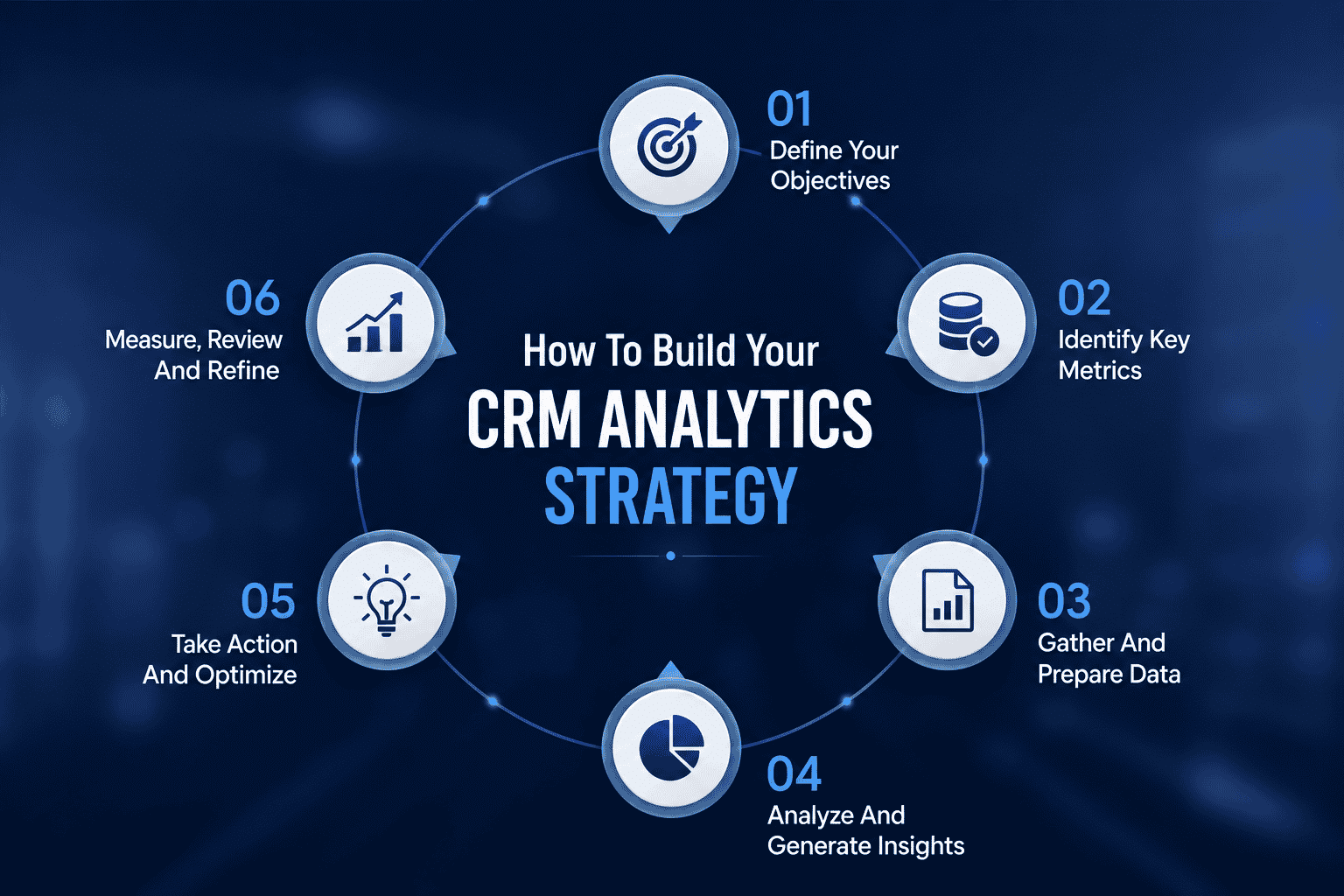
How To Build Your CRM Analytics Strategy-Step By Step
This core section outlines a structured 60 to 90 day sequence to evolve from raw data to reliable CRM analytics. A successful CRM analytics strategy aligns data collection with specific business outcomes and embeds insights into daily workflows rather than creating isolated reports that gather dust.
Although the steps are presented linearly, organizations can iterate. However, avoid skipping foundational stages such as data quality and KPI definition. Each phase builds on the previous one, so shortcuts early in the process create compounding problems later.
Strategy Alignment With Revenue, Marketing, And Service Goals
The first step is aligning CRM analytics with 3 to 5 specific business decisions rather than generic reporting requests. Think weekly pipeline calls, monthly marketing ROI reviews, and quarterly renewal planning. Defining clear objectives before selecting technology is essential for a successful CRM analytics strategy.
Document a small set of North Star metrics that serve as your guiding indicators:
Metric
Target
Owner
Pipeline Coverage Ratio
3x quota
VP Sales
Win Rate
Above 25%
Sales Director
Customer Lifetime Value
15% YoY growth
Customer Success
Net Revenue Retention
Over 110%
Revenue Operations
Customer Satisfaction Score
85%+
Service Manager
Data Foundations And CRM Analytics Architecture
Audit the existing CRM data model by reviewing objects like opportunities and accounts, mandatory fields, picklists, and integrations. Common gaps include 30% duplicate contacts or missing segments in 40% of accounts per 2024 CRM benchmarks from Nucleus Research. Establishing data governance ensures data quality and accuracy through regular maintenance and processes for handling information.
Architect your system with CRM as the customer data hub, augmented by marketing automation for leads, product telemetry for usage, billing for revenue, and support systems for tickets, following a structured CRM implementation guide for scalable business growth. Mapping the customer journey involves identifying every touchpoint to pinpoint where data is generated and where insights are needed.
Enforce quality thresholds to ensure reliable analytics:
95% of opportunities must have close date and stage populated
90% of accounts must have industry and segment defined
Implement monthly data health checks with assigned stewards per department
Aberdeen Group’s 2023 study shows data quality above 90% correlates with 22% higher forecast accuracy. Role-based access should tie to CRM permissions so sales reps see their own deals while managers gain insights into team performance.
Metric Design, Dashboards, And Sales Forecasting
Convert business questions into concrete CRM analytics metrics. The question “Where do deals stall?” becomes stage conversion rates and average days-in-stage from opportunity histories. Sales managers can then identify patterns and coach reps on moving deals through the sales funnel more efficiently.
Craft role-based dashboards that serve specific needs:
Role
Dashboard Focus
Executive
Pipeline coverage, CLV trends, forecast accuracy
Sales Manager
Velocity by rep, stage conversion, activity metrics
Marketer
Attribution, campaign performance, channel ROI
Customer Success
Health scores, renewal probability, engagement signals
Operationalizing Insights In Day-to-Day Workflows
Embed analytics directly into CRM interfaces rather than forcing users to switch between systems. Homepage widgets should surface next actions for sales reps, opportunity pages should display churn risk, and account timelines should summarize customer engagement patterns.
Concrete examples of operationalized insights include:
Surfacing “contact now” leads for sales teams based on engagement signals
Displaying at-risk alerts for customer success to trigger proactive outreach
Flagging low-ROI marketing campaigns weekly for budget reallocation
Automate alerts for CSAT drops below 80% or campaign engagement spikes, feeding recurring meetings like pipeline scrubs and quarterly business reviews. Forrester 2024 research shows this embedding increases user adoption by 35% and response times by 28%, enhancing customer experiences through timely, relevant interventions. This approach helps sales reps and sales managers make informed decisions without leaving their primary workspace.
Change Management, Training, And Continuous Improvement
Training and adoption efforts are key to ensuring employees effectively use CRM analytics tools and adhere to accurate data entry practices, which can lead to higher adoption rates among employees; understanding common CRM adoption challenges and best practices for sales teams helps shape these programs. Role-specific training works better than generic sessions because a sales playbook on pipeline dashboards differs from marketing training on attribution models.
Establish a 30-60-90 day adoption plan:
Day
Milestone
30
Executive dashboard walkthrough completed
60
First team meeting fully driven by CRM analytics
90
First iteration of KPI refinements based on feedback
Key CRM Analytics Metrics And Customer Value Indicators
Metrics are the language of CRM analytics. A focused set of indicators creates clarity for sales teams, marketing teams, and service functions across acquisition, conversion, retention, and customer lifetime value. Performance metrics like customer satisfaction score, retention rate, and lifetime value gauge CRM success and provide the foundation for continuous improvement.
Revenue And Sales Performance Metrics
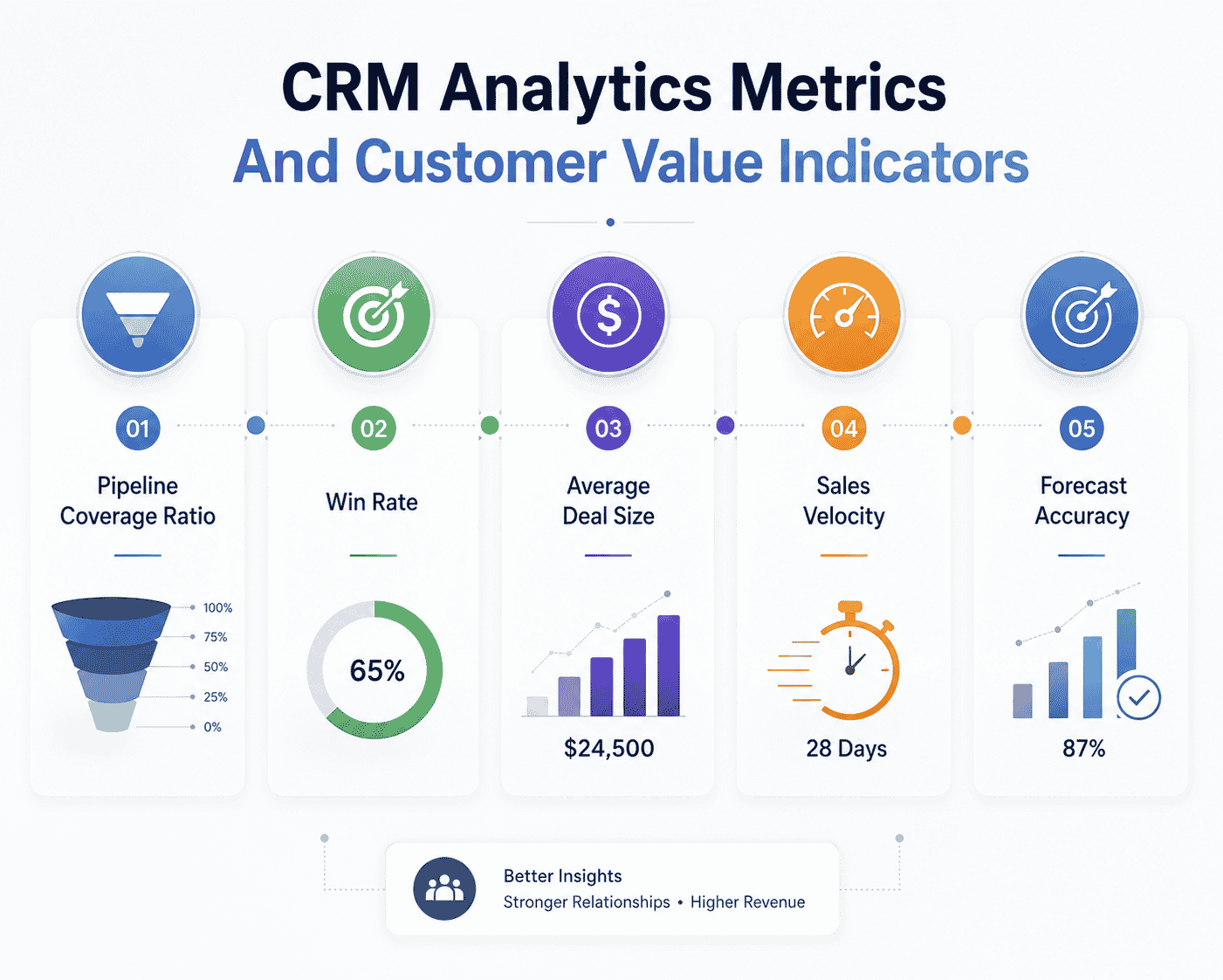
Key sales metrics that every CRM analytics strategy should track include:
Metric
Definition
Benchmark
Pipeline Coverage Ratio
Total pipeline value divided by quota
3-4x quota
Win Rate
Closed-won divided by total opportunities
25-30% B2B average
Average Deal Size
Average value of closed deals
Varies by segment
Sales Velocity
(Opportunities x Win Rate x Deal Size) / Cycle Days
Track trend over time
Forecast Accuracy
Predicted vs actual revenue
Aim for 80%+
A European B2B firm in 2024 improved win rates by 8% by focusing on opportunities with high activity levels and strong marketing engagement signals, supported by disciplined sales reporting in a CRM that highlighted these patterns. AI-powered scoring models can enhance customer relationships and augment traditional sales metrics by 5 to 10% without supplanting human judgment, according to Salesforce 2024 data.
Marketing Campaign And Channel Performance Metrics
Crucial marketing analytics metrics in the CRM context include lead-to-opportunity conversion with a 20 to 30% benchmark, opportunity influence by campaign measuring revenue share, cost per qualified lead targeting under $200, and multi-touch attribution that weights all touchpoints. Customer segmentation based on purchase history and behavioral signals can enhance marketing campaign relevance.
Marketing and sales alignment on definitions matters significantly. What counts as an MQL or SQL must be agreed upon for trustworthy CRM data analysis. Advanced segmentation categorizes customers based on demographics, behavioral patterns, and psychographics, enabling more precise targeting.
Real-time analysis enabled one brand to pause underperforming campaigns and reinvest budget, boosting ROAS by 25%. Tie marketing metrics back to opportunity and revenue data directly in the CRM to improve accountability, using email tracking CRM capabilities where appropriate to understand engagement. Review weekly channel performance summaries and conduct monthly deep dives on campaign cohorts to identify trends and optimize marketing strategies.
Customer Satisfaction, Retention, And Loyalty Metrics
Understanding these metrics helps teams uncover actionable insights about customer health:
Net Promoter Score measures customer satisfaction and their likelihood to recommend the business to others, providing predictive insights into customer loyalty and areas for improvement
Customer Effort Score reflects the difficulty customers face when obtaining answers and lodging queries, with a lower CES indicating higher customer satisfaction and loyalty
Customer retention rate measures the percentage of existing customers retained over a given period, providing insights into customer loyalty and business performance
Customer turnover rate, or churn, is the percentage of customers lost over a certain period, which can be calculated monthly, quarterly, or yearly, and is essential for understanding customer satisfaction and product quality
Centralize survey data in CRM systems so service and success teams can see satisfaction trends at the account and segment level. Flag at-risk customers using combinations of low CSAT, decreased product usage, and fewer customer interactions. A subscription business reduced churn by 12% by targeting customers whose product usage fell 30% over a quarter, demonstrating how proactive retention strategies enhance customer loyalty.
Customer Lifetime Value And Profitability Metrics
Customer lifetime value measures the total revenue a company can expect to earn over the lifetime of a given customer relationship, linking customer success efforts to revenue. A practical formula multiplies average revenue by expected lifespan and gross margin. For example, $10k ARR multiplied by 3 years multiplied by 70% margin equals $21k CLV.
Create CLV segments of high, medium, and low in CRM analytics tools to prioritize account management, cross-sell, and retention programs. Pair CLV with customer acquisition cost for a clearer picture of customer profitability across segments or channels.
Effective CRM data analysis enables businesses to create personalized experiences by analyzing customer purchasing patterns and engagement levels, leading to increased customer retention and satisfaction, particularly when powered by dynamic contact management for smarter relationship tracking. A 2024 focus on high-CLV segments yielded a 22% marketing ROI lift for one organization. Update CLV calculations quarterly from CRM and billing data rather than relying on static assumptions to ensure accuracy.
Operational And Process Quality Metrics
Internal process metrics that support CRM analytics success include data completeness scores targeting 95%, time to first response for new leads under 24 hours, case resolution time under 5 days, and SLA adherence above 90%. Track these in dashboards to maintain service quality and sales execution discipline, and use CRM automation for sales and growth to keep these processes consistent at scale.
Improving these metrics indirectly enhances customer experience, revenue, and team efficiency even though they may not be directly visible to customers. These operational metrics inform business processes and help automate repetitive tasks where possible.
Set realistic targets based on company size, region, or industry benchmarks. For SaaS companies, a 2-day lead response time serves as a reasonable starting point. Review operational metrics weekly to maintain discipline and identify quick wins for CRM strategy improvement, particularly for verticals like retail where CRM tools that help retail teams stay organized can make these targets achievable.
Technology Stack And CRM Analytics Tools To Support Your Strategy
A successful CRM analytics strategy relies on the right mix of CRM software, data infrastructure, and analytics tooling rather than one isolated platform. Implementing CRM analytics involves assessing business needs and setting a budget to select a CRM tool that fits financial constraints and enhances user adoption.
Role Of The Core CRM Platform
The core CRM platform stores structured data about contacts, accounts, opportunities, campaigns, and service cases, making it the natural foundation for analytics. CRM tools like Salesforce, HubSpot, and Gain.io smart CRM tools for sales teams provide the bedrock for all customer relationship data.
Best practices for configuring the CRM to support analytics include consistent stage definitions with 6 to 8 standardized stages, mandatory fields for critical data points, and thoughtful use of custom objects. Activity tracking, CRM email integration, and call logging enrich the dataset available for CRM data analysis.
Cloud-based CRM deployment benefits analytics through real-time data access and easier integration with external data analytics tools. Salesforce CRM analytics and similar platforms enable Salesforce data to flow seamlessly into reporting systems. The principles covered here apply regardless of vendor, assuming a modern, API-enabled CRM platform, and reinforce the value of choosing CRM tools that fit your workflow.
Analytics, BI, And AI Layers On Top Of CRM Data
Business intelligence tools, embedded analytics modules, and AI services consume CRM data to deliver dashboards, visualizations, and predictions back to business users. CRM analytics can be categorized into three primary types: descriptive, predictive, and prescriptive analytics, each serving distinct functions within the CRM framework.
Descriptive analytics focuses on historical data to provide insights into past sales trends and customer behavior, helping businesses understand the effectiveness of their previous activities. Predictive analytics uses historical data to forecast future customer behaviors and market trends, enabling businesses to anticipate customer needs and plan marketing efforts accordingly. Prescriptive analytics provides actionable recommendations based on predictive models, helping businesses optimize strategies and achieve desired outcomes.
Modern CRM analytics tools allow non-technical users to explore datasets with drag-and-drop interfaces while enabling more advanced modeling for data teams, building on solid sales reporting practices in a CRM. Monitor models quarterly as customer behavior and market conditions change over time, recalibrating predictions to maintain accuracy in your data analysis process.
Data Integration And Single Customer View
Integration with existing systems is crucial for overcoming data silos and enabling centralized customer data management, which enhances overall business processes and decision-making, especially when robust customer interaction tracking in CRM is in place. Technical steps to combine CRM data with marketing platforms, web analytics, product usage tracking, and billing systems create a unified customer profile.
Common integration patterns include:
Pattern
Best For
Native Connectors
Simple integrations like Marketo-Salesforce
iPaaS Middleware
Mid-market with tools like Zapier
Event Streaming
An enterprise with high data volume using Kafka
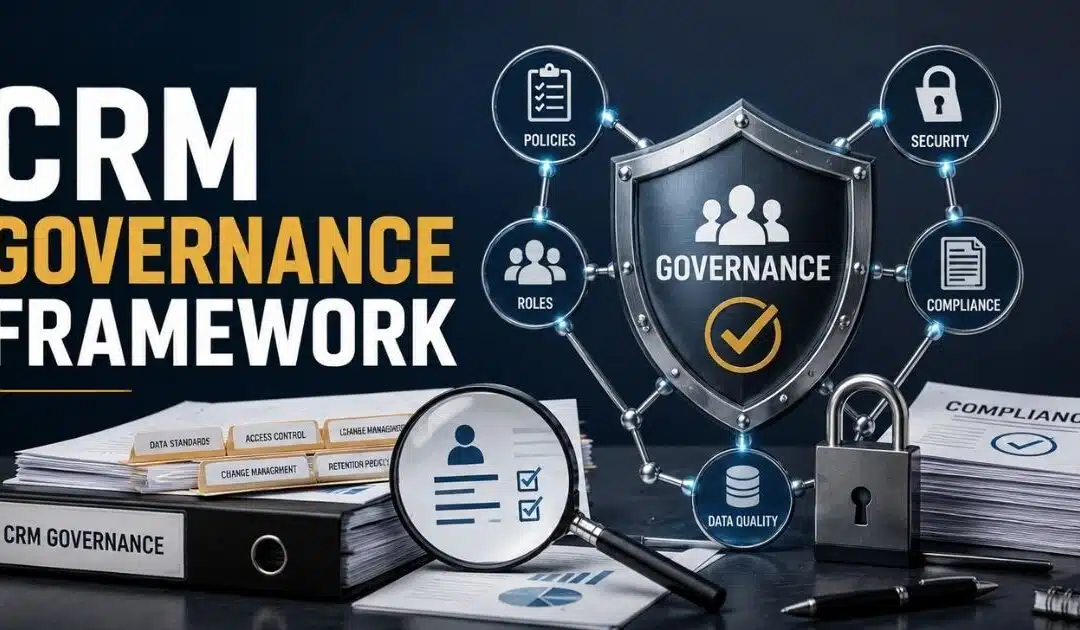
Governance, Security, And Compliance In CRM Analytics
Data governance, privacy, and compliance grow increasingly important when designing CRM analytics strategies. GDPR in Europe and CCPA/CPRA in California impose strict requirements on how organizations handle customer data and customer preferences.
Role-based access control, field-level security, and data masking approaches protect sensitive information while still enabling rich analytics. Set clear policies around data retention, consent tracking, and usage of personal data for targeted marketing campaigns and personalized marketing campaigns.
Periodic access reviews and audit logs help ensure regulatory compliance and maintain customer trust. Governance should be positioned not as a blocker but as a critical enabler of scalable, trustworthy CRM analytics that supports business growth and underpins a data-driven customer engagement CRM strategy.
Buy Versus Build Considerations For Mid-Market And Enterprise
Trade-offs exist between relying on out-of-the-box CRM analytics tools and building custom data pipelines with a full BI stack:
Approach
Pros
Cons
Out-of-box
Lower cost, faster deployment
Less flexibility
Custom Build
Full flexibility, 20-30% more insight
Higher cost, longer timeline
Hybrid
Balance of both
Requires careful architecture
Cost considerations extend beyond licensing to include implementation, maintenance, and ongoing optimization. Gain.io typically recommends a pragmatic hybrid strategy, using prebuilt components where possible and custom work where it delivers clear strategic advantage.
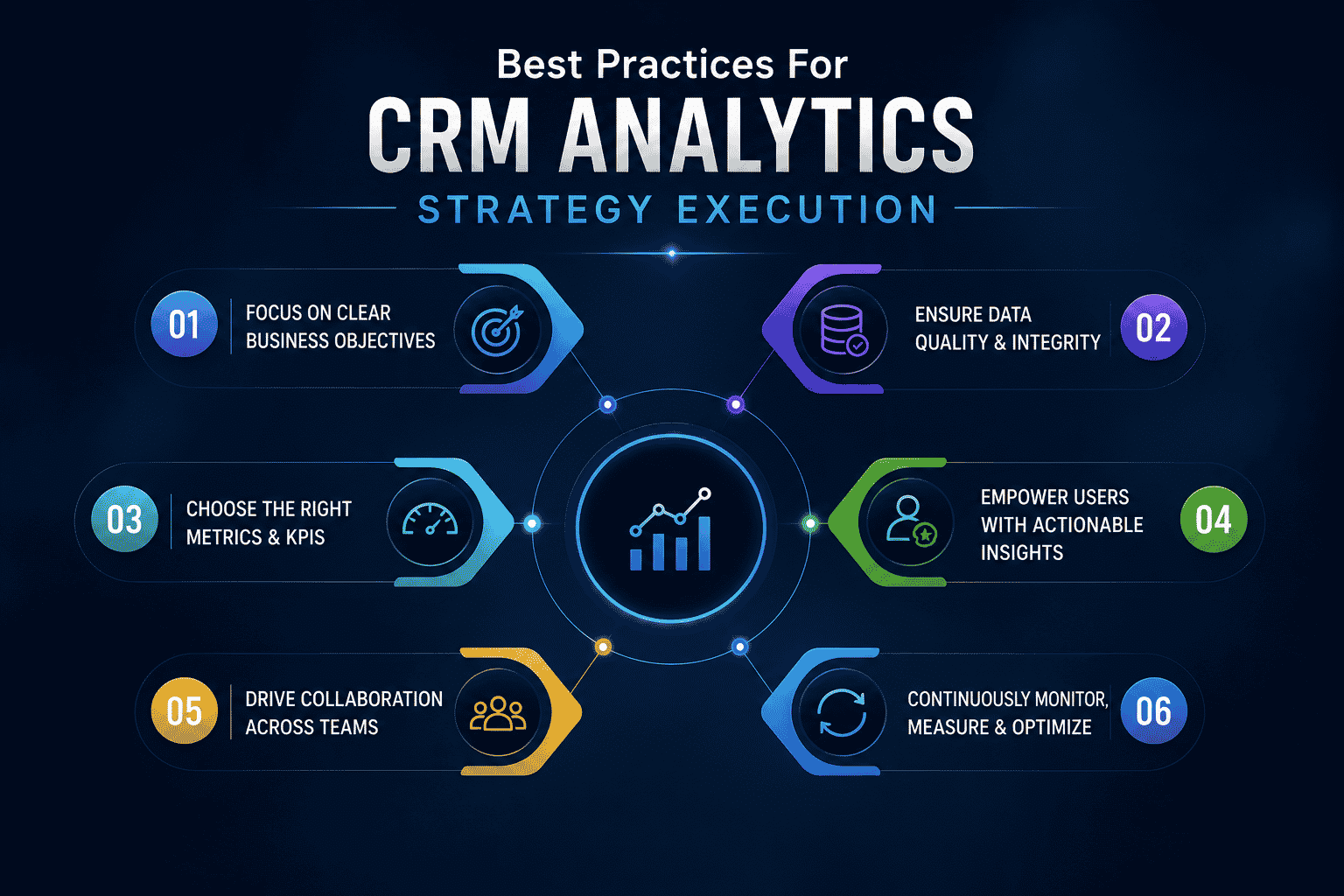
Use Cases And Best Practices For CRM Analytics Strategy Execution
This section translates theory into concrete use cases across sales, marketing, and service functions. Each use case demonstrates how a consistent CRM analytics strategy helps enhance customer outcomes and internal efficiency simultaneously.
Sales Forecasting And Pipeline Health Improvement
A tech firm improved forecast accuracy by 18% using stage-weighted pipelines and spotting stalls via activity dips across segments. Analyzing CRM data revealed that opportunities with fewer than three activities in 14 days had a 60% higher chance of slipping.
Organizations using data-driven forecasting have been shown to grow revenues 1.5x faster than peers relying on gut feel, according to Gartner 2024 research. Best practices include weekly standardized pipeline reviews, clear definition of exit criteria for each stage, and consistent logging of key activities in the CRM to support disciplined CRM-based lead management for sales teams.
Sales managers can coach sales reps using dashboard insights rather than anecdotal updates, focusing conversations on sales pipeline status and specific deal blockers. This approach transforms pipeline meetings from status updates into coaching sessions that drive results through the entire sales process.
Marketing Campaign Optimization And Attribution
A B2B brand shifted budgets mid-quarter using multi-touch attribution, lifting influenced revenue by 27%. CRM analytics linked marketing campaigns to actual revenue, enabling budget shifts from low-performing to high-performing channels in real time.
Marketing teams can trigger automated, personalized campaigns using insights based on customer behavior, especially when leveraging CRM automation benefits for sales and growth. Advanced marketing analytics provide a more accurate view than last-click attribution from web analytics alone. Best practices include mandatory campaign association for opportunities, regular campaign hygiene, and standardized naming conventions.
Continuous measurement and experimentation through A/B testing and creative variants remain central to a high-performing CRM analytics strategy for marketing. These marketing efforts compound over time as teams learn what resonates with different customer segments.
Customer Satisfaction, Support, And Proactive Retention
Service and success teams can use CRM analytics to identify common drivers of dissatisfaction, such as recurring product issues or long resolution times, mirroring how modern CRM adoption is transforming sales teams into more proactive, insight-led organizations. Personalization through CRM analytics can significantly enhance customer satisfaction and loyalty, as it allows businesses to tailor their offerings based on individual customer preferences and behaviors, which is central to any effective customer engagement CRM strategy.
Combining ticket data, product usage metrics, and satisfaction surveys in the CRM allows teams to run targeted outreach and education programs. Predictive models flag customers with increased risk of churn, prompting high-touch interventions that improve renewal rates and customer loyalty.
Best practices include segmenting customers by health score, implementing proactive check-ins for high-value accounts, and tracking outcomes in the CRM. Better service experiences reduce churn while also driving referrals and higher customer lifetime value over time, helping teams enhance customer relationships systematically.
Account Growth, Cross Sell, And Upsell Strategy
CRM analytics can surface accounts with strong product adoption, high satisfaction scores, and untapped product lines, making them ideal targets for cross-sell and upsell campaigns, especially when paired with focused CRM adoption strategies to improve CRM ROI. Account teams can use opportunity history, contract data, and engagement signals to time offers for renewal or expansion cycles based on customer needs.
One SaaS company increased ARPU by 22% using data-driven “next product to buy” models that identified purchase history patterns. Track the impact of upsell plays within the CRM, including win rates, deal size uplift, and incremental customer lifetime value.
Aligning compensation and incentives with data-backed account growth metrics reinforces use of CRM analytics insights and drives adoption among sales reps who see direct benefits from using the system.
New Market Expansion And Strategic Planning
Leadership can use CRM analytics to evaluate performance by region, segment, or vertical when deciding where to invest in new sales headcount or marketing campaigns. Analyzing CRM data reveals product-market fit patterns and informs geographic or vertical expansion plans.
One company used CRM analytics to identify an unexpectedly strong niche segment within their existing data and built a targeted go-to-market motion around it. Best practices include building scenario models in analytics tools, testing in pilot markets, and monitoring key metrics closely during the first 6 to 12 months of expansion.
Anchor strategic planning in CRM data to avoid overreliance on anecdotal feedback. Data insights from historical patterns provide a more reliable foundation for expansion business strategies than gut instinct alone.
Gain.io Approach To Building CRM Analytics Strategy
Gain.io partners with organizations to design, implement, and scale CRM analytics strategies that align with their growth goals. The typical engagement pattern includes discovery and KPI alignment, data and platform assessment, pilot dashboard and forecasting build, user training, and ongoing optimization cycles.
Gain.io works with clients’ existing CRM software and analytics tools, helping orchestrate an integrated stack instead of forcing a rip-and-replace approach, and can also act as an all-in-one CRM to grow your sales and team where appropriate. Comprehensive training programs ensure teams understand customer behavior through their new analytics capabilities and can analyze customer data effectively, applying principles from the broader CRM implementation guide for scalable business growth.
Organizations can work with Gain.io to assess their current CRM analytics maturity and build a roadmap that delivers value within the next 90 days. Whether you need help with data processing foundations, building predictive insights capabilities, or operationalizing analytics into frontline workflows, the partnership approach ensures sustainable results that support long-term business growth.
Frequently Asked Questions
Who Should Own CRM Analytics Strategy Inside The Organization?
Ownership typically sits with a senior revenue or operations leader such as Head of Revenue Operations, VP Sales Operations, or Chief Customer Officer, supported by data and IT teams. While IT manages infrastructure and integrations, the business side should own KPI definitions, priorities, and adoption, ensuring analytics directly support frontline decisions. Establishing a cross-functional steering group with representatives from sales, marketing, customer success, finance, and IT that meets monthly helps review progress and adjust the roadmap based on evolving business needs.
How Long Does It Take To See Value From A New CRM Analytics Strategy?
Realistic timeframes suggest 4 to 8 weeks to launch an initial set of trusted dashboards and reports for core KPIs, with 3 to 6 months needed to see measurable improvements in forecasting, campaign ROI, or retention. Factors influencing timing include current data quality, number of systems requiring integration, and availability of internal resources. Starting with one or two high-impact use cases like sales forecasting and churn risk demonstrates early wins before scaling more broadly, similar to how a sales acceleration case study on closing deals faster with Gain.io shows impact within a few months.
How Can We Improve Data Quality Before Investing Heavily In CRM Analytics Tools?
Practical steps include cleaning duplicates, standardizing picklists, making critical fields mandatory, and training users on accurate data entry habits. Set clear data quality targets such as 95% completeness for key fields and track them on a simple internal data health dashboard. Investing in data quality early reduces rework later and makes advanced analytics like predictive scoring more reliable for sales teams and marketing teams alike.
Is CRM Analytics Only Useful For Large Enterprises With Big Data Teams?
Small and mid-sized organizations can benefit significantly from even basic CRM analytics, such as simple pipeline dashboards, cohort retention views, and campaign performance tracking, especially when paired with a CRM for startups and small sales teams that keeps processes lightweight. Many modern CRM platforms now offer built-in analytics features that non-technical users can configure without data engineering expertise. Smaller businesses should start with a lightweight setup, focusing on the few metrics that most directly affect revenue and customer satisfaction to gain insights quickly and pairing that with a tool that helps them get more from their CRM with a simpler sales workflow.
How Often Should We Update And Review Our CRM Analytics Strategy?
A quarterly strategic review helps reassess KPIs, priorities, and new use cases, along with more frequent monthly reviews of data quality and dashboard usage. Significant business changes such as entering a new region, launching a new product line, or shifting pricing models should trigger a dedicated CRM analytics review, ideally supported by a platform that enables you to get more from your CRM with a simpler sales workflow. Treat CRM analytics strategy as a living program that evolves alongside your customer relationship management practices rather than a one-time project.
Customer data can quickly become messy without proper control. Duplicate records, outdated information, and inconsistent processes create confusion across sales, marketing, and support teams. Many businesses invest in CRM software but still struggle to keep their data accurate and organized. That is where a CRM governance framework becomes important.
A strong CRM governance framework helps teams manage customer data with clear rules, ownership, and standards. It improves data quality, supports compliance, and keeps every department aligned. Better governance also helps businesses make faster decisions and improve customer relationships.
This guide covers everything you need to know about CRM governance frameworks, including key components, best practices, common challenges, and proven strategies for long-term success.
What Is A CRM Governance Framework
A CRM governance framework is a structured approach that helps organizations manage CRM data, users, processes, and technology in a consistent way. It creates clear responsibilities, access rules, and data governance standards across the business. Many organizations use a governance framework to improve data quality, support compliance, and align CRM strategy with business objectives. Strong CRM governance also helps project teams and business users manage customer relationship data without confusion.
A well-planned CRM governance framework supports better customer experience and business outcomes. It helps teams control change management, integration, and system updates with less risk. Businesses can also track performance metrics, improve the customer journey, and maintain consistent processes across sales, marketing, and support services.
Without proper governance, CRM projects often face challenges like poor data quality, rising costs, and low user buy-in. A strong governance plan helps organizations prioritize resources, create value, and build long-term competitive advantage.
Key Components Of A High-Performing CRM Governance Framework
A high-performing CRM governance framework needs more than rules and documentation. Strong governance depends on clear ownership, accurate CRM data, aligned business objectives, and reliable processes. Organizations with structured governance plans often improve customer experience, data quality, and project success while reducing operational risks and unnecessary costs.
Clear Roles And Responsibilities
Every CRM governance framework needs defined responsibilities. Project teams, business users, and stakeholders should know who controls data access, system updates, and compliance tasks. Clear ownership helps organizations avoid confusion and improve accountability across the CRM platform.
Strong governance also improves decision-making. Sales, marketing, and support teams can work with consistent customer data and aligned objectives. According to Salesforce research, 73% of customers expect companies to understand their needs and expectations. Clear governance responsibilities help businesses deliver that level of customer engagement CRM-driven experience and long-term value.
Strong Data Quality Standards
Data quality is one of the most critical parts of CRM governance. Poor CRM data creates reporting errors, weak customer insights, and failed business strategies. A governance framework should include data validation rules, duplicate control, and regular audits to maintain accurate information.
Many organizations struggle with bad data from external sources and disconnected systems. Gartner reports that poor data quality costs organizations an average of $12.9 million every year. Strong governance practices help businesses create reliable customer relationship records and support better business outcomes across the enterprise.
Structured Change Management
CRM systems constantly evolve with new tools, integrations, and business requirements. A structured change management process helps organizations control updates without disrupting daily operations. It also reduces project risks and improves user buy-in.
Change control policies should define approval workflows, testing procedures, and implementation steps. Teams can then prioritize updates based on business objectives and customer needs. A managed process also helps organizations maintain compliance and system stability while supporting future innovation and CRM capabilities.
Performance Tracking And Reporting
Performance metrics help businesses determine whether CRM governance strategies actually work. A strong governance framework should track user adoption, data accuracy, sales performance, and customer journey improvements. Reliable reporting helps stakeholders measure success and identify challenges early.
Businesses that monitor CRM performance often achieve stronger business outcomes. Research from HubSpot shows companies that use CRM systems effectively can improve sales by up to 29%. Consistent reporting also helps project teams align governance practices with company objectives and long-term strategy and supports structured CRM adoption for sales teams.
Integration And System Control
Modern businesses use multiple platforms for sales, marketing, customer support, and services. CRM integration helps organizations connect those tools into one managed system, especially when core channels such as CRM email integration are managed centrally. Without governance, disconnected technology can create duplicate records and inconsistent customer data.
A governance framework should define integration standards, security rules, and access controls. Teams can then maintain consistent processes across the enterprise. Strong system control also protects customer data and improves operational efficiency. Businesses with aligned CRM processes often gain a stronger competitive advantage in fast-changing markets, including those leveraging flexible open source CRM platforms.
How To Build A CRM Governance Framework Step By Step
A successful CRM governance framework needs clear planning, team alignment, and long-term business focus. Many organizations fail because they skip structure and accountability. A step-by-step governance strategy helps businesses improve CRM data quality, reduce risks, and support better customer relationships across the enterprise, regardless of whether they use a simple CRM vs all-in-one CRM solution.
Step 1: Define Business Objectives
Every CRM project should start with clear business objectives. Teams need to identify what success looks like before they build governance processes. Some companies focus on better customer experience, while others prioritize sales growth, compliance, or data quality improvements.
A clear strategy helps organizations align CRM governance with real business outcomes. Stakeholders, project teams, and business users can then focus on shared goals. According to Gartner, companies with aligned CRM strategies are more likely to improve customer retention and operational efficiency. Strong objectives also help determine project scope, required resources, and long-term investment value.
Step 2: Assign Governance Roles
A CRM governance framework needs clear responsibilities across departments. Every team should understand who controls data access, change management, integration, and system updates. Without ownership, governance processes often become inconsistent and difficult to manage.
Businesses should assign governance leaders, CRM administrators, and data stewards early in the project. This structure improves accountability and creates better communication between sales, marketing, support, and IT teams. Research from PwC shows companies with defined governance roles improve project success rates by more than 30%. Strong leadership also helps organizations prioritize challenges, follow a structured CRM implementation roadmap for successful deployment, and maintain compliance standards.
Step 3: Create Data Standards
Data governance plays a major role in CRM success. Organizations need consistent rules for customer data entry, validation, storage, and updates. Clear standards help teams avoid duplicate records and inaccurate reporting across the CRM platform.
A governance plan should also define data ownership and quality control processes. Teams can then maintain reliable customer relationship records across multiple systems and external sources. IBM estimates that poor data quality costs businesses trillions globally each year. Strong data governance practices protect business value and improve decision-making across the enterprise.
Step 4: Build Change Control Processes
CRM systems evolve as businesses grow. New tools, integrations, and workflows can create risks without proper change control. A structured process helps organizations manage updates without disrupting daily operations or customer services.
Businesses should document approval workflows, testing procedures, and implementation timelines. This keeps CRM governance aligned with business objectives and customer expectations. A controlled process also supports better user adoption and system stability. Companies with effective change management strategies are six times more likely to meet project goals, according to Prosci research.
Step 5: Monitor Performance Metrics
Performance metrics help organizations measure whether CRM governance strategies actually work. Businesses should track CRM data quality, user adoption, customer journey improvements, and operational efficiency. Consistent reporting helps teams identify gaps before they affect business outcomes.
A strong governance framework also supports continuous improvement. Teams can review performance reports, identify new challenges, and refine governance practices over time. Salesforce research shows businesses that actively use CRM analytics improve sales productivity by up to 34%. Regular monitoring helps organizations maintain competitive advantage and prepare for future business growth.
CRM Data Quality Standards Every Organization Should Follow
High-quality CRM data helps businesses improve customer relationships, sales performance, and decision-making. Poor data creates reporting errors, weak customer insights, and wasted resources. Strong centralized contact management and data governance standards help organizations maintain accurate, secure, and consistent customer information across every CRM process.
Accurate Customer Data Entry
Every CRM governance framework should start with accurate data entry standards. Teams need clear rules for customer names, contact details, job titles, and company records. Consistent formatting helps business users avoid duplicate records and incomplete customer profiles by supporting a contact management CRM structure.
Small data errors can create major business problems over time. Research from Experian shows 91% of businesses struggle with data quality issues. Accurate CRM data improves customer experience, sales communication, and reporting accuracy. It also helps project teams maintain trust in the CRM platform and business processes.
Consistent Data Validation Rules
Data validation helps organizations maintain clean and reliable customer records. A CRM system should automatically check email formats, phone numbers, required fields, and duplicate entries before records enter the database. This process improves governance control and reduces human error.
Validation rules also support compliance and better reporting. Teams can work with more reliable customer relationship data across sales, marketing, and support services. According to IBM, poor data quality costs businesses billions every year through operational inefficiencies and lost opportunities. Strong validation practices protect business value and improve long-term CRM success.
Regular Data Audits And Cleanup
CRM data quality declines over time without regular audits. Customer details change frequently, and outdated records can affect business outcomes. A governance framework should include scheduled reviews to identify duplicate records, inactive contacts, and missing information.
Many organizations clean CRM data only after major issues appear. That approach increases operational costs and reporting errors. Gartner research shows poor data quality can reduce business productivity by up to 20%. Regular audits help organizations maintain accurate performance metrics and support better customer journey management across the enterprise.
Secure Access And Data Control
Strong data governance requires clear access control policies. Not every user should have permission to edit or export sensitive CRM data. Businesses should define role-based access rules to protect customer information and maintain compliance standards.
Controlled access also reduces accidental data loss and security risks. Teams can manage customer relationship records more safely across integrated tools and external sources. According to Verizon’s Data Breach Investigations Report, human error remains one of the leading causes of data breaches. Strong governance practices help organizations protect customer trust and business reputation.
Standardized Integration Processes
CRM systems often connect with marketing platforms, customer support tools, and external databases. Without standardized integration processes, businesses can create inconsistent customer records and reporting gaps. A governance plan should define how data moves across systems.
Standardized integration improves operational efficiency and data consistency. Teams can then maintain aligned customer information across every department. Businesses with connected CRM technology often improve customer experience and sales performance faster than competitors, especially when they rely on robust CRM email sync. Strong integration standards also support future scalability and long-term enterprise growth.
Roles And Responsibilities Inside A CRM Governance Framework
A CRM governance framework works best when every team member understands their role. Clear responsibilities improve accountability, reduce confusion, and support better decision-making. Strong governance structures also help organizations maintain data quality, compliance, and long-term CRM success across departments by reinforcing the foundations of CRM software for modern sales teams.
Executive Sponsors And Leadership
Executive leaders set the direction for CRM governance strategy. They align the CRM project with business objectives, approve investments, and support change management across the organization. Leadership teams also help secure buy-in from stakeholders and business users.
Strong executive support improves project success rates. According to PMI research, projects with active executive sponsorship perform significantly better than those without leadership involvement. Leaders also help prioritize resources, manage risks, and ensure governance practices stay aligned with customer experience goals and long-term business outcomes.
CRM Administrators And System Managers
CRM administrators manage the daily operations of the CRM platform. They handle system configuration, user access, security settings, and integration processes. Their role is essential for maintaining system performance and operational stability.
Administrators also support governance control by monitoring workflows and managing technical updates. They help teams maintain consistent CRM data and reduce system errors. Research from Salesforce shows businesses with dedicated CRM management teams achieve higher user adoption and stronger operational efficiency, especially when they follow structured CRM adoption strategies to improve ROI. Clear technical ownership also supports future scalability and enterprise growth.
Data Stewards And Governance Teams
Data stewards focus on data governance and quality control. They create standards for customer data accuracy, consistency, and compliance. Their work helps organizations maintain reliable reporting and better customer relationship management.
Governance teams also review data quality issues, duplicate records, and external source integrations. Strong oversight protects the value of CRM data across sales, marketing, and support services. Gartner reports that poor data quality remains one of the top barriers to business performance. Data stewards help organizations reduce those risks and improve decision-making, especially during complex tasks such as CRM migration from Excel to a modern system.
Business Users And Department Teams
Business users interact with the CRM system every day. Sales teams, marketers, and support agents enter customer information, update records, and manage customer interactions. Their daily actions directly affect CRM data quality and governance success.
Organizations should provide clear governance policies and regular training for users. Well-trained teams create more accurate customer data and follow consistent business processes. HubSpot research shows CRM adoption improves significantly when employees understand the system’s value. Strong user participation also helps organizations improve customer interaction tracking in CRM, customer journey management, and operational consistency.
IT And Integration Specialists
IT teams support the technical side of CRM governance. They manage integrations, security protocols, infrastructure, and system performance across the enterprise. Their role becomes critical when businesses connect CRM tools with external platforms and services.
Integration specialists also help organizations maintain secure data transfers and stable workflows. Proper system integration improves customer experience and operational efficiency. According to MuleSoft, businesses now use hundreds of applications across departments, which increases integration complexity. Strong IT governance helps organizations maintain control, reduce risks, and support future innovation, especially during CRM implementation for scalable business growth.
Common CRM Governance Challenges And Practical Solutions
Many organizations invest heavily in CRM systems but still struggle with governance issues. Poor data quality, low user adoption, and weak processes often reduce CRM value. A structured governance framework helps businesses solve these challenges and improve long-term customer relationship management success.
Poor Data Quality Problems
Poor CRM data creates major business challenges. Duplicate records, outdated customer details, and incomplete profiles reduce reporting accuracy and weaken customer experience. Many businesses also collect inconsistent data from multiple tools and external sources.
A strong data governance strategy helps organizations maintain accurate and consistent records. Teams should use validation rules, scheduled audits, and duplicate control processes. According to Experian, 94% of businesses believe data quality directly affects business performance. Better CRM data quality improves decision-making, sales performance, and customer journey management across the enterprise and helps prevent common CRM implementation mistakes.
Low User Adoption Rates
Many CRM projects fail because employees avoid using the system properly. Business users may see CRM processes as time-consuming or difficult to manage. Poor training and weak communication often create resistance across teams, even when the CRM offers smart features to organize sales better.
Organizations should provide simple workflows, role-based training, and clear governance policies. Executive support also helps teams understand the value of CRM governance. Salesforce research shows that high-performing sales teams are more likely to use CRM systems consistently. Strong user adoption improves data accuracy, customer relationship management, and overall business outcomes, especially when startups choose the right CRM platform compared for new startups.
Weak Change Management
CRM platforms constantly change with new integrations, tools, and business requirements. Without proper change management, organizations face workflow disruptions, system confusion, and operational risks. Teams may also struggle to adapt to updated governance processes.
A structured governance framework should include clear change control procedures and approval workflows. Businesses should test updates before full implementation and communicate changes early. Prosci research shows organizations with strong change management practices are far more likely to achieve project success. Controlled updates help businesses maintain system stability and long term operational efficiency.
Lack Of Clear Ownership
CRM governance often breaks down when responsibilities remain unclear. Teams may assume someone else manages data quality, security, or compliance tasks. This creates gaps in accountability and weakens governance control across the business.
Organizations should assign clear ownership roles for CRM administrators, data stewards, and project leaders. Defined responsibilities improve coordination between sales, marketing, support, and IT teams. According to PwC, businesses with structured governance roles improve project performance and reduce operational risks. Clear ownership also helps organizations maintain aligned business objectives and governance practices.
Integration And Security Risks
Modern businesses use many connected tools across departments. Weak CRM integration processes can create inconsistent customer data and security vulnerabilities. Poor access control also increases the risk of compliance issues and data breaches.
A strong governance framework should define integration standards, user permissions, and security protocols. IT teams should monitor system connections and manage access carefully. Verizon reports that human error remains a leading cause of data breaches worldwide. Better governance control helps organizations protect customer data, maintain compliance, and support long-term business growth.
CRM Governance Framework Best Practices For Security And Compliance
Security and compliance play a major role in every CRM governance framework. Businesses manage large amounts of customer data across multiple systems and teams. Strong governance practices help organizations reduce security risks, maintain compliance, and protect customer trust in a fast-changing digital environment.
Role-Based Access Control
Every CRM system should use role-based access control. Employees only need access to the data and tools required for their responsibilities. Limited access reduces the risk of accidental data exposure and unauthorized system changes.
A strong governance framework should define access levels for sales, marketing, support, and IT teams. Businesses can also review permissions regularly to maintain compliance standards. According to IBM, the average global data breach cost reached $4.45 million in recent years. Controlled access helps organizations protect customer data and reduce operational risks.
Regular Security Audits
Security audits help organizations identify vulnerabilities before they become serious problems. CRM platforms often connect with external sources, cloud tools, and third-party integrations. Weak security controls can expose sensitive customer relationship data.
Businesses should review login activity, access permissions, and integration security on a regular schedule. A clear governance plan also helps teams maintain consistent monitoring processes. Verizon reports that many cyberattacks exploit weak internal controls and outdated systems. Regular audits improve governance visibility and strengthen long-term CRM security strategies.
Clear Data Retention Policies
Many organizations store outdated CRM data for years without proper governance control. Unnecessary customer records increase compliance risks and make data management more difficult. Clear retention policies help businesses maintain cleaner and safer CRM systems.
A governance framework should define how long customer data remains in the system and when records should be archived or deleted. Teams can then manage CRM data more efficiently while meeting legal requirements. Proper retention policies also improve data quality, reduce storage costs, and support better compliance practices across the enterprise.
Employee Training And Awareness
Technology alone cannot protect customer data. Employees play a critical role in CRM governance and security compliance. Poor password habits, phishing attacks, and careless data handling still create major business risks.
Organizations should provide regular security training and clear governance guidelines for business users. Teams need to understand how to handle customer data, manage access, and follow compliance standards. Research from Proofpoint shows human error remains one of the top cybersecurity risks worldwide. Strong employee awareness helps businesses maintain better governance control and customer trust.
Secure Integration Management
Modern CRM platforms connect with marketing tools, support software, payment systems, and external services. Poor integration management can create security gaps and inconsistent customer data across the business. Strong governance practices help organizations maintain secure and stable connections.
Businesses should evaluate every integration before implementation. IT teams should also monitor APIs, encryption standards, and data sharing processes regularly. According to MuleSoft, organizations now manage hundreds of connected applications across departments. Secure integration management helps businesses improve operational efficiency while protecting customer experience and compliance standards, particularly for CRM with email integration to streamline communication.
How To Measure CRM Governance Success With KPIs And Audits
A CRM governance framework needs regular measurement to stay effective. Businesses should track KPIs, audit results, and system performance to identify gaps early. Strong monitoring helps organizations improve data quality, maintain compliance, and achieve better customer relationship management outcomes over time.
Track CRM Data Accuracy
CRM data accuracy is one of the most important governance KPIs. Businesses should measure duplicate records, incomplete customer profiles, and outdated contact information. Accurate data supports better customer experience, reporting, and business decision-making.
Organizations can use automated audits and validation tools to monitor data quality regularly. Teams should also review external source integrations that affect CRM data consistency. According to Gartner, poor data quality costs organizations millions every year through operational inefficiencies and lost opportunities. Better data accuracy improves customer trust and long-term business value.
Measure User Adoption Rates
User adoption shows whether employees actively use the CRM platform. Low adoption rates often signal poor training, weak governance processes, or system usability issues. Businesses should monitor login frequency, feature usage, and workflow completion across departments.
Strong user participation improves customer relationship management and operational efficiency. Managers can also identify which teams need additional support or training. Salesforce research shows companies with high CRM adoption achieve stronger sales performance and customer retention, highlighting how CRM adoption is changing modern sales teams. Consistent usage helps organizations maintain aligned governance practices and better business outcomes.
Review Compliance Performance
Compliance audits help organizations measure whether CRM governance policies meet internal and legal standards. Businesses should review access control, data retention, customer consent records, and security practices regularly. Weak compliance processes can increase financial and reputational risks.
Audit reports also help stakeholders identify governance gaps before major issues appear. Teams can then improve security controls and update governance frameworks when necessary. IBM research shows the global average cost of a data breach continues to rise every year. Strong compliance tracking helps businesses protect customer data and maintain trust.
Monitor Customer Experience Metrics
Customer experience metrics reveal how CRM governance affects real customer interactions. Businesses should monitor response times, customer satisfaction scores, and issue resolution rates across support and sales teams. Strong governance processes often create more consistent customer journeys.
Organizations that track customer experience data can improve service quality faster. Clear CRM processes also help teams deliver personalized communication and better support. According to HubSpot, customers expect fast and connected interactions across every channel. Better customer experience metrics often lead to stronger retention and competitive advantage.
Evaluate Audit And Process Results
Regular audits help organizations measure the effectiveness of CRM governance processes. Teams should review workflow performance, integration stability, and system security on a scheduled basis. Audit findings often reveal operational challenges that daily reporting may miss.
Businesses should also compare audit results with original business objectives and governance goals. This approach helps project teams refine processes and prioritize future improvements. Research from Deloitte shows organizations with continuous governance reviews adapt faster to business and technology changes. Ongoing audits support long-term CRM success and operational consistency.
Final Thoughts
A strong CRM governance framework helps businesses maintain accurate data, improve customer relationships, and support long-term growth. Without proper governance, CRM systems often become disorganized, difficult to manage, and less valuable over time. Clear processes, defined responsibilities, strong data quality standards, and regular audits help organizations keep their CRM strategy aligned with business objectives.
Successful CRM governance also improves compliance, security, and operational efficiency across sales, marketing, and support teams. Businesses that invest in structured governance frameworks can reduce risks, improve customer experience, and gain a stronger competitive advantage. As customer expectations and technology continue to evolve, organizations that prioritize CRM governance will stay better prepared for future business challenges and opportunities.
FAQs
Can Small Businesses Use A CRM Governance Framework?
Yes, small businesses can benefit from a CRM governance framework. Clear governance processes help teams maintain accurate customer data, improve sales workflows, and reduce operational mistakes. Strong governance also helps businesses scale CRM systems more efficiently as customer data and team size grow.
How Often Should A Company Audit CRM Data?
Most organizations should review CRM data quality at least every quarter. Regular audits help businesses identify duplicate records, outdated customer information, and compliance risks before they affect business outcomes. Frequent reviews also improve reporting accuracy and customer experience.
Can CRM Governance Improve Sales Performance?
Yes, strong CRM governance can improve sales performance significantly. Clean customer data and consistent CRM processes help sales teams track leads, personalize communication, and close deals faster. Businesses with effective CRM strategies often achieve better operational efficiency and customer retention.
What Happens Without Proper CRM Governance?
Poor CRM governance often leads to inaccurate data, weak compliance control, and disconnected business processes. Teams may struggle with duplicate records, low CRM adoption, and inconsistent customer experiences. Over time, those issues increase operational costs and reduce the overall value of CRM investments.
Which Teams Should Participate In CRM Governance?
CRM governance should involve sales, marketing, support, IT, compliance, and executive leadership teams. Cross-functional collaboration helps organizations maintain aligned business objectives, stronger data governance, and consistent customer relationship management practices across the enterprise.
Bad CRM data creates bigger problems than most businesses realize. Duplicate contacts, missing details, outdated records, and messy pipelines can hurt sales, marketing, and customer relationships. Teams waste hours fixing errors instead of closing deals or helping customers. Over time, poor data quality also affects forecasting, reporting, and decision-making.
A proper CRM data cleanup process helps businesses keep customer records accurate, organized, and useful. It improves team productivity and makes every sales and marketing effort more reliable. But cleanup is not only about deleting bad data. A strong process also helps prevent future issues and keeps your CRM healthy as your business grows.
This guide covers everything you need to know about CRM data cleanup, from audits and deduplication to automation, governance, and long-term data hygiene.
What Is A CRM Data Cleanup Process
A CRM data cleanup process is the method businesses use to fix, organize, and maintain customer data inside a CRM system. It helps remove duplicate records, correct data entry errors, and update outdated records. Many companies deal with dirty data, missing fields, invalid data, and improperly formatted data every day. Bad CRM data affects marketing and sales campaigns, customer relationships, and business intelligence. Clean CRM data improves data quality and helps sales teams work with accurate data.
A proper CRM data cleanup process also supports better CRM data management and stronger data governance. Teams can identify duplicate records, standardize data, and maintain a consistent format across the entire database. CRM data cleansing also helps remove unnecessary data and incomplete data from contact records and existing records.
Strong CRM hygiene keeps customer information accurate, up to date, and useful for marketing efforts, sales process management, and long-term sales productivity improvement.
Common CRM Data Problems That Damage Sales, Marketing, And Reporting
Poor CRM data creates problems across every department. Sales teams that rely on CRM to manage leads effectively lose time, marketing campaigns target the wrong audience, and reports become unreliable. Many businesses also struggle with duplicate data, incomplete data, and outdated records inside the CRM database. A proper CRM data cleanup process helps fix those issues before they damage revenue and customer relationships.
Duplicate Records
Duplicate records are one of the biggest CRM data problems. The same customer may appear multiple times with different phone numbers, job titles, or email addresses. This creates confusion for sales and support teams. It also hurts data accuracy across the customer database.
Research shows duplicate entries can affect 15% to 30% of CRM records in many businesses. Sales reps may contact the same lead twice or miss important updates stored in another record. Marketing and sales campaigns also suffer because duplicate data inflates reporting and wastes budget.
Outdated Customer Information
Customer data changes constantly. People switch companies, change phone numbers, or update job titles. Old contact records quickly turn into bad data inside the CRM system. Outdated records also reduce trust in the CRM database.
Recent studies show nearly 40% of CRM data becomes outdated every year. Sales teams may reach the wrong contact or send messages to inactive accounts. Marketing campaigns also fail when customer information is not up to date. Clean CRM data helps businesses maintain accurate data and stronger customer relationships.
Incomplete Data Fields
Incomplete data creates gaps across the sales process. Missing fields like company name, industry, phone numbers, or location make customer segmentation harder. Sales reps also struggle to personalize outreach without enough data points.
Poor data quality often starts with weak data entry practices and unstructured web forms. Many businesses collect customer data without proper validation rules. As a result, CRM data fields stay empty or contain inconsistent data. Incomplete records also affect business intelligence and forecasting accuracy. Reliable CRM data management depends on complete and consistent data.
Inconsistent Data Formats
Inconsistent formatting creates serious CRM data quality issues. One team may write “United States,” while another uses “USA” or “US.” Phone numbers, addresses, and names may also appear in different formats across existing records.
Small formatting problems create larger reporting errors later. Automation tools cannot match the same data correctly when fields use different structures. Data matching becomes difficult, and duplicate records increase. Standardize data formats during the data cleansing process to maintain clean data and consistent CRM records. Proper data governance also improves long-term CRM hygiene.
Manual Data Entry Errors
Manual data entry creates many hidden CRM cleanup problems. Employees may type incorrect data, miss important fields, or upload invalid data into the CRM system. Small mistakes often spread across the entire database over time.
Research from Salesforce shows sales reps spend a large part of their time fixing bad data and searching for correct information. Incorrect data also affects marketing efforts, customer service, and reporting. Businesses can reduce data errors with native CRM features, third-party tools, and automated validation rules. Better data hygiene helps ensure data accuracy across all business processes.
How To Audit CRM Data Before Starting The Cleanup Process
A CRM data cleanup process should always begin with a proper audit. Without an audit, businesses may remove useful customer data or miss serious data quality issues. A structured review helps sales and marketing teams identify duplicate records, outdated records, and inaccurate data before the actual cleanup starts.
Check Duplicate Records
Duplicate data is one of the most common CRM data problems. The same customer may appear multiple times with different phone numbers, email addresses, or job titles. Duplicate entries confuse sales teams and damage customer relationships.
Recent industry reports show duplicate records affect nearly 20% of CRM databases worldwide. Poor data quality also costs businesses an average of $12.9 million annually, especially for teams still migrating messy contact lists from Excel into a structured CRM environment. Businesses should review contact records, CRM data fields, and account names to identify duplicates early. Data matching tools and native CRM features help detect the same data across the customer database. Early detection improves CRM data quality and reduces future data errors.
Review Missing Data Fields
Missing fields often weaken the sales process and reporting accuracy. Important customer information like industry, company size, phone numbers, or location may stay incomplete inside the CRM system. Incomplete data also limits audience segmentation for marketing campaigns.
Studies from 2025 show almost 31% of CRM records contain incomplete data fields. Sales and support teams rely on complete and accurate data to personalize communication and improve conversions. Businesses should also review web forms and manual data entry practices to understand why missing fields appear. Strong CRM data management depends on complete and consistent data across existing records.
Spot Incorrect And Invalid Data
Incorrect data creates serious CRM cleanup challenges. Small data entry errors often affect forecasting, reporting, and customer engagement. Invalid phone numbers, fake email addresses, and improperly formatted data lower trust in the CRM database.
Current data quality research shows almost 30% of business data becomes inaccurate each year due to changes in customer information, which makes disciplined customer interaction tracking in CRM essential for keeping records current. Businesses should audit contact records for spelling mistakes, invalid data, and inconsistent formatting. Third-party tools can verify customer information and improve data accuracy. A proper data cleansing process helps maintain clean CRM data across the entire database and supports better marketing and sales campaigns.
Analyze Data Sources
CRM data usually comes from multiple sources. Sales reps, web forms, marketing efforts, imports, and third-party data providers all add information into the CRM system, which is why automating repetitive sales tasks and updates becomes critical for keeping data consistent. Poor source management increases dirty data and duplicate records.
Recent surveys show businesses now use more than 15 average data sources for customer data collection. More sources often create more inconsistent data and duplicate entries. An audit should identify where bad CRM data enters the system. Businesses can review imports, automation workflows, and manual uploads to detect weak points. Better data governance improves CRM hygiene and supports long-term data quality across all business processes.
Measure Overall Data Quality
A CRM audit should end with a full data quality review. Businesses need clear metrics to understand the condition of the CRM database before the cleaning process starts. Common metrics include duplicate records, incomplete data, outdated records, invalid data, and missing fields.
Recent reports show 91% of businesses face ongoing CRM data accuracy issues. Poor data hygiene also affects business intelligence, forecasting, and marketing campaigns. Teams should measure how much clean data already exists inside the CRM system. Accurate reporting helps businesses prioritize CRM data cleansing tasks and ensure data accuracy over time. Strong CRM hygiene supports better decision-making and more reliable customer relationships.
Step-By-Step CRM Data Cleanup Process For Accurate Customer Records
A structured CRM data cleanup process helps businesses maintain accurate customer records and improve daily operations, especially when paired with a simpler, well-designed sales workflow in your CRM. Without a clear process, bad data spreads quickly across the CRM system. Proper cleanup improves data accuracy, customer relationships, reporting, and marketing and sales performance.
Step 1: Create A Full Data Backup
A CRM cleanup process should always start with a full backup of the CRM database. Data cleanup may remove duplicate records, outdated records, or unnecessary data. A backup protects existing records if mistakes happen during the cleaning process.
Recent reports show almost 32% of businesses experience accidental data loss during large-scale CRM updates. Backup copies help sales and support teams recover customer information quickly. Businesses should store backup files securely before making changes to CRM data fields. A safe backup process supports better CRM data management and long-term data hygiene.
Step 2: Remove Duplicate Records
Duplicate records create confusion across the sales process and marketing efforts. The same customer may appear multiple times with different phone numbers, job titles, or contact details. Duplicate entries also affect reporting accuracy and customer relationships.
Current CRM studies show duplicate data can reduce sales productivity by nearly 18%, and it also undermines the impact of CRM follow-up automation for better sales conversions. Businesses should use data matching tools and native CRM features to identify duplicate records across the customer database. Teams can merge duplicate entries while keeping the most accurate data. Proper CRM data cleansing improves data quality and helps maintain clean CRM data across the entire database.
Step 3: Fix Incorrect Data Fields
Incorrect data damages marketing campaigns, forecasting, and customer communication. Small data entry errors often create invalid data, inconsistent data, and improperly formatted data inside the CRM system. Poor formatting also affects automation and reporting tools.
Recent business surveys show almost 27% of CRM records contain inaccurate or outdated customer information, which highlights the value of dynamic contact management for smarter relationship tracking. Businesses should review CRM data fields for spelling mistakes, missing fields, and formatting issues. Standardize data formats for names, addresses, and phone numbers to maintain a consistent format. Clean data helps sales teams and marketing teams work with more confidence and accuracy.
Step 4: Update Missing Customer Information
Incomplete data weakens customer segmentation and business intelligence. Missing phone numbers, company details, or customer preferences reduce the value of CRM records. Sales reps also struggle to personalize outreach when important data points are missing.
Recent data quality reports show businesses lose up to 12% of potential revenue due to incomplete customer data, reinforcing how critical it is to manage contacts better and build stronger relationships. Businesses should review web forms, imports, and third-party data sources to fill missing fields. Third-party tools can also enrich customer information with up-to-date details. Accurate and complete data supports stronger marketing and sales campaigns.
Step 5: Set Data Hygiene Rules
A CRM data cleanup process does not end after one cleanup session. Businesses need strong data governance and CRM hygiene rules to prevent future data errors. Without clear rules, dirty data quickly returns to the CRM database.
Recent studies show businesses with structured data governance improve CRM data quality by more than 40%. Teams should create standards for data entry, formatting, and customer record updates. Automated validation rules also help identify duplicates and invalid data early. Strong data hygiene keeps clean CRM data accurate, consistent, and up to date across all business processes.
Best Tools And Automation Methods For CRM Data Cleanup And Deduplication
Manual CRM cleanup takes time and often misses hidden data problems. Modern tools and automation methods help businesses remove duplicate records, correct invalid data, and maintain clean CRM data faster. The right systems also improve data quality, reporting accuracy, and customer relationships across marketing and sales teams.
Native CRM Cleanup Features
Most modern CRM systems include built-in tools for CRM data cleanup and deduplication. Platforms like Salesforce, HubSpot, and Zoho CRM offer duplicate detection, automated validation rules, and data matching features. Native CRM features help businesses maintain accurate customer records without extra software.
Recent CRM industry reports show over 74% of businesses now rely on automation inside their CRM database, often starting with CRM platforms that offer deep email integration. Built-in cleanup tools can identify duplicate records, detect incomplete data, and standardize CRM data fields automatically. Businesses also reduce manual data entry errors through automated workflows. Native tools improve CRM data quality and support better data hygiene across the entire database.
Third-Party Data Cleanup Tools
Third-party tools help businesses handle large-scale CRM data cleansing more efficiently, especially when they extend into smart CRM tools for sales teams that combine cleanup, automation, and day-to-day selling workflows. Tools like DemandTools, OpenRefine, and Insycle support data matching, duplicate removal, and data standardization across multiple systems. They also improve data accuracy faster than manual cleanup methods.
Recent market data shows businesses using automated data cleansing tools reduce bad data issues by nearly 40%, which is especially valuable in complex B2B sales CRM environments for revenue teams. Third-party data platforms can enrich customer information with updated phone numbers, job titles, and company details. Many tools also detect improperly formatted data and invalid entries. Better CRM data management helps sales teams and marketing teams work with cleaner and more reliable data.
Automated Validation Rules
Validation rules help businesses stop dirty data before it enters the CRM system. Automated checks verify phone numbers, email formats, mandatory fields, and customer data accuracy during data entry. Strong validation improves CRM hygiene and reduces future cleanup work.
Recent surveys show almost 25% of CRM data errors come from manual data entry mistakes. Businesses can create rules that reject incomplete data, duplicate entries, or inconsistent data automatically. Validation systems also maintain a consistent format across CRM records and customer databases. Better automation supports cleaner data and stronger business processes over time.
AI-Powered Deduplication Tools
AI-powered systems now play a major role in CRM data cleanup. Advanced tools use machine learning to identify duplicate records even when names, addresses, or contact details look slightly different. Traditional matching tools often miss those hidden duplicates.
Current CRM automation research shows AI-based deduplication improves duplicate detection accuracy by more than 50%. AI tools also analyze data points across existing records to spot incorrect data and outdated records faster. Businesses can improve customer relationships and marketing campaigns with more accurate data. Smart automation also reduces manual review work for sales and support teams.
Automated Data Enrichment
Data enrichment tools help businesses maintain up-to-date customer information automatically. These systems pull verified details from trusted third-party data providers and update CRM records regularly. Accurate customer data improves business intelligence and marketing efforts.
Recent reports show almost 62% of B2B companies now use automated enrichment tools to improve CRM data quality. Businesses can update missing fields, correct outdated records, and standardize customer information in real time. Automated enrichment also improves lead scoring and customer segmentation. Strong data governance and continuous CRM data cleansing help maintain clean CRM data across all marketing and sales campaigns.
CRM Data Governance And Data Hygiene Best Practices For Long-Term Accuracy
A CRM data cleanup process works best when businesses maintain strong data governance and long-term CRM hygiene practices, which is just as important for startups and small sales teams choosing a simple CRM as it is for larger organizations. Without clear standards, dirty data quickly returns to the CRM database. Proper governance helps teams maintain accurate customer records, improve data quality, and support better business decisions.
Set Clear Data Entry Rules
Clear data entry rules help businesses reduce data errors and maintain consistent data across the CRM system. Without standards, sales teams may enter customer information in different formats. Inconsistent data creates duplicate records and reporting problems later.
Recent CRM research shows almost 33% of bad data comes from manual data entry issues. Businesses should create rules for phone numbers, job titles, addresses, and CRM data fields. Validation checks also help reject incomplete data and invalid data before records enter the customer database. Strong standards improve CRM data quality and support long-term data hygiene.
Assign Data Ownership
CRM data management becomes difficult when nobody owns the cleanup process. Businesses should assign responsibility for CRM data quality to specific employees or teams. Clear ownership improves accountability and reduces unnecessary data problems.
Recent surveys show businesses with dedicated data governance teams improve data accuracy by more than 40%. Data owners can monitor duplicate records, outdated records, and incomplete customer data regularly. Sales and support teams also benefit from faster issue resolution. Strong ownership helps businesses maintain clean CRM data and more reliable customer relationships over time.
Schedule Regular Data Audits
Regular audits help businesses detect bad CRM data before it spreads across the entire database. Customer information changes constantly, and outdated records appear quickly without routine reviews. A scheduled audit process improves CRM hygiene and data accuracy.
Current industry reports show nearly 25% of CRM data becomes outdated every year. Businesses should review duplicate entries, missing fields, and improperly formatted data monthly or quarterly. Third-party tools and native CRM features can automate many audit tasks. Consistent reviews help maintain clean data and support stronger marketing and sales campaigns.
Use Automated Validation Systems
Automation plays a major role in long-term CRM data cleansing. Validation systems help identify duplicate records, incorrect data, and invalid entries during data entry. Automated checks also reduce manual cleanup work for sales teams.
Recent automation studies show businesses using validation tools reduce data entry errors by almost 50%, freeing fast-moving teams and growing startups that depend on lightweight CRM tools to focus on selling instead of fixing data. Businesses can create rules for email formats, required CRM data fields, and consistent formatting. Automated alerts also help detect duplicate data and missing fields faster. Better automation supports stronger data governance and more accurate CRM records across all business processes.
Train Teams On CRM Hygiene
Employees play a major role in CRM data quality. Poor training often leads to duplicate data, incorrect data, and incomplete customer information inside the CRM system. Proper training helps teams follow data governance standards more consistently.
Recent workforce reports show businesses with regular CRM training programs experience fewer data quality issues and higher sales productivity. Teams should learn how to standardize data, avoid duplicate entries, and maintain up-to-date customer records. Training also improves awareness around CRM cleanup, customer relationships, and business intelligence. Strong team habits help businesses maintain accurate data and cleaner CRM databases long term.
Key CRM Data Cleanup Metrics To Track Performance And ROI
A CRM data cleanup process should always include performance tracking. Without clear metrics, businesses cannot measure data quality improvements or understand the return on investment. The right KPIs help teams monitor CRM hygiene, reduce bad data, and improve marketing and sales performance.
Duplicate Record Rate
Duplicate record rate measures how much duplicate data exists inside the CRM database. High duplicate rates create confusion for sales teams and damage customer relationships. Duplicate entries also reduce reporting accuracy and affect marketing campaigns.
Recent CRM reports show duplicate records increase customer acquisition costs by nearly 15%, while teams that standardize pipelines and cleanup flows, like in a sales acceleration case study using Gain.io, often see faster cycles and better ROI. Businesses should monitor how many duplicate records appear monthly and how quickly teams resolve them. Native CRM features and third-party tools can help identify duplicate records automatically. Lower duplicate rates usually lead to cleaner CRM data, better data accuracy, and stronger business intelligence.
Data Completeness Score
Data completeness measures how much customer information exists across CRM data fields. Missing fields reduce the value of customer records and weaken marketing efforts. Incomplete data also affects lead scoring and customer segmentation.
Recent industry research shows almost 30% of CRM records contain incomplete data. Businesses should track important fields like phone numbers, job titles, company details, and contact information. Complete customer data improves sales process efficiency and customer relationships. A higher completeness score also supports better CRM data management and cleaner business processes.
Data Accuracy Rate
Data accuracy rate shows how much information inside the CRM system is correct and up to date. Incorrect data creates failed outreach attempts, inaccurate reports, and weak forecasting. Bad CRM data also hurts customer trust.
Current data quality studies show businesses lose nearly 20% of revenue due to inaccurate customer data and poor data governance. Businesses should regularly review contact records, outdated records, and invalid data to maintain accurate data. Third-party data verification tools can also improve CRM data quality. Better accuracy rates support cleaner CRM records and stronger marketing and sales campaigns.
Data Entry Error Rate
Data entry error rate measures how often employees create incorrect data during manual updates. Common issues include spelling mistakes, improperly formatted data, duplicate entries, and inconsistent data. Small errors quickly spread across the entire database.
Recent workforce reports show employees spend up to 27% of their time fixing data errors and searching for correct customer information, time that could instead support customers directly in retail CRM tools that keep teams organized. Businesses should monitor CRM data fields with the highest error rates and create validation rules to reduce mistakes. Automated systems also improve data hygiene and maintain a consistent format across customer databases.
CRM Cleanup ROI
CRM cleanup ROI measures the business impact of better data quality. Businesses should compare cleanup costs with improvements in sales productivity, marketing performance, and operational efficiency. Strong CRM data cleansing often creates measurable financial gains.
Recent studies show businesses with strong data governance improve operational efficiency by more than 35%, and sectors like real estate often pair that governance with CRM tools that help agents save time. Clean CRM data helps sales and support teams close deals faster and improve customer experiences. Businesses should track conversion rates, reporting accuracy, and customer retention after CRM cleanup. Better data management supports long-term growth and more reliable business intelligence.
Common CRM Data Cleanup Mistakes Businesses Must Avoid
A CRM data cleanup process can improve data quality and business performance, but common mistakes often create new problems instead of solving old ones. Poor planning, weak data governance, and inconsistent cleanup methods can damage customer records and reduce CRM data accuracy over time.
No Data Backup Before Cleanup
Many businesses start CRM cleanup without creating a backup of existing data. That mistake can lead to permanent data loss if records are deleted or merged incorrectly. Missing backups also make recovery difficult after cleanup errors.
Recent business continuity reports show nearly 29% of companies experience data loss during system updates or migrations. Businesses should always create secure backup copies of the CRM database before starting the data cleansing process. Backup files protect customer information, contact records, and sales history. Safe CRM data management helps maintain accurate data and stronger business processes.
Removing Useful Customer Data
Some businesses remove large amounts of customer data without proper review. Important data points may disappear during duplicate removal or CRM data cleansing. Poor cleanup decisions often affect customer relationships and future marketing efforts.
Recent CRM studies show almost 21% of businesses accidentally remove valuable CRM records during large cleanup projects. Teams should carefully review duplicate records, outdated records, and inactive contacts before deletion. Data matching tools and third-party tools help identify duplicate data more accurately. Smart cleanup methods maintain clean CRM data without damaging the customer database.
Ignoring Data Entry Standards
Weak data entry practices quickly create dirty data inside the CRM system. Different teams may use different formats for phone numbers, job titles, or company names. Inconsistent data reduces reporting accuracy and weakens automation performance.
Recent surveys show manual data entry errors remain one of the biggest causes of bad CRM data worldwide. Businesses should create clear formatting rules for CRM data fields and customer information. Validation systems also help prevent invalid data and incomplete data from entering the system. Better standards improve CRM hygiene and long-term data quality.
No Ongoing Data Audits
Many companies treat CRM cleanup as a one-time task. Bad data slowly returns when businesses stop reviewing existing records regularly. Outdated records, duplicate entries, and missing fields continue to grow without ongoing audits.
Current industry reports show almost 25% of CRM data becomes outdated every year due to customer and business changes. Businesses should schedule monthly or quarterly audits to maintain clean data and accurate customer records. Native CRM features and automation tools can simplify the cleaning process. Regular audits support stronger data governance and more reliable business intelligence.
Too Much Manual Cleanup Work
Manual CRM data cleaning takes time and often creates more data errors. Employees may miss duplicate records or update customer data inconsistently across the CRM database. Large customer databases become difficult to manage without automation.
Recent CRM automation research shows businesses using automated cleanup tools improve data accuracy by nearly 40%. Third-party tools and AI-powered systems help identify duplicates, standardize data, and maintain up-to-date information faster. Automation also reduces pressure on sales and support teams. Better CRM data cleansing improves marketing and sales campaigns while supporting long-term CRM hygiene.
How Gain.io Helps Businesses Maintain Clean And Accurate CRM Data
Gain.io all-in-one CRM helps businesses improve CRM data quality through structured automation, centralized workflows, and smarter data management practices. Teams can reduce duplicate records, fix inconsistent data, and maintain accurate customer information across the CRM system. The platform also supports cleaner workflows for sales and support teams by reducing manual data entry errors and improving process consistency.
Businesses can use Gain.io to standardize CRM data fields, monitor outdated records, and maintain up-to-date customer data more efficiently, whether they are migrating from Excel into a modern CRM or comparing Gain.io vs Salesforce-style enterprise CRM options. Better workflow visibility also helps teams identify data gaps before they affect marketing campaigns or reporting accuracy. With stronger CRM hygiene and automated business processes, companies can improve customer relationships, support cleaner marketing and sales operations, and maintain long-term data accuracy across the entire customer database.
FAQs
How Often Should Businesses Perform CRM Data Cleanup?
Most businesses should run a CRM data cleanup process every month or quarter. Customer data changes quickly, especially phone numbers, job titles, and contact records. Regular CRM hygiene helps maintain accurate data and prevents duplicate records from spreading across the CRM database.
Can Small Businesses Benefit From CRM Data Cleansing?
Yes, small businesses benefit greatly from CRM data cleansing. Clean CRM data improves marketing and sales campaigns, customer relationships, and reporting accuracy. Better data quality also helps smaller teams save time and reduce manual data entry errors.
Does CRM Cleanup Improve Sales Performance?
Yes, CRM cleanup can improve sales performance significantly. Accurate customer information helps sales teams personalize outreach and avoid duplicate entries or outdated records. Recent CRM studies also show businesses with strong data hygiene often close deals faster and improve forecast accuracy.
Which CRM Data Fields Need The Most Attention During Cleanup?
Businesses should focus on CRM data fields like email addresses, phone numbers, job titles, company names, and customer status. Incorrect data, missing fields, and inconsistent data formats in those areas often create reporting problems and weak customer segmentation.
Can Automation Reduce CRM Data Errors?
Yes, automation helps reduce data errors and improves CRM data quality. Validation rules, duplicate detection, and third-party tools can identify invalid data and maintain consistent data automatically. Automated CRM data management also reduces manual cleanup work for sales and support teams.
Choosing a CRM sounds simple at first. Most platforms promise better sales, stronger customer relationships, and faster team performance. But once you start comparing tools, everything begins to look the same. Features overlap. Pricing gets confusing. Sales demos hide the real problems. One wrong decision can waste time, money, and months of team effort.
A CRM evaluation framework helps you avoid that situation. It gives your team a clear way to compare platforms based on real business needs, not marketing promises. You can identify must-have features, spot hidden limitations, and choose a CRM that fits your workflows.
This guide breaks down the full evaluation process step by step. You will learn what to compare, what questions to ask, and how to make a confident CRM decision without second-guessing later.
What Is A CRM Evaluation Framework And Why Does It Matter
A CRM evaluation framework helps businesses compare different CRM systems in a structured way. It gives sales teams and key stakeholders a clear path during the CRM selection process. Instead of choosing CRM software based on flashy features, companies can focus on business goals, customer satisfaction, and daily workflows. A strong CRM evaluation process also helps consolidate customer data, improve customer interactions, and create deeper relationships with customers.
Most businesses compare several CRM vendors before selecting a new CRM software system. That is why CRM evaluation criteria matter. Teams need to review lead management features, workflow automation, reporting capabilities, integration capabilities, data security, mobile functionality, and customization capabilities. A good CRM assessment questionnaire also helps identify pain points, pricing structure, total cost of ownership, and user adoption challenges before the implementation phase begins.
The right CRM solutions support better data sharing, real-time insights, campaign performance, and sales performance as your business evolves, especially when you understand modern CRM software for sales teams and how it fits your processes.
Why Most Businesses Choose The Wrong CRM System
Many companies invest in CRM software with high expectations. They want better sales performance, smoother customer interactions, and stronger team collaboration. But the wrong CRM system creates more problems than solutions. Teams stop using it. Customer data becomes messy. Workflows slow down instead of improving.
Recent studies show that 20% to 70% of CRM projects fail because of poor user adoption, weak planning, and bad implementation decisions. A structured CRM evaluation framework helps businesses avoid those costly mistakes.
Poor Business Goal Alignment
Many businesses start the CRM selection process without clear business objectives. Teams focus on trendy features instead of real operational needs. A CRM may look impressive during demos but still fail in daily use.
Sales teams often need lead management, workflow automation, and real time visibility. Marketing teams may focus on campaign performance and segmentation capabilities. Without clear evaluation criteria, companies choose CRM solutions that do not support their actual workflows or customer experiences.
Too Much Focus On Features
Many CRM vendors promote AI tools, predictive analytics, and advanced dashboards. Businesses often get distracted by those features. The result is a CRM software system packed with tools nobody uses.
A good CRM should solve specific business problems first. Contact management, data sharing, mobile functionality, and integration capabilities matter more for daily operations. Research shows poor user adoption remains the biggest reason CRM systems fail. Complex interfaces usually create resistance inside sales teams and support departments.
Weak User Adoption Strategy
A CRM system only works when employees actually use it. Many businesses ignore stakeholder feedback during the evaluation process. Teams receive a new CRM without proper onboarding or training.
That creates frustration across departments. Employees return to spreadsheets, emails, and disconnected tools. Studies show 43% of CRM project failures happen because of low user adoption. A smooth implementation process should include relevant stakeholders, feedback loops, and simple workflows from the beginning.
Ignoring Integration And Data Problems
Many businesses fail to check integration capabilities before choosing CRM technology. The chosen CRM may not connect properly with other systems like email platforms, accounting tools, support tickets, or knowledge bases.
Disconnected systems create duplicate customer information and poor data quality. Teams lose real-time insights because customer data stays scattered across platforms. Recent reports show fragmented data remains a major challenge for CRM success and AI readiness. Strong CRM evaluation criteria should always include data encryption, custom fields, API support, and seamless integration with existing tools.
Underestimating Long-Term Costs
Many companies only compare monthly pricing during CRM evaluation. They ignore onboarding costs, customization work, enterprise plan upgrades, and implementation support. The total cost of ownership becomes much higher later.
Free trials also create false confidence. Some CRM solutions look affordable at first but charge extra for workflow automation, reporting capabilities, or advanced lead management features. A smart CRM assessment questionnaire should evaluate pricing structure, scalability, data security, and long-term business growth before making a final decision.
What Business Goals Should Shape Your CRM Evaluation Process
A CRM evaluation process should start with clear business goals. Without direction, businesses often choose CRM software that creates more complexity instead of solving problems. Your CRM system should support sales growth, customer satisfaction, operational efficiency, and better customer experiences across every department.
Recent reports show businesses using goal-based CRM strategies improve sales productivity by up to 34%. A structured CRM evaluation framework helps teams connect CRM technology with real business outcomes instead of short-term feature lists.
Better Sales Performance
Many businesses invest in CRM systems to improve sales performance. Sales teams need better lead management, faster follow-ups, and clear visibility into pipelines. A good CRM software system should help teams track interactions, manage customer information, and close deals faster.
Reports show CRM platforms can increase sales revenue by up to 29% when properly implemented. CRM evaluation criteria should focus on workflow automation, mobile functionality, predictive analytics, and real-time insights. Those features help sales teams stay organized and improve lead generation without adding extra manual work.
Stronger Customer Relationships
Customer relationship management is not only about sales. Businesses also need stronger customer experiences and long-term retention. A CRM should help teams consolidate customer data and improve customer interactions across multiple channels.
Support teams, marketing departments, and account managers all rely on shared customer information. Strong contact management and segmentation capabilities improve personalization and customer satisfaction. Research from Salesforce shows 88% of customers value the experience a company provides as much as its products or services. CRM solutions should support deeper relationships through accurate data sharing and fast response times.
Faster Team Collaboration
Many businesses struggle with disconnected tools and scattered customer data. Teams lose time when information stays trapped inside emails, spreadsheets, or separate platforms. A CRM system should create one central place for customer records, support tickets, campaign performance, and internal updates.
Integration capabilities matter heavily during the CRM selection process. The chosen CRM should connect smoothly with other systems like email platforms, accounting software, and knowledge bases, and many teams now expect CRM with email integration so sales communication stays centralized. Better collaboration improves efficiency across departments and reduces communication gaps between sales, support, and marketing teams.
Scalable Business Growth
Business needs change over time. A CRM that works for a small team today may fail as the business evolves. Companies should evaluate whether CRM software supports future growth, additional users, custom fields, and advanced management features.
Scalability also affects pricing structure and total cost of ownership. Some CRM vendors charge heavily for enterprise plan upgrades, automation tools, or advanced reporting capabilities. Businesses should review potential vendors carefully before the implementation phase begins. Flexible customization capabilities help companies adapt workflows without replacing the entire CRM software later.
Better Decision Making
Modern CRM technology provides much more than customer storage. Businesses now use CRM systems for forecasting, campaign analysis, and strategic planning. Real-time visibility helps leaders make faster and smarter decisions across sales and customer service operations.
Reporting capabilities should remain a key part of any CRM evaluation framework. A strong CRM should deliver clear dashboards, accurate forecasting, and measurable KPIs. Businesses also need secure data encryption, HIPAA compliance where required, and reliable analytics tools. Studies show data-driven companies are 23 times more likely to acquire customers successfully compared to businesses with weak analytics processes.
Which CRM Features Actually Matter For Daily Operations
Many businesses buy CRM software with hundreds of features they never use. Fancy dashboards and AI tools may look impressive during demos, but daily operations depend on practical functions. The right CRM system should simplify work, improve customer interactions, and help teams stay productive without extra complexity.
Research shows businesses lose nearly 20% of productivity because employees switch between disconnected tools and manual tasks. A smart CRM evaluation framework helps companies focus on CRM features that improve workflows, customer satisfaction, and long term business growth.
Contact And Lead Management
Strong contact management sits at the center of every good CRM software system. Sales teams need fast access to customer information, previous conversations, support tickets, and purchase history. Without organized records, customer interactions become inconsistent and slow.
Lead management features also play a major role in sales performance. Teams should track leads across every stage of the pipeline with real time visibility. CRM systems with lead scoring, custom fields, and automated follow ups help businesses improve lead generation and close deals faster, especially when supported by a complete guide to lead management that aligns marketing and sales. Studies show companies using structured lead management increase conversion rates by over 50%.
Workflow Automation Tools
Manual work wastes time across sales, marketing, and support teams. Workflow automation helps businesses reduce repetitive tasks and improve operational efficiency. A strong CRM solution should automate follow-ups, task assignments, email sequences, and internal notifications.
Automation also improves customer experiences because teams respond faster and stay more consistent. CRM technology with workflow automation reduces human errors and helps relevant stakeholders focus on higher-value work, especially when you automate sales tasks to stay focused and organized instead of relying on manual reminders. Reports from HubSpot show automation tools save employees nearly 2 hours per day on average. That creates better productivity without increasing team size.
Integration And Data Sharing
Many businesses already use email tools, accounting software, marketing platforms, and knowledge bases. A CRM system should connect smoothly with those other systems. Poor integration capabilities often create duplicate customer data and disconnected workflows.
Strong data sharing improves collaboration across departments. Sales teams, support teams, and marketing departments all need access to the same customer information. A CRM evaluation process should review API flexibility, native integrations, and compatibility with existing tools. Businesses with connected CRM solutions gain faster access to real-time insights and more accurate reporting capabilities.
Reporting And Analytics
Good decisions depend on accurate data. CRM systems should provide reporting capabilities that help businesses measure sales performance, campaign performance, and customer satisfaction. Clear dashboards allow managers to identify pain points before they become larger problems.
Predictive analytics also helps businesses forecast revenue, identify sales trends, and improve resource planning. Modern CRM software should deliver real-time insights without forcing teams to build complicated reports manually. Research shows data-driven businesses are 19 times more likely to remain profitable compared to companies with weak analytics strategies.
Mobile Access And Security
Sales teams and support teams often work outside the office. Mobile functionality allows employees to track interactions, update records, and respond to customers from anywhere. A slow or outdated mobile experience reduces user adoption quickly.
Data security remains equally important during the CRM selection process. Businesses handle sensitive customer data every day. CRM vendors should provide data encryption, secure access controls, backup protection, and HIPAA compliance where required. A strong CRM evaluation framework should also review vendor reliability and security standards before the implementation phase starts.
How To Build A CRM Evaluation Framework Step By Step
A CRM evaluation framework helps businesses compare CRM systems with a clear process instead of guesswork. Without structure, companies often overlook important evaluation criteria, waste budget, and choose CRM software that fails during daily operations. A step by step approach reduces risks and improves long term results.
Research shows businesses with documented software evaluation processes complete CRM implementation projects 30% faster than companies without structured planning. A proper CRM evaluation process also improves user adoption, customer satisfaction, and overall sales performance.
Step 1: Define Clear Business Goals
Every CRM selection process should begin with clear business objectives. Businesses need to identify what problems the new CRM should solve. Some companies want stronger lead management. Others focus on customer interactions, workflow automation, or better reporting capabilities.
Key stakeholders from sales, marketing, support, and operations should join the discussion early. Their feedback helps identify pain points and daily workflow issues. A CRM evaluation framework should always align CRM technology with specific business needs instead of generic feature lists. Clear goals also make it easier to compare potential CRM vendors fairly.
Step 2: Build Your Evaluation Criteria
Once business goals are clear, teams should create detailed CRM evaluation criteria. This list helps businesses compare CRM solutions based on real operational requirements instead of marketing promises. Important areas usually include contact management, mobile functionality, integration capabilities, data security, and customization capabilities.
A CRM assessment questionnaire also helps organize the evaluation process. Businesses should score each CRM software system based on workflow automation, real time insights, predictive analytics, and user interface quality, using tips for choosing CRM tools that fit your workflow as a reference for what truly matters. Research from Capterra shows ease of use remains one of the top factors behind successful CRM adoption across small and mid sized businesses.
Step 3: Compare CRM Vendors Carefully
Most businesses review several CRM vendors before making a final decision. Product demos alone should never drive the selection process. Sales presentations often highlight advanced features but hide limitations around onboarding process, support quality, or pricing structure.
Businesses should review customer support, enterprise plan flexibility, data encryption standards, and integration with other systems. Strong CRM evaluation also includes checking HIPAA compliance where required, API access, and scalability as the business evolves. A detailed vendor comparison reduces the chance of expensive migration problems later.
Step 4: Test Real Team Workflows
A testing process helps businesses understand how the chosen CRM performs in real situations. Teams should use free trials or sandbox environments to test customer interactions, lead generation workflows, support tickets, and campaign performance.
Sales teams and support departments should track interactions using actual customer data during testing. This step reveals usability problems, missing management features, and workflow gaps early and highlights where you need a simpler sales workflow inside your CRM. Studies show businesses that include end users during CRM testing achieve much higher user adoption rates after implementation. Real world testing also improves stakeholder feedback before final approval.
Step 5: Review Costs And Implementation Plans
Pricing often looks simple at first. But many CRM systems include hidden expenses for onboarding, integrations, training, advanced analytics, or additional users. Businesses should calculate the total cost of ownership before selecting a CRM solution.
The implementation process also deserves close attention. A good CRM vendor should provide onboarding support, migration help, training resources, and ongoing assistance after launch. Businesses should review timelines, feedback loops, and internal responsibilities before the implementation phase begins. Proper planning reduces delays and improves long term CRM success.
What Questions Should You Ask CRM Vendors Before Buying
Many businesses focus too much on product demos during the CRM selection process. Vendors usually highlight advanced features but avoid discussing limitations, hidden costs, or long term support. The right questions help businesses uncover problems before signing expensive contracts.
Research shows nearly 60% of failed CRM projects happen because companies choose CRM software without proper vendor evaluation. A structured CRM evaluation framework helps businesses compare CRM vendors based on support quality, scalability, security, and real operational fit.
How Well Does The CRM Fit Our Business Needs?
Every business has different workflows, customer interactions, and sales processes. A CRM software system should support specific business goals instead of forcing teams to change how they work. Businesses should ask vendors how their CRM solutions handle lead management, support tickets, customer information, and workflow automation.
Customization capabilities also matter. Teams may need custom fields, tailored dashboards, or unique approval workflows. A flexible CRM system adapts more easily as the business evolves. Vendors should explain how their platform supports different industries, operational models, and future growth plans during the CRM evaluation process.
What Integration Options Are Available?
Most companies already use several tools for marketing campaigns, accounting, customer service, and communication. A CRM that cannot connect with those other systems creates data silos and manual work. Businesses should ask vendors about API access, native integrations, and compatibility with existing tools.
Integration capabilities directly affect data sharing and real time visibility. Teams need accurate customer data across departments without switching between disconnected platforms. Studies show employees lose almost four hours weekly because of poor software integration and duplicated tasks. Strong CRM technology should simplify workflows, not complicate them further.
How Secure Is Customer Data?
Customer data security should remain a top priority during CRM evaluation. Businesses store sensitive customer information, sales records, and support history inside CRM systems every day. Vendors should clearly explain their data encryption methods, backup systems, and access controls.
Businesses in healthcare or regulated industries should also ask about HIPAA compliance and industry standards. Security problems damage customer satisfaction and brand reputation quickly. Research from IBM shows the global average cost of a data breach reached $4.45 million recently. A reliable CRM vendor should provide transparent security documentation and clear compliance policies.
What Support And Training Are Included?
A good CRM implementation process depends heavily on vendor support. Businesses should ask what happens after the contract is signed. Some CRM vendors provide strong onboarding process support, while others leave teams to handle setup alone.
Questions about training resources, response times, account management, and technical support are critical. Relevant stakeholders should understand how quickly vendors resolve issues during the implementation phase. Poor support often leads to low user adoption and workflow disruptions. Businesses should also ask whether the vendor offers knowledge bases, live support, or dedicated success managers for enterprise plan customers.
What Is The Real Long-Term Cost?
Many CRM systems look affordable at first glance. But hidden expenses often appear later through feature upgrades, storage limits, onboarding fees, or advanced reporting capabilities. Businesses should ask vendors for a full breakdown of the pricing structure before making a final decision.
The CRM evaluation process should include the total cost of ownership over several years, not only monthly subscription costs. Companies should review charges for additional users, predictive analytics tools, automation features, and integrations. Free trials rarely show the complete financial picture. Clear pricing discussions help businesses avoid budget surprises after selecting a new CRM.
How To Test A CRM With Real Team Workflows And Use Cases
A CRM demo can look perfect until real teams start using it. Many businesses choose CRM software based on presentations instead of actual workflows. That creates usability problems, poor user adoption, and expensive implementation issues later.
A structured CRM evaluation process should test how the CRM system performs during daily operations. Research shows companies that run workflow-based CRM testing improve software adoption rates by more than 40%. Real use cases help businesses identify pain points before selecting a new CRM.
Use Real Customer Scenarios
Businesses should avoid generic demo environments during the testing process. Real customer interactions reveal whether a CRM software system actually supports daily operations. Sales teams should test lead management, follow-ups, support tickets, and customer information using realistic data.
Marketing teams can also test campaign performance, segmentation capabilities, and reporting capabilities. Real workflows expose weak automation rules, slow dashboards, or missing management features. A strong CRM evaluation framework focuses on practical business tasks instead of polished vendor presentations.
Include Every Department Early
CRM systems affect more than sales teams alone. Support departments, marketing teams, operations staff, and leadership teams all interact with customer data differently. Relevant stakeholders should participate during CRM evaluation and testing.
Each department should test workflows based on their own responsibilities. Support teams may focus on track interactions and ticket resolution. Marketing teams may review lead generation tools and data sharing, while revenue teams can lean on a B2B sales CRM guide for revenue teams to validate whether complex deals are handled properly. Stakeholder feedback helps businesses understand whether the chosen CRM supports collaboration across departments or creates new workflow problems.
Test Automation And Integrations
Workflow automation often looks impressive during demos. But businesses need to verify how automation performs with real tasks and other systems. Teams should test email syncing, task creation, notifications, and customer updates inside realistic scenarios, paying attention to whether smart CRM tools for sales teams like task management and pipelines really streamline work.
Integration capabilities also deserve close attention. The CRM should connect smoothly with accounting software, communication tools, knowledge bases, and marketing platforms. Poor integrations slow operations and create duplicate customer data, which is why many teams prefer an all-in-one CRM to grow your sales and team instead of stitching together multiple tools. Research shows disconnected business systems reduce employee productivity by nearly 30% across many organizations.
Review User Experience Carefully
A CRM with too many complex features creates frustration quickly. Teams should evaluate the user interface, mobile functionality, navigation speed, and dashboard usability during testing. A simple workflow usually improves user adoption more than advanced tools with steep learning curves.
Employees should complete common tasks without heavy training or technical support. Businesses should also test custom fields, reporting tools, and search functions across different devices. CRM technology should reduce manual work, not create additional confusion for teams already handling busy customer interactions.
Measure Performance Before Final Approval
The CRM selection process should include measurable evaluation criteria before businesses make a final decision. Teams should track response times, workflow speed, reporting accuracy, and collaboration efficiency during the testing phase.
Businesses should also compare the testing results against original business goals. A good CRM solution improves customer satisfaction, sales performance, and operational efficiency without increasing unnecessary complexity. Studies show companies that use structured CRM evaluation methods reduce implementation failure risks significantly compared to businesses that rely only on demos and free trials.
What Metrics Help Measure CRM Success After Implementation
Many businesses stop evaluating CRM software after the implementation phase ends. But a CRM system only delivers value when it improves sales performance, customer satisfaction, and daily operations over time. Without proper tracking, businesses cannot measure whether the chosen CRM supports real business goals.
Research shows nearly 50% of CRM projects underperform because companies fail to monitor post-implementation results. A strong CRM evaluation framework should include clear performance metrics, feedback loops, and long-term measurement strategies across every department.
User Adoption Rate
User adoption remains one of the clearest signs of CRM success. Employees should actively use the CRM software system during daily workflows. Low usage often signals poor onboarding process, weak user interface design, or unnecessary complexity.
Businesses should track login frequency, feature usage, and workflow completion across sales teams and support staff. Stakeholder feedback also helps identify usability problems early. Studies show companies with high CRM user adoption achieve much stronger sales performance and customer experiences compared to businesses with low employee participation.
Sales And Lead Performance
A CRM should improve lead management and help teams close more deals. Businesses should measure lead generation, conversion rates, average sales cycle length, and revenue growth after implementation. Those metrics show whether CRM solutions support better customer interactions and operational efficiency, similar to how a sales acceleration case study with Gain.io links shorter cycles to better processes.
Real-time insights also help managers monitor pipeline health and campaign performance more accurately. CRM systems with strong predictive analytics, reporting capabilities, and dedicated lead management software for sales teams make it easier to identify sales trends and weak points. Research shows CRM software can increase sales productivity by up to 34% when used effectively across teams.
Customer Satisfaction Scores
Customer relationship management should improve customer experiences across every touchpoint. Businesses should track customer satisfaction scores, response times, retention rates, and support ticket resolution performance after launching a new CRM.
Strong contact management and centralized customer information help teams respond faster and personalize communication more effectively. Dedicated tools to manage contacts better and build stronger relationships make it easier to maintain context across every interaction. Businesses can also monitor reviews, surveys, and feedback loops to identify service gaps. Research from Microsoft shows 96% of customers say customer service affects their loyalty to a brand. CRM technology should strengthen deeper relationships, not create communication delays.
Workflow And Productivity Gains
A good CRM system reduces manual work and improves collaboration between departments. Businesses should measure task completion speed, workflow automation usage, and time spent switching between other tools. Productivity metrics reveal whether the CRM simplifies daily operations or adds unnecessary complexity.
Integration capabilities also affect workflow efficiency heavily. Teams should review how well the CRM software connects with other systems like email platforms, accounting tools, and knowledge bases, and whether it offers dynamic contact management for smarter relationship tracking instead of scattered records. Reports show employees lose significant work hours every week because of disconnected software systems and poor data-sharing processes.
Cost And ROI Performance
Businesses should also compare CRM costs against measurable business outcomes. A CRM evaluation process should track the total cost of ownership, including onboarding, enterprise plan upgrades, customization capabilities, and long-term support expenses.
ROI metrics may include revenue growth, reduced support costs, improved campaign performance, and stronger sales efficiency. Businesses should review whether the chosen CRM delivers value as the business evolves. A successful CRM implementation creates long-term operational improvements instead of short-term feature excitement.
How Gain.io Simplifies The CRM Evaluation Process
Choosing the right CRM software becomes difficult when businesses compare multiple vendors, pricing models, and feature lists at the same time. Teams often lose track of evaluation criteria, stakeholder feedback, and workflow requirements during the CRM selection process. That slows decision making and increases the risk of choosing the wrong CRM system.
Gain.io helps businesses organize the entire CRM evaluation framework in one place. Teams can manage customer data, track interactions, review workflows, and monitor sales performance without switching between disconnected tools, which is especially valuable for CRM for startups and small sales teams that need simplicity. The platform also supports workflow automation, lead management, reporting capabilities, and real-time visibility across departments, making it one of the top CRM tools that help startups grow smarter without heavy setup. Features like task management, deal tracking, and centralized contact management make collaboration easier for sales teams and decision makers, whether they are comparing Gain.io vs Salesforce CRM or evaluating CRM tools for other industries like retail teams that need to stay organized and real estate agents who want to save time. Gain.io also simplifies onboarding, improves user adoption, and helps businesses evaluate CRM solutions based on real operational needs instead of sales demos alone.
FAQs
Can A Small Business Use A CRM Evaluation Framework?
Yes, small businesses benefit greatly from a CRM evaluation framework. It helps teams compare CRM solutions based on business goals, pricing structure, lead management features, and user adoption instead of choosing CRM software blindly.
Does CRM Pricing Always Reflect Quality?
No, expensive CRM systems are not always the right CRM for every business. Some companies pay for advanced management features they never use during daily operations.
How Long Does A CRM Implementation Process Usually Take?
The implementation process depends on business size, customer data complexity, and customization capabilities. Small businesses may complete onboarding within weeks, while enterprise CRM systems often require several months.
Can Businesses Switch From Their Current CRM Easily?
Yes, but CRM migration requires careful planning. Businesses must transfer customer information, support tickets, custom fields, workflows, and reporting capabilities without losing critical data, which is easier when you rely on a strong contact management CRM for growing businesses that keeps records centralized.
Why Does CRM Data Quality Matter So Much?
CRM systems depend heavily on accurate customer data. Poor data quality affects customer interactions, sales performance, campaign performance, and predictive analytics across departments.
Contains information related to marketing campaigns of the user. These are shared with Google AdWords / Google Ads when the Google Ads and Google Analytics accounts are linked together.
90 days
__utma
ID used to identify users and sessions
2 years after last activity
__utmt
Used to monitor number of Google Analytics server requests
10 minutes
__utmb
Used to distinguish new sessions and visits. This cookie is set when the GA.js javascript library is loaded and there is no existing __utmb cookie. The cookie is updated every time data is sent to the Google Analytics server.
30 minutes after last activity
__utmc
Used only with old Urchin versions of Google Analytics and not with GA.js. Was used to distinguish between new sessions and visits at the end of a session.
End of session (browser)
__utmz
Contains information about the traffic source or campaign that directed user to the website. The cookie is set when the GA.js javascript is loaded and updated when data is sent to the Google Anaytics server
6 months after last activity
__utmv
Contains custom information set by the web developer via the _setCustomVar method in Google Analytics. This cookie is updated every time new data is sent to the Google Analytics server.
2 years after last activity
__utmx
Used to determine whether a user is included in an A / B or Multivariate test.
18 months
_ga
ID used to identify users
2 years
_gali
Used by Google Analytics to determine which links on a page are being clicked
30 seconds
_ga_
ID used to identify users
2 years
_gid
ID used to identify users for 24 hours after last activity
24 hours
_gat
Used to monitor number of Google Analytics server requests when using Google Tag Manager
1 minute
PostHog is used to collect anonymous usage statistics and product interaction data to help improve website performance and user experience.