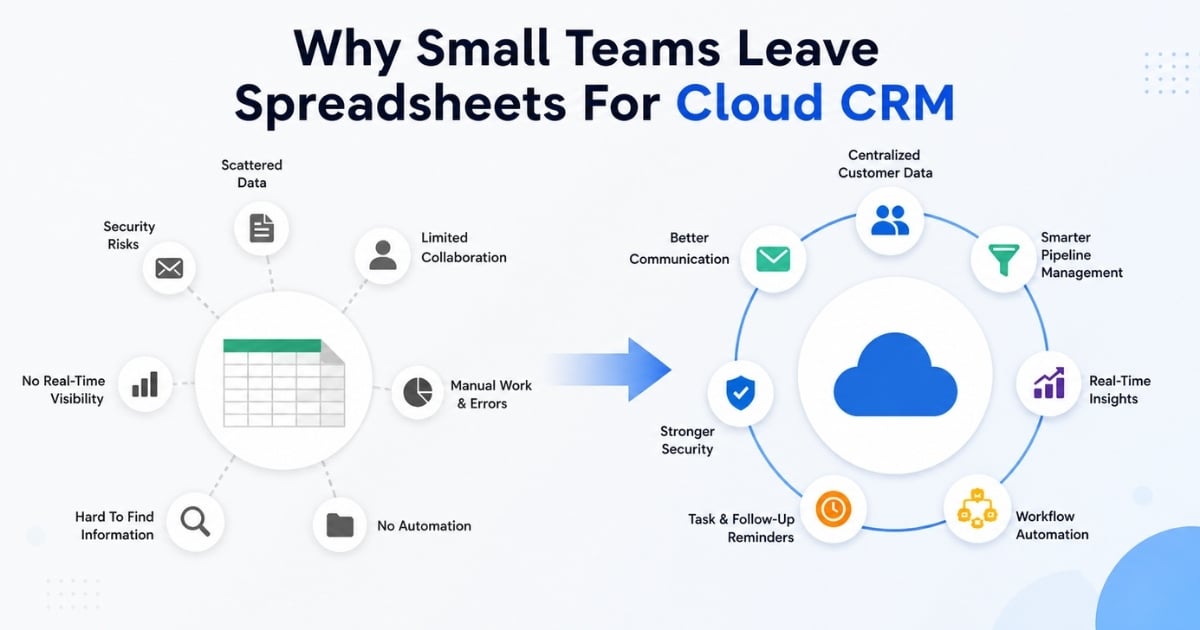
Spreadsheets helped many small businesses get started. They were fast, familiar, and almost free. But by 2026, using Excel, Google Sheets, inboxes, and personal notes as a customer management system has become a competitive liability. Buyers expect fast replies, personal context, and consistent communication across email, calls, meetings, and digital channels. A spreadsheet cannot enforce follow-ups, show a live pipeline, or tell a sales rep which leads need attention right now.
Salesforce’s 2025 sales research notes that about 30% of sales teams still rely primarily on spreadsheets for pipeline management, even as CRM users report stronger productivity and better customer data access. Harvard Business Review has also reported that responding to leads within one hour makes them seven times more likely to qualify. For small businesses, the message is clear: spreadsheets may organize rows, but cloud based crm software organizes revenue work.
What Is Cloud CRM For Small Business
Cloud CRM is customer relationship management software delivered over the internet. Instead of installing software on office servers, teams access a crm platform through a browser or mobile app. The crm provider hosts the system, manages updates, secures the data, and keeps the platform available from anywhere with an internet connection.
For small businesses, this usually means a subscription model. In 2026, many cloud based crm options cost about $10 to $60 per user per month, while some vendors offer a free crm or free plan with limits. Pricing for cloud-based CRM solutions can range from free tiers to under $25 per user per month for advanced, specialized tools. There are no server maintenance costs, and many providers offer tiered monthly pricing that fits small business budgets.
Cloud-based CRMs include lower upfront costs because there is no hardware to buy, improved data accessibility via mobile apps, automated sales nurturing, and better team collaboration. Implementing a cloud CRM can lead to reduced operational costs, as it eliminates the need for in-house hardware and IT maintenance. Cloud CRMs typically offer lower operational costs since they eliminate the need for in-house hardware and maintenance, as the provider manages updates and security on their servers, and modern cloud CRM software adds scalable performance, security, and faster deployment for growing teams.
Why Small Teams Leave Spreadsheets For Cloud CRM
Spreadsheets work until sales processes become too active for rows and columns. Once multiple sales reps touch the same prospects, follow-ups become time-sensitive, and managers need live forecasting, the limits become obvious. Cloud CRM for small businesses gives small teams shared visibility, cleaner crm data, and data-driven processes for B2B sales CRM that help them close deals faster.
Prospect And Customer Data Lives In Too Many Places
A local agency may keep Facebook leads in one sheet, website leads in another, referrals in a third, and customer information in personal inboxes. The result is fragmented customer data and no single view of customer relationships. Analysts such as Gartner have emphasized the single customer view as a key driver of CRM value for SMBs.
Cloud CRM centralizes customer contacts, notes, sales emails, meetings, and deal history. Teams can search by company, owner, stage, source, or last activity instead of hunting through files. Salesforce research has found that 74% of businesses report better access to customer data with CRM, which is why a small business crm becomes more useful as activity grows.
Leads And Deals Slip Through The Cracks
Spreadsheets do not assign ownership, create reminders, or warn a manager when a deal is stale. A small B2B company with 80 to 100 open opportunities can easily lose trial users after a trade show because nobody knows which rep owns the next step.
Cloud CRM adds pipeline stages, tasks, alerts, and follow-up dates. Sales reps can track leads from inquiry to close, and managers can see which opportunities have waited too long, while CRM follow-up automation keeps outreach timely without adding manual work. The Harvard Business Review lead response study makes this practical: if one-hour response makes leads seven times more likely to qualify, then automated reminders are not a nice extra. They protect revenue.
Team Collaboration Becomes Confusing
Shared spreadsheets often turn into files named “Leads_Final_Updated_v7.xlsx.” One rep changes a status, another works from an old copy, and a third calls the same prospect because the latest conversation is not visible. Cloud CRM systems provide real-time data access, which enhances collaboration among teams and ensures that everyone is working with the most current information.
A cloud CRM provides activity timelines, ownership, permissions, and change tracking. Cloud-based CRM systems allow small businesses to access customer data from anywhere, facilitating remote work and improving team collaboration. This became essential during the 2020-2024 remote work shift and remains standard for distributed sales teams.
Reporting And Forecasting Are Manual And Inaccurate
Spreadsheet reporting depends on filters, formulas, copying, and manual cleanup. A founder may spend half a Monday building a forecast from three sheets, only to have the numbers become outdated when a rep updates a deal later that day.
Cloud CRM dashboards show pipeline value, win rates, deal age, expected close dates, and sales performance in real time. A dedicated sales pipeline CRM can improve sales forecasting accuracy by 42% by organizing customer interactions and data effectively, which enhances productivity. Better forecasting helps small businesses plan hiring, inventory, cash flow, and sales coverage with less guesswork.
Spreadsheets Cannot Handle Modern Communication Channels
Prospects now interact through email, website forms, social media, calls, digital meetings, and marketing campaigns. Spreadsheets cannot automatically track interactions across those channels or connect every touchpoint to the right record.
A cloud based crm can connect email, calendars, forms, and marketing tools so customer interactions are logged against the right contact. An online retailer can see which people clicked an email marketing campaign and later purchased, while a B2B sales manager can see which demo follow-up moved a deal forward. This is where marketing automation, sales automation, and an AI sales assistant for pipeline efficiency work together.
Compliance And Security Risks Increase
A spreadsheet full of customer records on a personal laptop is a risk. If the laptop is lost, customer information may be exposed. If the file is emailed to the wrong person, there may be no audit trail. Privacy laws such as GDPR and CCPA increase the pressure to manage data responsibly.
Cloud CRM systems offer encryption, access controls, audit logs, retention settings, and export controls. Owners can limit who sees sensitive data and revoke access when someone leaves. This is difficult to enforce with files saved locally or shared through email.
Scaling The Business Exposes Spreadsheet Limits
A sheet that works for 50 customers becomes fragile at 500 or 5,000 contacts. Files slow down, formulas break, duplicates multiply, and onboarding new reps becomes messy.
The flexibility of cloud CRM solutions allows businesses to scale their operations easily, adjusting user access and features as needed without significant investment, which is especially important in CRM for startups and small sales teams. Cloud-based CRM solutions are designed to be scalable, allowing businesses to easily adjust user seats and functionalities as their needs evolve, without the need for significant infrastructure investment. CRM systems are designed to be scalable, accommodating the growth and changing needs of your business over time, allowing you to add new functionalities and increase the number of users without compromising performance.
Benefits Of Cloud CRM For Small Business Teams
The best crm for small business teams is not about software for its own sake. It is about faster revenue growth, lower manual effort, cleaner sales execution, and better customer relationships.
Higher Productivity With Less Manual Data Entry
CRM and sales automation can reduce data entry time by about 20% to 30%, according to sales productivity benchmarks. Emails sync automatically, form fills create records, and sales tasks remind reps what to do next, especially when you automate sales tasks to stay focused and organized.
For a two-person team, that can reclaim several hours each week. Instead of copying notes from inboxes into cells, reps can manage tasks, update deals, and focus on live conversations. This matters most for founders who still sell and cannot afford administrative drag.
More Revenue From The Same Customer Base
Centralized crm data helps teams spot renewals, expansion opportunities, and dormant accounts. A SaaS startup can use strong contact management to build better relationships, filter customers approaching renewal, review last conversations, and assign follow-ups before the contract is at risk.
SMB surveys often report that 39% of companies improve upselling and cross-selling after adopting CRM. A CRM system can increase customer retention by enabling businesses to track interactions and provide personalized solutions, which is crucial for maintaining customer loyalty. Even a simple crm with reminders and segments can lift revenue without complex advanced analytics.
Faster, More Personalized Customer Experiences
When a rep opens a contact record and sees previous conversations, notes, meetings, and deal history through dynamic contact management, the next conversation feels informed. That improves customer experience and helps create a consistent customer experience across the team. Salesforce research has reported that 84% of customers believe the experience of doing business with a company is as important as its products and services, highlighting the need for effective customer relationship management. Templates, notes, and sales playbooks help small teams respond consistently while still sounding personal.
Support For Remote And Hybrid Work
Cloud-based CRMs offer small businesses cost-effective, scalable, and remote-accessible management of customer relationships. One of the key advantages of cloud CRM is that it provides access to customer data from anywhere with an internet connection, which is particularly beneficial for remote teams and businesses with distributed operations, including retail teams that need CRM tools to stay organized. A sales team split across Austin, Denver, and New York can work from the same live pipeline. A rep can update a deal after a demo from a phone, while a manager sees the change instantly. This mobile access is hard to match with local files or disconnected sheets.
Better Decisions With Real-Time Insights
CRM systems provide powerful reporting and analytics tools that turn real-time data into actionable insights, allowing businesses to evaluate sales performance, understand customer behavior, and monitor marketing effectiveness. A founder might discover referrals close twice as often as cold leads and shift budget toward referral programs.
Around 74% of businesses using CRM report improved access to customer data and analytics, improving forecasting and planning. Small teams do not need a large BI stack to benefit. A few dashboards showing lead source, win rate, sales cycle length, and pipeline value can change how decisions are made.
Key Cloud CRM Features That Replace Spreadsheets
If you live in Excel or Google Sheets today, the right crm system should replace familiar spreadsheet workflows with clearer sales workflows. Effective cloud-based CRMs for small businesses include features like automation, lead management, and intuitive interfaces, and a simpler sales workflow often delivers more value than a complex toolset. Gain.io focuses on these essentials instead of overwhelming small teams with enterprise-only modules.
Unified Contact And Account Management
Contact management replaces separate “Leads.xlsx” and “Customers.xlsx” files with one database of people and companies, making it much easier for CRM tools to help sales teams manage leads. Each record can include email, phone, company, source, lifecycle stage, notes, and sales history. This foundation lets teams group prospects by industry, region, deal stage, or customer journey. It also helps track customer interactions without forcing reps to search inboxes and tabs.
Visual Pipelines And Deal Tracking
A visual pipeline replaces a manual status column. Deals move through stages such as New, Qualified, Proposal, Negotiation, and Won. Managers can see expected revenue without rebuilding a spreadsheet forecast, and a visual sales pipeline improves deal clarity across the team. If five deals stall in Proposal, the issue is visible. The manager can coach reps, improve the proposal process, or adjust follow-up timing. That is how cloud crm for small business turns activity into pipeline control, grounded in a clear understanding of what a sales pipeline is and how to build one.
Automation Of Repetitive Tasks
Workflow automation handles routine tasks like creating a follow-up three days after a proposal, assigning a new inbound lead, or reminding a rep before a sales call, all of which support stronger sales deal tracking for modern sales teams. Automation capabilities in CRM platforms allow small businesses to automate manual tasks, such as social media responses, task creation for customer service requests, and lead scoring, which helps improve efficiency and productivity. For Gain.io, automation is focused on sales follow-ups, reminders, and deal-related actions. The goal is simple: fewer missed next steps and less manual effort.
Integrations With Email, Calendars, And Key Apps
A good CRM should integrate seamlessly with existing tools and services, enhancing functionality and streamlining business processes, which is crucial for small businesses looking to maintain efficiency as they grow. Common 2026 integrations include Google Workspace, Microsoft 365, Stripe, Slack, Zapier, and marketing tools. Email and calendar sync are the starting point. They help a crm system capture sales conversations, demos, follow-ups, and meetings without asking reps to copy everything manually.
Secure, Role-Based Access And Audit Trails
Cloud CRM lets owners decide who can view, edit, export, or manage customer records. A junior rep may see only assigned deals, while a manager sees the full pipeline. Audit trails show who changed a field and when. That reduces the silent errors common in spreadsheets, such as deleted formulas or overwritten notes. It also lowers the risk of someone exporting the full customer list without permission.
How To Choose The Right Cloud CRM When Leaving Spreadsheets
There are many crm solutions, from zoho crm and hubspot crm to niche tools, Gain.io vs Salesforce CRM options, and sales-first platforms. The best crm software is not always the largest. The best small business crm is the one your team will actually use to improve sales processes.
Start With Clear Goals And Use Cases
Start with three to five outcomes: never lose a web lead, see forecasted revenue by month, reduce admin work, or improve follow-up consistency. Then map a few real deals from the first inquiry to the closed deal. An agency may not need deep marketing automation on day one. It may need proposal tracking, sales notes, email sync, and follow-up tasks. Clear goals keep the shortlist focused.
Balance Cost With Long-Term Value
Most small-business-focused cloud CRMs cost roughly $10 to $60 per user per month in 2026. Some affordable crm and inexpensive crm options are enough for early teams, while more customizable crm platforms add reporting, automation, and integrations. When comparing CRM systems, consider the pricing structure, as many platforms charge based on the number of leads or customers stored in the database, which can lead to increased costs as your business grows. Also compare crm software cost against hours saved, faster follow-up, and deals recovered. Cost effective crm solutions should reduce friction, not create surprise add-ons.
Prioritize Ease Of Use And Adoption
Even the best crm fails if sales reps avoid it. If the tool feels like an annoying crm, people will return to spreadsheets and inboxes. During trials, ask reps how quickly they can add a contact, update a deal, log notes, and schedule a follow-up. For crm for small teams, adoption beats complexity.
Choose intuitive navigation, clear dashboards, and minimal clicks per action. Mobile access helps field sales teams stay updated. Service teams also benefit from simple layouts that make managing customer relationships easier and faster without confusion.
Check Critical Integrations And Data Migration Paths
Confirm email, calendar, and core business app integrations before committing. Also, test the spreadsheet import with a sample of real data. A good migration path should let you import customer contacts, companies, deal stages, and notes through CSV. The crm supports your existing workflow best when setup does not require a developer or a long IT project.
Look for native integrations with marketing software, accounting software, and communication tools. Reliable service tools help track customer requests without gaps. Clean data mapping ensures service automation runs smoothly after migration.
Plan A Gradual Rollout Instead Of A Big Bang
Start with one workflow, such as all new inbound leads entering the CRM from a specific date. Keep the old spreadsheet read-only for 30 to 90 days while the team builds confidence. Then import active deals, standardize pipeline stages, and move reporting into the CRM. A phased rollout creates internal champions and reduces resistance.
Set clear milestones and track progress weekly. Encourage feedback from early users and refine workflows based on real usage. Gradual rollout helps service teams adapt faster while improving managing customer relationships across every stage.
Cloud CRM For Small Business-Why It Matters Now More Than Ever
Cloud-based systems are no longer an optional infrastructure for growing sales teams. Since 2020, customers have become faster, digital buying journeys have expanded, and customer relationships now depend on consistent execution across every touchpoint.
Customer Expectations Have Risen Sharply Since 2020
80% of customers are more likely to purchase from a company offering a personalized experience, which can be facilitated by a CRM system. Small businesses are judged against large brands that remember preferences, recommend relevant products, and respond quickly. A local retailer can use crm tools and email marketing segments to send relevant offers instead of generic blasts. Better personalization starts with organized customer insights.
Consistent personalization requires unified customer contacts, updated customer records, and clear visibility into past interactions. CRM features help track behavior patterns, refine segmentation, and improve messaging accuracy across channels without relying on scattered data sources.
Remote And Hybrid Sales Are Here To Stay
Many buyers now prefer video calls, digital demos, and email follow-ups. That creates more digital customer interactions to track. Cloud CRM gives distributed sales teams shared notes, calendars, pipeline updates, and deal history. Local files struggle when reps work from home, coworking spaces, customer sites, and different time zones.
Mobile access ensures teams stay productive regardless of location. Cloud based crm software allows real-time updates, while contact management keeps every interaction logged. This consistency helps teams avoid miscommunication and maintain accurate deal progress across regions.
Data Privacy And Compliance Pressure Is Growing
Frameworks like GDPR, CCPA, and regional privacy laws have tightened expectations for storing and using customer data. Ad hoc spreadsheets make data deletion, access control, and audit logs hard to prove. A reputable crm provider offers encryption, permissions, retention controls, and data processing documentation. Even very small businesses benefit from standard data handling.
Secure cloud based crm systems include role-based permissions, data encryption, and audit trails. These features protect sensitive information while helping businesses respond to compliance requests quickly and maintain trust with customers and regulatory bodies.
AI And Automation Have Become Accessible To Small Teams
From 2023 to 2026, AI features such as lead scoring, sales email suggestions, and predictive next steps moved into mainstream crm software. Small businesses can now use these tools if crm data is centralized and clean. A modern crm may suggest the next action for a stale opportunity or draft a personalized follow-up. Spreadsheets cannot easily provide that at scale.
Workflow automation reduces manual work by handling repetitive updates, reminders, and task assignments. AI powered insights help prioritize leads and improve timing. Even simple crm setups now combine automation with actionable data to increase efficiency.
Competitive Advantage Depends On Execution, Not Just Ideas
Two companies can sell similar services. The one with clearer pipeline visibility, faster follow-ups, and better customer management usually wins more deals. This is why 91% of companies with 10 or more employees use CRM systems for better customer management, indicating the widespread recognition of CRM’s importance in enhancing customer relationships. In 2026, crm for small business is a baseline operating system for revenue, not a luxury.
Reliable systems combine reporting tools, customizable crm dashboards, and advanced analytics to deliver deeper insights. Businesses that act quickly on data outperform competitors by improving response time, strengthening relationships, and optimizing every stage of the sales cycle.
Why Gain.io Is Built For Small Teams Leaving Spreadsheets
Gain.io is built for small teams that are ready to leave spreadsheets and run sales from one clear workspace. It is an all-in-one CRM to grow your sales and team focused on the work that moves deals forward: contact management, visual sales pipelines, sales task management, notes and collaboration, email integration for sales conversations, and calendar management for sales activities.
Gain.io helps teams import spreadsheet data, organize customer and prospect information, and turn status columns into visual pipeline stages. Reps can manage leads, log notes from sales conversations, schedule demos, plan follow-ups, and keep deal context visible without digging through files. The platform combines crm clarity with practical sales execution, so teams see what needs attention next.
Gain.io is designed around clarity over complexity. It avoids enterprise bloat and keeps key features easy for non-technical users. Small teams can start with contacts, deals, sales tasks, email sync, and calendar management, then build a repeatable process as the pipeline grows.
Security and accessibility matter too. Gain.io is available from modern browsers and mobile devices, supports role-based permissions, and protects data with encrypted cloud storage. For teams comparing best crm solutions or searching for the best crm for small teams, the value is simple: get out of spreadsheets, gain pipeline visibility, and close deals with fewer missed steps by using smart CRM tools for sales teams.
FAQs
When Is The Right Time For A Small Business To Move From Spreadsheets To Cloud CRM
A good rule of thumb is when multiple people need the same customer data every day or when the team manages more than 50 to 100 active deals at once. Duplicated outreach, missed follow-ups, and difficulty answering “what will we close this month” are strong signs. Moving earlier is usually easier because data is cleaner and habits are less entrenched.
How Much Does Cloud CRM Typically Cost For A Small Business In 2026
Most cloud CRM for small business options cost about $10 to $60 per user per month, depending on features, support, and automation depth. Some vendors offer a free plan, while others start with paid-only tiers. Always check add-ons for advanced reporting, marketing modules, email limits, or extra integrations.
How Long Does It Take A Small Team To Get Productive With A New Cloud CRM
Basic setup for a small team can often be completed in a few days, including CSV import, one pipeline, email sync, and basic reminders. Most users become comfortable adding contacts, updating deals, and logging activities within one to two weeks of daily use, as shown in a sales acceleration case study where teams closed deals faster with Gain.io. Advanced automation and reporting can be added later.
Who Owns Our Data In A Cloud CRM And How Easy Is It To Export
Reputable cloud CRM providers state that customers own their data. Exports usually come in CSV or similar formats that can open in spreadsheets or move into another system. Before signing a long-term contract, confirm export options, limits, and whether activity history is included.
Can A Cloud CRM Work Alongside The Tools We Already Use
Yes. Most crm solutions integrate with email, calendars, accounting systems, payment tools, communication tools, and marketing platforms through native connectors or APIs, including CRM tools that help real estate agents save time. Start with email and calendar sync, then add integrations that remove the most copy-paste work. A good CRM should reduce tool sprawl, not create more systems to update manually.
Small businesses are facing a fundamental shift in how they manage customer relationships. Global e-commerce sales are projected to reach $8.1 trillion by 2026, and B2B sales cycles now average 84 days according to Salesforce research. With 58% of small business workforces operating remotely per HubSpot surveys, centralized systems for managing customer information have become essential rather than optional.
The right CRM can save small businesses time, provide access to crucial data, and help build connections with customers, leads, and partners. According to Nucleus Research, 83% of small businesses reported a positive return on investment from their CRM spending within the first year, often through improved sales productivity reaching 34% higher than non-CRM users. CRM adoption among small businesses rose 25% year-over-year between 2024 and 2026, driven largely by AI integrations that reduce manual tasks by 40%.
This article details seven must-have CRM features derived from SMB benchmarks, then guides you through evaluation, implementation, alignment across functions, and scaling strategies tailored to small business constraints.
What Is A CRM Tool For Small Businesses
A CRM tool, or customer relationship management software, serves as a central hub that systematically manages customer interactions throughout the entire sales process. Unlike generic contact lists in Google Sheets that lack automation and pipeline tracking, or accounting software like QuickBooks focused solely on financials, a CRM system centralizes customer data and allows small businesses to track customer interactions efficiently.
Core CRM functions include a robust contact management database storing profiles with interaction histories, activity tracking that logs calls and emails, pipeline views visualizing deal progression, basic automation for task assignments, and reporting dashboards summarizing metrics like win rates. Popular CRM tools for small businesses focus on affordability, ease of use, and essential automation to help teams manage customer relationships without enterprise-level complexity.
7 Must-Have Features In CRM Tools For Small Businesses
With over 100 CRM vendors targeting small businesses, daily usage concentrates on a handful of critical capabilities. HubSpot reports that teams using these core features see 28% shorter sales cycles, while Salesforce data shows 29% sales productivity improvements. Nucleus Research quantifies $8.71 ROI per dollar invested through higher win rates and reduced response times.
The seven features below are chosen based on common SMB benchmarks from sources including HubSpot, Salesforce, and G2’s 2024 CRM report, where 92% of small business users prioritize ease of use and automation.
Intuitive Contact And Account Management
Effective CRM contact management centralizes all data including emails, calls, notes, and linked deals into a unified 360-degree view. A CRM system should centralize customer data, allowing small businesses to track customer interactions and manage the entire sales process efficiently. This eliminates spreadsheet silos where 45% of small businesses lose data according to Gartner research.
Interfaces must enable new users to navigate in under an hour, with tools like Zoho CRM and OnePageCRM exemplifying streamlined UIs critical for small teams averaging 3 to 10 users. Nucleus Research shows centralized data improves close rates by 17% and customer satisfaction by 20% through better data quality as a single source of truth.
Practical requirements include customizable fields for industry or lifecycle stage, fast search across records, and segmentation tools. For example, HubSpot CRM allows tagging by company size, boosting targeted outreach efficiency. Strong contact management forms the foundation for building better customer relationships across your entire customer journey.
Sales Pipeline Visualization And Deal Tracking
Visual pipelines using Kanban boards or stage lists reveal opportunity statuses and bottlenecks at a glance. Sales pipeline management includes visual tracking of deals through different stages, essential for small teams tracking core stages like New Lead, Qualified, Proposal, Negotiation, and Closed Won or Lost with daily updates.
Salesforce benchmarks indicate consistent visual pipeline tracking lifts forecast accuracy by 42% and win rates by 15%, with high-performing SMBs updating deals 2.5 times faster than average. Pipeline management gives sales reps clear visibility into which opportunities need attention and which are progressing smoothly.
When evaluating CRM platforms, focus on drag-and-drop customization, surfacing metrics like expected value and close date without extra clicks. Tools like Pipedrive offer AI-powered boards that auto-suggest stages based on historical data, reducing manual adjustments and helping teams close deals faster.
Workflow Automation For Follow-Ups And Tasks
Workflow automation triggers tasks, reminders, and emails based on events like new leads created or quotes sent. Around 67% of SMB leaders rate automation as extremely important according to HubSpot’s 2024 survey because it offsets limited headcount and reduces manual errors by 30%.
CRM systems help reduce operational costs by automating routine tasks, which allows teams to focus on higher-value activities and improves overall efficiency. Concrete examples include automatic reminders for untouched leads after 3 days, task creation when a deal moves stage, and notifications when key customers have not been contacted for 30 days.
Marketing automation capabilities within your CRM solution can trigger email sequences based on prospect behavior, saving hours of manual effort weekly. Bitrix24 data shows automating sales tasks saves 10 hours weekly per rep, offsetting staffing gaps. Look for no-code builders that allow non-technical users to adjust workflows as the business grows without requiring IT support.
Email Integration And Communication Tracking
Native sync with Google Workspace and Microsoft 365 logs emails to contact records with open and click tracking, templates, and sequences. CRM with email integration allows sending personalized emails and tracking responses directly from the CRM. This capability is crucial since 80% of small business communication occurs via email per US Chamber reports.
Teams using email tracking respond 20% faster with consistent messaging, correlating to 18% higher reply rates according to Pipedrive studies. Customer communication becomes more personalized when sales teams can see the complete interaction history before making a call.
Key evaluation questions include whether the CRM plugs into your existing inbox, whether it creates duplicates, and how easy it is to see recent conversations. Communication tools that surface conversation previews before calls enable more relevant, personalized communication with prospects and customers.
Reporting, Dashboards, And Revenue Insights
Simple dashboards displaying pipeline value, win rates averaging 26% for CRM users versus 19% without, sales cycle length, and revenue sources empower small businesses with actionable data. Sales activity tracking software and analytics help firms using dashboards achieve 32% better forecasting accuracy.
Adjustable drag-and-drop reports exportable for investor meetings or internal reviews suit non-technical users managing data management tasks. Avoid CRM software that forces complex BI setups just to get basic performance views, since that slows down lean teams where 75% of SMBs prefer simple views according to G2.
Even simple CRM reporting capabilities provide advanced analytics insights that guide sales forecasting and strategic planning. Deal management visibility helps marketing teams and sales teams align on which activities drive the best results.
Integration With Core Small Business Tools
Seamless connections to accounting software like QuickBooks, support platforms like Zendesk, marketing tools like Mailchimp, and calendars eliminate duplicate data entry. Integrating your CRM with other business tools ensures that the details of every customer interaction are readily available on demand, which can include anything from sales meetings to online chats and social media tools mentions.
A CRM system can create data relationships with other applications, which is crucial for maximizing the lifespan of your CRM purchase and ensuring seamless operations across different business functions. Integrating a CRM with existing tools like email, accounting software, and scheduling apps eliminates duplicate data entry and creates a complete view of customer interactions and purchase history.
Well-integrated stacks extend CRM life by 2 to 3 years per Forrester research, reducing switchover risks. Essential connections should work reliably out of the box through native marketplaces or integration platforms. Project management tools integration helps teams manage tasks and coordinate business processes across departments, while visual sales pipeline software ensures deals stay organized and easy to track.
Mobile Access And Remote-Friendly Features
Mobile CRM apps with offline access, note capture, push notifications, and pipeline views support hybrid teams where 63% of small business leaders view mobility as essential for business continuity according to Gartner 2024. Key features to look for in a small business CRM include automation capabilities, mobile access, and app integration to streamline business processes and improve efficiency.
Ideal mobile capabilities include quick note capture after field meetings, push notifications for hot leads, and a condensed but usable pipeline view, which is especially important for time-poor professionals like real estate agents using CRM tools to save time. Poor mobile usability can limit adoption by 40%, so trial testing reveals real-world usability beyond desktop-only demos.
Test the mobile app during free trials since field reps and small business owners spend significant time away from desks. Strong mobile access enables task management and lead management activities regardless of location.
Ways To Evaluate CRM Tools For Small Business Budgets
CRM systems for small businesses can start at less than $10 per user per month and scale to upward of $50 per user per month, depending on features and capabilities. Free tiers like HubSpot CRM offer 1,000 contacts and up to three users, while Zoho CRM provides 5,000 records for 3 users, suiting micro-teams but capping automation and storage compared with the best CRM software options for small sales teams.
Understanding Pricing Models And Tiers
Per-seat licensing dominates small business CRM pricing, with tiers unlocking features progressively. HubSpot Starter at $20 per month adds automation, while Freshsales offers a free plan for 3 users jumping to Growth at $9 for AI capabilities. Contact limits and add-ons for emails or storage apply across most vendors.
Read pricing pages carefully to understand what is included in entry-level plans versus what jumps at higher tiers. Many small business CRMs offer a free tier or trial, allowing businesses to test the software before committing to a paid plan, so it is worth following tips for choosing CRM tools that fit your workflow before signing a contract.
Map your current team size and 12 to 24 month hiring plans against tier limits to avoid frequent plan changes costing 15 to 20% extra annually. A customizable CRM with transparent pricing lets small teams budget reliably without surprise costs.
Calculating Return On Investment
ROI calculation follows a straightforward formula: extra revenue plus saved labor cost minus CRM spend, divided by CRM spend, over 12 months. For example, a 5% win rate lift on $500K pipeline yields $25K extra revenue, while automation saving 4 hours weekly per rep at $30 per hour saves $6K annually per team.
Salesforce data shows 8.71:1 ROI for high-adoption SMBs with productivity improvements up to 34%. Implementing a CRM can streamline sales processes, enabling sales teams to focus on closing deals rather than administrative tasks by following a simpler sales workflow in their CRM, which can lead to faster deal closures.
Track baseline metrics before implementation including current monthly revenue, win rate, and average deal size to compare against post-CRM results. CRM systems can improve customer relationships by centralizing customer data, allowing businesses to provide personalized service and build stronger customer relationships.
Free Trials, Freemium Plans, And Pilot Projects
Trials lasting 14 to 30 days let you test key workflows, integrations, and mobile use rather than just clicking around. Run a limited pilot with 2 to 3 sales reps over 30 to 60 days before rolling out company-wide.
Define success criteria in advance such as 20% faster response times or 90% data completeness. Reviewing guides on choosing CRM tools that fit your workflow and learning from case studies where teams closed deals faster with Gain.io can clarify what success should look like. Small businesses need to evaluate the support quality of a CRM provider, including response times and available support channels, to ensure successful implementation and use.
Starting small with a free CRM or trial allows learning quickly before scaling when daily use proves value. Less annoying CRM options prioritize simple onboarding over feature bloat.
Avoiding Hidden Costs And Vendor Lock-In
Hidden fees include paid onboarding packages sometimes exceeding $500, add-ons for basic features, overage charges, and pricey admin help for simple changes. Check contract terms for minimum commitments, auto-renew clauses, and export options.
Confirm that you can easily export contacts, activities, and pipeline data in standard formats like CSV. Small businesses should consider scalability when choosing a CRM, ensuring that the system can grow with their business and accommodate increasing numbers of users and data.
Tools designed for small business should make switching in and out straightforward, reducing long-term vendor lock-in risk. Annoying CRM experiences often stem from inflexible contracts rather than software limitations.
Aligning CRM Spend With Growth Stages
Solo founders or tiny teams should start with simpler, lower-cost plans, then upgrade when adding sales reps or introducing more complex marketing campaigns, similar to recommendations in many CRM guides for startups and small sales teams. Invest more heavily when deal volume increases, when adding channels like outbound email, or when reporting needs become advanced.
CRM systems are designed to be scalable, accommodating the growth and changing needs of a business over time, allowing for the addition of new functionalities and users without compromising performance. Revisit your CRM plan annually to ensure pricing and features still match your current stage.
Choosing a simple CRM with room to grow prevents premature investment in heavyweight enterprise stacks that small teams cannot fully utilize.
How To Implement CRM Tools Successfully In A Small Business
Gartner research indicates 70% of CRM failures stem from implementation issues like poor processes, not software limitations. Small businesses succeed with lightweight but structured rollout plans that can be executed without full-time systems administrators.
High adoption yields 47% revenue growth according to Nucleus Research. The following sections walk through the processes of defining processes, migrating data, onboarding users, encouraging adoption, and iterating after launch.
Mapping Your Sales And Service Processes First
Document current sales and customer service steps on paper or a whiteboard before configuring any CRM fields or pipelines. Capture entry points including website leads, referrals, and inbound calls, plus major stages and handoffs between roles so the CRM mirrors real workflows.
Simplify overly complex processes during this stage rather than blindly replicating messy habits inside the CRM. Aligning CRM structure with existing buyer journeys, especially in B2B sales CRM environments with longer cycles, reduces setup errors by 25% and ensures the system supports your actual sales process.
Cleaning And Migrating Existing Data
Cleanse legacy spreadsheets and email contact lists by removing duplicates and fixing outdated records before importing. Data cleaning tools typically cut 20 to 30% of invalid records. Standardize fields like job titles and industries, decide which historical data truly matters, and run a test import with a small sample.
Clean data at launch increases user trust in the system and improves adoption by 35% according to HubSpot. Store customer information accurately from day one using integrated contact management to build stronger relationships and maintain CRM records integrity throughout the customer experience.
Training And Onboarding Your Team
Even the simplest CRM needs structured training through short live sessions, recorded walkthroughs, and written quick-start checklists. Focus onboarding on daily tasks like updating deals, logging notes, and managing leads inside the CRM rather than covering every advanced CRM features capability at once.
Appoint an internal CRM champion who answers questions and collects feedback for future improvements. Role-based training ensures each user sees only workflows and views relevant to their job, whether managing customer information or strengthening customer relationships.
Driving Adoption And Consistent Use
CRM data value depends on consistent usage since incomplete CRM data quickly erodes trust. Leaders should model good behavior by using dashboards in meetings and holding teams accountable for keeping deals and contacts current.
Simple incentives or recognition for clean data and on-time updates work especially well in the first 90 days after launch. Periodic check-ins help identify user frustrations and remove friction points quickly before they undermine adoption.
Iterating On Workflows And Automation Over Time
Treat CRM setup as an ongoing process by starting simple, monitoring what works, and gradually introducing additional automation and custom solution configurations. Quarterly reviews of reports, pipelines, and automations ensure they still reflect current strategy and product offerings.
Avoid over-automating early, which can overwhelm teams and confuse customers with impersonal communication. Automating routine tasks should enhance the customer journey, not replace genuine relationship building.
How To Align CRM Features With Sales, Marketing, And Service
The same CRM platform must often serve sales, marketing, and customer support in a small business where roles frequently overlap. Aligning features across these functions reduces silos and offers customers a smoother experience.
Structured CRM use shortens sales cycles by 28% and improves retention by 20% per HubSpot research. The following workflows leverage CRM supports capabilities for sales execution, marketing campaigns, support quality, and cross-functional collaboration.
Supporting The End-To-End Sales Cycle
CRM should support prospecting, qualification, proposal, negotiation, and renewal in one continuous view. Sales teams can use tasks, notes, and stage changes to coordinate next steps and never lose track of an opportunity, so comparing options like Gain.io vs Salesforce CRM helps you choose a platform that fits this end-to-end flow.
Structured pipelines often shorten sales cycles by giving visibility into bottlenecks and stalled deals. Map follow-up cadences and call schedules within the CRM rather than relying on scattered reminders across different tools, and look for smart CRM features for sales teams that make these workflows easy to follow.
Powering Targeted And Measurable Marketing
CRM data including lifecycle stage, last activity, and industry drives segmented marketing campaigns via email or other channels. CRM platforms can enhance marketing efforts by providing insights into customer behavior, allowing for more targeted and personalized marketing campaigns.
The feedback loop works clearly: campaigns create leads tracked in CRM, and outcomes inform future campaign design. Small businesses with limited budgets benefit from data-driven targeting through marketing teams that avoid wasting spend on uninterested audiences.
Improving Customer Support And Retention
Logging support interactions and linking them to contact and account records helps teams anticipate issues and identify churn risks. Customer service requests logged in CRM provide flags for frequent issues or high-value customers needing proactive outreach.
Better visibility into history lets any team member jump in and help, which is vital in small teams where people wear multiple hats. Track resolution times and satisfaction trends to continuously improve customer experience.
Enabling Collaboration Across Small, Multi-Role Teams
CRMs give everyone a shared view of customers so marketing teams, sales teams, founders, and support do not work on conflicting information. Shared timelines, mentions, and activity feeds make coordination easier, cutting email threads by 50% and improving handoffs.
Better internal handoffs directly impact customer perception and response times. Standard conventions for notes and tagging keep information understandable as teams grow and new members join.
Using CRM Insights For Strategic Decisions
Aggregated CRM data guides decisions about which products to focus on, which channels generate the best leads, and where to invest in hiring. Monthly or quarterly sessions where leadership reviews CRM dashboards lift planning accuracy by 30%.
Small businesses using data analytics from their CRM score higher in planning accuracy and resilience during market shifts. Turn daily activity data into practical strategy through an intuitive interface that surfaces actionable insights.
Why Gain.io Is Built Around These Must-Have CRM Features
Gain.io is an all-in-one CRM built to embody the seven must-have features detailed throughout this guide. The platform delivers an intuitive interface for hour-one onboarding, visual pipelines with drag-and-drop functionality, no-code automation that offsets headcount limits, email sync with open and click tracking, customizable dashboards for revenue insights, native integrations extending stack life, and mobile apps for remote access.
Designed specifically for sales teams and growing businesses, Gain.io prioritizes fast setup under 30 minutes, low learning curves for lean teams, and transparent pricing between $10 and $50 per user without enterprise complexity. The CRM provider supports cross-functional use across sales, marketing, and service in unified views while remaining focused on helping teams close deals faster.
How Long Does It Take A Small Business To See Results From A New CRM?
Many small teams see qualitative benefits like better visibility and reduced data hunting within a few weeks. Harder financial metrics such as improved win rates and shorter sales cycles typically emerge within 3 to 6 months assuming strong adoption across the team. Time to value depends heavily on having clear processes, clean data, and focused training rather than solely on the software chosen.
How Can A Small Business Improve CRM Adoption Among Team Members?
Adoption improves when the CRM makes daily work easier rather than harder through fewer manual steps, faster information access, and clear expectations on usage. Involve users in tool selection, start with simple workflows, and use CRM dashboards in regular meetings to show that leadership relies on the data. Building the CRM into routine tasks prevents it from feeling like extra work.
What Security And Privacy Features Should Small Businesses Expect In A CRM?
Expect encrypted data in transit and at rest, regular backups, role-based access controls, and support for multi-factor authentication at minimum. Check where data is hosted, how vendors handle compliance obligations like GDPR if applicable, and what processes exist for incident response. Salesforce CRM and other major vendors typically provide security documentation that smaller providers should also match.
Can A CRM Replace Spreadsheets Completely?
For managing customer information, pipeline tracking, and follow-ups, a well-implemented CRM should largely replace spreadsheets while improving accuracy and collaboration. Some businesses may still use spreadsheets for ad hoc analysis, but those should draw from CRM exports rather than serve as the primary contact database for customer data.
What Happens If A Small Business Outgrows Its Current CRM?
Outgrowing a CRM often means needing more users, advanced features like sophisticated lead management, deeper integrations, or custom reporting beyond current platform capabilities. Choose tools early on that support straightforward data export in standard formats and have clear upgrade paths. Platforms aligned with small business growth evolve with expanding teams rather than forcing disruptive system changes when the business grows.
Customer relationship management systems have become essential for small businesses looking to organize contacts, track customer interactions, and manage deals more effectively than scattered spreadsheets allow. A CRM system serves as a centralized hub where small businesses can store customer information, track customer interactions, and manage the entire sales process.
According to the 2024 Salesforce State of Sales report, small businesses using CRM saw 29 percent faster sales cycle closures compared to non-users. With 91 percent of small and medium businesses now using CRM platforms, according to 2025 Gartner data, the question is no longer whether to adopt one, but which platform fits your specific needs. This guide provides a structured CRM comparison for small businesses framework to help you evaluate crm tools and select the right solution for your team.
What Are Small Business CRM Fundamentals
For companies with 1 to 50 employees, small business CRM translates to practical tools that consolidate contacts into searchable records with activity histories, automate task assignments, and provide drag-and-drop pipelines that outperform spreadsheets by preventing data loss and enabling shared access. Many small businesses start with spreadsheets to manage customer data, but as they grow, spreadsheets become inefficient and unwieldy for tracking interactions and managing leads. Understanding how CRM helps sales teams manage leads clarifies why a typical small business crm software setup organizes 100 to 1,000 contacts, logs weekly interactions, and tracks 20 or more active deals.
A 2024 Nucleus Research study found that small businesses gained $8.71 ROI per dollar spent on CRM software through 22 percent productivity boosts. HubSpot’s 2025 SMB Trends report links CRM implementation to 37 percent revenue uplift through better deal visibility. These numbers reflect what happens when sales teams gain clear insight into their pipeline and stop losing deals to missed follow-ups.
Core Criteria For Comparing CRM Platforms
This section provides a practical comparison framework using six subcriteria that small businesses can use to score vendors side by side. When choosing a Customer Relationship Management system for a small business, prioritizing tools that address immediate needs without adding unnecessary complexity is essential. For a broader overview of choosing the best CRM options for small business, each criterion below functions as a lens for evaluating any platform, whether you are considering HubSpot crm, Pipedrive, Zoho crm, Freshsales, monday.com CRM, Salesforce CRM Starter, or Gain.io.
Ease Of Use And Onboarding
Ease of use is the most critical factor in CRM adoption; a steep learning curve can lead to wasted investment. For small business teams, this means interfaces requiring under 10 minutes to log a call or update a deal, with intuitive navigation via search bars and visual pipelines accessible to non-technical staff.
When choosing a CRM, small businesses should prioritize ease of use, as many team members may not have extensive technical expertise. G2’s 2025 CRM report shows usability as the top adoption driver at 68 percent and the leading abandonment reason at 42 percent. Tools like Zoho CRM and OnePageCRM emphasize 4-minute setups and guided tours, contrasting with bloated enterprise software.
Practical evaluation steps:
Ask a new user to add a contact and create a deal within 10 minutes during free trials
Test core proficiency timeline: aim for 1 week for essential features
Check for in-app tours, templates, and guided setup wizards
Microsoft Dynamics 365 reports 80 percent of small teams achieve core proficiency in one week and full comfort in 30 days. Less annoying CRM and similar simple CRM options often reduce onboarding friction significantly.
Pricing, Total Cost, And Return On Investment
Pricing evaluation extends beyond monthly per-user fees to add-ons, implementation fees, and potential price increases when scaling beyond a free tier. Many small business CRMs can start at less than $10 per user per month and scale to upwards of $50 per user per month, making them accessible for various budgets. Pricing for CRM solutions can vary significantly, with some platforms offering plans as low as $7 per user per month, while others may charge upwards of $100 per user per month for more advanced features.
Evaluating the total cost of ownership is important when selecting a CRM, considering implementation fees and training costs. For a 12-36 month projection, factor in team growth from 3 to 10 users and future feature needs like marketing automation or phone integration, and decide whether a simple CRM vs all-in-one CRM structure better matches your growth plans.
Cost Factor
Budget Range
Notes
Entry Plans
$9-$30/user/month
HubSpot Starter $15, Zoho $14
Free Tiers
$0
HubSpot 1,000 contacts, Freshsales up to 3 users
Add-ons
$5-$20/month
Integrations, extra storage
Hidden Costs
Variable
Zapier connections, training
Sales Pipeline And Contact Management Capabilities
For most small businesses, the heart of the CRM is contact records, activities, and a clear sales pipeline view. A CRM system centralizes customer data, giving teams a complete view of every interaction, which makes it easier to provide personalized service and build better customer relationships.
Contact management requirements include custom fields, tags linking companies to contacts, activity timelines, and basic segmentation for outreach. Pipeline management features should include 5-7 clearly defined stages, drag-and-drop boards, and forecasts that update automatically as deals move. With contact management CRM capabilities, lead management tools, and pipeline tracking, a CRM solution provides reminders to contact leads and manage tasks, which keeps deals moving and improves sales processes.
G2 2025 data rates Pipedrive highest at 4.6/5 for visual pipeline management, with 55 percent of SMBs citing this as primary value. A practical example: a local service business uses 4 stages (Lead, Qualified, Proposal Sent, Won/Lost) to forecast $50,000 monthly revenue with probability tracking. This approach helps sales reps manage leads effectively and close deals faster.
Automation, Reminders, And AI Assistance
CRM platforms automate repetitive tasks like task management, scheduling follow-ups, and logging sales activities, which helps small businesses increase efficiency and focus on higher-value activities. Core automation features such as “if this, then that” workflows can automate repetitive tasks in a CRM. Common small business automations include automatic follow-up tasks, email sequences for new leads, and alerts when deals go stale, allowing teams to automate sales tasks to stay focused and organized.
Modern AI features in tools like Pipedrive, HubSpot, Zoho, and Freshsales can assist with lead scoring, email drafting, or next-best-action suggestions. Gartner 2025 notes AI boosts productivity 40 percent but warns effectiveness depends on having clean CRM data. Using a CRM system can help small businesses automate routine tasks, such as follow ups and logging sales activities, which is not possible with spreadsheets, especially when paired with a simpler sales workflow in your CRM.
Priority automations to implement first:
Follow-up reminders after form submissions
Quote send notifications
Stale deal alerts after 14 days of inactivity
Evaluate AI claims by looking for transparent explanations, user controls, and the ability to turn advanced automation features off if they do not fit the workflow. Marketing automation features and workflow automation capabilities should scale with your business processes.
Integrations And Mobile Access
A good CRM should integrate seamlessly with existing tools and software to ensure a smooth workflow and data management. Key integrations include Google Workspace, Microsoft 365, QuickBooks, and marketing tools, as well as CRM with email integration to keep communication and data in sync. A CRM system can integrate with other software tools, allowing for seamless data flow and better visibility into customer interactions, unlike spreadsheets which require manual updates.
Popular integration patterns in 2025-2026:
Contact syncing with email marketing campaigns platforms
Website form captures flowing directly to CRM programs
Zapier or Make connections for custom automated workflows
Mobile accessibility is essential for field teams or remote work in a CRM context, enabling quick updates to deal statuses and access to contact information. G2 reports 72 percent of SMBs demand mobile access, with Pipedrive scoring 4.5/5 for mobile functionality. Test mobile apps during trials by completing common actions like adding notes after meetings or logging calls.
Scalability, Security, And Compliance
Small businesses should look for CRM solutions that offer scalability, allowing them to grow and adapt as their needs change over time. This means supporting user growth from 3 to 15+ users without forcing a complete platform change, adding more pipelines, and expanding permissions as teams grow.
Data security and compliance measures, such as GDPR compliance, should be ensured in a CRM selection process. Key security basics include:
Security Feature
Why It Matters
Role-based access
Control who sees financial data, discount levels
Audit trails
Track changes and access history
Encryption in transit
Protect contact data during sync
Data export options
Maintain control over customer information
Best Fit CRM Options For Common Small Business Scenarios
Different business profiles require different crm platforms. The goal is not declaring a single best CRM software but helping readers identify which category matches their current reality and 1-2 year growth plans. A modern CRM platform brings together contact management, sales activities, and marketing campaigns in one place, making it easier for small businesses to coordinate across teams. Consider moving from free or inexpensive crm tools to robust paid options when complexity increases past 50 deals monthly or team size exceeds 5 users.
Solo Entrepreneurs And Micro Agencies
Solo founders, consultants, and very small agencies need lead tracking, 3-stage pipelines, basic email templates, and clear visibility into who needs a follow-up. Lightweight CRM tools or free tiers like HubSpot Free or Zoho Bigin can be sufficient at this stage, handling 500 records with calendar syncs.
Key features that small businesses at this stage should look for in a CRM include contact management, task management, email marketing integration, and mobile access. Example workflow: log discovery calls, schedule proposals, use reminders to follow up on unsigned contracts. OnePageCRM reports users doubling outreach with 4-minute setups. Upgrade when contact lists exceed 100 and segmentation becomes necessary.
Local Service And Field Sales Teams
Home services, local agencies, and field sales reps rely heavily on mobile access, location-based notes, and quick scheduling. Bigin excels with job tracking features for small business teams operating in the field, similar to CRM tools that help retail teams stay organized with centralized pipelines and task tracking.
Integration priorities for this segment:
SMS tools for appointment confirmations
Route-planning apps for efficient scheduling
Invoicing platforms to eliminate double data entry
A 2025 Field Service report notes 35 percent efficiency gains from proper CRM implementation. Scenario: a technician updates job notes on-site via mobile app, syncing back for follow-ups and upsell opportunities that improve customer relationships.
Small B2B Sales Teams With Longer Cycles
B2B teams selling higher-ticket services face longer sales cycle durations, multi-step approvals, and more stakeholders per deal. Prioritize CRM systems that support multiple pipelines, custom fields, deal collaborators, and detailed forecasting, drawing on principles from a dedicated B2B sales CRM guide for revenue teams.
Tracking engagement across channels (email, meetings, calls) and attaching proposals to deal records creates clear customer history for the entire sales process. As teams grow to 5-15 sales reps, access control, role-based views, and cross-team reporting become increasingly important. Salesforce SMB data shows 25 percent faster cycles with proper pipeline visibility.
Product-Focused Online Businesses And Ecommerce
Ecommerce and digital product businesses need syncing orders and customer history from platforms like Shopify or WooCommerce into the CRM. Segmenting customers by purchase behavior, order value, or churn risk enables CRM-driven marketing campaigns to win repeat business, similar to how the best CRM software for small sales teams supports targeted outreach and everyday sales workflows.
Look for CRM vendors that integrate tightly with ecommerce platforms, support abandoned cart workflows, and track lifetime value metrics. A 2025 BigCommerce study shows 22 percent revenue lift from proper CRM-ecommerce integration. Performance at scale matters as contact databases and order histories can quickly grow into tens of thousands of records.
Startups Preparing For Rapid Growth
Startups expecting to raise capital or scale quickly should choose CRM features that handle sophisticated reporting, multi-channel marketing, and expanded teams without painful migration. Focus on platforms with APIs, robust automation rules, and strong integration ecosystems, similar to the top CRM tools that help startups grow smarter.
The best CRM software for small businesses should prioritize ease of use, quick implementation, and essential features that deliver immediate value without overwhelming users. Start simple with basic pipelines and email tracking, then layer in advanced features, customer success workflows, and product usage data as you grow, following guidance tailored to CRM for startups and small sales teams. Avoid overbuilding: prioritize adoption over configuring every advanced analytics feature from day one.
Key Features To Prioritize In A Small Business CRM
This section drills deeper into specific capabilities, complementing the comparison framework and scenario mapping above. Key features that small businesses should look for include contact management, lead management, task management, email marketing integration, and mobile access.
Contact, Lead, And Account Management
A “single source of truth” means every customer interaction, from first inquiry to renewal, stored on a unified timeline within your contact database. Modern CRMs provide analytics on sales activities, campaign performance, and other metrics, helping business leaders make informed decisions and refine business processes to drive long-term growth.
Must-have elements:
Flexible custom fields and tags
Basic segmentation for targeted outreach
Deduplication to maintain clean contact data
Company-contact relationships
Example: a small B2B agency tags contacts by industry and lead source to prioritize outreach and measure campaign success. Exploring smart CRM tools for sales teams can illustrate how contact management, tagging, and notes all work together in practice. Test import tools and deduplication in trials, as migrating from spreadsheets often creates the biggest friction during data management transitions.
Email, Calling, And Multi-Channel Communication
Integrating email and phone inside the CRM saves time and ensures every conversation is logged for small teams to reference. CRM with email integration makes this easier by syncing communication automatically. CRM software automates repetitive tasks like scheduling follow-ups and logging sales activities, which helps small businesses increase efficiency.
Useful capabilities include email templates, open and click tracking, call logging, and basic sequences for automating routine tasks like quote follow-ups. Some CRM integrates built-in phone features while others rely on integrations with VOIP providers. Even small business owners should consider compliance and consent tracking for email campaigns, particularly when serving customers across multiple countries.
Reporting, Dashboards, And Forecasting
Data-driven decisions start with clear dashboards showing core metrics. A modern CRM provides analytics on sales activities, campaign performance, and other metrics, helping business leaders make informed decisions.
Essential dashboards to start with:
Pipeline overview with deal values by stage
Activity tracking (calls, emails, meetings)
Win rate and revenue forecasts
Lead source performance
Start with 3-5 essential dashboards rather than tracking dozens of metrics. Test whether the CRM provider allows non-technical users to adjust filters and create custom reports without admin support.
Customization, Permissions, And Workflows
Balance simplicity and flexibility: the CRM should allow custom fields, pipelines, and views without requiring coding. Role-based permissions control who sees financial data, discount levels, or sensitive notes as the team grows.
Choosing a CRM requires prioritizing ease of use, automation capabilities, budget-friendly pricing, and seamless integration with existing tools. Map at least one end-to-end workflow from lead capture to closed deal and confirm the CRM tools can support it, applying best practices from tips for choosing CRM tools that fit your workflow. Custom objects may help more complex processes like subscriptions or projects, even if not used immediately.
Support, Education, And Community
For small business CRM software users without in-house IT, vendor support quality can be as important as the feature list. Look for multiple support channels: live chat with under 2-hour response times, email support, and comprehensive knowledge bases.
Test support by asking a real implementation question during a trial and evaluate response clarity and speed. Active user communities and template libraries can shorten the learning curve by 30 percent according to G2 research, helping teams discover best practices over time.
Step-by-Step Process For Choosing Your Small Business CRM
The goal is moving from research overload to a structured, time-bound selection process completed in 2-4 weeks. A 2024 Forrester study indicates 70 percent of SMBs decide faster with clear evaluation plans, especially when following frameworks that compare CRM platforms for new startups.
Clarify Goals, Constraints, And Must Haves
Start with a short requirements workshop to write down top problems (missed follow ups, poor visibility, scattered customer data) and top goals for the next 12 months. Categorize requirements into “must have,” “nice to have,” and “not needed now,” limiting the must-have list to 5-8 items.
Capture constraints including budget caps per user per month, existing tools that must integrate, and any compliance requirements. Involve at least one frequent future user in defining criteria to improve adoption later. This alignment boosts adoption rates by 80 percent according to industry research.
Build A Shortlist Of CRM Candidates
Narrow the list to 3-5 platforms that fit your size, budget, and scenario profile. Use vendor websites, independent reviews from G2 or Capterra, and peer recommendations to build this shortlist, and consider common CRM adoption challenges, mistakes, and best practices so you choose tools your team will actually use.
Document why each tool made the cut in one sentence (for example, “best for email integration” or “simplest for our non-technical team”). Eliminate any CRM vendors that obviously break budget constraints or lack critical integrations before investing time in free trials.
Run Structured Free Trials And Pilot Tests
Design a simple test plan focused on 5-10 real tasks: adding contacts, creating deals, logging calls, sending test emails, and viewing reports. Limit trials to 7-14 days per tool to prevent endless comparisons.
Have at least two people test each tool and compare notes on usability and workflow fit. Capture quantitative impressions like time to complete tasks (target under 5 minutes per common action) and qualitative feedback on layout clarity. A generous free plan allows thorough testing before commitment.
Align The Team And Make A Decision
Even in very small companies, basic alignment before committing avoids resistance and low adoption later. Hold a short decision meeting to walk through comparison criteria and rank each shortlisted tool.
Choose a system where core users feel confident, even if it is not the most feature-rich option. Adoption is the primary success factor in the first 6-12 months. Document the reasons for the final choice so future team members understand the context.
Plan Implementation, Training, And First 90 Days
Outline a 90-day roadmap: data cleanup and import in week one, configuration of pipelines and fields in week two, basic automation setup in week three, and training sessions throughout.
Start with required actions like “every call and email must be logged” and expand expectations gradually. Schedule reviews at 30 and 90 days to assess whether the CRM relieves original pain points. Designate an internal champion responsible for questions and liaison with vendor support, which drives 40 percent higher usage rates.
How Gain.io Fits Into The Small Business CRM Landscape
Gain.io is built specifically for small and growing sales teams that need a focused CRM solution without enterprise complexity. Our approach emphasizes rapid onboarding (under one week for most teams), intuitive visual pipeline management, and sales-specific workflows that help you close deals rather than managing software.
For the criteria outlined in this comparison, Gain.io maps strongly to ease of use and sales pipeline capabilities. Sales teams working with B2B clients, professional services, and agencies find particular value in our streamlined contact management, notes collaboration, and calendar integration designed around actual sales activities rather than generic task tracking.
Practical workflows Gain.io simplifies for small business teams include website form leads flowing automatically into your pipeline, structured follow-up sequences that keep deals moving, and reporting views designed for business owners rather than analysts. A modern CRM platform brings together contact management, sales activities, and marketing campaigns in one place, making it easier for small businesses to coordinate across teams.
If you are evaluating CRM platforms using the framework in this article, map Gain.io against your must-haves and run a trial with your actual sales process. Reviewing a Gain.io vs Salesforce CRM comparison can also clarify whether you need enterprise-level complexity or a leaner tool. For evidence of impact, study how teams close deals faster with Gain.io. The right fit becomes clear when the tool matches how your team already works rather than forcing new habits from day one.
Frequently Asked Questions
When Is The Right Time For A Small Business To Move From Spreadsheets To A CRM?
Switch when spreadsheets slow growth, limit visibility, or hurt customer service. A crm for small business fits teams up to three users or mid sized businesses. Start with a basic crm, free crm, or affordable crm software. Cheap crm software and enterprise crm options support business growth and improve customer service.
How Difficult Is It To Migrate Existing Data Into A New CRM?
Migration is manageable with most crm for small business tools. Affordable crm software, cheap crm software, and even free crm platforms offer import tools for spreadsheets. Basic crm systems handle small datasets for up to three users, while enterprise crm supports mid sized businesses. Clean data ensures business growth and better customer service.
What If My Team Resists Using The CRM After We Buy It?
Resistance often results from complexity, unclear expectations, or lack of visible personal benefits. Keep initial setup simple, train with real sales examples, and tie CRM usage to outcomes that matter like reduced admin time or clearer commission tracking. Designate a champion to gather feedback and celebrate early wins. This approach lifts adoption by 50 percent according to industry research.
How Long Should We Give A New CRM Before Deciding It Is Or Is Not Working?
Commit to at least 60-90 days of active use with a clear plan before judging results. Set measurable goals like 80 percent follow-up completion rates or improved visibility of open deals, then review progress at 30 and 90 days. If the tool feels fundamentally misaligned after adjustments and training, switch earlier rather than sink more time into a bad fit.
What Happens To Our Data If We Decide To Switch CRM Vendors Later?
Reputable CRM platforms allow you to export core data, including contacts, companies, and deals as CSV files or via APIs before closing an account. Confirm export options and data retention policies during evaluation so you understand how easily you can leave. Schedule responsibility for any future migration and maintain periodic backups to stay in control of your customer information, regardless of vendor changes.
Managing contacts should feel simple, but it often turns messy. Scattered data, missed follow-ups, and poor visibility slow down growth. Many businesses store contact details, yet fail to turn them into real relationships. That is where smart systems make a difference.
Contact management features bring structure, clarity, and control. Teams can track conversations, organize data, and respond at the right time. Every interaction becomes easier to manage and more meaningful.
A strong setup does more than store names. It supports sales, improves communication, and builds long-term connections. This guide breaks down the key contact management features that help businesses stay organized, responsive, and ready to grow.
What Contact Management Features Mean
Contact management features refer to the tools inside a contact management system or crm software that help businesses organize and use customer data effectively. A contact management platform stores all contact details, phone numbers, and customer information in a centralized database. This makes it easy for team members to access the same data from one centralized location. Many contact management systems also support interaction tracking, so businesses can track customer interactions across the entire customer journey.
A strong contact management software does more than store a contact record. It helps manage customer relationships, supports sales and marketing efforts, and improves customer experience. Sales teams can track interactions, manage sales leads, and move deals through the sales pipeline. At the same time, marketing tools and marketing automation help run targeted marketing campaigns.
With the best contact management software, businesses can streamline communication, manage follow-ups, and build more meaningful relationships with customer contacts.
Why Contact Management Features Are Important
Contact management features play a key role in modern business software. They help organize contact data, improve visibility, and support better decisions. A strong contact management system connects sales, marketing, and support teams. This leads to faster responses and stronger customer relationships.
Better Customer Relationships
Contact management features help teams manage customer relationships with more clarity. A centralized database stores all customer information, contact details, and past interactions in one place. This makes every conversation more informed and relevant.
Studies show 74% of businesses improve their understanding of customer data with CRM systems. Sales and customer service teams can access the same contact data and respond with context. This improves trust and leads to more meaningful relationships. Strong customer relationships also increase customer satisfaction and long-term loyalty.
Improved Sales Process And Lead Tracking
Contact management tools support the entire sales process. Sales teams can track interactions, manage sales leads, and monitor the sales pipeline with ease. Every contact record shows progress and next steps.
Around 70% of sales professionals say CRM systems help close more deals. With proper contact management solutions, teams can plan follow-ups, schedule sales calls, and track opportunities. This leads to better sales forecasting and higher conversion rates. A structured system keeps the sales pipeline clear and organized.
Centralized Data And Team Collaboration
A contact management platform keeps all customer data in one centralized contact management location. Team members can access the same data without confusion. This removes data silos and improves collaboration across departments.
CRM platforms allow real-time access to customer records and contact information from anywhere. Sales, marketing, and support teams can share updates and track customer interactions together. This improves internal communication and ensures everyone works with accurate customer data.
Stronger Marketing And Automation Capabilities
Contact management features connect with marketing tools and marketing automation. This helps teams run better marketing campaigns based on customer data and behavior. Lead segmentation CRM strategies become easier with organized contact information.
More than 45% of CRM usage focuses on contact management and automation. Businesses can target the right audience and improve marketing efforts. Automation also reduces manual work and supports lead generation. This leads to more effective sales and marketing efforts.
Higher Efficiency And Business Growth
Contact management software reduces manual tasks and improves workflow. Teams spend less time managing contacts and more time building relationships. This increases overall productivity.
CRM systems can increase sales revenue by up to 29% and deliver strong ROI for businesses. With better reporting tools and interaction tracking, CRM software shows how businesses make smarter decisions. A well-structured system supports customer experience, improves efficiency, and drives long-term growth.
Key Contact Management Features Every CRM Should Include
Contact management features define how well a CRM system handles customer data and daily workflows. A strong contact management platform keeps everything in one place and helps teams act faster. From organizing contact details to tracking interactions, each feature plays a clear role. The right setup supports sales, marketing, and customer service teams at every stage of the customer journey.
Centralized Contact Database
A centralized database is the foundation of any contact management system. It stores all contact information, customer records, and interaction history in one place. This helps team members access the same data without confusion.
Research shows that poor data management costs businesses millions each year due to errors and duplication. A clean contact database reduces that risk. CRM systems help organize contact data and keep it updated. This improves customer experience and ensures smooth communication across teams.
Contact Segmentation And Organization
Contact segmentation helps businesses organize customer contacts into clear groups. Teams can sort contact data based on behavior, location, or purchase history. This makes targeting more precise.
Studies show segmented marketing campaigns can increase revenue by up to 760%. A dedicated contact management CRM supports this by allowing teams to organize contact information quickly. Marketing teams can use this data for better campaigns, while sales teams can focus on high-value sales leads. This leads to stronger sales and marketing efforts.
Interaction Tracking And History
Interaction tracking gives full visibility into customer interactions. Every call, email, or sales call is stored in the contact record. This helps teams understand the entire customer journey.
CRM platforms show that businesses using interaction tracking improve customer retention by over 27%. Sales and support teams can track interactions and respond with context. This leads to more meaningful relationships and better customer satisfaction. It also helps support teams deliver excellent customer service.
Automation And Task Management
Automation is a key feature in modern contact management software. It helps reduce manual work and supports follow-ups, reminders, and task management. CRM automation for sales and growth means teams can focus on building relationships instead of repetitive tasks.
Reports suggest automation can increase productivity by up to 30%. Contact management solutions use marketing automation and workflow tools to streamline communication. This improves the sales process and keeps sales leads active. It also helps customer service teams respond faster.
Integration With Other Tools
A contact management system connects with other business software like crm tools, marketing tools, and support platforms. This ensures smooth data flow across systems and supports organizing sales better with smart CRM features.
Around 60% of companies prefer CRM platforms that integrate with other tools. Integration helps track customer interactions across channels, including social media links and CRM email integration. It also supports data consistency and better reporting tools. This improves decision-making and strengthens overall business performance.
Contact Segmentation And Data Structuring For Targeted Campaigns
Contact segmentation and clean data structuring help businesses use customer data with purpose. A contact management system organizes contact data into clear groups. This helps teams run focused marketing campaigns and improve sales and marketing efforts. Better structure leads to better results.
Segment Contacts With Clear Criteria
A contact management platform allows teams to segment customer contacts based on behavior, location, and purchase history. This helps sales and marketing teams focus on the right audience. Contact management tools make it easy to organize contact information and group customer records.
Research shows segmented campaigns can drive up to 760% more revenue. CRM systems support this by using customer data and contact details to build precise segments. Sales teams can also focus on high-value sales leads. This improves lead generation and strengthens the sales pipeline.
Use Customer Data For Personalization
Customer data plays a key role in personalization. A contact management system connects customer information, past interactions, and preferences in one centralized database. This allows marketing tools to create targeted messages.
Studies show 80% of customers are more likely to buy from brands that offer personalized experiences. Contact management software helps track customer interactions and build more meaningful relationships. This improves customer experience and increases customer satisfaction across the entire customer journey.
Keep Contact Data Clean And Structured
Clean contact data is critical for accurate targeting. Many contact management systems include features that remove duplicate contact records and maintain data consistency. This ensures teams work with the same data across departments.
Poor data quality can cost companies up to 15% of their revenue. A strong contact management solution helps manage customer relationships with accurate contact information. It also supports data compliance and data privacy regulations. Clean data improves reporting tools and supports better decisions.
Align Segmentation With Marketing Goals
Segmentation must align with marketing campaigns and sales goals. A contact management platform helps teams connect segmentation with marketing automation and sales strategies. This ensures every campaign targets the right customer contacts.
Reports show businesses that align data with strategy see higher conversion rates. CRM platforms help track interactions and measure campaign performance. Marketing efforts become more effective when backed by structured contact data. This supports better sales forecasting and improves overall business growth.
Automation Inside Contact Management Features
Automation plays a key role in modern contact management features. It reduces manual work and keeps contact data accurate. A contact management system connects tasks, customer data, and workflows. This helps teams move faster and stay consistent across the entire customer journey.
Automated Data Entry And Updates
Contact management software can capture and update contact details without manual input. It pulls customer information from emails, forms, and other tools into a centralized database. This keeps contact data accurate and easy to access.
Studies show sales teams spend only about 34% of their time selling, while the rest goes to admin tasks. Automating sales tasks to stay focused and organized helps reduce that gap. CRM systems update contact records in real time and remove duplicate data. This helps team members work with the same data and improves data quality.
Smart Follow Ups And Reminders
Follow ups are critical in the sales process. Contact management tools automate reminders and tasks based on customer interactions. This ensures no sales lead is missed.
Research shows quick follow ups can increase conversion rates by over 20%. A contact management platform schedules tasks, alerts the sales team, and keeps the sales pipeline active. This improves customer experience and helps manage relationships with both new and existing customers.
Workflow Automation For Sales And Marketing
Automation connects sales and marketing tools into one system. A contact management system connects marketing automation with CRM platforms to streamline communication. This helps teams get more from their CRM and manage leads without manual effort.
Reports show marketing automation can boost qualified leads by 451%. Contact management solutions support this by automating email flows, lead scoring, and task management. This improves sales and marketing efforts and supports better lead generation.
Interaction Tracking And Activity Logging
Automation tracks every customer interaction across channels. Calls, emails, and social media links are stored in the contact record. This creates a complete view of the customer journey.
CRM software shows that businesses using interaction tracking improve customer retention by over 25%. Sales and customer service teams can track interactions and respond with context. This leads to more meaningful relationships and better customer satisfaction.
Reporting And Sales Forecasting Automation
Automation also supports reporting tools and sales forecasting. A contact management platform collects contact data and generates reports without manual work. This helps teams make faster decisions.
Studies show companies using CRM systems improve forecast accuracy by up to 42%. Automated reports give insights into the sales pipeline, customer interactions, and campaign results. This helps businesses plan better and manage customer relationships more effectively.
Contact Management Features For Sales Pipeline And Lead Tracking
Contact management features give sales teams a clear view of every deal. A contact management system connects contact data with each stage of the sales pipeline. This helps teams track progress, act faster, and close more sales leads with confidence.
Lead Capture And Qualification
A contact management platform helps capture sales leads from forms, emails, and other tools. It stores contact details and customer information in a centralized database. This makes lead data easy to access and review.
Studies show companies that respond to leads within five minutes are 21 times more likely to qualify them. CRM systems support quick action with organized contact data. As outlined in how CRM helps sales teams manage leads, sales teams can review customer records and decide which leads to prioritize. This improves lead generation and speeds up the sales process.
Sales Pipeline Visibility
A clear sales pipeline helps teams understand where each deal stands. Contact management tools link contact records with pipeline stages. This gives a real-time view of progress.
Reports show 63% of companies say CRM systems improve sales visibility. Sales teams can track interactions, update deal stages, and manage customer contacts with ease. This clarity helps forecast revenue and plan next steps. A structured pipeline also reduces missed opportunities.
Interaction Tracking For Better Decisions
Interaction tracking shows every customer interaction in one place. Calls, emails, and meetings are saved in the contact record. This helps teams understand past actions and plan next moves.
Research shows businesses using CRM software improve customer retention by over 25%. Sales and customer service teams can track interactions and respond with context. This leads to better conversations and stronger customer relationships. It also supports better decision-making across the sales pipeline.
Follow-Ups And Task Management
Follow-ups keep the sales pipeline active. Lead management software for sales teams and other contact management solutions automate reminders and tasks for sales calls and emails. This ensures no lead is forgotten.
Studies show consistent follow-ups increase conversion rates by up to 30%. A contact management system connects task management with customer data. Sales teams can schedule actions and track progress in one place. This improves customer experience and helps close deals faster.
Integration Capabilities That Strengthen Contact Management Features
Integration plays a key role in modern contact management features. A contact management system connects with other tools to keep data aligned. This reduces manual work and improves visibility across teams. Better integration leads to faster decisions and smoother workflows.
CRM And Business Software Integration
A contact management platform works best when it connects with crm systems and other business software. It brings customer data, contact records, and sales activities into one centralized database. This helps teams access the same data without gaps.
Studies show 60% of businesses prefer crm software that integrates with existing tools. Sales teams and support teams can manage customer relationships more effectively. This improves customer experience and ensures consistent communication across departments.
Email And Communication Tool Integration
Contact management tools often connect with email and communication platforms. This allows teams to track customer interactions directly from their inbox. Every email becomes part of the contact record.
Research shows teams using integrated communication tools improve response time by over 35%. A contact management system connects emails, messages, and follow ups in one place. This helps streamline communication and build more meaningful relationships with customer contacts.
Marketing And Automation Tool Integration
Integration with marketing tools and marketing automation helps teams run targeted campaigns. A contact management system connects customer data with marketing platforms. This supports better segmentation and lead generation.
Reports show marketing automation can increase qualified leads by up to 451%. Contact management solutions help manage marketing campaigns and track performance. This improves sales and marketing efforts and ensures consistent messaging across channels.
Social Media And External Platform Integration
Contact management software can connect with social media links and other external platforms. This helps track customer interactions beyond emails and calls. It gives a complete view of the entire customer journey.
Studies show over 70% of customers engage with brands through social media. CRM platforms allow teams to track interactions and update contact data in real time. This improves customer satisfaction and supports excellent customer service.
Reporting And Analytics Tool Integration
Integration with reporting tools helps businesses analyze contact data and performance metrics. A contact management system connects with analytics platforms to generate insights.
Companies using integrated analytics improve decision-making by over 30%. Teams can track interactions, monitor the sales pipeline, and review marketing efforts. This supports sales forecasting and helps businesses manage relationships more effectively.
Contact Interaction Tracking And Customer History Management
Contact management features give teams a clear view of every customer interaction. A contact management system stores each touchpoint in one place. This helps teams understand behavior, respond faster, and manage relationships across the entire customer journey.
Full Interaction History In One Place
A contact management platform stores every email, call, and meeting inside the contact record. This creates a complete view of customer interactions. Team members can access past conversations without searching across tools.
Research shows 76% of customers expect consistent interactions across teams. CRM systems support this by keeping all contact data in a centralized database. Sales and support teams can track interactions and respond with context. This improves customer experience and builds stronger relationships with customer contacts.
Real Time Interaction Tracking
Real-time tracking helps teams stay updated on every customer action. Contact management tools capture new interactions as they happen. This includes emails, social media links, and support requests.
Studies show faster response times can improve customer satisfaction by over 20%. A contact management system connects real-time updates with customer data. Sales teams and support teams can act quickly and improve service quality. This helps manage customer relationships more effectively.
Better Context For Sales And Support Teams
Customer history gives valuable context for every sales call or support request. Contact management software shows past purchases, issues, and preferences in one view. This helps teams personalize communication.
Reports show 80% of customers prefer brands that offer personalized experiences. CRM platforms allow teams to track interactions and use that data in conversations. This leads to more meaningful relationships and better outcomes for both sales and customer service teams.
Improved Retention And Customer Experience
Interaction tracking helps businesses improve customer retention. Teams can identify patterns and address issues before they grow. A contact management system connects customer data with insights.
Research shows increasing customer retention by 5% can boost profits by up to 25% to 95%. Contact management solutions help track customer interactions and improve service quality. This leads to higher customer satisfaction and long-term loyalty.
Data Security And Compliance In Contact Management Features
Data security is critical for any contact management system. Businesses handle sensitive customer data every day. A strong setup protects contact information and ensures compliance with data privacy regulations. This builds trust and supports long-term customer relationships.
Secure Storage And Centralized Database
A contact management platform stores customer data in a secure centralized database. It protects contact details, phone numbers, and customer records from unauthorized access. This keeps contact data safe across the entire customer journey.
Reports show the average data breach cost reached $4.45 million in 2023. Contact management software uses encryption and secure servers to reduce risks. CRM systems ensure team members access the same data without compromising security. This helps businesses manage customer relationships with confidence.
Access Control And User Permissions
Access control limits who can view or edit customer information. A contact management system allows role-based permissions for team members. This protects sensitive data and prevents misuse.
Studies show insider threats account for over 20% of data breaches. CRM platforms help manage contact records with strict access rules. Sales teams, support teams, and marketing teams can access only the data they need. This improves data security and keeps customer information protected.
Compliance With Data Privacy Regulations
Businesses must follow data privacy regulations like GDPR and other local laws. A contact management solution helps manage consent and data usage. This ensures legal compliance when handling customer contacts.
Research shows 71% of consumers are concerned about how companies use their data. CRM software supports compliance by tracking consent and managing customer data properly. This helps businesses avoid penalties and maintain customer trust.
Data Accuracy And Duplicate Management
Accurate data is important for both security and performance. Many contact management systems include tools to remove duplicate contact records and maintain clean data. This ensures teams work with the same data.
Poor data quality can cost businesses up to 15% of their revenue. Contact management tools help organize contact information and keep records updated. This supports better reporting tools and improves customer experience. Clean data also reduces risks linked to incorrect information.
Analytics And Reporting In Contact Management Features
Analytics and reporting turn raw contact data into clear insights. A contact management system collects customer data from every interaction. This helps teams understand trends, improve decisions, and align sales and marketing efforts with real performance.
Track Customer Data And Behavior
A contact management platform tracks customer data across calls, emails, and campaigns. It stores contact details, interaction history, and behavior patterns in a centralized database. This gives teams a clear view of each contact record.
Studies show data-driven companies are 23 times more likely to acquire customers. CRM systems help track customer interactions and identify trends. Sales teams and marketing teams can use this data to improve customer experience and build stronger relationships with customer contacts.
Measure Sales Pipeline Performance
Reporting tools show how the sales pipeline performs at each stage. A contact management system connects sales leads, deals, and outcomes in one place. This helps teams understand where opportunities slow down.
Reports suggest companies using CRM analytics improve sales forecast accuracy by up to 42%. A dedicated sales pipeline CRM lets sales teams review pipeline data, track interactions, and plan next steps. This leads to better sales forecasting and more consistent results across the sales process.
Analyze Marketing Campaign Results
Contact management features connect with marketing tools to track campaign performance. Teams can measure open rates, conversions, and engagement using customer data. This helps refine marketing campaigns.
Research shows businesses using analytics improve marketing ROI by over 20%. A contact management platform helps align marketing efforts with customer behavior. This ensures sales and marketing efforts work together and deliver better results.
Improve Decision Making With Insights
Analytics helps businesses make informed decisions based on real data. A contact management system connects reporting tools with customer records and performance metrics. This gives a full picture of business activity.
Studies show data-driven decision-making improves productivity by up to 6%. Teams can track interactions, monitor trends, and adjust strategies quickly. This supports better customer satisfaction and helps businesses manage relationships more effectively.
Common Challenges In Contact Management Features And Solutions
Contact management features often face real-world challenges. A contact management system may struggle with data quality, adoption, or tool alignment. These issues affect customer experience and slow down growth. Clear fixes help teams manage relationships better and get more value from their crm tool.
Scattered Data Across Multiple Tools
Many teams store customer information across google contacts and other tools. This creates gaps and duplicate customer records. It also makes it hard to organize contact information and keep a single contact record.
Studies show poor data visibility reduces productivity by over 20%. Contact management solutions fix this with a centralized location. A strong contact management system connects other business software and keeps customer data aligned. This ensures team members work with the same contact data and avoid confusion.
Low Team Adoption And Usage
Some crm platforms fail because team members do not use them fully. Complex interfaces and poor training reduce adoption. This affects the sales process and limits the value of contact management features.
Reports show nearly 40% of CRM projects fail due to low adoption. Simple contact management software with mobile access improves usage. Training and clear workflows help sales team and support agent roles use the system daily. This improves data quality and supports better customer relationships.
Inconsistent Data And Duplicate Records
Duplicate customer contacts and outdated contact information create confusion. Teams may contact the same contact twice or miss key updates. This affects customer satisfaction and damages trust.
Research shows bad data can cost businesses up to 15% of revenue. Contact management tools solve this with data validation and cleanup features. A contact management platform helps maintain accurate customer records and supports data compliance. Clean data improves reporting tools and decision-making.
Poor Follow-Ups And Missed Opportunities
Missed follow-ups can hurt lead generation and sales outcomes. Without proper task management, teams lose track of sales leads and customer interactions. This weakens the sales pipeline.
Studies show 48% of sales reps never follow up after the first contact. Contact management features support reminders and automate tasks. This helps track interactions and ensures timely sales call actions. Better follow-ups improve conversion rates and strengthen customer relationships.
Compliance And Data Privacy Risks
Handling customer data comes with strict data privacy regulations. Many small businesses struggle with compliance and secure storage. This creates legal risks and trust issues.
Reports show 71% of customers worry about data privacy. Contact management systems help manage data privacy regulations with secure storage and access control. A good crm software protects contact data and ensures compliance. This builds trust and supports long-term customer experience.
How To Choose The Right Contact Management Features For Your Business
Choosing the right contact management features shapes how well your team handles customer data. A good contact management system should match your workflow and goals. It should also support growth, improve customer experience, and keep data organized across teams.
Define Business Needs And Goals
Clear goals help you choose the right contact management features. Think about your sales process, customer interactions, and team structure. A contact management system should support your daily workflow and long-term growth.
Studies show 91% of companies with over 10 employees use crm systems. Businesses that align tools with goals see better results. A contact management platform helps manage customer relationships and supports sales and marketing efforts. This ensures your crm tool fits your business needs.
Check Core Features And Usability
Focus on key features like contact database, interaction tracking, and task management. A contact management software should be easy to use for all team members. Simple tools improve adoption and reduce errors.
Reports show 40% of CRM users struggle with complex systems. The best contact management software offers a clean interface and smooth navigation. Sales teams and support teams can track interactions and manage customer contacts without confusion. This improves productivity and customer satisfaction.
Evaluate Integration Capabilities
Integration is important for smooth workflows. A contact management system connects with other tools like marketing tools, crm platforms, and business software. This keeps contact data consistent across systems.
Studies show 60% of businesses prefer integrated crm software. A strong contact management solution supports marketing automation and reporting tools. This helps streamline communication and improve sales and marketing efforts. Better integration leads to stronger performance.
Consider Scalability And Flexibility
Your business will grow over time. A contact management platform should handle more contacts, users, and data without issues. It should also adapt to new processes and tools.
Reports show scalable crm systems improve efficiency by over 30%. Contact management solutions help manage more contacts and track interactions across the entire customer journey. This supports long-term growth and ensures your system remains useful as your needs change.
Review Security And Compliance Features
Security is critical when handling customer data. A contact management system should follow data privacy regulations and protect contact information. This builds trust with customers.
Research shows data breaches cost companies millions each year. CRM systems offer secure storage, access control, and compliance tools. This helps businesses manage relationships safely and maintain strong customer experience.
Future Trends Shaping Contact Management Features
Contact management features continue to evolve with new technology. A modern contact management system now focuses on speed, accuracy, and smarter insights. Businesses expect better customer data use and smoother workflows. These trends shape how teams manage relationships and improve customer experience.
AI-Powered Contact Insights
AI is changing how contact management software handles customer data. It can analyze contact data, predict behavior, and suggest next steps. This helps sales teams and support teams act faster and with more confidence.
Reports show over 80% of businesses plan to use AI in CRM systems. A contact management platform can track interactions and provide insights from customer records. This improves decision-making and helps manage relationships more effectively. AI also supports better sales forecasting and lead generation.
Automation First CRM Systems
Automation is becoming a core part of contact management features. A contact management system connects workflows, follow-ups, and task management into one process. This reduces manual work and keeps data consistent.
Studies show automation can increase productivity by up to 30%. CRM platforms use marketing automation and other tools to streamline communication. Sales and marketing teams can focus more on customer relationships. This improves sales and marketing efforts and overall performance.
Omnichannel Interaction Tracking
Customers interact across many channels. A contact management system must track interactions from email, phone, and social media links in one place. This gives a full view of the entire customer journey.
Research shows companies using omnichannel strategies retain up to 89% of customers. Contact management tools help track customer interactions across channels. This improves customer experience and supports more meaningful relationships. It also helps customer service teams respond with full context.
Stronger Data Privacy And Compliance
Data privacy is a growing concern for businesses and customers. Contact management solutions now focus on data compliance and secure storage. This helps businesses follow data privacy regulations and protect customer information.
Reports show 71% of consumers worry about how companies use their data. CRM systems include features for access control and secure data handling. This builds trust and improves customer satisfaction. It also reduces risks linked to data breaches.
Mobile Access And Remote Work Support
Mobile access is now essential for modern teams. A contact management platform allows team members to access contact data from anywhere. This supports remote work and real-time updates.
Studies show over 50% of CRM users rely on mobile access. Contact management software helps sales teams track interactions, manage contacts, and update data on the go. This improves productivity and keeps workflows smooth. It also supports faster response times and better customer experience.
How Gain.io Enhances Contact Management Features For Modern Teams
Gain.io strengthens contact management features by bringing all customer data into one centralized database. It helps teams organize contact details, track customer interactions, and manage contact records in one place. This improves visibility across the entire customer journey and supports better customer relationship management crm.
A contact management system like Gain.io with smart CRM tools for sales teams connects contact data with deals, tasks, and notes. This gives sales teams a clear view of every customer contact and sales pipeline stage. It also supports interaction tracking and follow-ups, so no opportunity is missed. Teams can manage customer relationships and streamline communication without switching between tools.
Gain.io also supports automation and integration with other tools. It helps with managing contacts better and building stronger relationships, lead generation, sales and marketing efforts, and task management. This makes contact management software more effective for small businesses and growing teams.
FAQs
What Makes Contact Management Features Different From CRM Features?
Contact management features focus mainly on storing contact details and organizing contact data. CRM systems go further by managing the full customer journey, including sales pipeline, marketing campaigns, and customer interactions. Contact management tools are often simpler, while crm platforms include automation, reporting tools, and deeper insights. Both are important, but crm software provides a complete view of customer relationships.
Can Contact Management Software Improve Lead Conversion Rates?
Yes, contact management software can improve lead conversion rates. It helps track interactions, manage follow-ups, and keep contact data organized. Studies show CRM systems can increase lead conversion rates by up to 300% when used properly. This happens because teams respond faster and use better customer data.
Is Contact Management Only Useful For Sales Teams?
No, contact management features are not limited to sales teams. They also support marketing tools, customer service teams, and support teams. A contact management system connects customer information across departments. This helps improve customer experience, streamline communication, and support better sales and marketing efforts.
How Do Contact Management Tools Help With Customer Experience?
Contact management tools improve customer experience by giving teams full access to customer records and interaction tracking. This helps personalize every conversation. Research shows companies using CRM systems see higher customer satisfaction and retention. With better customer data, teams can build more meaningful relationships and respond with context.
Do Small Businesses Need Advanced Contact Management Features?
Yes, small businesses benefit from advanced contact management features. Even simple contact management solutions help organize contact information and manage relationships better. CRM adoption is growing fast, with many small businesses using crm tools to improve sales and marketing efforts. A good system supports growth, lead generation, and long-term customer success.
Customer data often sits scattered across emails, spreadsheets, and notes. Sales follow-ups get missed. Opportunities slip away. That is where crm software for small business starts to make a real difference. It brings every interaction into one place and gives clear visibility into your customers.
Growth becomes easier when systems support your team instead of slowing them down. A good CRM helps track leads, manage pipelines, and build stronger relationships without extra effort. It saves time and removes guesswork.
This guide covers everything you need to know. From features to benefits and smart selection tips, you will learn how to choose a CRM that fits your business and helps you compete with confidence.
What Is CRM Software
CRM software for small business helps manage customer relationships in one central place. A crm system stores customer data, contact details, and every customer interaction. Sales teams and marketing teams use it to track leads, manage the sales pipeline, and improve the sales process. A simple crm also reduces manual effort and keeps data quality high.
Customer relationship management software connects crm tools, marketing automation, and service tools into one workflow. It supports lead management, deal tracking, and follow-ups across different sales cycles. With visual tools like a visual sales pipeline, teams can track deal progress and forecast revenue with better accuracy.
Modern crm solutions like Gain.io offer user friendly crm features that go far beyond spreadsheets, as outlined in this complete guide to CRM software. Many include a free plan, mobile access, and integration with existing tools. Small businesses and mid-sized businesses can choose the right crm to build stronger customer relationships and improve sales performance.
Key Features Of CRM Software For Small Business
CRM software for small business works best when the right features support daily work. A strong crm system brings structure to sales, marketing, and service. It reduces manual effort and keeps customer data clear. The right mix of crm features helps small teams move faster and build stronger customer relationships.
Contact And Customer Data Management
A solid contact management system keeps all customer information in one place. It stores contact details, past customer interactions, and notes. Sales reps can access crm data quickly without searching across tools. This improves response time and keeps communication clear.
Studies show poor data quality costs businesses up to 20% of revenue. A clean contact database supports better decisions. It also helps marketing teams send consistent messaging. Many crm solutions like Gain.io offer user friendly crm dashboards for easy access.
Lead And Deal Management
Lead management helps track leads from first contact to final deal. A crm for small business makes it easy to manage leads and score them based on value. Sales teams can focus on high quality prospects and reduce wasted effort.
Deal management tools track deal progress across different sales cycles. Visual tools like a visual sales pipeline show where each deal stands. Reports show companies using crm tools can increase conversion rates by up to 300%. Platforms like Gain.io support smooth deal tracking and pipeline management.
Sales Pipeline And Forecasting
A clear sales pipeline helps sales reps understand deal stages. A modern crm shows every step with visual tools. Teams can track deal progress and adjust strategy quickly. This leads to better sales performance and faster deal closure.
Sales forecasting uses crm data to predict revenue. Accurate forecasts help small businesses plan growth. Research shows companies with strong forecasting improve revenue accuracy by over 40%. Many sales pipeline crm systems also connect with accounting software for better financial planning.
Automation And Task Management
Automation features reduce repetitive administrative tasks. A crm system can handle follow-ups, task tracking, and reminders. This saves time for sales teams and service teams. It also ensures no lead gets missed.
Marketing automation tools help manage campaigns and customer journey touchpoints. Businesses using automation report up to 30% higher productivity. Platforms like Gain.io offer CRM automation to handle repetitive sales tasks even in a free plan. This makes it an inexpensive crm option for small teams.
Integration And Mobile Access
A strong crm integrates with existing tools like email, accounting software, and project management tools. This creates a smooth workflow across departments. Teams can avoid switching between platforms and keep data aligned.
Mobile access allows sales reps to update crm data from anywhere. This improves follow-ups and keeps deal tracking accurate. Reports show over 65% of sales teams rely on mobile crm tools today. A user friendly crm with mobile support helps small businesses, including busy retail teams that need to stay organized, stay responsive and competitive.
Benefits Of CRM Software For Small Business Growth And Efficiency
CRM software for small business delivers clear value when used the right way. It improves sales, saves time, and strengthens customer relationships. A good crm system connects teams and reduces manual effort. Each benefit supports long-term growth and better efficiency.
Stronger Customer Relationships
Customer relationship management helps businesses understand customer interactions better. A crm system stores customer data, past conversations, and preferences in one place. Sales teams and service teams can respond faster and with more context. This builds trust and improves the customer journey.
Reports show 86% of buyers value great experience as much as product quality. CRM tools help maintain consistent messaging across channels. Platforms like Gain.io support stronger customer relationships through centralized customer information.
Improved Sales Performance
A small business crm gives full visibility into the sales pipeline. Sales reps can track leads, manage deals, and focus on high-value opportunities. Lead scoring and deal tracking improve decision-making.
Studies show crm solutions can increase sales by up to 29%. A visual sales pipeline also helps forecast revenue more accurately. Tools like Gain.io provide visual tools that help sales teams close deals faster and improve overall sales performance.
Better Team Productivity
CRM software reduces manual effort across daily tasks. Automation features handle follow-ups, task tracking, and reminders. This allows small teams to focus on selling instead of administrative tasks.
Research shows businesses using marketing automation see up to 30% higher productivity. A user friendly crm also improves adoption among sales teams and marketing teams. With fewer repetitive tasks, teams can manage leads more efficiently and improve output.
Centralized Data And Insights
A crm system acts as a single source of truth for crm data. It stores contact details, deal progress, and customer interactions in one place. This improves data quality and reduces confusion.
Companies that use crm tools effectively can boost revenue by up to 41% per sales rep. Valuable insights from crm data help businesses understand trends and customer behavior. Sales visibility crm dashboards and reports support better planning and smarter decisions for growth.
Cost Efficiency And Scalability
CRM software for small business offers flexible pricing options. Many platforms provide a free plan or inexpensive crm packages, but it is still important to compare the best CRM options for small business before committing.
A scalable crm system supports both small businesses and mid-sized businesses. It grows with your needs without major upgrades. This makes it easier to choose the right crm that fits your budget while still delivering essential features and long-term value.
Types Of CRM Software For Small Businesses
CRM software for small business comes in different types based on goals and workflows. Each crm system focuses on specific needs like sales, marketing, or data insights. The right crm helps small teams improve efficiency and manage customer relationships with less effort.
Operational CRM
Operational crm focuses on daily business activities. It supports lead management, contact management, and deal tracking. Sales teams can manage leads, track customer interactions, and move deals through the sales pipeline. This type of crm system also helps automate follow-ups and reduce manual effort.
Reports show businesses using operational crm tools can improve sales productivity by up to 34%. Platforms like Gain.io CRM offer strong operational features. Small businesses benefit from better task management and smoother sales process.
Analytical CRM
Analytical crm focuses on data and insights. It collects crm data from customer interactions and turns it into valuable insights. Businesses can understand customer behavior, track trends, and improve sales forecasting.
Studies show data-driven companies are 23 times more likely to acquire customers. A crm system with analytics and strong sales deal tracking helps improve sales performance and marketing strategies. It also supports better decisions across different sales cycles. This type of crm is useful for both small businesses and mid-sized businesses.
Collaborative CRM
Collaborative crm connects sales teams, marketing teams, and service teams. It ensures consistent messaging across all customer touchpoints. Customer information stays shared and updated across departments.
Research shows companies with strong collaboration improve customer retention by up to 27%. A collaborative crm system helps track customer journey and improve communication. It also integrates with existing tools like email and project management tools. This makes workflows smoother and improves customer relationships.
Strategic CRM
Strategic crm focuses on long-term customer relationships. It uses crm tools to improve customer loyalty and retention. Businesses can plan better engagement strategies based on customer data.
Reports suggest increasing customer retention by 5% can boost profits by up to 95%. A strategic crm system supports stronger customer relationships through personalized communication and a clear process to track deals from lead to close. It helps small business crm users focus on long-term value instead of short-term sales.
All In One CRM
All in one crm combines features from different crm solutions. It includes marketing automation, sales pipeline management, and service tools in one platform. This type of crm integrates everything into a single system.
Modern crm platforms like Gain.io offer all-in-one solutions. Small teams can manage leads, track deals, and handle customer interactions without switching tools. This improves efficiency and keeps data quality high.
How To Choose The Right CRM Software For Small Business
Choosing the right crm software for small business can feel complex at first. Many crm solutions offer similar features. A clear approach helps narrow the options. Focus on business needs, team size, and long-term goals to make a smart decision.
Define Business Needs First
Clear goals make crm selection easier. Identify what your small business needs most. Some teams need strong lead management. Others focus on customer relationships or marketing automation. A simple crm may work for small teams with basic needs.
Research shows 50% of CRM projects fail due to poor planning. Map your sales process and customer journey before choosing a crm system so you can choose CRM tools that fit your workflow. This ensures the tool fits your workflow. A well-defined plan helps you pick the right crm with relevant crm features.
Check Ease Of Use
A user friendly crm improves team adoption. Complex systems slow down sales teams and increase errors. A clean interface helps startups and small sales teams manage leads, track deals, and update crm data quickly.
Reports show nearly 40% of users avoid tools that feel hard to use. Platforms like Gain.io CRM focus on simplicity. Easy navigation improves task management and reduces administrative tasks. Small teams benefit from faster onboarding and better productivity.
Evaluate Features And Integration
Not all crm tools offer the same features. Check essential features like contact management, pipeline management, and sales forecasting. Marketing tools and service tools also matter for long-term growth.
A strong crm integrates with existing tools like accounting software and project management tools. Around 60% of businesses prefer systems with easy integration. Platforms like Gain.io CRM connect with many apps and bundle smart CRM tools for sales teams. This improves data flow and supports better customer interactions.
Review Pricing And Value
Budget plays a key role in crm selection. Compare small business CRM costs with features offered. Some platforms provide a free plan or inexpensive crm options for small businesses.
For example, Gain.io CRM offers all core features and support at 9.50/seat/month. A good crm system should deliver value, not just low cost. Balance pricing with automation features, scalability, and support.
Test Scalability And Support
A crm system should grow with your business. Small businesses often expand into mid-sized businesses over time. Choose crm solutions that support different sales cycles and larger data volumes.
Strong vendor support is also critical. Studies show 70% of companies value reliable support when choosing software. A scalable and modern crm ensures long-term success. It helps sales teams, service teams, and marketing teams stay aligned as the business grows.
Best CRM Software For Small Business Compared And Reviewed
Choosing the best crm software for small business depends on features, ease of use, and budget. Many crm tools offer similar functions, but each has strengths. A clear comparison helps small teams pick the right crm that improves sales performance and customer relationships.
HubSpot CRM
HubSpot CRM stands out as a popular free crm for small businesses. It offers strong contact management, deal tracking, and marketing automation tools. Sales teams can manage leads, track the sales pipeline, and handle follow-ups in one system.
Over 30,000 businesses use HubSpot globally, with a free plan that supports core crm features. It also integrates with over 1,000 apps, which helps connect existing tools. This makes it a strong option for small teams that want a modern crm without upfront cost.
Gain.io CRM
Gain.io focuses on simplicity and performance for small businesses. It offers a user friendly crm interface with essential features like lead management, deal tracking, and pipeline management. Small teams can manage customer data and customer interactions without complexity.
This crm solution supports visual sales pipeline views and automation features for follow-ups and task tracking. It helps reduce manual effort and improve deal progress, as shown in a sales acceleration case study. Gain.io works well for businesses that want an inexpensive crm with strong usability and quick setup.
Zoho CRM
Zoho CRM is known for flexibility and value. It offers advanced crm features like lead scoring, marketing tools, and sales forecasting. Businesses can customize workflows and manage different sales cycles easily.
Research shows Zoho CRM ranks among the best crm software for value with high feature depth. It also supports integration with over 2,000 apps, which improves scalability. This makes it a strong choice for growing small businesses and mid-sized businesses.
Monday CRM
Monday CRM focuses on visual tools and team collaboration. It offers a visual sales pipeline, task management, and project management tools in one platform. Sales reps can track leads and deal progress with clarity.
This crm system works well for teams that need both crm tools and workflow management. It supports automation features and integrates with many existing tools. However, it may lack some of the advanced capabilities found in dedicated visual sales pipeline software or enterprise crm platforms.
Salesforce CRM
Salesforce is a powerful enterprise crm with advanced capabilities. It offers deep customization, strong sales forecasting, and AI-driven insights. Large sales teams use it to manage complex sales pipelines and customer data.
More than 150,000 businesses use Salesforce worldwide. It provides strong automation features and integration options. However, it may feel complex and expensive for small businesses, especially when you compare Gain.io vs Salesforce CRM. It suits companies that plan long-term growth and need advanced crm solutions.
Common Challenges Small Businesses Face Without CRM Software
Small businesses often struggle to manage customer relationships without a proper crm system. Data stays scattered. Tasks take longer. Missed follow ups hurt sales. CRM software for small business solves these issues and brings structure to daily operations.
Scattered Customer Data
Customer data often sits across emails, spreadsheets, and notes. Sales reps waste time searching for contact details and past customer interactions. This slows down the sales process and creates confusion.
Reports show poor data quality costs businesses up to 20% of revenue. Without a central contact database, teams cannot trust crm data. A small business crm keeps customer information organized and easy to access. This improves accuracy and supports better decision making.
Missed Leads And Follow Ups
Leads slip through the cracks without proper lead management. Sales teams may forget follow ups or lose track of deal progress. This results in lost opportunities and lower sales performance.
Studies show companies that respond to leads within 5 minutes are 21 times more likely to convert. Without crm tools, tracking leads becomes manual and inconsistent. A crm system ensures timely follow ups and keeps the sales pipeline active by showing exactly how CRM helps sales teams manage leads.
Low Team Productivity
Manual effort slows down small teams. Tasks like data entry, task tracking, and updates take too much time. Sales reps spend less time selling and more time on administrative tasks.
Research shows employees spend nearly 30% of their time on repetitive work. Without automation features, productivity drops. A modern crm automates routine tasks and improves workflow efficiency. This helps teams focus on high-value activities.
Poor Sales Visibility
Without a visual sales pipeline, teams lack clarity. Sales managers cannot see deal tracking or pipeline management in real time. This makes it hard to forecast revenue and plan next steps.
Reports show companies with structured sales pipelines can increase revenue by up to 28%. A crm system provides a visual sales pipeline and shows deal progress clearly. This improves sales forecasting and helps teams stay aligned.
Inconsistent Customer Experience
Customer interactions feel disconnected without a crm system. Marketing teams and service teams may not have access to the same customer information. This leads to inconsistent messaging and poor customer experience.
Studies show 86% of buyers expect consistent communication across channels. Without customer relationship management software, businesses struggle to deliver a smooth customer journey. A crm for small business ensures every team works with the same data and context.
Future Trends Shaping CRM Software For Small Business
CRM software for small business continues to evolve with new technology and user needs. Modern crm systems focus on automation, data insights, and better customer relationships. Small businesses that follow these trends gain a clear advantage in sales and efficiency.
AI-Powered CRM Systems
Artificial intelligence is changing how crm tools work. AI helps analyze crm data, predict customer behavior, and improve lead scoring. Sales teams can identify high-value leads and act faster.
Reports show over 60% of businesses now use AI in some form within crm solutions. AI also improves sales forecasting and customer interactions. Platforms like Gain.io already include AI features. This trend will keep growing as small teams seek smarter automation.
Deeper Automation Across Workflows
Automation features now go beyond basic follow-ups. Modern crm systems handle task management, deal tracking, and customer journey updates automatically. This reduces manual effort and saves time.
Studies show automation can boost productivity by up to 30%. Marketing automation tools also help marketing teams run campaigns with less effort. A user friendly crm with strong automation features and a simpler sales workflow helps small businesses manage leads and improve efficiency across different sales cycles.
Mobile First CRM Experience
Mobile access has become essential for sales teams. Sales reps need to update crm data, track leads, and manage the sales pipeline from anywhere. A mobile friendly crm system improves speed and flexibility.
Reports show over 65% of sales professionals rely on mobile crm tools. Mobile access also improves follow-ups and deal progress tracking. Small business crm platforms now focus on smooth mobile experience across devices and operating systems.
Stronger Integration Ecosystems
CRM integrates with more tools than ever before. Businesses expect crm solutions to connect with accounting software, project management tools, and marketing tools. This creates a unified system for all operations.
Around 70% of companies prefer crm tools that work with existing tools. Integration improves data flow and reduces errors. Platforms like Gain.io CRM supports wide integration ecosystems. This trend helps businesses build a complete tech stack.
Focus On Data Privacy And Security
Customer data protection is now a top priority. Businesses must secure contact details and customer information within the crm system. Data privacy laws are also becoming stricter across regions.
Reports show 71% of customers are concerned about how companies use their data. Modern crm solutions now include advanced security features and access controls. This helps small businesses protect crm data while maintaining trust and stronger customer relationships.
Why Gain.io Fits CRM Software For Small Business Needs
Gain.io offers a focused approach to crm software for small business. It keeps things simple without losing essential features. Small teams and startups can manage customer data, track leads, and control the sales pipeline from one clean dashboard, similar to what you would expect from top CRM tools that help startups grow smarter.
The platform supports lead management, deal tracking, and follow-ups with minimal manual effort. Its user friendly crm design helps sales teams adopt it quickly. Gain.io also provides visual tools for deal progress and sales forecasting, which improves sales performance. For small businesses that want an inexpensive crm with strong usability, Gain.io delivers a balanced and practical crm solution.
FAQs
Does CRM Software For Small Businesses Require Technical Skills?
No, most modern crm software for small businesses offers a user friendly crm interface. Small teams can use crm tools without technical knowledge. Many platforms include simple dashboards, visual tools, and guided setup to reduce complexity.
Can CRM Software For Small Businesses Work With Existing Tools?
Yes, a good crm system integrates with existing tools like accounting software and marketing tools. This helps sync customer data and improve workflow. Integration reduces manual effort and keeps all systems connected.
How Secure Is Customer Data In CRM Software?
Yes, most crm solutions include strong security features to protect customer data. They use encryption, access control, and secure storage. This ensures customer information and contact details stay safe and compliant.
How Long Does It Take To See Results From A CRM System?
Most small businesses see improvements within a few weeks. Better lead management and follow-ups improve sales performance quickly. Consistent use of crm tools leads to stronger customer relationships over time.
Is CRM Software For Small Businesses Suitable For Small Teams?
Yes, many small business crm platforms are built for small teams. Options like free crm or inexpensive crm plans support limited users. They offer essential features like contact management, pipeline management, and task tracking.
Small businesses in 2026 face a genuine operational challenge. Customer information lives in spreadsheets, email threads sit in separate inboxes, sales tracking happens in one tool while marketing campaigns run in another. CRM software helps small businesses keep track of contacts, conversations, and follow-ups, all in one secure, easy-to-use system, replacing scattered spreadsheets and sticky notes. According to research, 84% of customers believe the experience of doing business with a company is as important as its products and services, highlighting the importance of CRM in managing customer relationships. With remote and hybrid work arrangements now standard, and multi-channel customer communication expected, scattered tools create friction that directly impacts revenue. An all in one CRM centralizes these touchpoints so a 3-20 person team operates from one dashboard rather than switching between disconnected systems. This guide explains what to look for in an all in one crm for small business, how automation works in practice, and where Gain.io fits as a practical solution.
What Is An All In One CRM For Small Business
An all in one CRM is a unified crm platform that consolidates customer relationship management, marketing automation, sales pipeline tracking, and multi-channel communication into a single system accessible from one login. This is not simply a marketing term but a structural distinction from traditional deployments where businesses might use separate tools for email marketing, SMS outreach, contact management, and sales tracking across multiple subscriptions.
The contrast with point tools matters for small teams. A point-tool approach requires businesses to manage multiple vendors, integrate data across platforms, and train team members on different interfaces. Research shows that 91% of companies with 10 or more employees use CRM systems for better customer management, indicating widespread adoption of crm solutions in various business sizes. All-in-one CRMs provide centralized data management, allowing businesses to gain a comprehensive view of each customer and enabling informed decision-making.
Consider a practical example. A 10-person digital agency using an all in one crm can view a single customer timeline that includes emails sent with open and click tracking, phone calls logged, proposals generated, and service history. Without an all-in-one system, this same information spreads across email providers, sales tools, and support platforms, requiring manual consolidation to understand customer status. The focus for crm for startups and small sales teams software is simplicity and quick setup rather than enterprise-level complexity.
Core Features Small Businesses Should Expect In An All In One CRM
Small business owners should evaluate an all in one crm by checking whether it handles five operational pillars: contact records, sales pipelines, marketing campaigns, customer support, and reporting. These features should work together seamlessly rather than as separate modules requiring constant switching.
Unified Contact And Company Records
Contact management provides a centralized, 360-degree view of all customer interactions, including social media history and behavioral tracking, so teams can manage contacts better and build stronger relationships. Every lead and customer should have a complete profile visible in one place showing all interactions. A unified contact record should include custom fields for industry-specific data and lead scoring to prioritize follow-up efforts.
A B2B agency, for example, needs to track multiple decision-makers and influencers within the same company. Their crm system allows them to tag contacts with roles like CFO or Marketing Manager, see all emails and calls with each contact layered on one timeline, and note which person has progressed furthest through the sales process. The system should also support duplicate detection to maintain data quality and offer dynamic contact management for smarter relationship tracking, which matters significantly for small teams that cannot afford data governance overhead.
Visual Sales Pipelines And Deal Management
Sales pipeline visualization uses drag-and-drop boards to show the status of every deal and provides revenue forecasting, illustrating how a visual sales pipeline improves deal clarity. An all in one crm should provide kanban-style pipelines where owners can intuitively drag deals across stages like New Lead, Qualified, Proposal Sent, and Closed Won. The visual approach allows non-technical team members to update pipeline status without complex data entry.
Customizable pipelines for different products or services are essential, and the best visual sales pipeline software to manage deals makes this configuration straightforward for small teams. A services business selling both hourly consulting and productized packages may need different pipeline structures. Deal value tracking enables revenue forecasting, which represents a critical insight for small business planning. CRM helps sales teams manage leads and track conversations, purchases, preferences, and service history, ensuring that every customer interaction feels connected and intentional.
Built In Email And Marketing Automation
One key differentiator of an all in one crm is that businesses do not need a separate email service provider for marketing campaigns. The crm software should include a drag-and-drop email builder, automated sequences and drip campaigns, A/B testing for subject lines and content, delivery tracking and analytics, and list segmentation based on behavior.
Concrete examples include a local services business that automatically emails quotes within 10 minutes of a customer inquiry and then follows up 3 and 7 days later. A consultancy might send welcome sequences for new leads and reactivation flows for customers inactive for 90 days. Built-in CRM with email integration tools integrate phone, email, and live chat within the CRM to log interactions automatically, eliminating the need for manual data entry after every customer touchpoint.
Customer Support And Service Tools
Even small teams with only a few members benefit from unified support tools within their crm. Service teams need shared inboxes so multiple team members can see incoming support requests, simple ticketing to track issue resolution, and full conversation history accessible from the customer record. CRM systems can improve customer experience by providing support and sales teams with knowledge of the customer and their prior communication, allowing for personalized solutions to their problems.
Support channels such as email, web forms, and live chat should be unified in one dashboard. For a 3-5 person team, this consolidated view eliminates the risk that an email support request gets lost in an inbox while a chat message gets lost in a separate channel.
Reporting, Dashboards, And Insights
Built-in dashboards should highlight metrics such as monthly new leads, win rates, campaign ROI, and churn without requiring exports to spreadsheets. A practical Monday morning dashboard for a small business owner should show new leads generated this week, total pipeline value, percent of deals in each stage, which campaigns generated the most leads this month, and which team member has the heaviest workload.
Using a CRM can increase reporting accuracy for small businesses, with 76% of small businesses experiencing improved accuracy after implementation, leading to better decision-making. The ability to create custom dashboards means owners can track the specific metrics they care about rather than navigating generic default reports.
Integrations And Simple Data Import
Integration capabilities enable smooth connections with email providers like Outlook and Gmail, as well as with project management and accounting software. An all in one crm should reduce the tool stack rather than increase it. Essential integrations include accounting software for invoice and payment tracking, calendar systems for appointment syncing, and website forms for lead capture.
A good CRM system should integrate seamlessly with existing tools and software used by the business, allowing for a unified workflow and reducing the need for multiple platforms. Data import from legacy tools should be straightforward so a business can migrate from spreadsheets or older CRM systems within a weekend using CSV imports without requiring technical support.
How Automation In An All In One CRM Saves Time And Protects Revenue
Workflow automation, often delivered through a dedicated sales automation CRM, allows for the automation of repetitive tasks such as follow-up emails, lead routing, and task assignments. This transforms small business operations by replacing manual tasks with intelligent workflows triggered by customer actions, protecting revenue by ensuring no leads fall through cracks due to forgotten follow-ups and helping teams automate sales tasks to stay focused and organized.
Replacing Manual Follow Ups With Automated Journeys
A local services business that previously manually emailed quotes, tracked follow-ups in a calendar, and sent reminder texts via personal phone can now configure a workflow. When a quote is sent, the system automatically sends a follow-up email after 3 days and another after 7 days if the prospect has not responded. This ensures consistency where every prospect gets the same follow-up cadence and reduces human error.
CRM software helps automate everyday tasks, allowing small businesses to focus on customer interactions rather than manual administrative work, which can enhance productivity. A service business implementing automation reduced no-show rates measurably within three months, and automated review requests after service increased customer satisfaction data collection.
Lead Scoring And Intelligent Routing
Lead scoring works by analyzing behaviors such as email opens, page visits, and form submissions, assigning numerical scores to indicate purchase readiness, and many teams now compare AI lead scoring vs manual scoring approaches to decide how to implement this capability. AI-powered insights in modern CRMs include lead scoring, call summarization, and predicting deal outcomes. An all in one crm should automate this so high-scoring leads are routed to the right salesperson or even to the founder for immediate follow-up, while lower-scoring leads enter nurture sequences.
For a small sales team, intelligent routing prevents the scenario where a hot lead lands in the inbox of a junior salesperson while the founder who typically closes larger deals remains unaware of the opportunity, especially when paired with a simpler sales workflow that helps you get more from your CRM.
Task Automation For Sales And Support Teams
Automatic task creation represents a subtle but powerful automation feature. When a deal moves to Proposal Sent, the crm automatically creates a follow-up task for two days later with a note to check in with the prospect. This removes reliance on sticky notes, email reminders, or individual team members remembering to follow up. Sales reps benefit from this automation by always knowing their next action without manual planning.
Marketing Automation Across The Entire Customer Journey
All-in-one CRM software integrates multiple functionalities into a single platform, including sales automation CRM, marketing automation, and customer support tools. Automated campaigns work across lead nurturing, onboarding new customers, upsell offers, and win-back sequences. An ecommerce small business can use automation to trigger replenishment emails and cross-sell related products based on purchase history. Marketing teams can automate routine tasks while maintaining personalized messaging.
Automation should respect consent rules and local regulations such as GDPR and CAN-SPAM. This matters for small businesses operating internationally or in regulated markets where automation that violates privacy laws creates legal risk.
Scenario Based Automation Examples For 2026
A webinar-based business can automate the entire registration journey. When a prospect registers, they receive a confirmation email immediately, a reminder email 24 hours before the event, and a follow-up email with recording and resources if they do not attend.
An ecommerce small shop can configure cart abandonment recovery. When a customer abandons a shopping cart, they receive an email after 1 hour reminding them of the items, offering a small discount, and showing similar products they might enjoy.
A B2B services firm can automate inbound qualification. When a form is submitted, the lead is immediately scored based on company size and industry, assigned to the appropriate salesperson, and the prospect receives a welcome email with resources while follow-up tasks are automatically created.
How To Turn CRM Data Into Practical Insights
Raw crm data becomes strategic insight only when organized and visualized for decision-making. Small business owners should review dashboards regularly to identify trends, bottlenecks, and opportunities. The best crm tools make this analysis intuitive so owners see insights at a glance.
Sales Performance And Pipeline Health
Owners should watch metrics including conversion rate by stage, average sales cycle length, and forecast versus actual revenue per month. A simple pipeline health report flags stuck deals older than 30 days, indicating either deals needing re-engagement or deals that should be marked lost.
For small sales teams, this insight reveals whether deals move efficiently through sales pipelines or whether a particular stage represents a bottleneck where prospects routinely go silent. If 50% of proposals result in closure but the average deal sits in Proposal Sent for 45 days, the business learns faster follow-up or clearer next-step communication is needed.
Marketing Attribution And Campaign ROI
An all in one crm can identify which channels like Google Ads, Instagram, referrals, or email marketing bring in the most profitable customers over time. Compare a January 2026 email campaign measuring opens, clicks, lead generation, and eventual customer conversion with a February 2026 social campaign using the same metrics.
This attribution proves critical for small business budget allocation. If referrals bring in customers with 3x higher lifetime value compared to paid ads, the business should invest in referral incentive programs. Without this visibility, small businesses waste budget on low-ROI channels.
Customer Retention, Churn, And Lifetime Value
Tracking repeat purchases, renewals, and inactivity windows reveals which customers are at risk of leaving. A simple retention dashboard highlights customers who have not ordered or engaged in 60 or 90 days, flagging them for re-engagement campaigns or customer success outreach.
For small businesses, this insight prevents the common scenario where a customer who has been with the business for 2 years suddenly churns because the business failed to notice declining engagement. Better customer relationships result from proactive outreach to at-risk customers.
Team Productivity And Workload Visibility
Managers can see workload by team member, open tickets, and overdue tasks to rebalance work. A 5-person team adjusts their week based on Monday morning reports showing that one team member has 12 open deals while another has 3, indicating either unequal distribution of pipeline or differences in deal velocity warranting discussion.
This transparency helps identify training needs. If one salesperson consistently has a higher close rate, the team can learn from their approach. Similarly, response times by team member reveal whether any individuals are overburdened.
Using Insights To Continuously Improve Processes
Encourage a monthly or quarterly review rhythm where teams tweak email sequences, sales stages, and SLAs based on crm data. If an email sequence has a 5% click rate but another sequence has 12%, the business should analyze what differs and apply those learnings to future marketing campaigns.
For sales processes, if deals regularly stall at Awaiting Customer Approval, the business should clarify what approval means, whether timelines are realistic, or whether early-stage discovery conversations should identify approval requirements earlier.
How To Choose The Right All In One CRM With Automation And Insights
Choosing an all in one crm requires balancing feature richness with simplicity, evaluating automation depth without overspending on unused capabilities, and ensuring the reporting dashboard answers specific business questions—principles that mirror common tips for choosing CRM tools that fit your workflow. The best approach documents needs, trials multiple platforms, and prioritizes quick ROI, which is especially important when comparing top CRM tools that help startups grow smarter.
Clarify Your Business Requirements And Budget
Document specific use cases like 500 contacts, 3 sales reps, and simple email campaigns along with a realistic monthly budget before evaluating crm vendors. Predictable pricing requires transparent pricing tiers that avoid hidden costs as contacts or features increase. This prevents selecting a platform based on impressive features only to discover it costs too much or proves overly complex.
Prioritize must-haves like automation and reporting over rarely used nice-to-have features. It is essential to consider the scalability of a CRM solution, ensuring it can grow with the business and adapt to changing needs without requiring a complete overhaul.
Evaluate Ease Of Use And Onboarding Time
When choosing CRM software, small businesses should prioritize user-friendliness and ease of setup to minimize training time and ensure quick adoption by team members. Customer support and ease of use are important for effective onboarding and intuitive systems for team adoption. A good small business crm should be learnable in days rather than months, with minimal training and no dedicated admin required.
Check whether the platform offers trial periods, onboarding checklists, and in-app tutorials that allow team members to self-serve learning. The ideal scenario has the team capturing leads, moving deals through pipelines, and sending automated follow-ups within the first week.
Assess Automation Depth Without Excess Complexity
The balance between powerful automation and confusing, overly technical builders that small teams never touch matters significantly. A visual workflow builder with clear triggers and pre-built templates for common journeys is ideal. A crm requiring custom code or complex conditional logic is likely overkill for small business needs.
Advanced all-in-one CRM solutions allow for customization to align with unique business processes, enabling flexibility and scalability as operations grow, and many teams weigh this against simpler options in a simple CRM vs all-in-one CRM comparison for 2026. Look for visual workflows, clear triggers following if-this-then-that logic, and pre-built templates customizable rather than built from scratch.
Check Reporting And Insights Match Your Decisions
Confirm the crm can answer weekly questions such as Where are this month’s leads coming from and Who is likely to buy again soon. If the crm cannot directly answer these questions without extensive customization or export to spreadsheets, it may not be the right crm solution.
Consider exporting options for accountants or advisors wanting periodic summaries. The ideal crm allows both real-time dashboard viewing for internal team members and periodic data exports for external stakeholders.
Plan Implementation And Change Management
A straightforward 30-day rollout works well and closely follows many best practices from a simple CRM for small teams guide 2026. Clean data by removing duplicates and outdated records from legacy systems. Import existing contacts into the crm. Configure pipelines by setting up deal stages specific to the business. Set 2-3 core automations including welcome sequences, follow-up tasks, and lead scoring. Then train the team.
This phased approach prevents overwhelm. By focusing on the 20% of features generating 80% of value in the first 30 days, the team builds momentum before layering advanced capabilities.
Real World Use Cases Of All In One CRM Automation And Insights
Concrete examples from 2026 illustrate how all-in-one CRMs deliver measurable business impact across different industries and business models. These use cases demonstrate that automation and customer insights benefits translate directly to revenue, efficiency, and customer satisfaction improvements.
Local Services Business Improving Follow Ups
A home services or salon business using an all in one crm automates the entire follow-up journey. When a customer books an appointment, they receive a confirmation SMS. 24 hours before the appointment, they receive a reminder SMS reducing no-shows. Immediately after the appointment, they receive a review request. 30 days later, they receive a time for your next service message.
This service business reduced no-show rates by 35% within three months. Beyond reducing no-shows, automated review requests increase customer satisfaction data collection critical for online reputation management.
B2B Agency Managing Long Sales Cycles
A 12-person digital agency tracking multi-contact deals in a long sales cycle uses an all in one crm to manage complexity that would otherwise require spreadsheets and email threads. The crm tracks multiple decision-makers within a prospect company, records all communications, and moves deals through stages like Initial Consultation, Proposal, Internal Review, and Contract Negotiation.
Automated nurture sequences keep prospects warm during internal review periods. Pipeline reporting shows total value of deals in each stage, enabling quarterly sales forecasting. The insight into which industries convert best informs the agency’s 2026 positioning.
Ecommerce Brand Increasing Repeat Purchases
An online store uses crm-backed automation to increase repeat purchase rate. The trigger for replenishment emails activates 25 days after purchase for products with typical 30-day usage cycles. The email includes customer purchase history, a link to re-order, and recommendations for complementary products based on previous purchases.
Additional automations trigger when customers have not purchased in 60 days, sending a we miss you discount code. The business measured a 22% lift in repeat order rate between Q1 and Q2 2026 using crm dashboards tracking repeat purchase rate month-over-month.
Consultancy Or Coaching Business Scaling Personalization
A coaching firm uses an all in one crm to scale personalized customer experience despite automation handling administrative overhead. A prospect books a discovery call through a crm form, which automatically sends a pre-call resource and adds a task for the coach to review the submission before the call.
After the discovery call, notes are recorded in the prospect record. If the prospect is a good fit, they receive a tailored proposal matching their stated goals. Automated contract and invoice follow-ups mean the coach focuses on coaching rather than administrative follow-up. These crms enhance collaboration and communication across teams by storing all relevant data in a single platform, facilitating better customer engagement.
Hybrid And Remote Teams Staying Coordinated
A small business with team members spread across multiple cities relies on a shared crm record as the source of truth for customer interactions. When a customer emails with a question, any team member can see full communication history and provide seamless continuity. Centralizing customer information prevents duplicated efforts.
Internal notes within crm records document decisions and next actions, ensuring remote team members stay aligned. Native mobile access provides robust mobile apps that allow teams to update records, log calls, and view deal status while in the field. Mobile accessibility allows for a fully functioning mobile app to manage relationships on the go.
Why Gain.io Is Built As An All In One CRM For Small Business
Gain.io is purpose-built as an all-in-one CRM to grow your sales and team for small business teams that need automation and customer insights without enterprise bloat or complexity. We understand the unique constraints and opportunities of small teams: tight budgets, limited IT resources, and the need for immediate ROI.
Gain.io consolidates unified contacts, sales pipelines, email campaigns, task management, and support in a single interface, combining core Gain.io features — smart CRM tools for sales teams into one workspace. This eliminates the tool fragmentation that small business owners consistently describe as their primary pain point. One login, one source of truth, one dashboard replaces switching between email tools, scheduling tools, and separate crm platforms.
The automation in Gain.io is designed to be configured in minutes with visual workflows and ready-made templates for common small business journeys rather than requiring technical expertise. A local service business can set up appointment reminders, review requests, and upsell campaigns within their first hour. A B2B business can configure lead management and nurture sequences without professional services, as shown in a sales acceleration case study where teams close deals faster with Gain.io. All-in-one CRMs streamline workflows by automating and customizing diverse processes, which increases productivity and efficiency for businesses.
Gain.io’s dashboards focus on practical owner questions rather than theoretical metrics. The Monday morning dashboard shows revenue forecast for the month, hottest leads this week with clear next actions, and customers at risk of churning based on inactivity. A small business CRM can gather all your company’s interactions with each customer and combine them with related data from sources such as accounting, inventory, marketing, and purchasing, helping maintain an accurate sales pipeline.
For small businesses ready to simplify operations and gain visibility into every customer relationship, Gain.io offers a practical path forward for 2026 growth.
Frequently Asked Questions
How Quickly Can A Small Business Realistically Implement An All In One CRM?
A small business can implement an all in one CRM within a few days to a few weeks, depending on setup complexity. Many cloud based systems offer a free plan and basic crm features for quick onboarding. The right crm system with a user friendly interface helps small teams avoid an annoying crm experience. Businesses can start with free crm tools like Zoho CRM or HubSpot CRM to manage customer data, customer contacts, and customer details efficiently from day one.
Do Very Small Teams With Fewer Than Five People Still Benefit From Automation?
Yes, even teams with up to two users or up to three users benefit from automation. A customer relationship management crm helps track interactions, manage customer requests, and improve customer relations without extra effort. Many best crm solutions offer marketing tools and automation that simplify daily tasks. For small and midsize businesses, using the best crm for small teams ensures better organization and productivity without needing complex systems.
How Do All In One CRMs Handle Data Privacy And Compliance?
Modern crm software focuses heavily on protecting customer data through secure cloud based systems. Businesses can manage customer details, control access, and ensure compliance with data regulations. Many platforms provide extensive customization options to align with specific legal needs. Choosing the best crm software with built-in security features ensures customer relationship management remains safe while maintaining trust and transparency.
Can An All In One CRM Replace My Existing Email Marketing And Helpdesk Tools?
An all in one crm can replace multiple tools by combining marketing tools, customer support, and sales features in one platform. Systems like HubSpot CRM and Zoho CRM allow businesses to contact customers, manage campaigns, and handle customer requests without switching tools. This reduces reliance on separate platforms and eliminates the need for a less annoying crm setup by centralizing operations.
What Should I Track In The First 90 Days Of Using An All In One CRM?
During the first 90 days, focus on tracking customer contacts, customer details, and customer interactions. Monitor how sales teams and marketing tools perform while managing customer relations. Businesses should track interactions, response times, and engagement to build a custom solution that fits their needs. For midsize businesses and growing teams, using the right crm system helps refine processes and improve efficiency early on.
Contains information related to marketing campaigns of the user. These are shared with Google AdWords / Google Ads when the Google Ads and Google Analytics accounts are linked together.
90 days
__utma
ID used to identify users and sessions
2 years after last activity
__utmt
Used to monitor number of Google Analytics server requests
10 minutes
__utmb
Used to distinguish new sessions and visits. This cookie is set when the GA.js javascript library is loaded and there is no existing __utmb cookie. The cookie is updated every time data is sent to the Google Analytics server.
30 minutes after last activity
__utmc
Used only with old Urchin versions of Google Analytics and not with GA.js. Was used to distinguish between new sessions and visits at the end of a session.
End of session (browser)
__utmz
Contains information about the traffic source or campaign that directed user to the website. The cookie is set when the GA.js javascript is loaded and updated when data is sent to the Google Anaytics server
6 months after last activity
__utmv
Contains custom information set by the web developer via the _setCustomVar method in Google Analytics. This cookie is updated every time new data is sent to the Google Analytics server.
2 years after last activity
__utmx
Used to determine whether a user is included in an A / B or Multivariate test.
18 months
_ga
ID used to identify users
2 years
_gali
Used by Google Analytics to determine which links on a page are being clicked
30 seconds
_ga_
ID used to identify users
2 years
_gid
ID used to identify users for 24 hours after last activity
24 hours
_gat
Used to monitor number of Google Analytics server requests when using Google Tag Manager
1 minute
PostHog is used to collect anonymous usage statistics and product interaction data to help improve website performance and user experience.