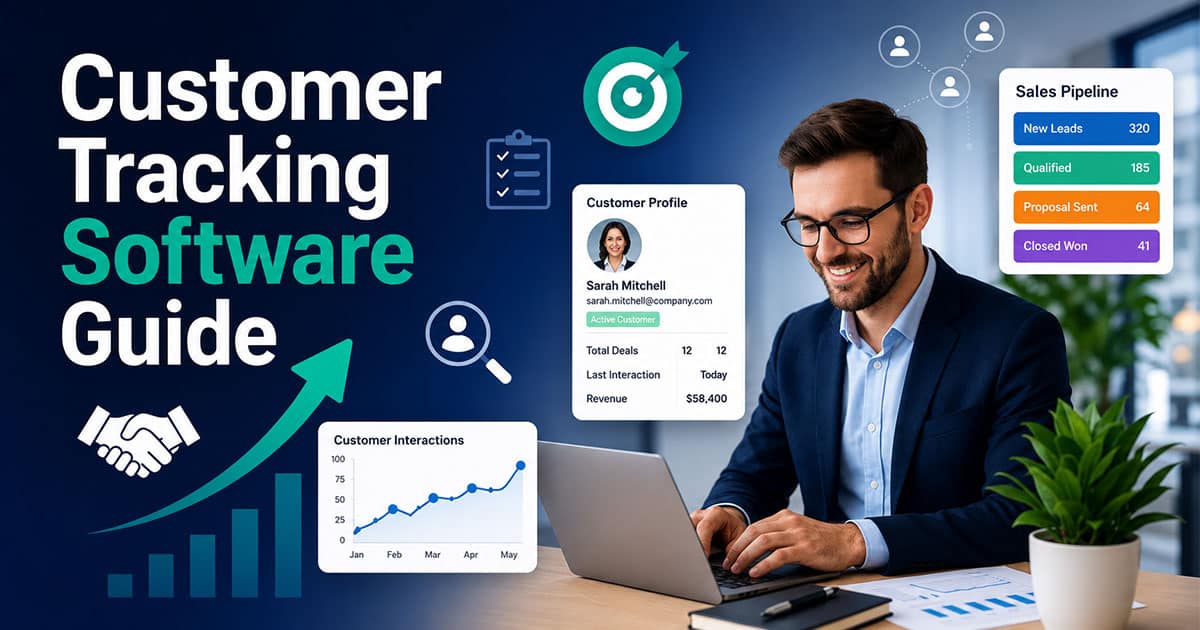
If you manage sales operations in 2026, you already know the pain of scattered customer data. Your sales team logs activities in Salesforce, tracks conversations in Slack, and somehow still misses critical context during pipeline reviews. The right customer tracking software changes that equation entirely.
This guide walks through what high-performing sales ops teams need from tracking platforms, how to evaluate options, and where tools like Gain.io fit into the picture. Whether you are standardizing your sales process for the first time or upgrading an existing stack, the goal remains the same: give every rep and manager real time visibility into customer interactions without creating more admin work. Let us break down what matters.
What Customer Tracking Software Means For Sales Operations
Picture a typical sales org in 2026. Reps update Salesforce when they remember. Customer conversations live in Slack threads nobody can find. Marketing tracks engagement in HubSpot while success monitors health scores somewhere else entirely. This fragmentation creates blind spots that distort forecasts and slow deal velocity.
Customer tracking software exists to solve this problem. It centralizes accounts, contacts, activities, and deal data into a single, continuously updated view. Unlike a basic address book or simple contact management system, these platforms capture the entire customer journey from first touch through the sales cycle, onboarding, and expansion.
The distinction matters for sales operations. RevOps leaders rely on this data to design territories, build compensation plans, model capacity, and run quarterly forecasts. Without complete activity capture, every downstream analysis starts with bad inputs.
Key Capabilities High-Performing Sales Ops Teams Rely On
Not all tracking software delivers equal value. The best platforms share common capabilities that separate them from basic CRMs or spreadsheets. Here is what sales ops leaders should prioritize when evaluating their stack.
Centralized Customer And Account Views
High-performing teams insist on a single record for each account and contact that spans sales, success, and marketing. No more hunting through three systems to understand a customer relationship when dynamic contact management for smarter relationship tracking is in place.
The best tools present timeline-style views showing meetings, calls, emails, notes, proposals, and renewals in chronological order. Imagine clicking into an account and seeing a vertical feed of Zoom calls with transcripts, Slack mentions, and HubSpot deal updates all in sequence. Clear columns display owner assignment, activity feeds, and searchable timelines that make audits straightforward.
This unified view eliminates silos. When a CSM can see the sales conversation history and an AE can see support tickets, handoffs become seamless and better contact management helps build stronger relationships over time. Customer records stay current without requiring anyone to manually sync information across platforms.
Automated Activity Capture
Leading tracking software in 2026 automatically logs emails, calendar events, and calls through server-side integrations with Gmail, Outlook, Zoom, and phone systems. Reps no longer spend hours on manual data entry because automating sales tasks keeps teams focused and organized.
Tools like Salesflare pull data from Office 365, Google Workspace, social media, and email signatures. They auto-enrich records with firmographics and technographics, achieving 90 percent or higher activity capture rates—exactly the kind of foundation modern sales activity tracking software for smarter sales teams depends on. This reduces rep admin time by two to four hours weekly while creating complete datasets for pipeline reviews.
The shift to server-side tracking matters more than ever. With browser-based cookie tracking increasingly unreliable due to privacy changes, sales ops teams need integrations that capture customer interactions regardless of device or browser settings.
Pipeline Tracking And Deal Management
Visual sales pipeline interfaces with drag and drop stages help sales ops enforce consistent entry and exit criteria. Each stage maps to concrete milestones, not vague labels, and the best visual sales pipeline software makes those milestones easy to manage at scale.
Pipeline management features include mandatory fields, stage-based checklists, and approval gates. These controls keep crm data accurate and make audits straightforward. When every deal follows the same structure, cohort analysis becomes possible.
Sales ops leaders use these structured stages for win-loss reviews and forecast calls. Teams can track win rates by segment, such as 45 percent for enterprise versus 62 percent for SMB, and rely on a visual sales pipeline to improve deal clarity during those reviews. They measure average cycle lengths and touches per won deal. Visual pipeline management turns raw data into actionable insights.
Segmentation, Scoring, And Routing
Customer tracking platforms segment by industry, ARR, region, persona, product interest, and lifecycle stage. This segmentation powers everything from territory design to marketing automation.
Lead and account scoring models range from basic firmographic rules to AI powered systems that weight engagement signals. Freshsales, for example, assigns points based on email opens and site visits. These scores help reps prioritize outreach and identify high-intent buyers.
Automated routing based on territory, partner channel, or product line cuts response times from hours to minutes. This speed matters for customer satisfaction and conversion rates. Teams using smart routing see conversion improvements of 20 percent or more.
Analytics, Reporting, And Forecasting Inputs
Tracking software feeds dashboards showing conversion rates, cycle length, activity volume, and stage-by-stage progression. Sales ops teams use this sales data to build bottom-up forecasts and scenario models.
Specific metrics matter here: Stage 1 to Closed Won conversion by segment, average touches per won deal, time spent in each stage. HubSpot reports can show time-in-stage variances, like 14 days in negotiation for high-ACV deals versus 7 days for mid-market.
These analytics support quarterly business reviews. Mature ops teams achieve 85 percent forecast accuracy by combining automated activity capture with structured pipeline stages. The numbers become trustworthy enough for board-level discussions.
Integrations With The Rest Of The Revenue Stack
Native integrations with CRMs like Salesforce Sales Cloud and HubSpot Sales Hub form the backbone of any tracking stack. Connections to Slack, Microsoft Teams, and CPQ or billing tools complete the picture.
Two-way sync prevents shadow databases. When deal stages update in the CRM, connected tools reflect those changes automatically. Leadership can trust reports across systems because all the data flows from a single source.
API access and webhooks enable custom workflows. RevOps engineers build automations that update deal stages based on meeting outcomes or trigger alerts when key milestones pass. Third party integrations extend functionality without requiring platform switches.
How To Choose Customer Tracking Software For A High-Performing Sales Ops Function
Selecting the right customer tracking software requires matching capabilities to your specific sales motion. Generic feature comparisons miss what matters most: fit with how your team sells.
Start With Your Sales Motion And Data Model
Map your core sales motions before evaluating any tool. Inbound, outbound, partner-led, PLG, or hybrid approaches each demand different capabilities.
Complex enterprise motions with six-month cycles and multiple stakeholders need deep account hierarchies, custom objects, and advanced permissions. A 500-contact deal requires robust relationship mapping that simple tools cannot provide, all supported by a clearly defined sales process with structured steps and benefits. SMB motions with 14-day trial-to-close cycles prioritize speed over depth, similar to how many retail teams use CRM tools to stay organized without heavy overhead.
Compare your exact sales process against each platform. Enterprise tools handle custom objects and complex workflows. SMB-focused options like Pipedrive offer lightweight pipelines with 80 percent less setup time. The right fit depends on your motion, not feature lists.
Prioritize Adoption And Day-To-Day Usability
The best system for sales ops is the one reps will use daily. Interface simplicity and speed matter more than impressive demo features, especially when you want to get more from your CRM with a simpler sales workflow.
Look for clean navigation, in-app guidance, and mobile access for field reps. Monday CRM’s customizable dashboards drive 90 percent rep usage. Complex enterprise CRMs often see 60 percent adoption because the learning curve discourages daily use.
Run short pilot programs with a subset of reps before full rollout. Track login frequency as a success indicator, much like teams that use Gain.io to close deals faster with streamlined sales acceleration. Daily logins suggest adoption. Weekly logins signal problems. Sales tools only work when the sales team uses them.
Evaluate Automation And Workflow Flexibility
High-performing teams rely on rules-based workflows for lead assignment, follow-up tasks, escalation, and renewal reminders. Sales automation software eliminates repetitive tasks and ensures nothing falls through cracks.
Low-code workflow builders let sales ops create complex workflows without heavy engineering support. Tools like EngageBay and Zoho CRM offer visual workflow builder interfaces that reduce manual work by 40 percent, especially when paired with sales workflow automation strategies.
Consider an example: when a late-stage deal goes silent for 10 days, an automated sequence alerts the AE, notifies the manager via Slack, and creates a follow-up task. This kind of proactive automation prevents deals from stalling unnoticed.
Assess Data Quality Controls And Governance
Required fields, validation rules, duplicate detection, and standardized picklists protect CRM health in fast-growing teams. Without these controls, sales data degrades quickly.
Define an explicit data dictionary and field ownership before implementation. Clear rules about who owns which accounts, what qualifies as an active opportunity, and how to handle legacy contacts prevent conflicts later.
Compliance considerations like GDPR and SOC 2 matter for companies handling sensitive customer data globally. Security verification processes and data governance policies protect both the company and its customers.
Align Pricing, Scalability, And Total Cost Of Ownership
Model costs over 12 to 36 months, including per-seat licenses, integration work, and ongoing admin resources. Pricing structures vary significantly across platforms.
Some tools charge per user month, ranging from 15 to 100 dollars. Others price based on contacts, events, or tracked interactions. High-volume orgs may find contact-based pricing expensive at scale.
Consider a team starting with 10 reps that doubles headcount over the next year. Costs might jump from 5,000 to 12,000 dollars annually when crossing tier thresholds. Factor in integration fees and admin time for accurate budgeting.
Customer Tracking Software Examples And Use Cases For 2026
Different categories of tracking software serve different purposes. Understanding where each fits helps sales ops build coherent stacks instead of disconnected tool collections, especially when you follow a dedicated sales deal tracking guide for modern sales teams.
Traditional CRMs As Customer Tracking Hubs
Platforms like Salesforce Sales Cloud and HubSpot Sales Hub serve as system-of-record for accounts, contacts, and deals. They form the foundation of most tracking stacks.
Sales ops still needs to configure pipelines, fields, and automations to turn these into effective sales operations tools. Out-of-the-box setups rarely match specific sales processes, which is why a dedicated B2B sales CRM guide for revenue teams can be so valuable. Custom pipeline stages, required fields, and automation rules transform generic CRMs into powerful sales pipeline CRM tracking engines.
A B2B company using Salesforce combined with calendar and email integrations can log 95 percent of customer activities automatically. The CRM becomes the single source of truth when properly configured and connected to communication tools, especially when teams know how to track deals from lead to close consistently.
Specialized Sales Activity And Conversation Intelligence Tools
Call recording and conversation intelligence tools capture meeting data, transcripts, and action items. These insights feed back into coaching programs and sales activity tracking software and sales enablement tools.
Managers use call insights to refine messaging, spot objection patterns, and identify skill gaps. Post-launch, a team might discover that reps who handle a specific objection differently see 30 percent better conversion rates. This kind of customer sentiment analysis drives continuous improvement.
Early risk detection becomes possible when AI analyzes conversation patterns. Deals where stakeholders express concerns or go quiet get flagged before they stall completely.
Marketing Attribution And Journey Tracking Platforms
Tools that track customer behavior from first ad click through CRM records and final revenue connect marketing spend to pipeline outcomes. This visibility supports honest discussions between marketing and sales ops.
Multi-touch attribution models allocate credit across the entire customer journey. A content download might receive 40 percent credit if it correlates with 2x pipeline quality. This data informs budget allocation and channel strategy.
Aligning pre-opportunity signals with pipeline quality helps both teams focus resources on what works. Marketing automation platforms that share data with sales tracking tools create seamless integration between demand generation and deal execution.
Revenue Operations And Orchestration Layers
Orchestration tools sit on top of CRM and connect calls, emails, deal data, and Slack so teams work where they already are. They keep tracking data accurate by prompting reps at the right moment.
This category addresses a core challenge: CRM updates happen at the end of the day when reps remember, not during conversations when context is fresh. Real-time prompts and automated updates solve this timing problem.
Gain.io operates in this space, helping sales ops turn raw tracking data into guided workflows and collaborative deal execution through its smart CRM tools for sales teams. The gap between recording activity and acting on it disappears when tools connect intelligently.
Implementation Strategies For Clean Data And Smooth Adoption
Even the best customer tracking software fails without proper implementation. Clean data and clear processes determine whether teams adopt the new system or revert to spreadsheets.
Audit And Cleanse Existing Customer Data First
Start with a structured data audit covering duplicate accounts, inconsistent naming, missing ownership, and obsolete records. Most databases contain 15 to 20 percent duplicates that distort reporting.
Define clear rules: who owns which accounts, what qualifies as an active opportunity, and how to handle legacy contacts. A rule like “active opportunity equals stage greater than SQL with assigned owner” creates consistent definitions.
Run the audit on a subset of regions or segments before applying rules globally. Cleaning 20 percent of records first validates your approach and surfaces edge cases. Full rollout follows once the methodology proves reliable.
Design Your Pipeline And Lifecycle Before You Configure
Agree on lifecycle stages in collaboration with marketing and success before touching the software. MQL, SQL, opportunity, customer, expansion, and churned stages need shared definitions across teams.
Map each pipeline stage to concrete customer behaviors or milestones. “Demo completed” means something specific. “Engaged” does not. Customizable sales stages tied to real actions prevent subjective interpretations.
Design a 5-stage new business pipeline and a separate 4-stage expansion pipeline for existing accounts. Different motions need different structures. Trying to force everything into one pipeline creates confusion.
Roll Out In Phases With Clear Success Metrics
Phased rollouts reduce risk. Start with a pilot team, gather feedback, make adjustments, then expand by region or segment over 8 to 12 weeks.
Pick three to five concrete KPIs: activity capture rate above 90 percent, forecast accuracy above 80 percent, and time-to-first-response under two hours for new leads. These metrics reveal whether the system works.
Training formats matter for sales productivity. Live workshops achieve 70 percent retention. Short video walk-throughs work better for visual learners at 90 percent retention. In-app tips reinforce learning during actual work.
Close The Loop With Sales Managers And Reps
Frontline managers need weekly dashboards and simple views to coach their teams. Complex reports that require exports and manipulation will not get used.
Recurring pipeline review rituals where reps walk through deals using shared tracking data replace personal notes and gut feelings. Maintaining complete visibility into deal status becomes normal rather than exceptional.
Change management should include feedback channels. Reps know what fields feel redundant and what views would help. Sales ops can refine automations quickly when two-week sprints incorporate frontline input.
Where AI Fits Into Customer Tracking For Sales Ops In 2026
AI capabilities have matured significantly, moving from experimental features to core functionality. Understanding where AI adds value and where human judgment remains essential helps sales ops teams deploy these tools wisely.
AI For Activity Capture And Data Enrichment
AI now parses meeting transcripts, emails, and chat threads to extract contacts, topics, and follow-up tasks automatically. Zoho CRM analyzes conversations and creates actionable tasks without rep input.
Enrichment services add firmographic and technographic details, achieving 80 percent fill rates. This reduces manual research and keeps customer records current. Website data and purchase history flow into profiles automatically.
Sales ops teams must still define what “good data” means. Guardrails like “approve AI additions before merge” prevent cluttered records. Predictive analytics works only when the underlying data stays clean.
AI For Deal Risk Detection And Forecast Support
AI models scan for signals like stalled stages, low stakeholder coverage, or lack of recent activity. Deals go 10 days without engagement get flagged automatically. Risk scores above 70 trigger manager attention.
Weekly reports ranking deals by risk score help managers prioritize coaching time. Focusing on high-risk deals above 100,000 dollars first improves win rates by 15 percent in teams using these tools effectively.
These signals support manager judgment during forecast calls. They do not replace the relationship context and strategic thinking that humans bring to complex deals.
AI For Workflow Suggestions And Sales Playbooks
AI recommends next-best actions based on patterns from past wins and losses. Adding a VP-level stakeholder might correlate with 25 percent faster cycles. The system surfaces that suggestion at the right moment.
High-performing sales ops teams treat AI insights as experiments to validate. Advanced sales automation handles routine recommendations while strategic accounts receive more nuanced human attention.
The balance matters. Automating key processes for standard deals frees reps to focus relationship-building energy on accounts that need it most.
Best Practices For Aligning Customer Tracking With Sales Operations
Strong alignment between customer tracking and sales operations drives consistency, visibility, and revenue growth. Clear systems help teams manage data, optimize workflows, and turn insights into measurable sales performance outcomes.
Define Clear Sales Process Structure
Every high-performing team builds alignment around a clearly defined entire sales process. Structured stages help sales reps understand priorities, track progress, and maintain consistency. A well-documented sales strategy ensures every action supports closing deals while improving visibility across the sales pipeline.
Centralize Data With CRM Software
A unified customer relationship management system keeps all the data in one place. Using an all-in-one CRM to grow your sales and team reduces fragmentation across business apps and ensures crm software becomes the single source of truth. Centralization helps teams manage customer relationships effectively and maintain accurate customer records.
Automate Repetitive Tasks And Workflows
Manual processes slow down growth and reduce efficiency. Teams that adopt sales automation software to automate repetitive tasks can streamline workflows and focus more on high-value activities. Automation across tools like marketing cloud and service cloud ensures smoother handoffs, faster execution, and fewer errors across the entire system.
Empower Sales Reps With The Right Tools
Productivity improves when sales reps have access to the right key features and sales tools. Clear dashboards, actionable insights, and integrated systems help improve customer interactions, especially when teams understand how CRM helps sales teams manage leads. Even small sales teams benefit from simplified processes that support faster decision-making and stronger execution.
Track Performance And Optimize Continuously
Consistent tracking improves sales performance and highlights opportunities for growth. Monitoring customer retention, engagement patterns, and outcomes helps refine execution. Teams that align tracking with goals can improve customer interactions, strengthen relationships, and maintain long-term revenue growth.
How Gain.io Helps Sales Ops Teams Get More Out Of Customer Tracking Software
Sales ops teams gain deeper control when customer tracking connects directly with execution. Gain.io centralizes customer data, giving full visibility across the entire sales process and eliminating scattered tools. Structured workflows help automate repetitive tasks, reduce manual data entry, and keep pipelines accurate.
Built-in intelligence highlights opportunities, improves sales performance, and supports faster decision-making. Sales reps track customer interactions, monitor behavior, and manage relationships without friction. Integration with essential business apps ensures seamless data flow across teams.
With clear insights and aligned processes, teams streamline workflows, improve customer retention, and focus on closing deals. Gain.io transforms customer tracking software into a system that drives measurable revenue growth and operational efficiency by automating sales tasks so teams stay focused and organized.
Frequently Asked Questions
How Is Customer Tracking Software Different From A Traditional CRM?
Traditional CRMs focus on storing contact and deal records. You input data, and the system holds it for later retrieval. Modern customer tracking software emphasizes continuous, automated capture of all interactions across the sales cycle. In many organizations, the CRM remains the system of record while dedicated tracking capabilities or orchestration layers enhance it.
When Should A Growing Sales Team Invest In Dedicated Customer Tracking Software?
Teams usually feel the need once they pass 5 to 10 reps, see inconsistent data in forecasts, or manage multiple regions or product lines. Growth exposes the limitations of manual processes. Track leading indicators like missed follow-ups, duplicate outreach, and weekly spreadsheet exports. If reps spend hours each week on data entry or managers cannot trust pipeline numbers, dedicated tracking software pays for itself quickly. Small businesses can start with a free plan from tools like HubSpot before scaling to paid tiers.
Can Customer Tracking Software Work Across Sales, Success, And Marketing?
The best implementations span the full revenue lifecycle. SDRs, AEs, CSMs, and marketers share account records with appropriate permissions. This all in one solution approach prevents information silos. Shared definitions matter. What marketing calls an MQL must match what sales accepts as qualified. Permission rules ensure each team sees relevant data without clutter or security concerns.
How Long Does It Usually Take To Fully Implement A New Tracking Platform?
Small teams with straightforward pipelines can go live in two to four weeks. Complex enterprise deployments with multiple business units, custom objects, and legacy migrations may take two to four months. Most time goes into data cleanup, process design, and change management rather than technical configuration. Project management discipline keeps implementations on track.
What Skills Should Sales Ops Leaders Build To Get The Most From These Tools?
Focus on data modeling, workflow design, basic analytics, and stakeholder communication across sales, marketing, and finance. These core competencies apply regardless of which tools your organization chooses. Familiarity with Salesforce, HubSpot, and workflow automation platforms provides tactical foundation. But understanding how reps sell day-to-day matters equally.