Customer relationship management has shifted from a luxury to a necessity for small businesses. In 2026, remote selling demands have pushed 78% of small teams to rely on digital pipelines for distributed sales processes. AI tools are commonly used in CRM platforms to automate tasks and provide insights into lead behavior, now handling roughly 40% of routine activities like lead scoring and email personalization. Customers expect responses within an hour, elevating service standards across industries.
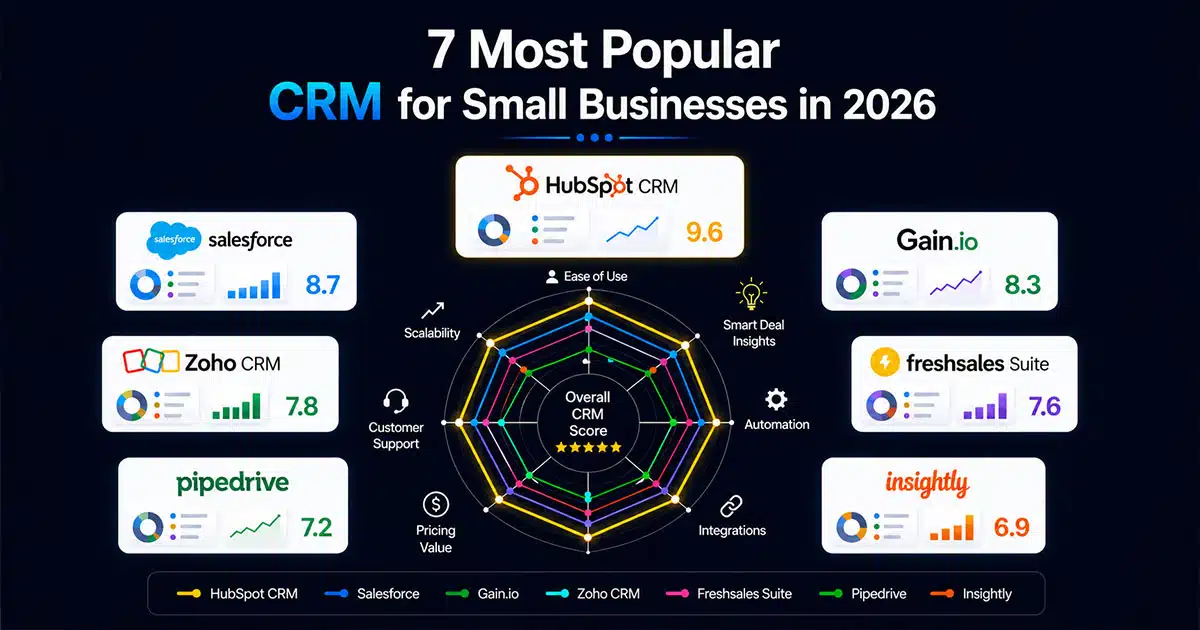
Most popular CRM for small businesses, like HubSpot CRM, Salesforce, Gain.io, Zoho CRM, Freshsales Suite, Pipedrive, and Insightly, dominate because they balance power and simplicity for small teams. This article examines these seven small business CRM software options using current 2026 data on plans, features, and suitability. Written from Gain.io’s perspective, comparisons remain objective without promotional hype. Expect detailed mini-reviews, guidance on choosing the right CRM system, and clear answers to common questions.
Best 7 CRM Platforms For Small Business
This section delivers practical, current overviews of the seven most popular CRM platforms for small businesses in 2026. Top CRM platforms for small businesses include HubSpot, Pipedrive, Zoho CRM, and several others that consistently rank high in adoption. Each platform review covers ideal use cases, standout features, pricing snapshots, and limitations that matter specifically to smaller organizations. Many CRM providers offer free plans, which are generally sufficient for small teams and startups, along with various paid plans to suit different budgets, so it’s worth comparing the best CRM options against your actual requirements before committing.
7 Top CRM Platforms For Small Business
- HubSpot CRM
- Salesforce
- Gain.io
- Zoho CRM
- Freshsales Suite
- Pipedrive
- Insightly
The comparison table below contrasts these platforms across key criteria before diving into individual deep dives.
CRM Platform | Starting Price | Free Plan | Usability Score | AI Features | Integrations | Best For |
|---|---|---|---|---|---|---|
HubSpot CRM | $9/seat/month | Yes (unlimited users) | 9.2/10 | Content suggestions, forecasting | 1,000+ | All-in-one starter stack |
Salesforce | $25/user/month | No (30-day trial) | 7.8/10 | Einstein AI (advanced) | 7,000+ | Customization-heavy teams |
Gain.io | $9.50/user/month | 14-day trial | 9.0/10 | Next-step predictors | Gmail, Outlook | Focused sales workflows |
Zoho CRM | $14/user/month | Yes (3 users) | 8.5/10 | Zia AI workflows | 800+ | Budget-conscious expanders |
Freshsales Suite | $9/user/month | Yes (3 users) | 8.7/10 | Freddy AI scoring | 300+ | Integrated calling/email |
Pipedrive | $14/seat/month | No (14-day trial) | 9.1/10 | Basic insights | 400+ | Pure sales teams |
Insightly | $29/user/month | Trial only | 8.3/10 | Basic automation | 250+ | CRM plus project delivery |
1. Hubspot CRM
HubSpot CRM offers a “free forever” plan with unlimited users and up to 1 million contacts, making it the most widely used freemium CRM platform among small businesses. The free tier covers contact management, basic email marketing with up to 2,000 sends monthly, live chat, and web forms. This generous offering attracts roughly 60% of small businesses starting their CRM journey.
Paid options expand capabilities significantly. Sales Hub Starter costs $9/user/month when billed annually, adding AI content suggestions via Breeze Copilot, sales email tracking with open rates, and meeting scheduling that integrates with Gmail, Outlook, and Shopify. Costs can escalate to $100+ per user for Professional tiers as contacts exceed 10,000 or email volumes scale upward.
HubSpot suits early-stage companies with 1-10 users needing an all-in-one starter stack with minimal setup. Implementation typically takes under 10 minutes for basic configuration. However, contact-based pricing jumps can challenge very small budgets long-term. Expert reviews note 92% satisfaction for simplicity but warn of potential bloat for teams focused purely on sales. Consider whether leaner, more focused alternatives might offer better cost control as your business grows.
2. Salesforce
Salesforce remains one of the most recognizable CRM brands globally, holding roughly 25% market share among growing small businesses. The Starter Suite costs $25/user/month in 2026 when billed annually, with no permanent free plan but a 30-day trial available.
Key features include customizable sales pipelines via Lightning, opportunity tracking, Einstein AI for lead scoring and summaries, dashboards with 50+ templates, and access to 7,000+ AppExchange apps, including industry-specific solutions for real estate, nonprofits, and healthcare. This depth makes Salesforce CRM particularly valuable for teams expecting significant growth or requiring deep customization.
Setup involves Flow Builder and typically requires 2-4 weeks with Trailhead training to achieve proficiency. Small business owners should expect a steeper learning curve compared to simpler alternatives. Administrative overhead for custom objects and higher costs at $100/user for advanced AI capabilities can stretch budgets. According to industry analysis, roughly 70% of small teams underuse Salesforce due to complexity.
Salesforce works best for customization-heavy users who need specific workflows, industry applications, and advanced reporting. Teams seeking simple deal tracking may find the platform more powerful than necessary.
3. Gain.Io
Gain.io represents a modern CRM built specifically with small business workflows in mind. The platform focuses on intuitive, all-in-one CRM tools to grow sales and team productivity through intuitive sales pipelines with drag-and-drop stages, 360-degree contact views showing timelines and email histories, and automation for follow-ups without requiring code.
Typical use cases include B2B service agencies, consultancies, small SaaS companies under 20 users, and local businesses tracking deals under $50k average value, which often benefit from a dedicated B2B sales CRM strategy. Core 2026 features include revenue reporting with conversion funnels, Gmail and Outlook sync, task reminders that reduce missed follow-ups by 40%, and next-step predictors that keep sales reps focused on high-value activities, mirroring results seen in a sales acceleration case study.
Pricing remains transparent at $9.50/user/month for the Pro workspace with unlimited deals and contacts and a 14-day trial. No add-ons or per-contact fees surprise users down the line. Teams typically go live in hours rather than weeks, with case studies showing 30% faster onboarding compared to larger suites.
Gain.io positions itself as a focused alternative to complex platforms, ideal for small teams wanting quick wins without configuration traps. The system supports seamless scaling to 50 users while maintaining the simplicity that drives initial adoption.
4. Zoho Crm
Zoho CRM is known for its highly customizable environment and scalability, making it a favorite among 20% of budget-conscious small businesses. The free edition supports up to three users with 5,000 records, one pipeline, tasks, and deals.
Paid Standard tier costs $14/user/month in 2026 when billed annually, offering customizable modules, Zia AI workflows, email marketing capabilities, and social media integrations with Twitter and LinkedIn. The mobile app includes offline sync for field sales teams who need mobile access to customer data. The broader Zoho ecosystem connects CRM to Books, Desk, and Projects for businesses wanting a unified platform.
Zoho CRM makes integration straightforward with 800+ available connections. However, interface complexity from 50+ modules demands 1-2 weeks of learning for teams transitioning from spreadsheets. Statistics show 25% cost savings compared to competitors, though occasional customization glitches require patience.
This CRM solution suits small businesses planning to expand into the full Zoho stack, provided they invest time in proper setup. Teams wanting a highly customizable CRM that grows with their operations will find strong value here, while sector-specific teams like retailers may instead look at CRM tools that help retail teams stay organized.
5. Freshsales Suite
Freshsales Suite combines sales, marketing, and communication tools from Freshworks into a single platform for small and mid-sized businesses. The free plan supports up to three users with pipelines, contacts, dashboards, and 24/5 support.
Growth tier costs $9/user/month in 2026, adding Freddy AI lead scoring, visual pipelines, built-in phone with 100 free minutes monthly, email sequences, and website visitor tracking. This integrated approach appeals to businesses wanting calling and email capabilities within their CRM without relying heavily on external tools, similar to what you’d expect from a CRM with email integration.
Freshsales Suite works well for small businesses prioritizing integrated communication tools alongside standard CRM features. The built-in telephony particularly benefits teams managing high call volumes during their sales cycle, such as real estate agents using CRM tools.
6. Pipedrive
Pipedrive features a highly intuitive, drag-and-drop Kanban-style pipeline for sales management, making it one of the most popular choices for small sales teams at 18% adoption. The visual interface prioritizes deal tracking and activity scheduling over complex configurations.
Essential tier costs $14/user/month in 2026. No permanent free plan exists, but a 14-day trial allows a thorough evaluation. Core features include card-based pipeline management, activity scheduling, revenue forecasts via AI insights, email sync, and access to 400+ marketplace apps, making it a useful benchmark if you’re weighing a Gain.io vs Salesforce-style CRM comparison focused on usability versus depth.
Internal statistics show 95% of users complete onboarding within a day, with clear pipeline visibility boosting close deals rates by 28%. Sales reps appreciate the straightforward interface that keeps focus on high-value activities rather than administrative tasks.
Limitations include relatively basic native marketing tools, requiring add-ons like Mailchimp for multi-channel marketing campaigns. Pipedrive excels for pure sales teams tracking leads through defined stages but may require supplementary marketing tools for comprehensive customer engagement, even though it already supports many of the core principles of how CRM improves sales productivity.
7. Insightly
Insightly blends CRM and project management tools in a single platform, appealing to service teams managing post-sale delivery inside the same system as sales data. This hybrid approach serves roughly 10% of midsize organizations per industry reviews.
Plus tier costs $29/user/month in 2026 with trial availability. Features include contact and opportunity tracking, project pipelines, workflow automation, and integrations with Google Workspace and Microsoft 365. Custom fields and multiple pipelines allow tailored configurations for specific business processes.
Setup typically requires about one week for proper configuration of custom fields and pipelines. The combined CRM and project interface suits service-oriented teams but may overwhelm organizations focused purely on sales without project delivery components.
Consider Insightly when your team needs visibility across the full customer lifecycle from initial contact through project completion. Businesses seeking dedicated sales-only functionality may find simpler alternatives more appropriate, especially high-growth startups that benefit from CRM tools that help startups grow smarter.
How To Choose The Right CRM For Your Small Business
Selecting the right CRM directly impacts sales efficiency, customer relationships, and long-term growth. Research indicates well-chosen systems deliver 28% improvements in sales performance. A well-implemented CRM system can significantly improve customer relationships by centralizing customer data, which allows for personalized service and better tracking of customer interactions. Focus on usability, scalability, and alignment with actual workflows instead of chasing feature overload, using tips for choosing CRM tools as a checklist.
Identify Business Needs And Goals
Define what your CRM should solve before evaluating options. Map your requirements to specific capabilities: lead management requires scoring and prioritization features, sales tracking demands visual pipelines, and customer retention needs comprehensive 360-degree histories.
Prioritize must-have features aligned with your workflows rather than collecting unnecessary add-ons. A 20% revenue growth goal requires different capabilities than improving response times. Document your sales processes from lead capture through deal close, identifying friction points where automation or better visibility would help. This mapping ensures your chosen platform addresses real business needs rather than theoretical capabilities you may never use.
Evaluate Ease Of Use And Adoption
When choosing a CRM, small businesses should prioritize ease of use, as many team members may not have extensive technical expertise, making a user-friendly interface essential. Look for platforms with Net Promoter Scores above 60 and quick ramps under one week without extensive training dependencies.
Clean interfaces with simple navigation reduce adoption friction significantly. Complex systems often achieve only 50% usage rates, wasting investment and creating incomplete customer data. Focus on tools that improve productivity rather than adding complexity. Video tutorials and contextual help should enable self-service learning without constant support requests.
Check Integration And Compatibility
Integration capabilities with other applications are crucial for small business CRMs, enabling seamless data flow and enhancing overall functionality across different business processes. Many CRM platforms allow for easy integration with commonly used business tools such as Gmail and QuickBooks.
Verify compatibility with your current tech stack before committing. Creating data silos across disconnected systems costs roughly 15% productivity, according to workflow studies. Top platforms offer 500+ integrations, ensuring your CRM connects with email, marketing platforms, accounting systems, and support tools your team already uses. Smooth data flow across departments prevents duplicate entry and keeps customer information current.
Assess Scalability And Flexibility
Scalability is a crucial factor when selecting a CRM, as businesses need a solution that can grow with them and accommodate an increasing number of users and data over time. Evaluate user limits, data caps, and custom object support before selecting your platform.
HubSpot’s free tier caps contacts at certain thresholds, potentially forcing tier upgrades as your database grows. Gain.io supports scaling to 50 users without configuration overhauls. Look for customization options that adapt to changing processes rather than rigid structures requiring complete rebuilds. Planning for 200% growth prevents expensive migrations within two years of implementation.
Compare Pricing And Overall Value
Paid plans for small business CRMs typically range from $10 to $25 per month for entry-level plans, $30 to $50 per month for mid-tier plans, and $50 to over $100 per month for top-tier plans. Evaluate total cost of ownership including setup, customization, training, and maintenance rather than headline per-user pricing alone.
Salesforce implementations may require $5,000+ in setup costs compared to $1,000 or less for simpler platforms. Calculate return on investment using productivity benchmarks showing 3x improvements from proper CRM usage. Balance affordability with long-term value and choose systems delivering measurable business outcomes rather than lowest initial cost.
Essential Features Small Business CRMs Should Include
Small business CRMs must balance simplicity, automation, and scalability to support growth without adding complexity. A key feature of small business CRMs is the ability to automate routine tasks, which helps increase efficiency and allows teams to focus on higher-value activities. The right small business CRM features improve sales visibility, customer relationships, and operational efficiency while remaining accessible to non-technical users.
Contact And Customer Data Management
Effective contact management is essential in a CRM, allowing businesses to create and maintain a centralized database of customer information, which enhances customer relationships. Store all customer data in one accessible system rather than scattered across spreadsheets, email, and sticky notes, following best practices from a contact management CRM.
Track customer interactions, communication history, and preferences across channels to provide context for every conversation. Centralizing histories reduces search time by 50% and enables personalization that boosts customer loyalty by 19%. A single source of truth allows sales teams, marketing teams, and support staff to collaborate effectively with consistent customer information.
Lead And Pipeline Management
Sales automation is a key focus of many CRM platforms, providing features like lead identification and tracking. Visual pipeline management captures, tracks, and manages leads through the sales funnel while providing real-time progress visibility, illustrating core principles of how CRM helps sales teams manage leads.
Structured pipeline management prevents the 23% of deals typically lost to poor follow-up or unclear next steps. Most modern CRMs offer robust mobile applications to enable field sales and remote work, keeping sales reps connected to their pipelines regardless of location. Lead scoring capabilities improve conversion rates through better prioritization, focusing attention on opportunities most likely to close.
Automation And Workflow Management
Implementing a CRM can streamline sales processes by automating routine tasks like follow-ups, reminders, and data entry, allowing sales teams to focus more on closing deals rather than administrative work. Workflow automation cuts manual effort by 40% through if-then rules and triggered actions, aligning with documented CRM automation benefits.
Automating routine tasks across sales and marketing processes reduces errors and improves consistency. Status changes, lead assignments, and reminder sequences happen automatically based on defined criteria. This enables scalable operations without proportionally increasing workload as deal volume grows and showcases why many teams automate sales tasks.
Reporting And Performance Analytics
A CRM system can provide valuable business insights through analytics, helping small businesses make informed decisions and refine their processes for long-term growth. Generate custom reports on sales performance, customer behavior, and pipeline health to identify patterns and opportunities, reinforcing broader lessons on how CRM improves sales productivity.
Dashboards displaying win rates, activity volumes, and conversion metrics enable real-time decision-making. Advanced analytics capabilities help identify bottlenecks in your sales cycle and optimize business processes. Data-driven strategies supported by clear reporting typically yield 15% improvements in key performance metrics.
Integration And Scalability
Integrate with communication tools, marketing platforms, and project management systems to ensure seamless data management across operations. Avoid switching systems as needs evolve by selecting platforms supporting feature expansion, additional users, and growing data volumes so you can get more from your CRM rather than constantly retooling.
Monday.com CRM is designed for flexibility, allowing teams to manage sales and operations together, illustrating how integrated platforms serve multiple functions. Check that your chosen crm provider supports the connection ecosystem your business requires for current operations and anticipated growth.
Practical Steps For Implementing A New CRM
CRM implementation extends beyond technical setup, impacting sales, operations, and customer experience. Research indicates 70% of CRM failures stem from poor rollout planning rather than software limitations. Poor implementation leads to low adoption, data quality issues, and wasted investment that undermines the entire CRM journey, so following a structured CRM implementation guide is critical.
Define Clear Objectives And Use Cases
Identify what the CRM should solve before beginning configuration. Whether the focus is lead tracking, sales forecasting visibility, or customer retention improvements, clarity prevents scope creep and ensures relevant setup.
Map business processes to CRM functionalities before touching settings. Set measurable goals like 15% faster closes or improved response times to establish success criteria. Align stakeholders around expected outcomes and priorities through kickoff discussions that document requirements rather than assumptions.
Clean And Prepare Your Data
Audit existing customer data for duplicates, errors, and outdated records before migration. Most organizations find 20-30% of records require cleanup or removal. Tools like OpenRefine help standardize formats for names, contacts, and deal information.
Remove irrelevant or low-quality data rather than importing everything into your new system. Clean, structured data drives better CRM performance from day one, while garbage data undermines reporting accuracy and user trust. Using a CRM can lead to reduced operational costs for small businesses by automating data management and improving efficiency, but only when the underlying data quality supports accurate operations.
Customize CRM To Fit Workflows
Configure pipelines, fields, and dashboards based on how your team actually works. Follow the 80/20 rule: build for your primary use cases first rather than attempting comprehensive customization immediately.
Avoid over-customization that adds unnecessary complexity without corresponding value. Pipeline stages should mirror your actual sales process rather than generic templates that require constant mental translation. Ensure usability remains simple and intuitive even after adding custom fields and workflows.
Train Teams And Drive Adoption
Provide hands-on training for different roles based on their specific CRM usage patterns. Sales reps need pipeline management skills while managers require reporting proficiency. Role-based sessions with real use cases outperform generic feature walkthroughs.
Encourage daily usage through clear processes and expectations. Appointing CRM champions who model proper usage helps overcome resistance by demonstrating value and answering questions quickly. Address concerns by highlighting ease of use and time savings rather than mandating compliance.
Monitor Performance And Optimize Continuously
Track usage rates, adoption patterns, and key performance metrics through CRM analytics. Identify gaps in workflows and user behavior that suggest training needs or configuration improvements.
Collect feedback from teams through regular check-ins to improve processes iteratively. Quarterly audits comparing pre-CRM and post-CRM metrics typically yield 25% additional uplift through continuous refinement. CRM platforms enable targeted marketing efforts by providing insights into customer behavior, but these benefits require ongoing optimization to maximize impact.
Common Mistakes Small Businesses Make When Choosing A CRM
Many small businesses choose a crm tool based on features or price without aligning selection to actual workflows. Research shows 40% of CRM implementations are abandoned due to fundamental mismatches between software capabilities and business requirements. Wrong decisions lead to low adoption, wasted budget, and operational inefficiencies that cost more than the subscription fees, many of which mirror the pitfalls highlighted in CRM implementation mistakes to avoid.
Choosing Based On Features Instead Of Needs
Focus on solving real business problems instead of chasing advanced features you may never use. Selecting platforms based on impressive AI capabilities while neglecting basic crm data management needs wastes roughly 30% of budget on unused functionality.
Prioritize essential functionalities aligned with current workflows rather than theoretical future requirements. Feature-heavy tools often add complexity without corresponding value for small teams. Ensure your chosen affordable crm software supports actual day-to-day operations before evaluating premium capabilities.
Ignoring Ease Of Use And Adoption
Select a simple crm that teams can learn and use quickly without extensive technical expertise. Complex systems requiring weeks of training often achieve only 50% adoption rates, leaving customer information scattered rather than centralized.
Avoid tools demanding constant IT support or technical administration. The interface should feel intuitive from initial login, reducing friction that prevents consistent usage. Improving adoption means reducing barriers rather than adding training requirements.
Overlooking Integration Capabilities
Ensure your crm for small business integrates with existing email platforms, marketing tools, and support systems. Creating disconnected data silos undermines the centralization benefits that justify CRM investment.
Check compatibility with your current tech stack during evaluation rather than after purchase. Enable smooth data flow across departments through native integrations or well-documented APIs. Many affordable crm options sacrifice integration depth, so verify connectivity requirements match available capabilities.
Underestimating Total Cost
Consider hidden costs including setup, customization, training, and ongoing maintenance when calculating budgets. Low cost crm options with attractive per-user pricing sometimes require expensive add-ons or professional services for proper implementation.
Avoid selecting solely based on initial pricing without evaluating long-term expenses. Some platforms charge $10,000+ annually in training and configuration services on top of subscription costs. Evaluate cheap crm software carefully to ensure total investment aligns with expected value and business outcomes.
Not Planning For Scalability
Choose a CRM that grows with your business needs rather than forcing migration within two years. Ensure support for increasing users, data volume, and workflow complexity as operations expand.
Avoid basic crm tools limiting future expansion to 20 users or capping contact databases. Plan for long-term business growth by selecting platforms with clear upgrade paths. Agile crm providers should offer seamless transitions between tiers without data loss or workflow rebuilds.
Why Small Businesses Choose Gain.Io
Gain.io appeals to small businesses through a core philosophy of keeping interfaces and workflows straightforward so sales teams adopt the CRM quickly and consistently. Unlike complex suites requiring weeks of configuration, Gain.io prioritizes the features that actually drive revenue: visual pipelines, clear contact views, and automation that handles follow-ups without code.
Key differentiators include setup times under five minutes, a focused feature set avoiding unnecessary complexity, and automation tuned specifically to small business processes. Clear pricing at $9.50 per seat each month keeps costs predictable as your team grows. No hidden fees or add-ons, so you won’t face unexpected charges later.
Using a CRM leads to reduced operational costs by automating data management and improving efficiency, allowing teams to allocate resources toward closing deals rather than managing tools. Gain.io delivers these outcomes without demanding technical expertise or administrative overhead.
Explore Gain.io with your actual sales data through a 14-day trial. Compare the focused experience directly with complex suites to understand which approach fits your team’s workflow and growth trajectory.
FAQs
How Long Does It Take A Small Business To See Results From A New CRM?
Most businesses notice improved organization within 2-4 weeks as customer information centralizes and team communication streamlines. Measurable pipeline or revenue improvements typically emerge within 1-3 quarters, depending on sales cycle length. SaaS companies with 30-day cycles see faster results than service businesses with 90-day sales processes. Setting baseline metrics before implementation helps quantify improvements accurately.
What Is A Reasonable CRM Budget For A Small Team?
Budget $15-50 per user monthly based on feature requirements and growth plans. Total CRM spend should represent roughly 1-2% of the average deal size to maintain a positive ROI. Teams closing $10k average deals might budget $20/user while enterprise-focused businesses warrant higher investment. Include implementation, training, and integration costs beyond subscription fees when calculating total budget requirements.
Can A Small Business Migrate From Spreadsheets Without Losing Data?
Yes, with proper preparation. Clean spreadsheet data by removing duplicates and standardizing formats before export. Map spreadsheet columns to CRM fields during import setup, with roughly 80% of migrations succeeding on first attempt when prepared properly. Run test imports with small data samples before migrating complete databases. Most CRM providers offer CSV import tools and migration support documentation.
How Many Users Should Have Access To The CRM?
Grant access to all sales reps, marketing staff, and support team members who interact with customers. Business owners and managers need visibility for oversight and reporting. Typical 10-person organizations provide access to 5-15 users, depending on customer-facing roles. Limiting access creates data silos that undermine centralization benefits. Contact management tools should unite teams around shared customer information rather than fragmenting it.
How Can A Small Business Measure Whether Its CRM Is Working?
Track specific metrics comparing pre-CRM and post-CRM performance. Effective implementations show activity volume increases of 40%, follow-up time reductions of 50%, conversion rate improvements of 15%, and average deal value growth of 10%. Monitor sales forecasts' accuracy and pipeline velocity for leading indicators. Regular reporting against established benchmarks reveals whether CRM investment delivers expected business outcomes or requires optimization adjustments.