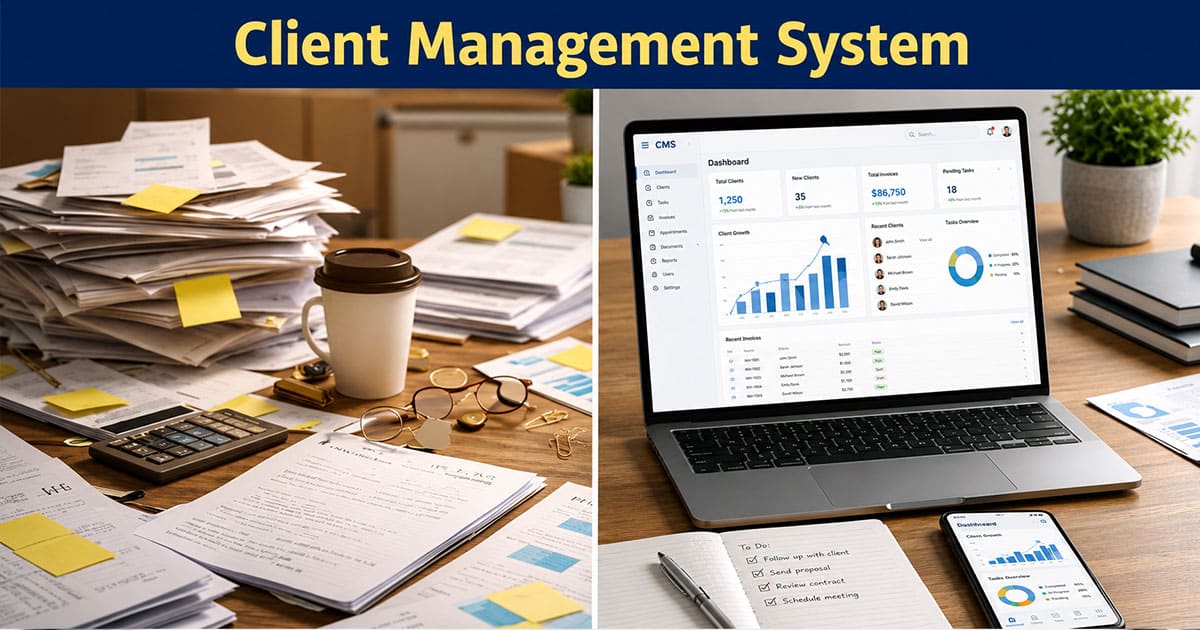
Managing clients should not feel like juggling flaming torches while blindfolded. Yet for many teams, that is exactly what happens when client information lives in scattered emails, random spreadsheets, and forgotten chat threads.
A solid client management system changes everything. It gives you a single source of truth for every client interaction, project status, and communication. No more hunting through inboxes. No more wondering who has the latest file version.
In 2026, the stakes are higher. Clients expect faster responses, cleaner handoffs, and total transparency. Teams that nail client management processes grow faster and keep clients longer. Those who do not? They lose to competitors who figured it out first.
What Is A Client Management System
A client management system is software that stores client details, histories, and work in progress in a single hub everyone on your team can access. Think of it as the central nervous system for managing clients.
It replaces messy email threads, scattered documents, and manual status updates with clear shared workspaces for each client account. The typical components in 2026 include contact records, communication logs, files and approvals, tasks, and dashboards showing where every client stands.
Here is the key difference from a generic CRM that chases leads: a dedicated client management software focuses on serving existing customers and keeping ongoing work on track. For sales led organizations, understanding CRM software for modern sales teams helps clarify where a client management system fits into the broader tool stack. Picture a marketing team with recurring clients. Instead of digging through weeks of emails, they open one workspace and see everything they need.
Client Management System Versus Traditional CRM
Many people use these terms interchangeably, but there are practical differences that matter when you run client heavy work. Understanding these distinctions helps you pick the right tool for your specific situation.
Aspect | Client Management System | Traditional CRM |
|---|---|---|
Core Purpose | Manages long-term client relationships and service delivery | Manages leads, deals, and sales pipeline activities |
Target Users | Support teams, account managers, customer success teams | Sales reps, marketing teams, business development teams |
Relationship Approach | Focus on retention, engagement, and ongoing value | Focus on acquisition, conversion, and revenue growth |
Data Structure | Unified client profiles with full interaction history | Lead, contact, and deal records organized in pipelines |
Workflow Type | Structured workflows for onboarding, support, and retention | Sales workflows for tracking deals and closing opportunities |
Communication Handling | Continuous tracking across support channels and service touchpoints | Tracks communication mainly linked to sales conversations |
Automation Scope | Automates ticketing, follow-ups, SLAs, and lifecycle processes | Automates email campaigns, lead scoring, and sales tasks |
Support Features | Built-in helpdesk, ticketing, and issue resolution tools | Limited support features, often requires integrations |
Customization | Designed for service operations and client success strategies | Designed for optimizing sales processes and funnels |
Reporting Metrics | Client retention rate, satisfaction score, response time | Conversion rate, pipeline value, revenue forecasting |
Core Functional Differences
Traditional CRM tools are built primarily for sales teams to manage leads, deals, and revenue forecasting across long sales cycles. They handle thousands of prospects and focus on lead scoring and sales process optimization, especially in complex B2B sales CRM environments.
A client management system leans into delivery and collaboration features. Think client facing portals, approval flows, shared timelines, and ongoing communication. A 2023 Gartner report found 68% of CRMs overload small agencies with unused sales tools, while client management platforms reduce feature bloat by 40%.
The focus shifts from “how do we close this deal” to “how do we keep this client delighted.”
Data Structure Approach
CRMs typically use rigid relational databases designed for mass contacts. Fields like lead source, pipeline stage, and deal value dominate. This structure works great for enterprise sales teams but feels clunky for service delivery.
Client management systems employ flexible hierarchical structures. Picture client workspaces that group projects, notes, and files together logically, supported by dynamic contact management for smarter relationship tracking. Service firms using this approach see 25% faster data retrieval because information lives where you expect it.
Workflow Flexibility Levels
Traditional CRMs follow linear sales funnels. Lead comes in, moves through stages, closes or dies. Simple, but rigid.
Client management systems offer modular, no-code workflow builders for custom client journeys. Creative teams using these tools report cutting workflow setup time by 50%, similar to how thoughtful sales workflow automation strategies streamline repetitive steps in revenue teams. You can build exactly what your client projects demand without developer help.
Ease Of Use
Client management tools prioritize intuitive portals that mimic familiar interfaces like email. The result? Adoption rates hit 90% in small teams compared to just 60% for complex CRM systems, a pattern also seen when specialized CRM tools that help real estate agents save time replace clunky, generic platforms.
When your team actually uses the tool, you get real benefits. When they avoid it because it is confusing, you just wasted money on software nobody touches.
Customization Capabilities
Client management systems allow per-client tailoring without IT involvement. Need a custom approval workflow for one demanding client? Build it yourself in minutes.
Traditional CRMs often require developers for meaningful customization. Mid-size firms spend an average of $5,000 annually on CRM customization, while modern sales automation CRM platforms focus on configurable workflows that reduce this dependency. That money could go toward actually serving clients instead.
Best Fit Use Cases
Client management systems excel for agencies managing 10 to 100 retainers. Marketing studios use them for approval cycles, feedback collection, and project tracking with multiple clients simultaneously.
Traditional CRMs suit sales heavy enterprises with 1,000 plus leads in their pipeline, where understanding how CRM helps sales teams manage leads becomes critical. A 50 person agency that switched to a focused client management tool reduced client churn by 22%.
Core Benefits Of A Client Management System
The real value shows up in daily work. Fewer surprises. Fewer missed messages. More confident client updates. These gains mirror what modern customer engagement CRM platforms deliver on the sales side. Here is what you actually gain.
Better Workflow Visibility
Real time dashboards show task statuses and bottlenecks before they become crises. Account managers can open one screen and see the latest feedback, files, and dates for every top client without digging through email, much like sales activity tracking software gives revenue teams instant visibility into pipeline health.
Teams using client management systems report 32% faster project delivery from shared access to information. When everyone sees the same picture, decisions happen faster and problems get spotted earlier.
Stronger Client Relationships
Personalized touchpoints become possible when you have centralized communication history at your fingertips. Knowing what a client said three months ago builds trust and prevents awkward repeated questions.
Research shows centralized client history enables tailored services that boost retention by 27%. Clients feel understood when you remember their preferences and past decisions. That feeling translates directly to long term client relationships and renewals.
Improved Team Coordination
Shared notes and activity logs cut miscommunications dramatically. Distributed teams see 35% fewer errors when everyone accesses the same client information, echoing how dedicated tools to manage contacts better and build stronger relationships reduce drop‑offs in sales handoffs.
No more “I thought you handled that” moments. No more duplicate outreach to confused clients. Team collaboration improves because the right hand finally knows what the left hand is doing.
Faster Task Execution
Workflow automation handles repetitive tasks like onboarding sequences, invoice reminders, and status updates. Teams free up roughly 20 hours weekly per rep when routine tasks run automatically, similar to the impact of dedicated sales task automation tools on revenue teams.
That time goes back to strategic work, client conversations, and revenue generating activities. You stop being a task administrator and start being a trusted partner.
Reduced Operational Gaps
Standardized processes prevent common problems like feedback mishandling, version confusion, and approval bottlenecks. Organizations using structured client management processes avoid 40% of typical operational issues.
The “who has the latest file” question disappears. Everyone knows where to look and what the current status is.
Scalable Growth Support
Handling volume increases without proportional staff hires becomes realistic. Studies show client management system users scale client loads 2.5 times with only 15% headcount growth.
Business growth does not require hiring at the same pace. Your systems handle the increased complexity while your team focuses on quality delivery.
Essential Features To Look For In A Client Management System
The best client management software depends on how you actually work with clients rather than just a long checklist of features. Here is what matters most.
Centralized Client Data
Storing client information, contact details, histories, and preferences in one hub eliminates information scattering. Master data access for sales, marketing, and service teams cuts search time by 50%. Look for systems that let you see the full picture of customer data without switching between apps. Everything about a client relationship belongs in one centralized location.
A strong contact management layer ensures every interaction is tied to structured client data, making customer relationship management more reliable. The right client management software and modern client management software solutions centralize customer data, helping teams analyze customer data effectively and improve customer satisfaction. Unlike other client management software or traditional CRM software, a well-designed system provides valuable insights into customer relationships while maintaining clean client data across all touchpoints.
Task And Project Tracking
Kanban boards, timelines, and project views keep client projects visible and on track. Teams report 28% improvements in on time delivery when using visual project management tools. You need to assign tasks clearly, track progress easily, and spot delays before clients notice them. Good project tracking turns chaos into clarity.
Effective project management combined with structured client communication helps teams manage client relationships without confusion. The right client management software connects project management with customer relationship management, ensuring every update reflects in client data. Many new client management software platforms improve customer satisfaction by aligning project workflows with client communication, unlike other client management software that separates tasks from actual client work.
Workflow Automation Tools
Handling client onboarding, approvals, and invoicing automatically saves enormous time. The best systems automate 70% of routine tasks according to industry benchmarks. Look for tools that let you automate tasks without coding, similar to modern sales automation software used by revenue teams. If automation requires a developer every time, you will never actually use it.
Automation improves contact management by reducing manual effort across repetitive processes and keeping client data consistent. Advanced client management software solutions integrate automation into customer relationship management workflows, helping teams maintain accurate customer data and improve customer satisfaction. Compared to traditional CRM software, the right client management software delivers valuable insights by connecting automation directly with client communication and relationship tracking.
Real Time Insights
AI powered analytics forecast trends and surface patterns in customer interactions. Reports on client behaviors guide 25% better informed business decisions. Dashboards should answer questions quickly. Which clients generate the most revisions? Which projects consistently run late? Valuable insights come from accessible data.
The ability to analyze customer data in real time strengthens customer relationship management and improves how teams handle client relationships. With the right client management software, teams gain valuable insights into customer data that drive better decisions. Many client management software solutions now outperform traditional CRM software by offering deeper visibility into client communication, helping businesses improve customer satisfaction through smarter actions.
Secure Data Management
GDPR compliant data encryption and role based access protect client data from breaches. Research shows 92% of data breaches stem from poor access controls. Robust security features are non negotiable. Your clients trust you with sensitive information. Protect it.
Secure systems protect both customer data and client data while supporting reliable customer relationship management. The right client management software ensures that client relationships remain protected through strong access control and encrypted environments. Unlike other client management software or basic CRM software, advanced platforms focus on protecting data integrity while still enabling teams to access valuable insights without compromising customer satisfaction.
Integration With Tools
Seamless connections with Slack, email, calendars, and other daily tools prevent double entry and context switching. The top client management software options integrate with 1,000 plus apps. Check integration capabilities carefully, especially around CRM email integration, since that is where most client communication still happens. A tool that does not connect with your existing stack creates more problems than it solves.
Strong integration capabilities enhance client communication and keep customer relationship management workflows connected. The right client management software allows smooth data flow between tools, ensuring client data and customer data stay consistent across platforms. Many new client management software solutions outperform other client management software by combining integrations with valuable insights, helping teams improve customer satisfaction without switching between disconnected systems.
How To Choose The Right Client Management System For Your Business
Selecting the right client management software follows a practical decision path rather than a technical breakdown. Here is how to approach it.
Identify Business Needs
Start by mapping your pain points. Where does client communication break down? What information gets lost? Which processes eat up too much time? Small agencies often prioritize project views over complex sales pipelines. Consultancies need strong communication history tracking. Your business needs dictate which features matter most.
For small businesses, understanding daily workflows helps identify gaps in customer engagement and managing customer relationships. The right client management software should support real use cases such as client onboarding, assign tasks efficiently, and improve how teams interact. Without aligning tools to actual business needs, even the best client management software options fail to deliver value.
Evaluate Key Features
Score potential tools against your specific use cases. A content heavy workflow needs strong approval tools rather than complex sales forecasting. Test demos with real scenarios. Bring actual client projects into trials. See how the tool handles your typical day, not some hypothetical situation.
Focus on key features like automation, visibility, and flexibility instead of feature overload. The top client management software often stands out by offering advanced features that support real workflows, much like platforms that automate sales tasks to stay focused and organized do for revenue teams. Evaluate how tools automate tasks, support client onboarding, and improve customer engagement. Strong marketing automation and workflow features should align with how your team already operates.
Check Integration Capabilities
Poor integration fits cause 75% of software implementation failures. Your new client management tool must connect with your ERP, email, calendar, and existing workflows. Make a list of every tool your team uses daily. Verify each integration works smoothly before committing.
Integration capabilities directly impact how well teams manage client tracking and maintain consistency across platforms. Tools that connect with marketing automation systems and provide CRM with email integration and task syncing improve efficiency. Without proper integrations, managing customer relationships becomes fragmented and slows down overall performance.
Consider Team Usability
Look for interfaces that require less than five minutes to understand. Tools with 95% satisfaction scores typically share one trait: they feel intuitive immediately. If your team needs extensive training just to log basic client interactions, adoption will suffer. Choose simplicity.
Ease of use plays a key role in how teams adopt new client management software options. For small businesses, simple interfaces help teams automate tasks and manage client onboarding without confusion. Tools that support quick task assignment and smooth workflows improve adoption and long term usability across teams.
Plan For Scalability
Tiered plans let you start small and grow. Many platforms offer a free plan or low cost entry points that expand as your needs increase. Think about where you will be in two years. Will this tool handle twice the client load? Plan for your professional plan needs before you need them.
Scalable systems support growing customer engagement and help teams manage client tracking across multiple clients. The right client management software should handle increased workload without breaking workflows, just as robust lead management software for sales teams scales prospect handling without chaos. As businesses grow, strong integration capabilities and flexible features ensure teams continue managing customer relationships efficiently.
Review Pricing Structure
Average costs run $15 to $50 per user per month. ROI typically arrives within four months according to industry data showing 300% productivity gains. One studio saved $20,000 annually by switching to an integrated client management system. Calculate your potential savings before dismissing higher priced options.
Pricing should reflect value rather than just cost. Many top client management software platforms offer flexible plans, including free plan options for early stage teams. Evaluate how features like marketing automation, task management, and customer engagement contribute to long term efficiency instead of focusing only on upfront pricing, just as you would when assessing tools to track deals from lead to close on the sales side.
Client Management Best Practices In 2026
Small consistent habits make any client management system valuable. Here is what separates teams that thrive from those that struggle.
Standardize Client Processes
Templated client onboarding ensures every new relationship starts strong. Organizations using standardized processes report 35% lower churn rates. Document how your team runs campaigns, handles feedback, and manages approvals. Build those steps into templates that everyone follows.
Standardization helps teams manage projects across multiple clients without confusion. Clear processes aligned with business needs improve business growth and support long term client relationships. When teams define key features in workflows early, they reduce errors and build strong customer relationships that last, similar to establishing a solid contact management CRM foundation in growing sales organizations.
Maintain Clean Data
Regular deduplication and record updates keep your client information accurate. Users who maintain clean customer data cut duplicates by 90% and improve decision accuracy. Agree on naming rules and required fields. Schedule monthly data cleanup sessions, just as teams do in CRMs with smart CRM tools for sales teams to keep pipelines trustworthy. Outdated records create confusion and embarrassing client moments.
Clean client details help teams gain valuable insights and make informed business decisions faster. Strong data practices improve improved customer satisfaction and ensure consistency across systems. Secure platforms with data encryption and robust security features protect information while keeping it usable for daily operations.
Use Automation Smartly
Apply workflow automation for status updates, reminders, and routine communications. Surveys show 62% of clients actually prefer automated status reports over manual updates. Do not automate everything though. Personal touchpoints still matter. Automate routine tasks, but keep relationship building human.
Modern ai powered tools and ai automation support teams by handling repetitive processes while maintaining quality. Teams can automate routine tasks like updates and follow ups while focusing on complex decisions that require human judgment, echoing the benefits described in modern sales automation software for revenue teams. This balance improves efficiency without losing the personal side of client relationships.
Monitor Performance Metrics
Track Net Promoter Score (target 50 plus), customer satisfaction, and delivery timelines. Teams monitoring metrics consistently see 20% yearly improvement in client outcomes. Dashboards should tell you what is working and what is not. If you cannot measure customer engagement, you cannot improve it.
Tracking metrics across the sales cycle and lead management helps teams understand performance beyond surface level data. Insights from dashboards help sales automation and marketing strategies align with real outcomes. Teams can identify gaps early and adjust workflows to maintain strong customer relationships and consistent growth, much like they do when using dedicated sales activity tracking software to monitor pipelines.
Improve Client Communication
Client portals reduce email volume by 50% while improving response times. Give clients a clear place to review work, provide feedback, and track progress. Fewer emails bouncing around means less chance for information to get lost. Customer satisfaction rises when clients feel informed without effort.
Clear communication systems help teams manage projects and accept online payments without friction. Better communication improves customer engagement and builds strong customer relationships over time. When clients feel informed, it directly supports improved customer satisfaction and long term trust.
Continuously Optimize Workflows
Review and refine your processes quarterly. Agile teams see 28% efficiency jumps from regular workflow optimization. What worked six months ago might drag you down today. Continuously analyze customer data and adjust your approaches based on what you learn.
Optimization helps teams adapt to changing business needs while maintaining efficiency. Using ai powered insights and tracking performance helps teams gain valuable insights into workflows. Continuous improvement leads to better informed business decisions, stronger processes, and sustainable business growth across all client operations.
How Gain.io Supports Modern Client Management
Gain.io brings structure to the chaos of client content and approvals. Marketing, creative, and social teams use it to manage daily collaboration with clients through dedicated workspaces that organize everything in one place, while its all-in-one CRM to grow your sales and team extends those advantages to revenue operations as well.
Instead of hunting through email threads and chat messages, teams share content, collect structured feedback, and track approvals in a clean interface. Clients review work without learning complex software. Everyone sees who approved what and when.
Teams using Gain.io report 3x faster approvals and 50% less admin time. The platform integrates with existing tools, reducing copy paste work and giving teams one reliable place for client facing content.
Imagine shifting a busy week of scattered client reviews into automated workflows that free you to focus on strategy and creative thinking.
Frequently Asked Questions
Is A Client Management System Only Useful For Large Agencies
Solo consultants, small studios, and fast growing teams all benefit from client management systems. A two person agency can use simple client workspaces to keep recurring retainers organized without complexity. Starting early prevents growing pains later. When more people and clients join, your processes already work. Scaling becomes easier when foundations exist from day one.
How Long Does It Take To Implement A Client Management System
Small teams often get running within a few days. Larger organizations with multiple departments and integrations may need several weeks for full implementation. A phased rollout works best. Begin with one or two client accounts. Learn what works before moving everyone onto the new platform. This approach catches issues early when stakes are low.
Do Clients Need Training To Use These Systems
Internal teams usually need more training than clients. The best client management software options provide clients a clear guided path to review and approve work with minimal instructions. If your client portal feels as simple as email, clients adopt it immediately. Choose tools designed for frictionless customer interactions.
Can A Client Management System Replace Email Completely
Most businesses still rely on email for introductions and formal updates. However, a client management system should handle ongoing work, files, and approvals. Use email mainly as a doorway into your platform. Link clients directly to their workspace or specific items needing attention. Manage customer interactions in the system, not scattered inboxes.
How Do I Know If My Team Is Actually Using The System Properly
Watch for signs like fewer “who has the latest version” messages, faster responses to client questions, and steady activity logs in the platform. Schedule short check ins after the first month to gather honest feedback. Adjust workflows where needed. A tool only delivers value when people actually use it consistently.