A company with 200 employees requests a demo. Another has 20. Most sales teams instinctively chase the larger account, but company size alone says very little about whether either prospect will become a profitable customer. Revenue, industry, technology stack, growth stage, buying process, and dozens of other factors often matter far more.
That is exactly why so many teams ask what is an ICP after months of chasing leads that never convert. An ideal customer profile ICP is not another marketing document. It is a practical framework that helps your sales team decide who deserves attention before time and budget disappear on the wrong accounts.
Unlike a buyer persona, which focuses on individual decision-makers, an ICP defines the companies that fit your business best. When your CRM captures that information correctly, marketing and sales efforts become more focused, qualification becomes faster, and every ideal customer is easier to identify long before the first sales call.
What Is An ICP?
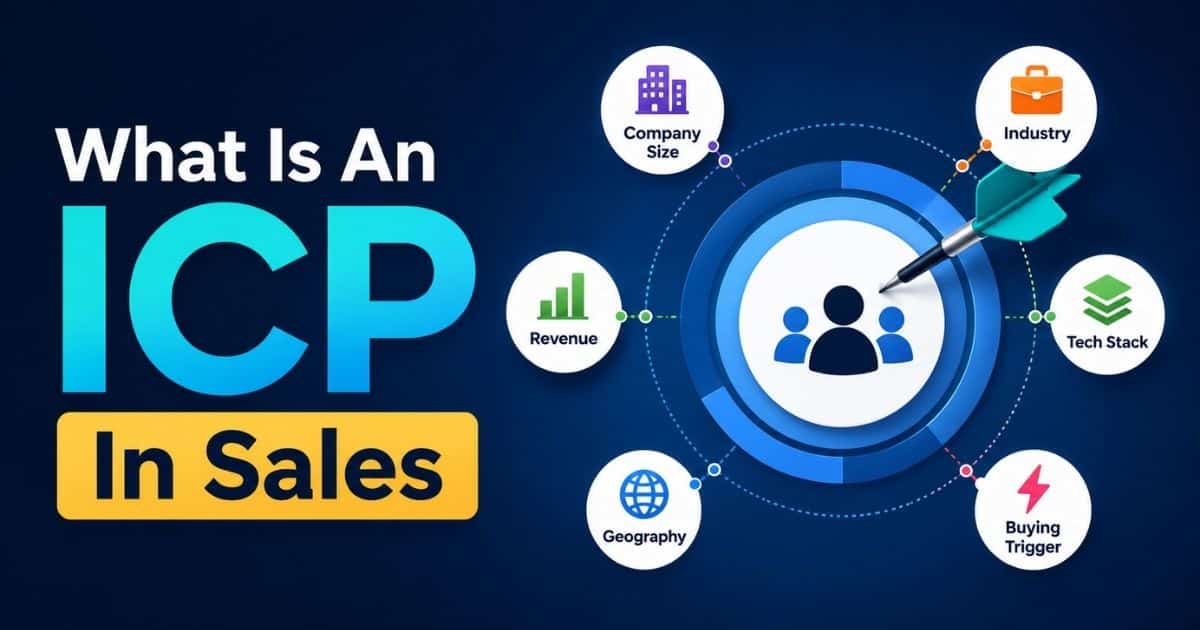
An Ideal Customer Profile (ICP) is a clear description of the type of company that is most likely to benefit from your product and generate the highest customer lifetime value. It identifies characteristics such as company size, industry, revenue, business goals, and operational needs so sales and marketing teams can focus their sales efforts on accounts with the greatest potential while supporting long-term customer success and account based marketing. An ICP defines the ideal company to target, while a buyer persona focuses on the individual decision-makers within that company.
What Is ICP In Sales?

An Ideal Customer Profile (ICP) in sales is a detailed description of the type of company or customer most likely to benefit from your product or service while delivering the highest long-term value to your business. An ICP defines key characteristics such as industry, company size, annual revenue, location, technology stack, and business needs.
Sales and marketing teams use an ICP to identify high-value accounts, qualify leads more effectively, personalize outreach, and focus resources on prospects with the greatest potential, which is also the foundation of an effective account-based selling strategy. A well-defined ICP helps improve conversion rates, shorten sales cycles, lower customer acquisition costs, and support sustainable business growth.
Why Your ICP Breaks Down Outside The CRM

Many businesses spend weeks defining an ideal customer profile, only to save it as a presentation, spreadsheet, or internal document. After the kickoff meeting ends, the document rarely influences daily work. Sales teams continue to qualify leads based on instinct, while the CRM treats every new account the same because it has no way to recognize what an ideal customer actually looks like.
An ICP Document Cannot Guide Daily Sales Decisions
Creating an ideal customer profile is only the beginning. Problems start when the profile exists outside the tools that sales reps use every day. A document may describe your best customers in detail, but it cannot automatically influence lead qualification, opportunity scoring, or account prioritization.
Without structured CRM data, every new lead enters the same pipeline regardless of industry, company size, budget, or buying potential. Sales reps waste time reviewing accounts that have little chance of becoming long-term customers, while valuable customers often receive the same attention as poor-fit prospects. As a result, the sales process becomes slower, less predictable, and more expensive.
CRM Should Treat Your ICP As Data, Not Documentation
Many organizations think of an ideal customer profile as a strategic exercise. In reality, it should function as a data model inside your CRM.
Instead of storing an ICP as text, every characteristic should become searchable information. Industry, employee count, annual revenue, geography, technology stack, and business model should exist as CRM fields that can filter, score, and segment accounts automatically.
Once your CRM understands who your best customers are, it can identify similar opportunities at scale. Marketing teams can create targeted campaigns, customer success teams can prepare personalized onboarding, and sales productivity improves as strategies become based on measurable data instead of assumptions.
Missing CRM Data Creates Poor Customer Prioritization
A CRM without ICP data cannot distinguish high-value opportunities from low-value ones. Every account appears equally important until a sales rep manually researches it.
That approach creates several problems:
- Longer sales cycles because every lead receives similar attention.
- Inconsistent qualification across different sales reps.
- Marketing teams attract customer segments that rarely convert.
- Customer success teams inherit accounts that are unlikely to retain or expand.
- Customer lifetime value declines because acquisition focuses on quantity instead of fit.
Many businesses assume they have a lead generation problem when the real issue is poor prioritization. The CRM simply lacks enough information to identify which prospects are most likely to deliver the most value.
Static Profiles Cannot Adapt To Changing Markets
Markets change constantly. New competitors emerge, customer expectations evolve, and industry trends shift throughout the year. An ideal customer profile stored in a document often becomes outdated without anyone noticing.
A CRM-driven ICP evolves alongside your business. As deals close, expand, or churn, new patterns appear in your customer data. You may discover that companies within a specific revenue range convert faster or that certain industries produce higher customer lifetime value than expected.
Because the information lives inside the CRM, your ideal customer profile becomes a living framework rather than a one-time project. Sales strategies improve continuously as new data reveals which customer segments create the most value for the business.
Operational ICPs Produce Better Business Outcomes
The strongest sales organizations do not treat an ideal customer profile as a document that sits in a shared folder. They build it directly into their CRM so every lead, account, and opportunity can be evaluated against the same criteria.
When the CRM recognizes your ideal customer profile as structured data, sales reps spend more time with the right prospects, marketing teams target audiences that closely resemble your best customers, and customer success teams inherit accounts with stronger long-term potential. The result is shorter sales cycles, better collaboration across departments, and a repeatable process for finding the customers who deliver the most value year after year.
The CRM Fields That Actually Define Your ICP

A good Ideal Customer Profile is not a long checklist that nobody updates. It is a small set of CRM fields that help your team qualify accounts, prioritize opportunities, and make better decisions every day. Every field should answer one simple question: Will this information help us identify customers who are more likely to buy and stay?
Many companies create dozens of ICP attributes, but only a handful ever influence the buying process. Too much data creates extra work, reduces sales efficiency, and leaves CRM records incomplete. Start with five or six fields that your team can maintain consistently.
Industry Or Vertical
Industry is often the first filter that separates strong opportunities from poor-fit accounts. Companies within the same sector usually face similar challenges, regulations, and buying behaviors, making it easier to personalize outreach and messaging.
Instead of broad categories, use specific values that reflect your actual target audience.
Good examples:
- SaaS
- Fintech
- Healthcare Providers
- Logistics
- Manufacturing
Avoid:
- Technology
- Services
- Business
Specific industries help marketing teams focus campaigns on relevant customer segments while allowing sales teams to tailor conversations around familiar pain points. Industry data also improves sales forecasting because patterns become easier to identify across similar businesses.
Employee Count Band
Company size often affects budgets, approval workflows, and purchasing priorities. Rather than storing an exact employee count, create predefined ranges that sales reps can select quickly.
Example values:
- 1 to 10 Employees
- 11 to 50 Employees
- 51 to 200 Employees
- 201 to 1,000 Employees
- 1,000+ Employees
Suppose your best-performing accounts are mid sized tech companies with between 50 and 200 employees. Every new account that falls within that range immediately becomes a higher-priority opportunity.
Employee bands also help distribute sales resources more effectively because enterprise accounts and small businesses usually require different sales approaches, and they make it easier to compare how different CRM options, such as in a Gain.io vs Pipedrive comparison, support your target segments.
Revenue Band
Annual revenue provides another strong indicator of buying potential. Companies with similar employee counts can have very different purchasing power, so revenue should complement company size rather than replace it.
Keep the options simple.
Example values:
- Under $1 Million
- $1 Million To $10 Million
- $10 Million To $50 Million
- $50 Million To $250 Million
- More Than $250 Million
Revenue bands help qualify potential customers without forcing sales reps to estimate exact figures. Public databases, company reports, and platforms like LinkedIn Sales Navigator often provide enough information to populate this field.
When combined with company size, revenue creates a much clearer picture of your customer base and supports more accurate sales targeting, including when you evaluate tools in a Gain.io vs Zoho CRM comparison to support those segments.
Technology Stack
Not every business needs this field, but software companies often benefit from tracking the technologies prospects already use.
For example, a CRM platform might record whether a prospect currently uses:
- Salesforce
- Gain.io
- HubSpot
- Microsoft Dynamics
- Zoho CRM
A customer support platform may track:
- Shopify
- WooCommerce
- Magento
Knowing the existing technology stack helps sales teams personalize conversations, anticipate migration challenges, and position the product more effectively. It also allows marketing strategy to focus on integration-specific content and CRM-driven follow-up automation that attracts highly relevant sales prospects.
Whenever possible, update this field using current customer data, website technology lookups, or information gathered during discovery calls.
Geography
Location influences regulations, language, market maturity, pricing, and customer expectations. Even companies with global products often perform better in specific regions.
Rather than storing only countries, create geographic segments that match your go-to-market strategy.
Example values:
- North America
- United Kingdom
- Australia
- Southeast Asia
- Middle East
Geographic data helps marketing teams localize campaigns while allowing sales teams to prioritize regions with stronger conversion rates. Over time, geography also becomes valuable for sales forecasting because regional performance trends become easier to measure, including in segments like retail teams using CRM tools to stay organized.
Buying Trigger Or Use Case
This field separates companies that merely fit your ICP from companies that are actively ready to buy.
Instead of asking why a company exists, record why it started evaluating solutions today.
Example values:
- Replacing Legacy Software
- Scaling Sales Operations
- Expanding Customer Support
- Hiring Rapidly
- Opening New Locations
- Preparing For Compliance
Buying triggers represent key buying signals that directly influence conversion probability. Two companies may have identical revenue, industry, and employee count, but the business actively replacing outdated software is far more likely to move forward than one simply researching options.
You can identify buying triggers through customer interviews, discovery calls, website forms, and conversations with existing customers. Another effective approach is to conduct customer interviews after successful implementations to understand what motivated the purchase in the first place.
Keep Your ICP Simple Enough To Use
More fields do not create a better ICP. They create more empty CRM records.
A practical framework with five or six consistently completed fields will almost always outperform a complex model with dozens of attributes. Your customer personas, current customer data, and feedback from existing customers should guide which fields deserve a place in the CRM. When every field supports better sales targeting, higher sales efficiency, smarter marketing strategy, and stronger decisions throughout the buying process, your ICP becomes something your team actually uses instead of another document stored in a shared folder.
How To Turn ICP Fields Into A Simple Lead Scoring Formula

An Ideal Customer Profile becomes far more useful when it moves beyond a detailed description and starts influencing how leads are prioritized. Instead of asking sales reps to review every account manually, assign points to the CRM fields that matter most. The final score helps identify the right customers faster and creates a consistent qualification process across the team.
The scoring model does not need to be complicated. In fact, simpler models that fit directly into your sales CRM workflow are easier to maintain and usually produce better adoption.
Assign Points To Your ICP Criteria
Start by giving each ICP field a score based on how strongly it matches your target customers.
| ICP Field | Match Criteria | Score |
|---|---|---|
| Industry | Matches your primary industries | +2 |
| Employee Count | Falls within your ideal range | +3 |
| Revenue Band | Matches your preferred revenue range | +2 |
| Technology Stack | Uses supported or integrated tools | +1 |
| Lead Source | Referral or demo request | +2 |
Imagine a company with the following profile:
- Industry: SaaS
- Employee Count: 120
- Revenue: $15 Million
- Technology Stack: HubSpot
- Lead Source: Demo Request
That account would receive:
- Industry Match = +2
- Employee Count Match = +3
- Revenue Match = +2
- Technology Stack Match = +1
- Demo Request = +2
Total Score: 10
Rather than relying on opinions, the CRM now ranks the account based on measurable criteria.
Set A Qualification Threshold
A score becomes useful only when it triggers an action. Decide what score represents a qualified opportunity and apply the same rule across every lead.
For example:
- 7 or More Points: ICP-qualified and ready for immediate follow-up.
- 4 to 6 Points: Needs additional qualification before entering the main pipeline.
- Below 4 Points: Low priority or nurture through marketing efforts.
Using a threshold removes guesswork from the qualification process. Every sales representative evaluates leads using the same standard, making it easier to align sales activities and improve consistency across the pipeline.
Refine Scores With Real Customer Data
Your first scoring model should never be your final one. Review closed deals, lost opportunities, customer feedback, and crm data every few months to understand which attributes actually predict success. You may discover that companies using a specific technology stack convert more often, or that referrals consistently outperform other acquisition channels, just as teams that adopted Gain.io in a sales acceleration case study saw faster cycles once their data was standardized.
Customer interviews, industry reports, and win-loss analysis can also reveal new buying patterns that deserve additional scoring weight. As your business evolves, your sales icp should evolve with it.
An ideal customer profile template is only a starting point. The real value comes from improving the scoring model as new insights become available.
Keep The Formula Easy To Maintain
Many companies overcomplicate lead scoring by adding dozens of rules, making the model difficult to understand and even harder to trust.
Focus only on attributes that consistently help you find sales prospects with a higher likelihood of becoming long-term customers. If a scoring rule rarely influences buying decisions, remove it.
A straightforward formula also helps new sales reps ramp up faster because qualification becomes part of the CRM instead of tribal knowledge shared by experienced team members.
Automate High-Scoring Leads
Once your scoring model is stable, let your CRM do the repetitive work. A lead with a score of 7 or higher can automatically move into a priority queue, notify an account executive, or trigger a follow-up task. Lower-scoring accounts can enter nurture campaigns until stronger buying signals appear.
Most modern CRM platforms, including Gain.io, support sales task automation and workflow automation that makes this process easier without requiring a complex setup. Instead of manually reviewing every new opportunity, your team can spend more time building relationships with the right customers, whether the prospect is an enterprise buyer or a small business owner searching for a solution that matches their needs.
How To Build A Live ICP Filter Instead Of A Static List

An Ideal Customer Profile should guide daily decisions, not collect dust in a slide deck. The easiest way to keep it useful is to turn it into a live CRM filter that updates automatically as new accounts enter your pipeline. Instead of reviewing a static document, your team works from the same real-time view every day.
Create A Shared ICP View
Start by creating a saved filter in your CRM using the fields you already defined.
For example, your filter could include:
- Industry = SaaS or Fintech
- Employee Count = 50 to 200
- Annual Revenue = $10M to $50M
- Geography = North America
- ICP Score = 7 or Higher
Every company that matches those conditions automatically appears in the same view. As new records enter the CRM or existing data changes, the list updates without any manual work.
Unlike a spreadsheet, this approach helps your team identify companies that match your ideal profile the moment they qualify.
Give Every Team The Same Source Of Truth
One of the biggest problems with traditional ICP documents is interpretation. Marketing may focus on one set of company characteristics, while sales prioritizes something completely different.
A shared CRM view removes that confusion.
Sales representatives, marketers, and managers all work from the same filtered list of high value leads, using the same CRM-based lead management process. Everyone knows exactly who should receive outreach, personalized campaigns, or priority follow-up because the qualification criteria already exist inside the CRM.
That consistency creates better alignment around purchasing decisions and reduces time spent debating whether an account is a good fit.
Use The View To Prioritize Daily Work
A live ICP view is more than a reporting tool. It becomes part of your team's daily workflow.
A sales leader can review the filtered pipeline every morning to assign new accounts, monitor activity, and ensure high value leads receive immediate attention.
Marketing teams can also use the same view when targeting companies for campaigns, webinars, or account-based initiatives. Because both teams rely on identical qualification rules, outreach becomes more consistent throughout the customer journey.
Refresh Your ICP Every Quarter
No Ideal Customer Profile stays accurate forever. Markets change, customer needs evolve, and new opportunities emerge. Review your saved filter every quarter using closed-won deals, lost opportunities, and lead conversion rates to confirm your criteria still reflect your strongest customers.
You may discover that companies with different annual revenue ranges convert faster or that another industry consistently delivers better results. Updating the filter with real customer data keeps your ICP aligned with current buying behavior instead of outdated assumptions.
A live CRM view evolves alongside your business. Rather than maintaining another document that nobody revisits, you create a practical workspace that helps every team identify companies, focus on the right opportunities, and make better decisions every day, whether you are coordinating complex offer management with a client portal or helping real estate agents save time with CRM tools.
ICP Accounts Vs. ICP Contacts Inside Your CRM

One of the most common mistakes in CRM management is treating an account and a contact as the same thing. They serve different purposes, and understanding the key differences helps build a stronger sales process.
An account represents a company. It becomes an ICP account when it matches your clearly defined ICP based on factors like industry, company size, annual revenue, and geographic location. A contact represents the people within that company who influence or make purchasing decisions, such as decision-makers, managers, or end users.
A strong ICP helps your team identify the highest value accounts, but qualifying the company alone is not enough. Enterprise purchases often involve multiple stakeholders, and relying on a single champion can slow deals or reduce conversion rates if that person leaves the buying process.
Instead, connect several contacts to every qualified account. Include decision-makers, budget owners, technical evaluators, and daily users whenever possible. Rich customer data and dynamic contact management give sales, product teams, and marketing better visibility into the buying committee while improving lead generation and account planning.
Reaching multiple people within the same organization also reduces risk. If one conversation stalls, your team can continue engaging customers directly through other stakeholders. That approach strengthens relationships across your target market and creates more opportunities to move deals forward.
Common Mistakes Teams Make With ICP In CRM

A well-defined Ideal Customer Profile only creates value when it becomes part of your daily CRM workflow. Many businesses invest time in building an ICP, but small execution mistakes prevent it from improving qualification, pipeline management, or sales performance. Here are the most common CRM-specific mistakes to avoid.
Creating ICP Fields Without Making Them Required
Many CRM administrators add custom ICP fields but leave them optional. As a result, sales reps skip them when creating new accounts, and most records end up incomplete.
Missing industry, company size, revenue, or buying trigger data makes it difficult to qualify leads consistently. Before long, your CRM contains hundreds of accounts with blank fields, making filters, reports, and lead scoring unreliable.
If an ICP field is essential for qualification, make it a required part of the account creation or qualification process and ensure your contact management system keeps those details centralized and easy to update.
Building An ICP Once And Never Updating It
An ICP should never remain static. Customer preferences change, new markets emerge, and buying behavior evolves. Yet many companies continue using the same profile they created during their CRM implementation.
Review your closed-won and closed-lost opportunities every quarter. Look for patterns in industry, company size, annual revenue, deal value, and buying behavior. Those insights help refine your ICP using real customer data instead of assumptions made months or years ago, especially when your sales workflow inside the CRM is simple enough that startups and small teams can maintain it consistently with a CRM built for their needs.
Treating Lead Scores As Reports Instead Of Actions
A lead score has little value if nobody acts on it. Many teams spend time building a scoring formula but never connect it to the rest of the CRM workflow. High-scoring accounts appear in reports, but sales reps still work through every lead manually.
Instead, let the score trigger an action. Qualified accounts can move into a priority pipeline, notify the assigned account owner, create a follow-up task, or start an automated workflow. When scores drive action, they improve response time and help sales teams focus on the best opportunities first.
Allowing Sales And Marketing To Use Different ICPs
Another common mistake is maintaining separate ICP definitions across different tools. Marketing may target one audience inside its automation platform, while sales qualifies accounts using completely different criteria inside the CRM. The result is inconsistent lead quality, conflicting reports, and wasted effort.
Create one shared ICP framework that both teams use. Marketing campaigns, lead qualification, reporting, segmentation, and automation should all reference the same account attributes and scoring rules. When everyone works from a single CRM-based definition, collaboration improves, qualification becomes more consistent, and every department focuses on the same high-value accounts.
Final Discussion
An Ideal Customer Profile becomes truly valuable when it lives inside your CRM instead of a presentation or spreadsheet. Structured fields, practical lead scoring, shared filters, and regular updates help every team work from the same definition of a qualified account. As your business grows, continue refining your ICP using real customer data and closed-deal insights rather than assumptions. A CRM-powered ICP is not a one-time project. It is an evolving framework that helps sales, marketing, and customer success identify the right accounts faster, prioritize high-value opportunities, and build a more predictable revenue pipeline, especially when supported by an all-in-one CRM like Gain.io.
Frequently Asked Questions
What's The Difference Between An ICP And A Buyer Persona?
An Ideal Customer Profile (ICP) defines the type of company that is the best fit for your product or service. It focuses on firmographic details such as industry, company size, revenue, and location. A buyer persona, on the other hand, represents the individuals within that company, including their responsibilities, goals, challenges, and buying behavior. In simple terms, an ICP identifies the right business, while a buyer persona identifies the right people.
How Many ICPs Should A Company Have?
Most companies benefit from having one primary ICP and a few secondary profiles. If your business serves different industries or customer segments with distinct needs, creating two or three ICPs is reasonable. Too many ICPs can make lead qualification, marketing, and sales more complicated, especially if your CRM tools are not chosen to match how your team works.
How Often Should You Update Your ICP?
Review your ICP at least once every quarter or whenever your market, product, or customer base changes significantly. Analyze closed-won deals, lost opportunities, customer feedback, and CRM reports to identify patterns that may require adjustments to your targeting criteria.
Can A Small Business Have An ICP Without A Lot Of Data?
Yes. A small business can build an effective ICP using information from existing customers, sales conversations, customer interviews, and market research. Your ICP does not have to be perfect from day one. It should improve as you collect more customer data and gain a better understanding of your ideal accounts, especially when supported by CRM tools that help startups grow smarter.
What CRM Fields Are Essential For Tracking ICP?
Start with the fields that have the greatest impact on qualification. Industry, company size, annual revenue, geography, technology stack, buying trigger, and an ICP score are enough for most businesses, especially when supported by smart CRM features for sales teams. A small set of consistently maintained fields provides far more value than a complex CRM with incomplete records.