Salesforce CRM is a cloud-based platform that helps businesses manage customer relationships, streamline operations, and improve sales, service, and marketing performance. As a leader in the CRM market, it provides tools to manage sales pipelines, track interactions, and centralize customer data in one system.
The platform uses AI CRM capabilities and ai powered features to automate tasks, generate insights, and support decision-making. Autonomous agents assist teams by handling repetitive actions and improving response speed. Salesforce also connects service and marketing functions, enabling better coordination across departments.
With real-time data and intelligent automation, businesses can optimize sales pipelines, deliver more personalized experiences, and improve overall efficiency while scaling operations effectively.
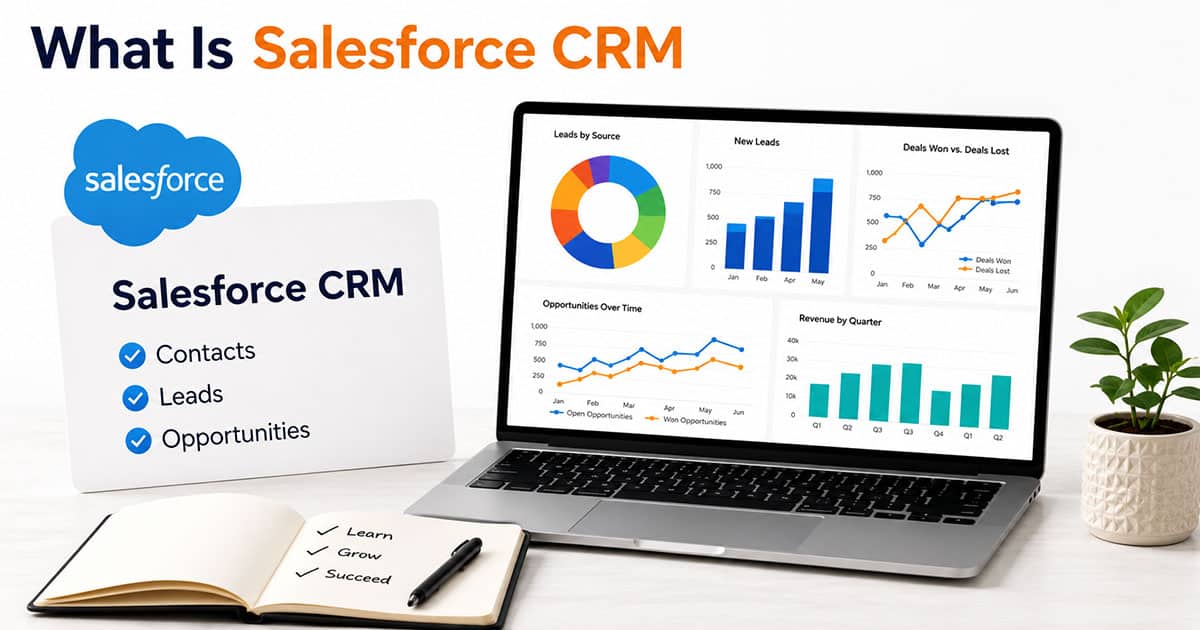
What Is Salesforce CRM
Salesforce CRM is a cloud-based platform that acts as a unified dashboard for managing every customer interaction your business has. In 2026, companies of all sizes use it to track leads, close deals, resolve support cases, and run marketing campaigns from a single source of truth. It has become the benchmark for CRM solutions because of its AI-native design and ability to adapt as your business grows.
Think about how your team currently works. Contact details might sit in one spreadsheet. Email threads live in inboxes. Notes from calls get lost in documents. Salesforce CRM replaces all of that with one shared system of record. Every lead, opportunity, account, and case logs automatically. Updates sync instantly across departments. A note from a sales call shows up in service records without anyone copying and pasting.
Salesforce started in 1999 as a small startup in San Francisco. Today it sits on the Dow Jones and S&P 500, reporting projected fiscal year 2026 revenue exceeding $41.5 billion. That growth reflects how central this platform has become to modern businesses.
The rest of this article covers what customer relationship management actually means, how Salesforce CRM works in practice for different teams, and how to decide if it fits your needs.
What CRM Means And Where Salesforce Fits
Customer relationship management is both a strategy and a category of software. At its core, CRM focuses on tracking every touchpoint with a customer. That starts from the first website visit and continues through purchase, support, and renewal.
A modern CRM centralizes contact details, communication history, deals, support issues, and marketing engagement into one shared view. Sales teams see pipeline stages. Service teams access purchase histories. Marketers track campaign engagement. Nobody has to switch between five different tools or ask a colleague to forward an email thread.
Salesforce CRM positions itself as an AI-native, cloud-first implementation of this concept. It ties together sales service marketing commerce and analytics on one integrated platform. The result is what Salesforce calls a 360-degree customer view.
Having all data in one place reduces handoffs and duplicate work. Employees stop asking customers to repeat information. The customer journey feels smoother because everyone on your team sees the same context. That single view becomes the foundation for personalized experiences that actually feel personal.
The Evolution Of Salesforce CRM
Salesforce launched in 1999 as one of the first Software as a Service CRM tools. Back then, most companies relied on clunky on-premise software like Siebel that required expensive installations. Salesforce changed the game by putting everything in the browser.
Key milestones shaped what the platform looks like today, mirroring broader future CRM technology trends and tools. The 2005 launch of AppExchange created a marketplace now hosting over 7,000 apps and connectors. In 2014, Trailhead debuted as a free online learning platform that has since trained over 5 million users. The 2016 introduction of Einstein brought artificial intelligence into the CRM with predictive scoring and recommendations.
Between 2018 and 2025, strategic acquisitions expanded the ecosystem dramatically. MuleSoft added API integrations. Tableau brought powerful analytics and visuals. Slack introduced real-time collaboration. Informatica strengthened data management capabilities.
By 2026, Salesforce CRM has evolved far beyond a digital Rolodex, reflecting the maturity of modern cloud CRM software for customer success. It now functions as a complete customer platform spanning data, AI, workflow automation, and agentic enterprise capabilities. The platform grew because it kept solving new problems rather than standing still.
Core Capabilities Of Salesforce CRM
Salesforce CRM organizes into clouds and products that cover the entire customer lifecycle. Each cloud addresses specific workflows while sharing the same underlying data and interface.
Sales Cloud handles the core of pipeline management. Key features include lead and opportunity management with automated scoring, account and contact views showing full histories, forecasting powered by AI driven insights, visual pipeline dashboards, and quote management that generates proposals quickly. Sales leaders get real time data on where deals stand without chasing reps for updates, benefiting from a visual sales pipeline that improves deal clarity.
Service Cloud supports case management across chat, email, phone, and self-service portals. Omnichannel routing sends support cases to the right agents. Knowledge bases help customers find answers themselves. Field service tools dispatch technicians efficiently. Everything connects back to the same customer record.
Marketing Cloud runs email journeys, audience segmentation, and campaign tracking. Marketers build marketing automation workflows using unified profiles. They measure which programs create pipeline rather than just clicks.
Commerce and revenue tools add online storefronts, subscription management, and automated renewals. These plug directly into CRM records so sales and finance stay aligned.
All capabilities work via browser and mobile apps. The interface stays clean and guided regardless of which department logs in.
How Different Teams Use Salesforce CRM Day To Day
Salesforce CRM becomes valuable when teams actually use it in their daily workflows. The platform reduces tool sprawl by giving sales, marketing, and service access to the same data and interface, much like a modern CRM software stack built for sales teams. Here is how each group typically operates.
Sales Teams
Account executives and sales development reps start their mornings reviewing AI-prioritized leads in Sales Cloud, similar to how an AI sales assistant for pipeline efficiency helps teams focus on the right opportunities. They update opportunity stages using Kanban boards and plan outreach based on next-best-action recommendations, supported by sales automation software to streamline follow-ups and tasks. Lead scoring ranks prospects by engagement signals so reps focus time where it matters.
Activity timelines log calls and emails automatically through Outlook or Gmail integration, underscoring why CRM email integration is important for accurate records and context. Task reminders prevent deals from stalling when follow-ups get forgotten, and broader sales task automation tools extend this by handling many repetitive admin steps. The system handles the admin work so sellers can focus on conversations.
Here is a quick example. A rep finishes a discovery call. They log the notes directly in Salesforce. The AI summarizes key points. The system schedules a demo task and generates a custom quote using CPQ tools. Meanwhile, the manager sees the pipeline update in real time without asking for a status report. This kind of workflow helps teams close more deals faster.
Marketing Teams
Marketers segment audiences in Marketing Cloud using unified customer profiles, a core idea behind a customer engagement CRM for better connections. They launch personalized email and ad campaigns through Journey Builder. Attribution tracking shows which programs create actual pipeline and revenue rather than vanity metrics.
Engagement signals flow into lead scores automatically, and email tracking CRM features provide deeper insight into who is engaging and when. When a prospect opens multiple emails, visits pricing pages, or downloads content, their score rises. Once it hits a threshold, sales gets an alert that the lead is ready for outreach.
The shared data ends debates between marketing and sales. Both teams look at the same numbers. Marketing can prove which marketing campaigns generated 3x ROI. Sales knows which leads deserve priority. The alignment drives productivity for everyone.
Service And Support Teams
Service teams handle incoming cases from chat, phone, email, and self-service portals inside Service Cloud, where CRM automation benefits for sales and growth also extend to faster, more consistent support. When an agent opens a case, they see the full context immediately. Purchase history, open opportunities, and prior issues appear on the same screen.
This context matters. Customers hate repeating themselves. Agents with full visibility resolve issues faster and leave customers feeling valued.
Consider this scenario. A customer reports a billing problem via chat. The system routes the case to the billing team automatically. Salesforce Einstein suggests a relevant knowledge article. The agent resolves the issue in one interaction without transferring the customer or asking them to explain again. That kind of experience builds customer satisfaction and loyalty.
Einstein AI And Agentforce In Salesforce CRM
Einstein is the built in AI layer that runs throughout Salesforce CRM, enabling many sales automation CRM capabilities directly inside reps’ daily workflows. Since 2023, it has expanded to include Einstein GPT for generative tasks, Copilot for conversational assistance, and Service Agent for predictions. These tools live directly inside the workflows your team already uses.
Concrete use cases include forecasting deal outcomes with higher accuracy, recommending next best actions based on patterns, summarizing call notes to save reps hours of admin time, and drafting follow-up emails that sellers can review before sending, all aligned with proven sales workflow automation strategies. The AI handles repetitive tasks while humans stay in control of decisions.
Agentforce represents the next evolution. Launched in late 2024, it deploys autonomous ai agents that perform multi-step tasks. These service agents can update records, triage support cases, or initiate workflows without human intervention. Agentforce service capabilities handle routine work so employees focus on complex problems.
Organizations set guardrails through prompt templates, approval workflows, and audit logs. The ai agents operate within defined boundaries that align with company policy and regulatory requirements. This balance between automation and oversight defines the agentic enterprise approach.
Customization, Scalability, And The Salesforce Ecosystem
Salesforce CRM works for small teams just starting out and scales to enterprises with tens of thousands of users, offering smart CRM features to organize sales better at every stage. The platform adapts to your processes rather than forcing you into rigid workflows.
Configuration options let admins customize without writing code. Custom fields capture data unique to your industry. Page layouts control what users see. Validation rules enforce data quality. Workflow automation triggers actions based on conditions. These tools handle most customization needs.
For complex requirements, developers use Apex code and Lightning Web Components. Integration tools connect legacy systems or custom applications. MuleSoft handles sophisticated API orchestrations when standard integrations fall short.
AppExchange offers thousands of prebuilt apps and connectors. Finance, HR, collaboration, and industry-specific solutions install without building from scratch. This ecosystem means you can extend functionality quickly as your business grows.
Scaling from a handful of licenses to thousands works smoothly, provided organizations follow strong CRM adoption practices for modern sales teams. Performance stays consistent. Security and access rules apply globally. Multi-org strategies support complex enterprise structures. The scalability gives confidence that Salesforce CRM grows alongside your company.
Analytics, Dashboards, And Data Insights
Salesforce CRM includes built-in reporting so leaders see what happens in the pipeline without waiting for manual reports, and many teams complement this with visual sales pipeline software to manage deals. Standard dashboards cover sales performance, service response times, and marketing funnel metrics. Each dashboard tailors to specific roles.
Beyond basics, Tableau integration enables deeper analytics and aligns with emerging top CRM trends for 2026 around unified, insight-driven platforms. Teams explore large volumes of customer data, build visual stories, and uncover trends. Data Cloud unifies information from multiple sources for comprehensive insights. You might spot churn risk early or identify upsell potential that would otherwise stay hidden.
Here is a practical example. A revenue leader opens their quarterly forecast dashboard in Salesforce. They drill into underperforming regions, compare rep performance, and decide where to add coverage or shift marketing investment. That decision happens in minutes rather than waiting for someone to compile a spreadsheet.
Security, Compliance, And Reliability In Salesforce CRM
A CRM system holds sensitive customer and financial information. Security and uptime cannot be afterthoughts.
Salesforce CRM provides core protections including role-based access controls, field-level security, encryption options, and audit trails. You control who sees what data down to individual fields. Event monitoring tracks suspicious activity.
Compliance support covers common frameworks. GDPR configurations help European operations. HIPAA-eligible services exist for certain healthcare solutions. SOC 1, 2, and 3 reports provide third-party validation. Your legal team should verify specific requirements, but the foundation is solid.
The cloud hosting model reduces IT burden. Salesforce manages data centers with geographic redundancy, automated backups, and 99.9% uptime targets. Your team focuses on using the software rather than maintaining infrastructure.
Like any large provider, Salesforce has faced security incidents historically. These experiences drive continuous improvement in defenses and processes. The platform invests heavily in zero-trust architecture and proactive monitoring.
Business Benefits, Challenges Of Salesforce CRM
Salesforce CRM delivers measurable business benefits. Sales processes accelerate with 32% productivity gains reported by mature users, reflecting how CRM helps sales teams manage leads more efficiently from first touch to close. Customer satisfaction improves when service teams have full context. AI driven insights help close more deals by surfacing opportunities that would otherwise go unnoticed. Integrations connect existing tools so data flows without manual entry.
Challenges exist too. The learning curve takes time for new users. Implementation requires thoughtful planning to avoid over-customizing before core processes stabilize. Costs range from $25 to over $500 per user monthly depending on edition and add-ons. Complex deployments need dedicated admins. Data migration from legacy systems demands careful attention.
ROI averages 8x for organizations that invest in proper training and change management. The platform delivers value quickly when rollout stays focused and realistic.
Final Discussion
Salesforce CRM plays a critical role in helping businesses manage customer relationships, streamline operations, and improve overall efficiency. By bringing sales, service, and marketing into a single platform, it creates better visibility across teams and ensures consistent customer interactions.
With built-in automation, AI-powered insights, and real-time data access, businesses can make faster decisions and respond to customer needs more effectively. The ability to manage sales pipelines, track performance, and personalize engagement helps drive growth and improve customer satisfaction.
As organizations continue to scale, adopting a flexible and intelligent CRM system like Salesforce ensures long-term success, better collaboration, and stronger customer experiences across every touchpoint.
FAQs
How Much Does Salesforce CRM Typically Cost For A Small Business?
Pricing varies by edition and features. Small business teams often start with Essentials at $25 per user monthly or Professional at $80 for more automation. Enterprise editions run $165 and up. Add-ons like Einstein push costs higher. Factor implementation and training into your budget since those can equal one to three times the annual subscription cost.
Can Salesforce CRM Work With The Tools We Already Use?
Salesforce integrates with popular email platforms like Outlook and Gmail, office productivity suites, accounting software like QuickBooks, and e-commerce systems like Shopify. Over 1,000 AppExchange connectors cover common use cases. APIs enable custom integrations when prebuilt options fall short. Check for certified connectors first since they offer better reliability and support.
How Long Does A Typical Salesforce CRM Implementation Take?
Timelines depend on complexity. A simple sales deployment might take two to six weeks. Multi-cloud rollouts with heavy integration work can stretch three to nine months. Clear scope, strong executive sponsorship, and focused requirements shorten timelines significantly. Starting with a minimum viable product and expanding iteratively reduces risk.
Do We Need A Dedicated Admin To Run Salesforce CRM?
Very small deployments can start without a full-time admin. However, most growing organizations benefit from at least one trained administrator who handles configuration, user support, and releases. Trailhead training and certification programs make it practical to grow someone internal into the role. Plan for roughly one admin per 100 users as you scale.
Is Salesforce CRM Suitable For Nonprofit Or Public Sector Organizations?
Salesforce offers industry solutions tailored to nonprofits, education, and government. Nonprofit Cloud handles fundraising, grants, and program management. Public Sector Cloud supports constituent services. Discounted licensing programs exist for qualifying organizations. Evaluate data residency requirements and partner support specific to your regulatory environment before committing.