Customer relationships do not grow by chance. Every lead, email, follow-up, and support interaction follows a process. When that process is inconsistent, teams waste time, opportunities slip away, and customers receive mixed experiences. That is where CRM workflow design becomes important.
A well-designed CRM workflow helps businesses organize customer interactions from the first touchpoint to long-term retention. It creates clear steps, automates repetitive tasks, and keeps sales, marketing, and support teams aligned. Instead of relying on manual work, teams can focus on building stronger customer relationships and closing more deals.
Whether you are creating workflows for lead management, customer onboarding, or support operations, the right design can improve efficiency, reduce errors, and deliver a better customer experience. This guide covers everything you need to know about CRM workflow design, from core components and best practices to automation, AI, optimization, and real-world examples.
What Is CRM Workflow Design And Why Is It Important
CRM workflow design is the process of creating structured steps that guide customer interactions throughout the customer lifecycle. It helps sales and marketing teams manage leads, customer data, and follow-up tasks without relying on manual processes. Through CRM workflow automation, businesses can automate repetitive tasks such as lead assignment, email follow-ups, task management, and customer service workflows. This reduces manual effort, improves data accuracy, and helps team members stay focused on closing deals and building stronger customer relationships.
Modern CRM systems use workflow automation, automation rules, and CRM workflow automation tools to streamline business processes across sales, marketing, and customer support. Automated CRM workflows can assign tasks to the right sales rep, automate processes, and support lead management throughout the sales funnel. Many CRM tools also include predictive analytics to predict customer behavior, improve customer engagement, and optimize workflows. As a result, businesses gain better operational efficiency, lower operational costs, and a more consistent customer experience.
Essential Elements Of A Successful CRM Workflow Design
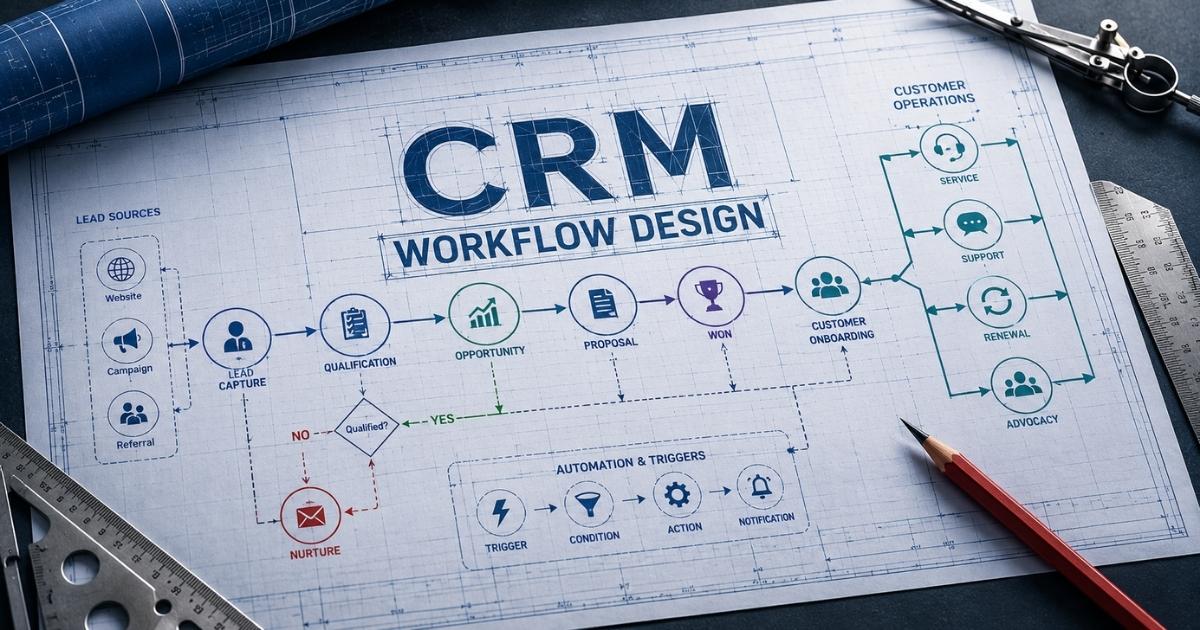
Every effective CRM workflow design relies on a few core building blocks. Each component helps organize customer interactions, reduce manual effort, and improve customer relationship management. When these elements work together, CRM workflows become easier to manage, automate, and optimize over time.
Customer Lifecycle Stages
A strong CRM workflow starts with clear customer lifecycle stages. Every lead should move through defined steps, from first contact to conversion and retention. Clear stages help sales and marketing teams track progress and identify gaps in the sales funnel.
A structured process also improves lead management and customer management. Sales managers can see where prospects stand and assign the right sales rep at the right time. Clear transitions between stages reduce confusion and improve overall operational efficiency.
Workflow Triggers And Actions
Triggers tell CRM systems when to automate tasks. A trigger can be action-based, time-based, status-based, or event-based. Once activated, automated workflows can send emails, assign tasks, create follow-up tasks, or update customer records.
CRM workflow automation depends on well-defined triggers. Without them, team members spend more time handling routine tasks manually. Smart automation rules help automate processes and reduce manual tasks across sales, marketing, and customer support, unlocking many of the core CRM automation benefits for sales and growth.
Customer Data Standards
Reliable CRM data is the foundation of workflow automation. Every business should standardize data entry formats and data management practices. Consistent records make customer interactions more accurate and easier to track.
Manual data entry often creates errors and incomplete information. Standard rules improve data accuracy and help CRM tools generate better insights. Clean customer data also supports predictive analytics and helps businesses predict customer behavior more effectively.
Lead Routing And Assignment
Lead assignment is one of the most valuable parts of CRM workflow management. Automated systems can instantly send new leads to the right sales rep based on location, industry, or lead score.
Fast routing improves response times and customer experience. It also prevents qualified leads from sitting idle. Automated CRM workflows help sales team members focus on managing leads and closing deals instead of handling administrative work.
Communication And Follow-Up
Consistent communication keeps customer relationships moving forward. CRM workflow automation tools can automate follow-up emails, onboarding tasks, customer inquiries, and customer service workflows.
A CRM platform that integrates with communication channels creates a complete view of every customer. Automated follow-ups improve customer satisfaction and customer engagement. Businesses that automate repetitive tasks also spend less time on manual processes and more time building meaningful customer relationships.
How To Map The Customer Journey Before Designing CRM Workflows
A CRM workflow works best when it follows the real path customers take. Every interaction matters, from the first website visit to a purchase or support request. Customer journey mapping helps businesses understand behavior, remove friction, and create automated workflows that match customer needs at every stage.
Customer Touchpoints
Customer touchpoints are the places where people interact with your business. These can include websites, emails, social media, sales calls, live chat, or customer support channels. Every touchpoint creates valuable customer data for your CRM systems.
A clear view of touchpoints helps sales and marketing teams understand customer interactions better. It also helps CRM workflow design support consistent communication throughout the customer lifecycle. Better visibility often leads to stronger customer engagement and improved customer satisfaction.
Journey Stages
Each customer follows a series of stages before becoming a loyal customer. Most journeys include awareness, consideration, purchase, onboarding, and retention. Clear stages make CRM workflow management much easier.
Defined stages help sales teams track progress inside the sales funnel. They also help marketing automation tools deliver relevant messages at the right time. Research from Salesforce shows that businesses with connected customer journeys often achieve stronger retention and revenue outcomes.
Pain Points And Bottlenecks
Bottlenecks slow down customer movement through the sales process. Long response times, poor follow-ups, and incomplete customer records are common examples. These issues can hurt customer experience and reduce conversions.
A journey map helps uncover those weak areas before workflow automation begins. Teams can then automate tasks, reduce manual effort, and create smoother transitions between stages. Early problem detection often leads to better operational efficiency and lower operational costs.
Behavior Patterns
Customer behavior reveals what people want and when they need it. Actions such as email opens, page visits, downloads, and demo requests provide valuable signals. CRM tools can capture this information automatically.
Behavior data supports lead management and sales automation. Lead scoring becomes more accurate when teams understand engagement patterns. Modern CRM automation platforms also use predictive analytics to predict customer behavior and identify prospects that are most likely to convert.
Workflow Opportunities
A completed journey map highlights where automated workflows can deliver the most value. Follow-up emails, lead assignment, onboarding tasks, and customer inquiries are common areas for automation. These routine tasks often consume valuable time.
CRM workflow automation tools can automate processes and assign tasks to the right sales rep without delays. Automated systems also improve data accuracy and reduce manual data entry. Studies show that businesses using sales workflow automation strategies can improve employee productivity by up to 30%, making CRM workflow design far more effective.
CRM Workflow Design Process Step By Step
A successful CRM workflow design does not happen by accident. It follows a clear process that aligns customer interactions with business goals. Each step helps reduce manual effort, improve customer engagement, and create automated workflows that support sales, marketing, and customer service teams.
Step 1: Define Business Goals
Every CRM workflow design should start with a clear objective. Ask what problem you want to solve. Some businesses focus on lead management. Others want better customer support, stronger customer engagement, or faster follow-ups.
Clear goals help sales and marketing teams create workflows that support real business outcomes. They also make it easier to track key metrics later. Research from Nucleus Research shows that companies continue to achieve an average return of about $8.71 for every dollar invested in CRM systems when workflows align with business goals.
Step 2: Map Customer Stages
A workflow should match the customer journey. Start by defining each stage of the customer lifecycle. Include awareness, qualification, purchase, onboarding, and retention. Every stage should have a clear purpose.
This step helps teams understand customer behavior and customer interactions. It also improves customer management across departments. A well-mapped journey reduces gaps in communication and creates a smoother customer experience throughout the sales funnel.
Step 3: Build Triggers And Rules
Triggers tell CRM systems when to take action. A trigger can come from a form submission, email click, status change, or scheduled date. Automation rules then decide what happens next.
CRM workflow automation depends on strong trigger logic. Automated systems can assign tasks, update customer records, and create follow-up tasks automatically. Well-designed rules reduce manual effort and help automate repetitive tasks that often slow business operations.
Step 4: Create Automated Actions
Once triggers are ready, build the actions that support your workflows. CRM software can automate follow-up emails, sales automation tasks, onboarding tasks, and lead routing. It can also assign leads to the right sales rep based on predefined conditions.
Automated workflows help sales team members spend less time on routine tasks. Studies show workflow automation can improve employee productivity by 20% to 30% while reducing human error. Better automation also improves data accuracy and supports stronger operational efficiency.
Step 5: Test And Optimize
No workflow should stay unchanged forever. Customer expectations, sales processes, and business goals evolve over time. Regular testing helps identify bottlenecks before they affect performance.
Teams should review adoption rates, conversion metrics, and customer satisfaction data. User feedback often reveals areas for improvement. CRM automation delivers the best results when businesses continuously optimize workflows and adjust them based on real customer and team behavior.
Common CRM Workflows Every Business Should Build
Not every workflow delivers the same value. Some have a direct impact on lead conversion, customer satisfaction, and operational efficiency. Businesses that automate the right CRM workflows can reduce manual work, improve response times, and create a more consistent customer experience across teams.
Lead Capture Workflow
A lead capture workflow collects prospect information from forms, landing pages, chat tools, and marketing campaigns. The CRM platform stores customer data automatically and creates a new lead record without manual data entry.
This workflow helps sales and marketing teams respond faster. Customer inquiries reach the right people immediately. Research shows that businesses that contact leads within minutes are far more likely to convert them than those that wait hours or days. Fast response times improve customer engagement and strengthen the sales process.
Lead Assignment Workflow
Lead assignment is one of the most valuable CRM workflow automation use cases. Automated workflows can assign new prospects to the right sales rep based on territory, company size, industry, or lead score.
This process removes delays and reduces manual effort. Sales managers no longer need to distribute leads by hand. CRM systems can also balance workloads across sales team members. Faster lead routing helps businesses manage leads more effectively and improves opportunities for closing deals.
Lead Nurturing Workflow
Many prospects are not ready to buy right away. A lead nurturing workflow keeps communication active through automated emails, educational content, and targeted CRM follow-up automation tasks.
CRM automation and marketing automation tools can trigger actions based on customer behavior. Email opens, content downloads, and website visits all provide useful signals. Automated CRM workflows help maintain customer relationships while moving leads through the sales funnel at a comfortable pace.
Customer Onboarding Workflow
A customer onboarding workflow starts after a purchase. It helps new customers learn how to use a product or service. Automated systems can send welcome emails, training resources, and onboarding tasks without extra manual work.
A smooth onboarding experience improves customer satisfaction and customer retention. Strong onboarding also reduces support requests later. Many CRM workflow automation tools include task management features that help customer support and account teams stay organized throughout the process.
Customer Support Workflow
Customer support workflows help businesses manage service requests from start to finish. CRM tools can create tickets, assign tasks, prioritize urgent issues, and track resolution times automatically.
An effective support workflow improves customer experience and keeps communication consistent. Customer records remain updated throughout each interaction. Automated workflows also reduce repetitive tasks for support teams, allowing them to focus on solving problems rather than handling administrative work.
CRM Workflow Design Best Practices For Automation And Scalability
A CRM workflow should do more than automate tasks. It should support growth without adding complexity. Strong workflow design helps businesses improve customer engagement, reduce manual effort, and maintain operational efficiency as customer data, team size, and business operations expand.
Use Lead Scoring
Lead scoring helps sales and marketing teams focus on the most promising prospects. A CRM platform can assign points based on customer behavior, website visits, email engagement, and other actions. This makes lead management more effective.
Sales team members spend less time chasing unqualified leads. They can prioritize prospects that show strong buying intent. Companies that use lead scoring often see higher conversion rates because the right sales rep reaches out at the right moment in the customer lifecycle.
Connect Communication Channels
Customer interactions happen across many channels. Email, chat, social media, phone calls, and support tickets all generate valuable customer data. A CRM should bring those conversations into one place.
A unified view improves customer relationship management and customer service workflows. For example, using a CRM with email integration means team members can access complete customer records without switching between multiple tools. Better visibility also improves customer satisfaction because customers receive faster and more personalized responses.
Automate High-Volume Tasks
Routine tasks consume valuable time. Follow-up emails, task management, lead assignment, and onboarding tasks are common examples. CRM workflow automation tools and dedicated sales task automation tools can automate these activities without sacrificing consistency.
Research shows workflow automation can reduce manual tasks by as much as 70% in some business processes. Automated workflows also improve data accuracy and reduce human error. Less manual effort allows sales and marketing teams to focus on customer relationships and closing deals.
Build For Future Growth
A workflow that works for ten customers may fail with ten thousand. Scalability should be part of every CRM workflow design decision. Automation rules, workflows, and data management practices should support future growth.
Companies that use CRM automation can often scale operations without adding the same percentage of staff. Automated systems handle larger volumes of customer inquiries, follow-up tasks, and customer support requests. Adopting a dedicated sales automation CRM helps control operational costs while maintaining service quality.
Track Performance Regularly
Every CRM workflow needs regular evaluation. Key metrics such as response time, lead conversion rate, adoption rate, and customer satisfaction reveal whether workflows deliver results. Strong CRM workflow management depends on continuous improvement.
User feedback can uncover bottlenecks that reports may miss. CRM automation performs best when businesses optimize workflows based on real data. Regular reviews also help sales managers identify weak points and improve overall operational efficiency across the sales process.
CRM Workflow Design Examples For Sales, Marketing And Customer Service
CRM workflow design becomes easier when you see how it works in practice. Different departments use CRM workflows for different goals, but the objective remains the same. Every workflow should improve customer experience, reduce manual effort, and support better business outcomes.
Sales workflows work best when the team behind them collaborates well too. See sales team collaboration techniques for how to keep reps aligned as these workflows scale.
Sales Lead Distribution
A sales lead distribution workflow automatically routes new prospects to the right sales rep. Rules can use location, industry, product interest, or lead score to determine ownership. This removes delays and keeps the sales process moving.
Sales managers no longer need to assign tasks manually. Automated systems instantly notify sales team members when a new opportunity arrives. Faster responses improve customer engagement and increase the chances of closing deals. This workflow is one of the most common examples of CRM workflow automation.
Email Nurture Sequence
An email nurture workflow helps businesses stay connected with prospects who are not ready to buy. CRM automation sends targeted messages based on customer behavior, interests, and actions within the sales funnel.
Marketing teams can automate follow-up tasks without creating extra work. Automated CRM workflows send content at the right time and keep customer relationships active. When paired with a simpler sales workflow in your CRM, marketing automation platforms often use predictive analytics to predict customer behavior and deliver more relevant communication.
Customer Onboarding Flow
A customer onboarding workflow begins after a purchase or contract agreement. The CRM platform can automate tasks such as welcome emails, training schedules, onboarding tasks, and account setup instructions.
This workflow helps customer support teams provide a smoother experience. Customer records remain updated throughout the process. Many businesses also automate sales tasks and connect project management tools with CRM workflow tools to coordinate onboarding activities across departments and improve overall operational efficiency.
Support Ticket Workflow
A support workflow manages customer inquiries from submission to resolution. CRM systems can categorize requests, prioritize urgent cases, and route tickets to the correct team members automatically.
Customer support agents receive complete customer data before responding. This reduces manual processes and improves response quality. Automated workflows also help businesses maintain service standards while streamlining processes across customer service workflows and support operations, reinforcing how CRM helps sales teams manage leads and handoffs across the customer lifecycle.
Re-Engagement Campaign
Some customers become inactive over time. A re-engagement workflow identifies those contacts and triggers personalized outreach campaigns. Messages can include special offers, educational content, or customer success resources.
Customer relationship management CRM platforms often use automation tools to handle this process. Complex workflows can monitor engagement levels and create actions based on customer interactions. This approach acts as a comprehensive solution for customer retention and highlights one of the key benefits of integrating CRM with sales and marketing activities.
Common CRM Workflow Design Mistakes And How To Avoid Them
Even the best CRM platform can fail when workflows are poorly designed. Small mistakes often lead to lost leads, poor customer experiences, and unnecessary manual effort. A few simple fixes can help CRM workflows deliver better results and support long-term business growth.
Unclear Lifecycle Stages
Many businesses create workflows without defining clear customer lifecycle stages. Leads move between teams without clear ownership. Customer interactions become inconsistent, and opportunities fall through the cracks.
A structured customer journey helps sales and marketing teams understand where prospects are in the sales funnel. Clear stages also improve CRM workflow management and customer relationship management. Team members can take action with confidence because every step has a defined purpose.
Poor Data Quality
CRM workflows rely on accurate customer data. Incomplete records, duplicate contacts, and inconsistent formats create problems across the entire system. Bad data often leads to poor decisions and missed opportunities.
Standardized CRM data improves data accuracy and customer management. Teams should reduce manual data entry whenever possible through automation tools and invest in robust contact management to build stronger relationships. Clean customer records help CRM systems automate processes more effectively and provide better visibility into customer behavior.
Too Much Manual Work
Some businesses invest in CRM software but continue relying on manual processes. Team members spend hours creating tasks, updating records, and sending follow-up emails. This reduces productivity and slows business operations.
CRM workflow automation exists to eliminate repetitive tasks. Automated workflows can assign tasks, route leads, and automate tasks across customer support and sales operations. Studies show workflow automation can reduce manual tasks by up to 70%, helping improve overall operational efficiency.
Weak Team Adoption
A workflow only works when people use it. Low adoption rates often happen when workflows are too complicated or disconnected from daily responsibilities. Complex workflows can frustrate sales team members and customer support staff.
Sales managers should monitor adoption and gather feedback regularly. Training and simple workflow structures improve participation. Auditing team usage also helps identify areas where businesses can optimize workflows and improve customer experience.
Lack Of Performance Reviews
Many organizations build workflows and never revisit them. Customer behavior changes, business processes evolve, and new automation opportunities appear over time. Static workflows eventually become less effective.
Regular reviews help identify bottlenecks and measure key metrics. Businesses should evaluate lead management, customer satisfaction, response times, and workflow performance. CRM automation delivers the strongest results when workflows evolve alongside customer needs and sales and marketing goals.
Key Metrics To Measure CRM Workflow Performance
A CRM workflow should deliver measurable results, not just automation. The right metrics help businesses understand what works and what needs improvement. Regular tracking also helps optimize workflows, improve customer experience, and increase the value of CRM workflow automation.
Lead Conversion Rate
Lead conversion rate shows how many prospects become customers. This metric helps sales and marketing teams evaluate the effectiveness of lead management and customer engagement efforts. A strong conversion rate often indicates that workflows support the sales funnel effectively.
CRM systems can track conversions automatically across multiple touchpoints. Sales managers can identify where leads drop off and adjust the sales process when needed. Better visibility helps businesses improve closing deals and strengthen customer relationships.
Response Time
Response time measures how quickly team members react to customer inquiries. Fast responses often lead to higher customer satisfaction and better customer engagement. Delayed replies can cause prospects to lose interest or seek alternatives.
CRM workflow automation tools help automate tasks such as lead routing and follow-up notifications. Automated workflows ensure requests reach the right sales rep without delays. Faster communication creates a better customer experience and improves overall operational efficiency.
Workflow Adoption Rate
A workflow delivers value only when people use it. Adoption rate measures how often sales team members, customer support staff, and marketing teams follow established CRM workflows. Low usage often signals workflow issues or training gaps.
CRM workflow management should include regular adoption reviews. Strong participation improves data accuracy and customer management. Businesses that monitor usage can identify barriers early and make adjustments before performance declines.
Customer Retention Rate
Retention rate measures how well a business keeps customers over time. This metric reflects the quality of customer interactions, customer support, and post-sale communication. Strong retention often indicates healthy customer relationships.
CRM automation supports retention through automated systems, onboarding tasks, and timely follow-up tasks. Customer records help teams personalize outreach throughout the customer lifecycle. Better retention also lowers operational costs because keeping customers is often less expensive than acquiring new ones.
ROI And Cost Savings
Return on investment remains one of the most important key metrics in customer relationship management CRM. Businesses want to know whether CRM software delivers measurable value. Research consistently shows that organizations can earn about $8.71 for every dollar spent on CRM solutions.
Workflow automation also reduces manual effort and repetitive tasks. Automated CRM workflows help automate processes across sales and marketing operations while reducing manual processes. Those efficiencies contribute directly to stronger business operations and long-term growth.
Future Trends Of CRM Workflow Design
CRM workflow design continues to evolve as customer expectations and technology change. Businesses now expect more than basic automation. Future CRM workflows will focus on intelligence, personalization, and faster decision-making. Companies that adapt early will improve customer experience, operational efficiency, and long-term growth.
AI-Powered Decision Making
Artificial intelligence is becoming a core part of CRM workflow automation. Modern CRM systems can analyze customer data, identify patterns, and recommend the next best action. This helps sales and marketing teams respond more effectively.
AI can also predict customer behavior with greater accuracy than traditional methods. Many CRM platforms already use predictive analytics to support lead management and customer engagement. As technology improves, AI will play a larger role in customer relationship management and workflow automation.
Predictive Customer Journeys
Future CRM workflows will become more proactive. Instead of reacting to customer actions, automated systems will anticipate customer needs before they occur. This shift will create more personalized customer interactions.
Customer behavior data, purchase history, and engagement signals help CRM automation identify likely outcomes. As highlighted in many future CRM technology trends, businesses can automate processes based on predicted actions and customer lifecycle stages. This approach improves customer satisfaction while reducing manual effort across business operations.
Real-Time Sentiment Tracking
Customer feedback no longer comes only through surveys. Advanced CRM tools can analyze emails, chats, social media messages, and support conversations in real time. This gives businesses a clearer view of customer sentiment.
Real-time monitoring helps customer support teams identify frustrated customers quickly. Automated workflows can trigger alerts and assign tasks when negative signals appear. Faster intervention protects customer relationships and improves customer experience across multiple channels.
Cross-Platform Automation
Businesses use more software than ever before. Future CRM workflow tools will focus heavily on integrating CRM with communication systems, finance software, project management tools, and marketing platforms.
Connected automation tools create a unified flow of information. Customer records stay updated across systems without manual processes. Choosing CRM tools that fit your workflow supports streamlining processes and helps team members work from a single source of truth.
Autonomous Workflow Management
The next generation of CRM workflow management will require less human oversight. Automation rules will adjust based on performance data, customer interactions, and changing business conditions. Workflows will become smarter over time.
Automated CRM workflows will handle complex workflows with minimal intervention. Sales automation, customer support, and marketing automation will work together as a comprehensive solution. This is especially powerful in complex B2B environments where a dedicated B2B sales CRM supports longer cycles and multiple stakeholders. One of the key benefits will be the ability to scale business operations while maintaining strong customer relationships and overall operational efficiency.
How Gain.io Supports Smarter CRM Workflow Management
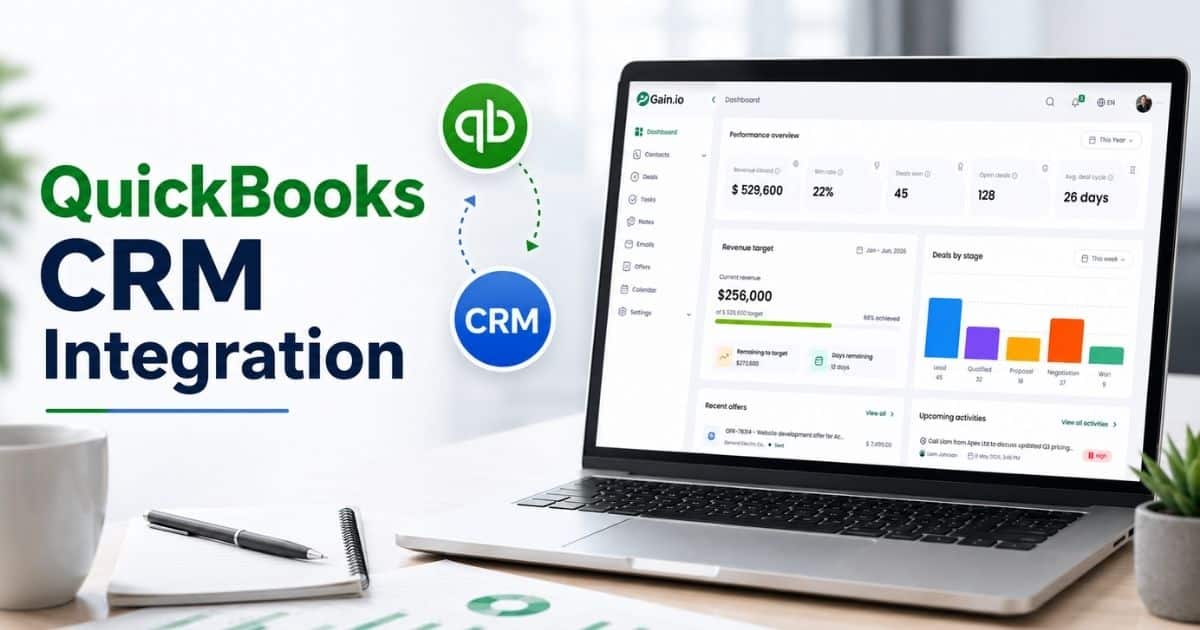
Gain.io — all-in-one CRM to grow your sales and team helps businesses manage CRM workflows with less manual effort and greater consistency. Teams can automate repetitive tasks, assign leads to the right sales rep, create follow-up tasks, and keep customer data organized in one place. This reduces delays and helps sales and marketing teams focus on customer relationships instead of administrative work.
The platform supports CRM workflow automation through customizable automation rules, lead management tools, and workflow triggers. Its smart CRM tools for sales teams help businesses streamline customer interactions across the entire customer lifecycle while maintaining data accuracy. Gain.io also helps automate processes related to customer support, onboarding, and sales activities, as shown in a sales acceleration case study on how teams close deals faster with Gain.io. With better visibility into customer records and workflow performance, teams can optimize workflows, improve customer engagement, and increase operational efficiency as the business grows.
FAQs
Can Small Businesses Benefit From CRM Workflow Automation?
Yes. CRM workflow automation helps small businesses automate repetitive tasks, manage customer data, and improve customer interactions without adding extra staff. The right CRM for startups and small sales teams ensures automated workflows also reduce manual effort and support faster growth with lower operational costs.
Does CRM Workflow Design Require Technical Skills?
No. Most modern CRM software includes visual workflow builders that make CRM workflow design easier. Sales and marketing teams can create automation rules, assign tasks, and automate processes without advanced technical knowledge.
How Often Should CRM Workflows Be Reviewed And Updated?
CRM workflows should be reviewed regularly based on performance data and customer behavior. Monitoring key metrics, customer satisfaction, and workflow adoption helps businesses optimize workflows and improve overall operational efficiency.
Can CRM Workflows Improve Data Accuracy?
Yes. Automated systems reduce manual data entry and keep customer records consistent across the CRM platform. Better data management improves lead management, customer relationship management, and decision-making across business operations.
What Features Should Businesses Look For In CRM Workflow Tools?
Businesses should look for workflow automation, lead scoring, customer lifecycle tracking, reporting, automation tools, and integration capabilities. Comparing options such as Gain.io vs Salesforce is helpful for understanding trade-offs. Strong CRM workflow tools help automate tasks, improve customer engagement, and support a scalable customer experience, whether you are evaluating CRM tools for retail teams or specialized CRM tools that help real estate agents save time.