Implementing a CRM should simplify your sales process, not complicate it. Yet many businesses struggle with CRM failures that drain resources and frustrate teams. A Gartner study reveals that 70% of CRM implementations fail, often due to issues that could have been avoided with proper planning.
The problem rarely lies with the CRM software itself. Instead, it comes down to how teams plan, execute, and maintain the system over time. From poor data migration to weak user adoption, the same common mistakes keep appearing across industries.
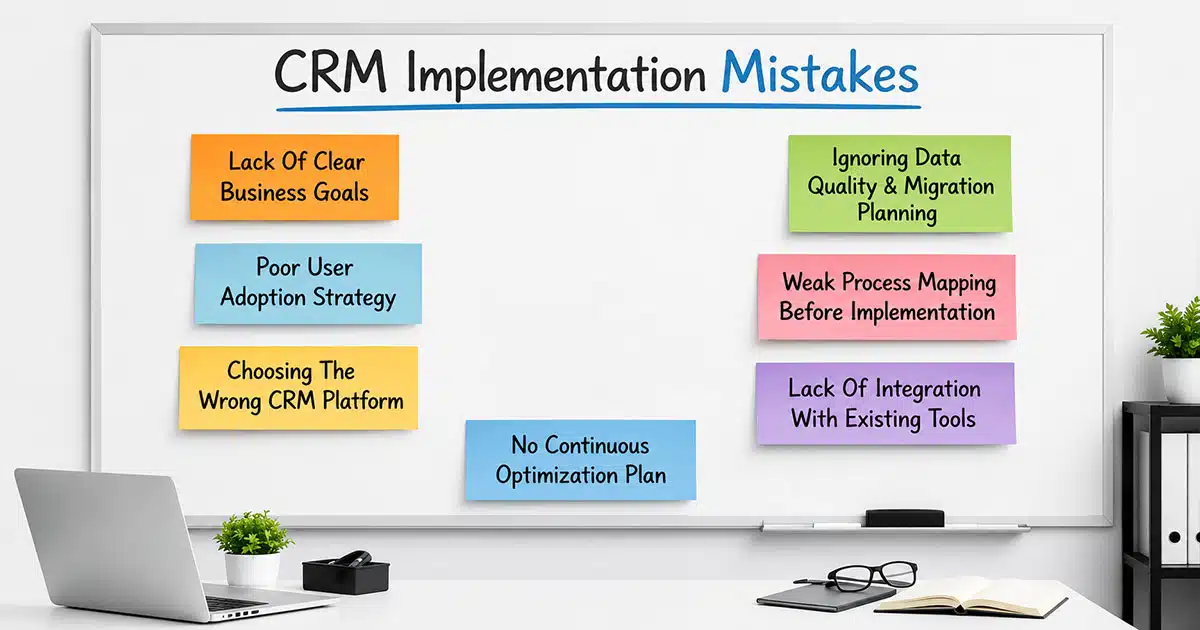
This guide breaks down the top seven CRM implementation mistakes that derail sales teams. You will learn what causes these failures and how to prevent them. Whether you are rolling out a new CRM system or fixing an existing one, these actionable insights will help you build stronger customer relationships and boost revenue.
What CRM Implementation Means For Modern Businesses
CRM implementation is the full process of selecting, configuring, and deploying a CRM system to manage customer interactions and business processes. For modern sales teams, it goes beyond installing software. It involves aligning the tool with your sales process, training your team, and ensuring data accuracy from day one.
A successful crm implementation transforms how your organization handles lead management, tracks customer data, and closes deals. Studies show that companies with well implemented crm systems see up to 29% increases in sales performance. The implementation process touches every part of your business operations, from how your sales team logs activities to how leadership reviews pipeline reports.
Why Many CRM Projects Fail Early
Understanding why CRM projects fail helps you avoid repeating the same common mistakes. Research shows that most crm failures happen within the first year of deployment. The issues typically stem from organizational challenges rather than technical problems.
The scale backs this up. Industry analysis puts CRM implementation failure between 30% and 63%, and Huble's 2026 research found over 60% of that failure traces to poor adoption, unclear ownership, and thin training, not the software. See CRM adoption metrics for how to track whether your own rollout is at risk, or the full implementation guide for the step-by-step process that avoids these mistakes in the first place.
Teams Start Without A Clear Strategy
One of the most common crm mistakes is launching without defined business goals. Many businesses purchase a CRM solution because competitors use one or because “it seems like the right time.” Without clear objectives, the implementation process becomes directionless.
Sales teams need specific targets tied to the CRM. Goals like “reduce lead response time by 40%” or “increase customer retention by 15%” give purpose to the system. When teams lack these benchmarks, they cannot measure success or identify what needs improvement. Industry data shows that companies with defined strategies achieve 30% higher success rates in their crm projects.
Leadership Support Remains Limited
CRM adoption requires commitment from key stakeholders across the organization. When leadership treats the implementation as an IT project rather than a business transformation, problems emerge quickly. Sales managers and executives must actively champion the new crm system for teams to take it seriously.
Without visible leadership support, employees view the CRM as optional. They continue using spreadsheets, sticky notes, and email threads instead of logging customer information in the system. This creates incomplete data and undermines the entire investment.
Employees Feel Overwhelmed By Change
Change management is often the missing piece in crm implementation. Your sales team has established habits built over years. Asking them to suddenly log every customer interaction in a new system feels like extra work, not improvement.
Research indicates that user adoption rates drop to 30-50% without proper training and support. Employees need to understand how the CRM makes their jobs easier, not harder. When organizations skip comprehensive training, they set up their implementation for failure.
Expectations Stay Unrealistic From Day One
Some organizations expect the CRM to solve all their problems immediately. They assume the system will magically fix broken sales processes, improve customer relationships, and drive revenue growth within weeks. These unrealistic expectations lead to disappointment and abandonment.
A successful implementation takes time. Teams need 60-90 days minimum to adapt to new workflows and see measurable results. Setting realistic timelines and milestones keeps everyone focused on gradual improvement rather than instant transformation.
Communication Breaks Between Departments
CRM systems work best when multiple business units contribute and access customer data. However, many implementations focus solely on the sales team while ignoring marketing, customer success, and operations. This siloed approach creates fragmented customer information and missed opportunities.
Effective implementation requires cross-team collaboration from the start. Regular communication between departments ensures everyone understands how the system should be used. Weekly check-ins during the first two months help identify issues before they become major obstacles.
Top 7 CRM Implementation Mistakes To Avoid
Now let us examine the specific common pitfalls that sabotage crm projects. Each mistake comes with warning signs and practical solutions to keep your implementation on track.
Lack Of Clear Business Goals
The most damaging CRM mistake is starting without measurable objectives. Vague goals like “centralize contacts” or “make reporting easier” do not provide direction. Your team needs specific, quantifiable targets that connect to revenue outcomes.
Strong implementation goals look like this: “Reduce average sales cycle from 90 to 60 days by Q4” or “Increase pipeline value by 25% within six months.” These targets guide configuration decisions, dashboard design, and automation rules. They also make it possible to measure ROI and demonstrate value to leadership.
Before selecting any CRM software, gather key stakeholders from sales, marketing, and operations. Spend time mapping out what success looks like for each team member. This alignment prevents scope creep and keeps the project focused on what matters most for business growth.
Poor User Adoption Strategy
Even the best CRM solution fails without consistent user adoption. Many organizations provide a single training session and expect employees to figure out the rest. This approach ignores how people learn and resist change.
Effective employee training includes role-based sessions tailored to specific workflows. Sales reps need different instruction than account managers or marketing coordinators. Short, recorded walkthroughs help new hires get up to speed without requiring repeated live training.
Beyond training, organizations must communicate the “why” behind the CRM. When your sales team understands how the system helps them close deals faster, they embrace it rather than avoid it. Link CRM usage to weekly meetings and performance reviews to reinforce its importance.
Choosing The Wrong CRM Platform
Not every CRM fits every business. Many businesses select platforms based on brand recognition or price rather than actual fit. A powerful tool with hundreds of advanced features becomes a burden if your team only needs basic pipeline management.
Evaluate CRM software against your specific business needs. Consider how your sales process works today and where you want improvements. Most crm systems offer free trials. Use these to test whether the interface feels user friendly and whether workflows match how your team operates.
The best CRM for your organization supports your existing systems and scales with your growth. Avoid choosing based on features you might use someday. Focus on what you need right now.
Ignoring Data Quality And Migration Planning
Poor data migration causes lasting damage to CRM implementations. Many organizations import years of customer data without cleaning it first. This brings in duplicate records, outdated contact information, and incomplete data that pollutes every report.
Before migrating data, conduct a thorough audit. Remove contacts who have not engaged in two or more years. Standardize company names and job titles. Validate email addresses and phone numbers. This cleanup takes time but prevents headaches later.
Data accuracy requires ongoing attention too. Establish clear rules about what information each team member must enter. Automated validation helps catch errors before they spread. Without accurate data, your CRM becomes an unreliable source that teams stop trusting.
Weak Process Mapping Before Implementation
Many teams try to configure their CRM without first understanding their current sales process. They create pipelines and fields based on assumptions rather than how work flows in reality. This disconnect causes confusion and low adoption.
Successful implementation starts with mapping your customer journey. Identify every touchpoint from lead capture through closed deal. Document which team handles each stage and what information they need. This map becomes your blueprint for CRM configuration.
Use custom workflows only where they add clear value. Over-engineering with dozens of pipeline stages and mandatory fields overwhelms users. Start simple with one primary pipeline and essential fields. Expand quarterly based on real feedback from your sales team.
Lack Of Integration With Existing Tools
A CRM that operates in isolation creates more work instead of less. Your sales team likely uses email, calendar apps, and other business tools daily. If the CRM does not connect with existing systems, people must enter the same information multiple times.
CRM integration failures affect up to 40% of implementations. When sales lacks access to marketing data or customer success insights, they miss valuable insights that could close deals. The result is fragmented customer relationships and inefficient processes.
Prioritize integrations that matter most for your workflow. Email integration allows tracking of sales conversations directly in contact records. Calendar connections ensure sales meetings appear alongside deal history. These connections let your CRM serve as a single source of truth.
No Continuous Optimization Plan
Treating implementation as a one-time event is a recipe for failure. Market trends change. Your business grows. Customer expectations evolve. A CRM configured in January may no longer fit your needs by December.
Research shows that organizations providing ongoing support see 40% higher ROI from their CRM investments. Schedule regular reviews to assess what is working and what needs adjustment. Gather feedback from users who interact with the system daily.
Optimization includes monitoring CRM usage patterns. Which features do teams ignore? Where do deals stall in the pipeline? Use this data to refine stages, automations, and training. Continuous improvement keeps your CRM aligned with business operations as they evolve.
Signs Of A Failing CRM Implementation
Recognizing early warning signs gives you time to correct course before complete failure. These indicators suggest your implementation needs immediate attention.
Users Avoid Logging Into The System
When your sales team stops opening the CRM, you have a serious problem. Low login rates indicate that users do not see value in the tool. They may find it too complicated, too slow, or simply unnecessary for their daily routine tasks.
Track login frequency and active users weekly during the first 90 days. If fewer than 70% of expected users log in regularly, investigate why. Often, the issue traces back to inadequate training or workflows that do not match how people work.
Data Remains Incomplete Or Outdated
A CRM full of bad data is worse than no CRM at all. When contacts lack phone numbers, deals have no value assigned, or notes sit empty, reports become meaningless. Your support team cannot help customers when customer information is missing or wrong.
Studies show that poor data quality contributes to productivity losses of 20-30% as teams spend time hunting for accurate data elsewhere. If your CRM data cannot be trusted, users will abandon it entirely.
Sales Teams Return To Old Tools
The clearest sign of CRM failure is when teams revert to spreadsheets and sticky notes. If reps keep their own tracking systems outside the CRM, they do not trust or value the official tool. This shadow IT undermines data consistency and visibility.
Watch for signs like private spreadsheets being shared in meetings or verbal updates replacing CRM reports. These behaviors indicate that the crm solution is not meeting real needs.
Reports Fail To Reflect Reality
Leadership relies on CRM reports for forecasting and decision-making. When those reports show incomplete pipelines or inaccurate projections, trust erodes. Sales performance metrics become unreliable guides.
If managers must manually verify CRM data before every meeting, the system has failed its core purpose. Reports should reflect reality without constant adjustment or explanation.
Productivity Levels Start Declining
CRM systems should streamline operations and save time. When productivity drops after implementation, something has gone wrong. Teams may be spending more time on data entry than actual selling.
Survey users about their experience. Are routine tasks taking longer? Do they feel overwhelmed by required fields? These insights reveal whether the CRM helps or hinders their work.
Best Practices For Successful CRM Implementation
Following proven strategies dramatically increases your chances of success. These practices address the common crm implementation mistakes outlined above.
Define Clear Goals Before Deployment
Start every CRM project with specific, measurable objectives. Gather input from all business units that will use the system. Document what success looks like in terms of revenue growth, efficiency gains, and customer retention improvements.
Use these goals to guide every configuration decision. Ask whether each custom field, automation, or integration moves you closer to your targets. If not, skip it for now.
Train Teams With Real Work Scenarios
Proper training uses real world examples from your sales process. Generic tutorials do not stick. Show reps exactly how to log their current deals, track follow-ups, and update customer interactions.
Create role-specific training paths. Account managers need different workflows than business development reps. Offer ongoing learning opportunities through recorded sessions and documentation that users can reference anytime.
Align CRM With Existing Workflows
Do not force your team to change how they work just to fit the software. Instead, configure the CRM to match proven workflows. This reduces friction and accelerates adoption.
Map your current sales process before touching CRM settings. Identify which stages, fields, and automations support existing practices. Build from there rather than starting from a blank template.
Monitor Adoption And Usage Metrics
Track how people use the CRM from day one. Look at login frequency, records created, deals updated, and activities logged. These numbers reveal whether the implementation is gaining traction.
Set benchmarks for crm usage and review them weekly during early months. If numbers fall short, dig into the reasons. Maybe training was insufficient. Perhaps the interface confuses users. Data tells you where to focus improvement efforts.
Improve Processes Through Regular Feedback
Create channels for ongoing user feedback. Monthly surveys, quick polls, and regular one-on-ones with power users surface issues before they spread. Listen to frustrations and act on them.
Schedule quarterly reviews to assess CRM performance against your original goals. Adjust configurations based on what you learn. This iterative approach ensures your CRM continues to gain valuable insights as your business evolves.
How Gain.io Helps Businesses Avoid CRM Implementation Mistakes
Gain.io is built for sales teams focused on closing deals and driving revenue growth. Unlike generic platforms that try to serve everyone, Gain.io delivers what sales professionals need without unnecessary complexity.
The platform provides intuitive visual sales pipelines that make tracking opportunities simple from day one. Contact management keeps leads, prospects, and customers organized throughout the sales lifecycle. Built-in task management handles follow-ups and deal-related actions without overwhelming users with features they will never use.
Gain.io integrates email and calendar seamlessly so your team logs activities without extra steps. Role-based access ensures everyone sees what they need while maintaining data accuracy. With Gain.io, your new system becomes a powerful tool that teams embrace rather than avoid.
FAQs
What Causes CRM Implementation Failure Most Often
The most common cause is lack of clear business goals combined with poor user adoption. When organizations cannot define what success looks like, they cannot configure the system effectively or measure results. Additionally, without comprehensive training and change management, employees resist using the new system. Research indicates that 70% of CRM failures trace back to these organizational issues rather than software problems.
How Long Does CRM Implementation Usually Take
Timeline depends on your team size and complexity. Small sales teams can complete basic implementation in four to eight weeks. Mid-sized organizations with multiple business units typically need three to six months for a complete rollout. Clean data, clear goals, and focused scope at the start can significantly shorten these timelines.
Why Do Employees Resist CRM Systems
Resistance usually stems from inadequate training and unclear benefits. When employees see the CRM as extra work rather than a helpful tool, they avoid it. Effective change management explains how the system makes their daily work easier. Role-specific training using real scenarios helps users see immediate value instead of viewing the CRM as a burden.
Can Small Businesses Fail At CRM Implementation
Yes. Small businesses face the same common pitfalls as larger organizations. In fact, smaller teams sometimes struggle more because they lack dedicated resources for proper planning and training. However, a light strategy with simple goals and basic data standards prevents future rework when the business scales.
How To Measure CRM Implementation Success
Track metrics tied to your original business goals. Common measurements include user adoption rates, data completeness percentages, pipeline value growth, and sales cycle duration. Compare these numbers to your baseline before implementation. If your goals included improving customer retention or sales performance, monitor those outcomes over time to confirm ROI.