CRM implementation plays a critical role in aligning support operations with long-term business goals. A well-structured approach helps teams streamline business processes, reduce manual effort, and improve customer response times. Many businesses struggle when they attempt to migrate data without a clear plan, often leading to inconsistencies and delays. Using the right crm tools that help startups grow smarter, teams can import data accurately and maintain data integrity throughout the transition.
A successful crm migration is not just about moving information but ensuring that every workflow supports better customer outcomes. Support teams benefit most when the system is tailored to real use cases, not generic setups. With the right strategy, CRM becomes a central hub that improves efficiency, enhances collaboration, and drives consistent service quality across every interaction.
What Does CRM Implementation Mean
CRM implementation is the complete process of selecting, configuring, deploying, and optimizing a customer relationship management system to align with your business operations. It goes beyond signing up for software. The implementation process typically includes requirements analysis, system configuration, data migration, integration with existing tools, user training, go-live execution, and continuous improvement, as outlined in a dedicated CRM implementation guide for successful deployment.
For support-driven businesses, implementation combines traditional CRM functionalities like contact and deal tracking with helpdesk features including ticket management, SLA tracking, and knowledge base setup. Success depends on treating this as a structured project rather than a simple software installation.
Why CRM Implementation Fails Without A Clear Strategy
Industry research shows that up to 63% of CRM projects miss their stated objectives. The root causes rarely involve missing features. Instead, failures stem from strategic gaps during planning and rollout.
Lack Of Clear Goals
Organizations without specific targets see 50% lower adoption rates compared to those with measurable KPIs. Vague desires like “better customer service” lead to feature bloat, with implementation costs running 40% higher than necessary. Without SMART goals such as reducing first response time by 25% or improving retention by 15%, teams cannot measure progress or justify the investment.
Many businesses still rely on an Excel spreadsheet to track performance, which limits visibility and makes goal tracking inconsistent. A clear step-by-step guide aligned with business needs ensures that every metric connects directly to measurable outcomes.
Poor Stakeholder Alignment
When executive visions clash with departmental workflows, projects stall. Research indicates 37% of CRM failures trace back to misalignment between leadership expectations and the actual needs of sales reps and support agents. Running cross-functional workshops before selecting any crm solution prevents this disconnect.
Misalignment often becomes worse when teams move from an old system or an existing crm without fully understanding operational gaps. Aligning expectations early helps address common challenges before they impact performance.
Undefined User Roles
Access control gaps and data silos emerge when permissions are not planned upfront. Approximately 25% of implementations suffer from permission errors after launch, creating security risks and workflow bottlenecks. Defining who creates records, who edits them, and who views reports must happen before configuration begins.
Without clear ownership across the entire process, teams struggle to manage responsibilities effectively. This creates confusion, slows execution, and impacts long-term system reliability.
Weak Change Management
Ignoring user resistance contributes to 30% abandonment rates. Rushed rollouts without adequate training cause productivity drops of up to 45% in the first month. Successful implementations communicate the “why” early and appoint internal champions to support the adoption process.
A complex process like CRM implementation requires structured communication and ongoing support, backed by clear CRM adoption strategies to improve CRM ROI. Without it, teams hesitate to adapt, reducing the chances of a smooth transition across departments.
No Data Planning
Data migration failures affect 55% of CRM projects, which is why following a structured CRM data migration guide for SaaS is critical. Unclean customer data propagates inaccuracies throughout the new system, undermining trust and reporting. Teams that skip data audits and field mapping spend weeks fixing issues that proper planning would have prevented.
Issues often begin during the entry of data from multiple sources, especially when migrating from an Excel spreadsheet or legacy tools. Clean preparation ensures accuracy and consistency from the start.
Rushed Deployment Decisions
Skipping sandbox testing inflates error rates by 60%. The pressure to go live quickly often results in broken automation rules, incorrect field configurations, and frustrated users. Building adequate testing time into your timeline protects your investment.
Many businesses rush implementation without fully evaluating system readiness, especially when moving away from an old system. Careful planning reduces risk and improves long-term adoption success.
How To Plan A CRM Implementation That Matches Business Goals
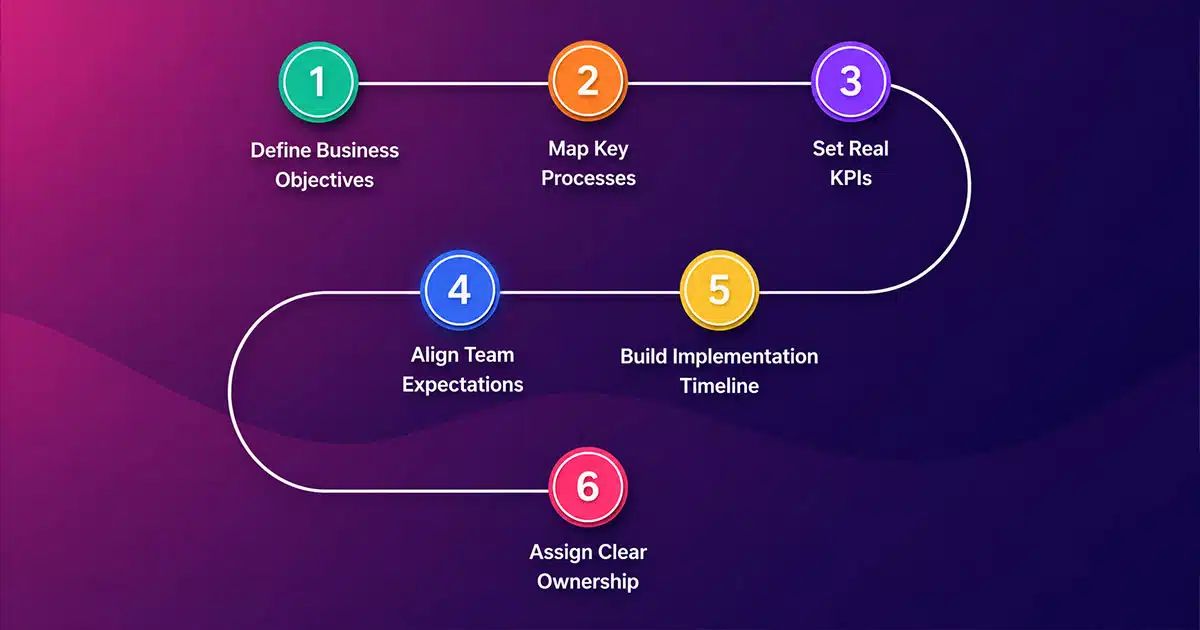
Planning separates successful implementations from expensive failures. Organizations that define clear objectives and map processes before configuration see dramatically better outcomes.
Define Business Objectives
Run collaborative workshops with leaders from support, sales, marketing, and finance. Identify specific pain points like fragmented customer views, manual reporting, or inconsistent follow-up. Translate these into measurable goals: reduce sales cycle time by 20%, boost customer retention by 15%, or cut ticket resolution time by 30%.
Clear objectives ensure your CRM aligns with real business outcomes instead of becoming just another tool. When goals are tied directly to revenue, efficiency, and customer experience, decision-making becomes faster and more focused across teams.
Map Key Processes
Diagram your current workflows for handling customer interactions, from initial inquiry through resolution and follow-up. Then design your target state, identifying where automation, custom fields, and dashboards will improve efficiency. This exercise reveals gaps in your current crm use and prevents automating broken processes.
Process mapping also highlights redundancies and manual bottlenecks that slow down operations. By visualizing each step, teams can eliminate unnecessary actions and create a streamlined workflow that supports scalability.
Set Real KPIs
Top performers track 10-15 KPIs, including customer lifetime value, net promoter score, win rates, and pipeline velocity. Select metrics that directly connect to your business goals and ensure your new crm system can track them from day one.
Well-defined KPIs act as a performance baseline and help teams measure progress consistently. Without them, it becomes difficult to evaluate whether the CRM is delivering real impact or just adding complexity.
Align Team Expectations
Cross-functional buy-in reduces resistance by 40%. Share demos, collect user feedback early, and address concerns before launch. When key stakeholders understand how the CRM serves their daily work, adoption accelerates.
Alignment also builds accountability across departments. When everyone understands their role and expected outcomes, collaboration improves, and implementation friction decreases significantly.
Build Implementation Timeline
Phased approaches work best. Plan 4-8 weeks for initial MVP rollout with core functionality, followed by iterative expansions. Create milestones like data audit completion by week two and pilot testing by week six.
A structured timeline prevents rushed decisions and allows teams to test and refine workflows before full deployment. It also helps manage resources effectively and keeps the entire project on track.
Assign Clear Ownership
Designate a project owner with decision authority and at least 20% of their time reserved for implementation. Assign data owners responsible for cleaning and migration, technical leads for integrations, and change champions from each department. Structured teams achieve 50% faster deployments.
Clear ownership reduces confusion and ensures accountability at every stage. When responsibilities are well defined, issues get resolved faster, and the entire implementation process becomes more efficient and predictable.
How To Choose The Right CRM System Based On Real Needs
Tool selection should follow your needs assessment, using practical tips for choosing CRM tools that fit your workflow. Switching CRMs later costs 2-3 times the original project budget, making this decision critical.
Identify Core Requirements
Evaluate needs across sales pipeline management, lead tracking, multi-channel support, and reporting. Prioritize must-haves like mobile access for field teams versus nice-to-haves that can wait for phase two.
Go deeper by documenting use cases for each department. Sales teams may need pipeline visibility, while support teams require ticket tracking and response automation. Mapping these needs ensures your CRM supports real workflows instead of generic functionality.
Involve frontline users during this stage to capture practical challenges. Their input reveals gaps that leadership may overlook, helping you define requirements that reflect day-to-day operations instead of assumptions.
Evaluate Feature Fit
Compare platforms on sales automation depth, marketing automation capabilities, and service modules. The right crm software matches your team size and complexity level, and all-in-one platforms like Gain.io CRM to grow your sales and team are built to support this balance.
Look beyond feature lists and test how those features work in practice. A system may offer automation, but if it lacks flexibility or customization, it can limit efficiency. Real-world testing helps validate whether features align with daily operations.
Run pilot scenarios such as lead assignment, follow-ups, and reporting workflows. This approach highlights how well the system handles real tasks and whether it reduces repetitive work or adds friction.
| Criteria | Enterprise CRM | Mid-Market CRM | SMB CRM |
|---|---|---|---|
| Cost per User/Month | $150-300 | $50-120 | $14-50 |
| Setup Complexity | High | Medium | Low |
| Customization Depth | Extensive | Moderate | Limited |
| Time to Value | 6-12 months | 3-6 months | 2-8 weeks |
Check Integration Needs
Scan for API compatibility with your email platform, billing system, and analytics tools, and prioritize CRM email integration importance to keep communication data in sync. Open APIs reduce custom coding by 70% and enable real-time data syncs that eliminate manual data entry.
Also consider future integrations. As your tech stack grows, your CRM should connect easily with new tools. A flexible integration layer ensures long-term scalability without frequent redevelopment.
Evaluate data flow between systems to ensure consistency. Poor integration planning often leads to duplicate records, delayed updates, and reporting inconsistencies that affect decision-making.
Assess Ease Of Use
Systems scoring above 80 on usability indices see 2.5x higher adoption rates, especially when they offer smart CRM tools for sales teams that feel intuitive from day one. Prioritize intuitive interfaces with drag-and-drop builders, especially for teams without technical expertise.
Evaluate onboarding time and user experience across roles. If new users struggle to navigate the system, adoption drops quickly. A user-friendly interface reduces training effort and accelerates productivity.
Test how quickly users can complete key actions such as updating records or generating reports. Faster task completion directly impacts team efficiency and overall system acceptance.
Review Scalability Options
Examine user limits, storage growth, and AI add-ons, and compare options such as a streamlined Gain.io vs Salesforce CRM comparison to match your growth plans. Cloud-based CRMs handle 10x data volume increases seamlessly, supporting business growth without platform changes.
Check how the system performs under increased load. As customer data and interactions grow, your CRM should maintain speed and reliability without performance degradation.
Consider the vendor roadmap and future capabilities. A platform that continuously evolves with new features and updates provides long-term value and reduces the need for system replacement.
Compare Total Costs
Factor in licensing, implementation costs, and total cost of ownership over three years. ROI calculators project 8.71x returns for well-optimized implementations, but only if you account for hidden costs upfront.
Include indirect costs such as training, customization, and maintenance. A lower upfront price may lead to higher long-term expenses if the system requires frequent adjustments or external support.
Analyze cost versus value rather than price alone. A slightly higher investment in the right CRM can deliver significantly better efficiency, improved customer relationships, and stronger business outcomes over time.
Moving From Spreadsheets To CRM Without Data Loss
Spreadsheets often contain 80% unstructured data prone to duplicates and inconsistencies, limiting your ability to build a simpler sales workflow around your CRM. Moving data requires careful preparation to avoid corrupting your new crm system.
Audit Existing Data
Inventory all spreadsheets, shared documents, and legacy tools containing customer information. Identify which records are current, which contain outdated information, and which contain duplicate data. Tools like Excel’s remove duplicates function help identify 20-30% of obsolete records.
A thorough audit also helps uncover hidden data sources that teams may rely on unofficially. Without identifying these, critical customer information can be missed during migration. Centralizing all sources ensures no data is left behind.
In addition, auditing provides visibility into data gaps and inconsistencies. This allows teams to define what should be migrated and what should be archived, improving overall data relevance.
Clean Duplicate Records
Use fuzzy matching to merge entries representing the same customer. This process typically reduces data volume by 15-25% while preserving complete interaction histories. Clean data is relevant data that your team can trust.
Duplicate records often create confusion for sales reps and support teams, leading to inconsistent communication. Removing duplicates ensures a single source of truth for every customer.
It also improves reporting accuracy, as metrics such as conversion rates and customer lifetime value rely on clean, unified records.
Standardize Data Fields
Enforce consistent formats for phone numbers, addresses, and dates before import. Standardization cuts import errors by 90% and ensures data quality from day one in your new system.
Standardization also improves system usability. When data follows consistent formats, teams can search, filter, and analyze information more effectively.
It further supports automation workflows, as consistent data ensures rules and triggers function without errors.
Map Data Structure
Align spreadsheet columns to CRM objects carefully. Your “Client Name” column might map to “Account Name,” while “Contact Person” maps to a related contact record. Document transformation rules for each field mapping.
Accurate mapping ensures relationships between data points remain intact. For example, linking contacts to accounts correctly preserves the context of customer interactions.
Proper documentation also simplifies troubleshooting and future updates, as teams can quickly understand how data flows within the system.
Run Test Migration
Import a sample of 200-500 records into a sandbox environment first. Validate 95% accuracy thresholds before attempting full migration. Test migrations reveal issues with customer details and custom fields before they affect production data.
Testing helps identify formatting issues, missing fields, and incorrect mappings early. Fixing these at the test stage prevents large-scale errors during final migration.
It also builds confidence among stakeholders, as they can review sample data and confirm readiness before full deployment.
Validate Final Import
After the final migration, sample 10% of records for manual verification. Run automated reconciliation scripts to confirm totals match. Organizations that validate prevent costly rework, with some cases avoiding over $100K in fixes.
Final validation ensures that all data has been transferred accurately and completely. It also confirms that relationships, custom fields, and historical records remain intact.
Ongoing monitoring after validation helps maintain data quality, ensuring that the system continues to deliver reliable insights and supports effective decision-making.
What Makes CRM Data Migration Smooth and Error-Free
The migration process requires governance, planning, and systematic validation to protect data integrity throughout the transition, while avoiding common CRM implementation mistakes to avoid.
Define Data Ownership
Assign data stewards responsible for each dataset from day one. Clear ownership reduces post-migration issues by 60% and establishes accountability for ongoing data backup and maintenance.
Ownership also ensures faster decision-making during conflicts, such as duplicate entries or inconsistent formats. When accountability is defined early, teams can maintain high data quality standards even after migration is complete.
Build Migration Plan
Outline ETL pipelines, schedule downtime windows during off-hours, and document rollback procedures. For enterprises handling millions of records, phased batches minimize risk and allow validation between transfers.
A structured plan reduces uncertainty and ensures every step of the migration process is controlled. It also helps teams anticipate bottlenecks and allocate resources efficiently across each phase.
Including contingency plans is equally important. Unexpected failures can occur during large-scale transfers, and having a rollback strategy ensures that business operations remain unaffected.
Use Automation Tools
Automation tools like native CRM importers accelerate transfers 5x compared to manual methods. They support incremental syncs that minimize system downtime and reduce human error during data operations.
Automation also standardizes repetitive tasks, ensuring consistency across large datasets. This becomes especially valuable when handling complex data structures or integrating multiple data sources.
In addition, automated workflows can log activities and errors in real time, making it easier to identify and resolve issues quickly without disrupting the entire migration.
Ensure Data Accuracy
Incorporate validation rules during import that flag anomalies. Expect roughly 5% of records to require manual review. Catching issues during migration prevents them from spreading throughout your crm data.
Accuracy depends on proper field mapping and standardized formats. Without this, mismatched fields can create inconsistencies that affect reporting and decision-making.
Teams should also validate relationships between records, such as contacts linked to accounts, to ensure the system reflects real-world customer interactions accurately.
Perform Quality Checks
Build dashboards tracking duplicate rates (target below 1%) and completeness scores (target above 98%). These metrics confirm smooth migration and establish baselines for ongoing monitoring.
Regular quality checks help identify hidden issues that may not appear immediately after migration. Monitoring these metrics over time ensures that data remains reliable and actionable.
Establishing benchmarks also allows teams to measure improvement and maintain consistency as new data enters the system.
Monitor Post Migration
Plan 30 days of hypercare with anomaly alerts. Ongoing audits sustain 99% data integrity long-term and catch issues before users lose trust in the system.
Post-migration monitoring ensures that the system continues to perform as expected under real usage conditions. Early detection of issues prevents long-term damage to data quality.
Continuous improvement practices, such as periodic audits and user feedback collection, help refine processes and maintain a high standard of data integrity across the CRM lifecycle.
Common CRM Implementation Mistakes That Hurt ROI
Many companies recognize these mistakes only after 6-12 months, when fixing them becomes expensive and disruptive.
Ignoring User Feedback
Systems that fail to address real workflows see 40% underutilization. Collect user feedback during pilots and after launch to identify friction points early.
Ignoring feedback creates a gap between system design and actual usage. When sales reps and support teams feel the system does not reflect their daily tasks, they avoid using it consistently.
Regular feedback loops help teams refine workflows and improve usability over time. Simple adjustments based on real input can significantly increase user satisfaction and long-term adoption.
Overcomplicating Workflows
Excessive customizations increase maintenance costs by 35% and slow system performance. Start lean with only essential automation rules and expand based on proven needs.
Complex workflows often confuse users and reduce efficiency instead of improving it. When processes become too detailed, teams spend more time navigating the system than completing tasks.
A simplified approach ensures that the CRM remains intuitive and scalable. Gradual improvements based on real usage data help maintain a balance between functionality and usability.
Skipping Proper Training
Inadequate training sessions result in 50% adoption failure. Untrained users log data 3x slower than trained colleagues, creating bottlenecks and data quality issues.
Training should not be a one-time activity. Continuous learning opportunities help users adapt to new features and improve their efficiency over time.
Well-trained teams use the CRM more effectively, leading to better data accuracy and improved customer interactions. Investing in training directly impacts overall system success.
Poor Data Structure
Propagating errors from unclean existing data inflates reporting inaccuracies by 25%. Invest in data cleanup before migration rather than fixing issues afterward.
A weak data structure affects every aspect of CRM usage, from reporting to automation. Inconsistent formats and missing fields make it difficult to generate reliable insights.
Establishing a strong data foundation ensures that the system delivers accurate and actionable information. Clean and well-organized data supports better decision-making across the business.
Lack Of Integration Planning
Siloed systems cost 20% in efficiency losses. Plan which tools connect to your CRM before configuration begins, prioritizing high-impact integrations over comprehensive connectivity.
Without proper integration, teams must switch between multiple platforms, leading to wasted time and increased risk of errors. Data inconsistency becomes a major issue when systems do not communicate effectively.
Strategic integration planning ensures seamless data flow and improves overall productivity. Connecting key tools creates a unified ecosystem that supports efficient operations.
No Performance Tracking
Implementations without monitoring miss optimization opportunities. Organizations that track adoption and performance metrics achieve 25% higher ROI over three years.
Tracking performance helps identify areas where the CRM is underperforming. Metrics such as user adoption, response time, and conversion rates provide valuable insights into system effectiveness.
Continuous monitoring allows teams to make data-driven improvements. Regular analysis ensures that the CRM evolves with business needs and continues to deliver measurable value over time.
How To Handle CRM Adoption Challenges Across Teams
CRM adoption fails when teams view the system as an administrative burden rather than a productivity tool, a pattern explored in depth in CRM adoption challenges and best practices for sales teams.
Address User Resistance
Executive sponsorship and pilot programs boost buy-in by 45%. Demonstrate wins like 15% time savings during pilots to build momentum for full rollout.
Resistance often comes from uncertainty and fear of change. When leadership actively supports the initiative and communicates its value, teams feel more confident in adopting the system.
Pilot programs also provide real examples of success, helping skeptical users see practical benefits instead of theoretical promises. This builds trust and reduces hesitation across departments.
Simplify Daily Workflows
Customize dashboards to show only relevant KPIs for each role. Simplified interfaces reduce login times by 30% and make the system feel helpful rather than overwhelming.
Overloaded dashboards create confusion and reduce efficiency. When users see only what matters to their role, they can complete tasks faster and with greater clarity.
Simplified workflows also reduce errors and improve consistency, making the CRM easier to integrate into daily routines.
Offer Continuous Support
Helpdesks, chatbots, and office hours sustain 80% usage rates beyond six months, ensuring sales can fully leverage how CRM helps sales teams manage leads. Ongoing support addresses the learning curve that causes early abandonment.
Support should be easily accessible and responsive. When users know help is available, they are more likely to explore features and use the system confidently.
Regular check-ins and feedback sessions also help identify ongoing challenges and improve the user experience over time.
Communicate Clear Benefits
Share ROI stories showing concrete improvements like 29% sales uplift. Teams that understand benefits engage at 2x the rate of those receiving only training.
Clear communication connects CRM usage to real outcomes such as faster deal closures or improved customer satisfaction. This makes the system feel valuable rather than mandatory.
Consistent messaging reinforces the importance of adoption and keeps teams aligned with business goals.
Track Usage Behavior
Login analytics identify drop-offs before they become permanent disengagement, much like sales activity tracking software for smarter sales teams highlights performance gaps before they hurt revenue. Early intervention with struggling users improves overall crm user adoption rates.
Monitoring usage patterns helps teams identify which features are underutilized and where users face difficulties. This allows targeted improvements and support.
Data-driven insights ensure that adoption strategies remain effective and adaptable as team needs evolve.
Encourage Team Accountability
Gamified leaderboards highlighting top CRM users lift participation by 35%. Public recognition motivates consistent engagement and creates peer pressure for adoption.
Accountability fosters a sense of ownership among users. When individuals see their contributions recognized, they are more likely to stay engaged.
Creating a culture of accountability ensures that CRM usage becomes a standard part of daily operations rather than an optional task.
Ways To Train Sales Teams For Effective CRM Using
Effective CRM training equips sales teams with the skills to use the system confidently. Structured learning improves adoption, boosts productivity, and ensures teams can manage pipelines, customer data, and sales processes efficiently.
Role-Based Training
Tailor modules to sales reps (prospecting, pipeline management) versus managers (forecasting, reporting). Role-specific training improves proficiency by 50% compared to generic sessions.
Focused training ensures each role learns only what is relevant to their daily responsibilities. This reduces confusion and helps users quickly apply what they learn in real scenarios.
It also improves efficiency, as teams avoid wasting time on features that do not impact their performance directly.
Hands-On Practice
Sandbox environments where agents simulate real deals cut ramp-up time from four weeks to approximately ten days. Practice builds confidence before handling live customer relationships.
Practical exposure allows users to understand system behavior without the risk of making errors in live data. This builds familiarity and reduces hesitation when transitioning to the actual system.
Repeated practice also strengthens retention, making it easier for teams to adopt CRM into their daily workflow.
Real Scenario Learning
Replay historical pipelines and sales records to show how the CRM would have improved outcomes. Concrete examples resonate more than abstract feature demonstrations.
Scenario-based learning connects CRM usage with real business impact. When users see how the system improves outcomes, they are more motivated to use it effectively.
It also helps teams understand best practices and avoid common mistakes in handling customer interactions.
Short Training Sessions
Microlearning sessions of 15-30 minutes retain 85% of knowledge versus 20% for full-day classes. Break training into digestible modules that fit busy schedules.
Short sessions keep users engaged and prevent information overload. This approach allows teams to learn gradually while continuing their daily tasks.
Consistent learning over time leads to better retention and long-term skill development.
Provide Quick Guides
Cheat sheets and video walkthroughs reduce support tickets by 60%. Make resources accessible within the CRM itself for just-in-time learning.
Easy access to guides ensures that users can solve problems quickly without interrupting their workflow. This improves productivity and reduces dependency on support teams.
Visual and concise resources also make it easier for users to understand complex features and apply them effectively.
Track Training Progress
Quizzes and certifications ensure 90% completion rates. Trained teams correlate with 18% revenue gains, making training investment measurable.
Tracking progress helps identify knowledge gaps and ensures that all users reach the required proficiency level. It also creates accountability and encourages continuous improvement.
Data-driven insights from training performance allow organizations to refine their programs and maximize the impact of CRM adoption.
Connecting CRM With Your Existing Tools And Workflows
Integrations eliminate context switching and repetitive tasks that waste agent time.
Identify Key Integrations
Email sync, calendar integration, and telephony connections prevent 40% of manual data entry. Map your critical communication channels before implementation.
Start by auditing all tools your teams currently use daily. Identify where customer interactions happen and ensure those touchpoints connect directly to your CRM platform.
Prioritizing high-impact integrations first helps reduce complexity and delivers quick efficiency gains across business operations.
Sync Sales Tools
CPQ software integration enables quote-to-cash automation, shortening sales processes by 25%, especially when paired with thoughtful sales workflow automation strategies. Connected tools create seamless customer data flow.
Sales teams benefit when every interaction, quote, and deal update syncs automatically. This eliminates duplicate work and ensures that sales reps always have up-to-date information.
A connected ecosystem also improves forecasting accuracy, as data flows consistently across all sales processes.
Connect Marketing Platforms
Marketing automation platforms like HubSpot CRM or similar tools boost lead-to-customer conversion by 30% when data flows bidirectionally with your CRM, particularly when you use a CRM with email integration to streamline sales communication.
Integration ensures that marketing and sales teams work with the same customer data. This alignment improves campaign targeting and lead nurturing strategies.
It also allows teams to track the full customer journey, from initial engagement to final conversion, creating better insights for optimization.
Integrate Support Systems
Unified ticketing with CRM histories resolves customer issues 40% faster, just as modern CRM tools that help retail teams stay organized centralize customer data for faster responses. Agents see the complete context without switching between systems.
Support teams gain a holistic view of customer interactions, including past purchases, previous issues, and communication history. This improves response quality and customer satisfaction.
Integrated systems also reduce response times, as agents no longer need to gather information from multiple platforms.
Automate Data Flow
Bidirectional APIs eliminate data lags. Middleware solutions handle 70% of no-code integration needs for teams without technical expertise.
Automation ensures that data updates in real time across all connected systems. This reduces inconsistencies and improves overall data accuracy.
It also frees up time by removing repetitive tasks, allowing teams to focus on higher-value activities.
Test Integration Stability
Load simulations confirm 99.9% uptime under real conditions. Test integrations before go-live to prevent workflow disruptions.
Testing helps identify potential failures and performance issues before they impact users. It ensures that integrations can handle real-world usage without breaking.
Continuous monitoring after deployment further ensures stability, helping teams maintain a reliable and efficient CRM environment.
How To Measure CRM Success After Implementation
Tracking the right metrics determines whether your CRM journey delivers returns.
Track User Adoption
Target 80%+ weekly login frequency. High adopters achieve 2x productivity compared to occasional users. Adoption metrics reveal whether the system serves daily work.
User adoption reflects how well the CRM fits into everyday workflows. If teams actively use the system, it indicates that the platform delivers value rather than adding friction.
Tracking feature usage also helps identify which tools are underutilized. This allows teams to refine processes and improve overall system engagement.
Monitor Sales Cycle
Average sales cycle reductions of 28% indicate successful CRM implementation, similar to real-world results where teams close deals faster with Gain.io after standardizing their pipelines. Track time from lead creation to close across all pipeline stages.
Shorter sales cycles mean faster revenue generation and better pipeline efficiency. It shows that automation and visibility are helping teams close deals more effectively.
Analyzing each stage of the cycle also helps identify bottlenecks, enabling continuous improvement in sales processes.
Measure Conversion Rates
Lead-to-customer conversion improvements of 15-20% signal effective process automation and data visibility. Compare pre- and post-implementation benchmarks.
Improved conversion rates indicate that teams are using customer data more effectively to nurture leads and close deals.
Tracking conversions across different channels also provides insights into which strategies work best, helping teams optimize their approach.
Evaluate Data Accuracy
Audit scores above 95% and completeness above 98% indicate healthy crm data. Poor data accuracy undermines every other metric.
Accurate data ensures reliable reporting and better decision-making. Without it, even the most advanced CRM functionalities lose their effectiveness.
Regular audits help maintain high data quality and prevent issues such as duplicate records or missing information.
Analyze Team Productivity
Tasks per user (typically up 34%) and response times reveal efficiency gains, while improved sales visibility matters more than ever for spotting bottlenecks early. Track both quantitative output and quality measures like customer satisfaction.
Higher productivity shows that the CRM is helping teams work smarter, not harder. Automation reduces manual effort and allows users to focus on high-value tasks.
Combining productivity metrics with customer satisfaction scores provides a complete view of performance, ensuring that efficiency does not compromise service quality.
Review ROI Impact
Calculate NPV from revenue gains minus implementation and subscription costs. Well-executed implementations average 8.71x returns over three years, with 47% of organizations reporting full value realization.
| KPI | Pre-CRM Average | Post-CRM Target | Typical Improvement |
|---|---|---|---|
| Sales Cycle (Days) | 90 | 65 | 28% |
| User Adoption Rate | N/A | 80%+ | 2x productivity |
| Data Accuracy | 70% | 95%+ | 36% |
| Conversion Rate | 15% | 18-20% | 20-33% |
Why Gain.io Fits Modern CRM Implementation Needs
Gain.io delivers a modern approach to CRM implementation by aligning data, automation, and revenue insights. It supports scalable growth, improves decision-making, and simplifies complex workflows across sales, marketing, and support teams.
Built For Revenue Operations Alignment
Gain.io is designed around revenue operations, ensuring that sales, marketing, and customer success teams work from a unified data layer. This alignment eliminates silos and creates a consistent view of the entire customer journey.
By connecting pipeline data, campaign performance, and customer interactions, teams can make faster and more informed decisions. This approach improves forecasting accuracy and helps organizations optimize revenue strategies with confidence.
It also ensures that every department contributes to shared business goals, creating a more cohesive and efficient operational structure.
Predictive Forecasting With Real Data
Gain.io leverages predictive analytics to provide accurate forecasts based on real-time data. Instead of relying on assumptions, teams can identify trends, risks, and opportunities early in the sales cycle.
This capability allows leaders to adjust strategies proactively and allocate resources more effectively. Sales teams gain visibility into deal health, while managers can track performance with greater precision.
Predictive forecasting also reduces uncertainty, helping businesses plan growth with a higher level of confidence and control.
Scalable And Flexible Integration
The platform’s robust API architecture supports seamless integration with existing tools and workflows. This ensures that data flows smoothly across systems without creating bottlenecks or inconsistencies.
Gain.io adapts to growing business needs, handling increasing data volumes and user demands without compromising performance. Its flexibility allows teams to expand their tech stack without worrying about compatibility issues.
This scalability makes it a reliable choice for organizations planning long-term growth and digital transformation.
No Code Automation And Data Governance
Gain.io simplifies complex processes through no-code automation, reducing reliance on technical expertise. Teams can build workflows, automate repetitive tasks, and improve efficiency without developer support.
At the same time, built-in data governance features ensure high standards of data accuracy, security, and compliance. This protects sensitive customer information while maintaining system reliability.
Together, automation and governance create a balanced system that supports both operational efficiency and long-term data integrity, making Gain.io a strong fit for modern CRM implementation needs.
FAQs
How Does CRM Implementation Impact Multi-Channel Sales Attribution Models
A properly implemented CRM unifies touchpoint data across email, chat, phone, and social channels for accurate attribution modeling. Machine learning algorithms within modern platforms assign fractional credit to each interaction, improving attribution accuracy by approximately 35%. This visibility helps teams understand which channels drive conversions and allocate resources accordingly.
What Data Governance Structure Works Best After CRM Implementation
Centralized ownership with automated policies, role-based access controls, and audit trails reduces compliance risks by 50%. Assign data stewards per department responsible for quality and accuracy. Document governance rules and review them quarterly as your business operations evolve.
How Can CRM Implementation Support Predictive Sales Forecasting Accuracy
CRM systems analyzing historical pipeline patterns, win rates, and external market data achieve 20-30% accuracy gains in forecasting. AI models require clean, complete data and at least 12 months of historical records to generate reliable predictions for your sales team.
What Role Does API Architecture Play In Scalable CRM Implementation
RESTful API endpoints enable a microservices architecture that handles 10x user growth without performance degradation. Open APIs facilitate integrations with professional services, billing systems, and product databases. Evaluate API documentation quality and rate limits before selecting your crm platform.
How To Align CRM Implementation With Revenue Operations Strategy
Revenue operations alignment requires unifying sales, marketing, and finance around shared KPIs and automated handoffs. Your CRM becomes the single source of truth for pipeline data, customer interactions, and revenue attribution. This alignment typically drives 25% improvements in overall revenue efficiency.