Salesforce CRM stands as the world’s leading customer relationship management platform in 2026. It processes over 200 billion customer records daily and serves everyone from startups to Fortune 500 enterprises. But what makes this software company’s product worth your attention?
The answer lies in how it brings ai agents, automation, and unified customer history into a single source of truth. This article breaks down exactly how Salesforce works, who benefits most, and where it falls short.
What Salesforce CRM Software Is
Salesforce launched in 1999 as the first cloud-based CRM platform, and it continues evolving rapidly today. At its core, this customer relationship management system stores leads, accounts, contacts, opportunities, cases, and marketing campaigns data so that sales, service, marketing, commerce teams can collaborate from one shared record, using smart CRM features to organize and manage sales activities.
Centralized contact management serves as a single source of truth, storing all contact details, interaction history, and social feeds in one location. Because Salesforce delivers as SaaS, hosting, security patches, and infrastructure are handled entirely by Salesforce. You access everything through a browser or mobile app without on-premise installations.
The platform positions itself as an ai crm with tools that suggest next best actions, generate content, and automate workflows based on real customer data. Everyday use cases include logging discovery calls with automatic activity updates, sending customized proposals via built-in quoting tools, or keeping track of contract renewals through automated reminders.
How Salesforce CRM Works Day To Day
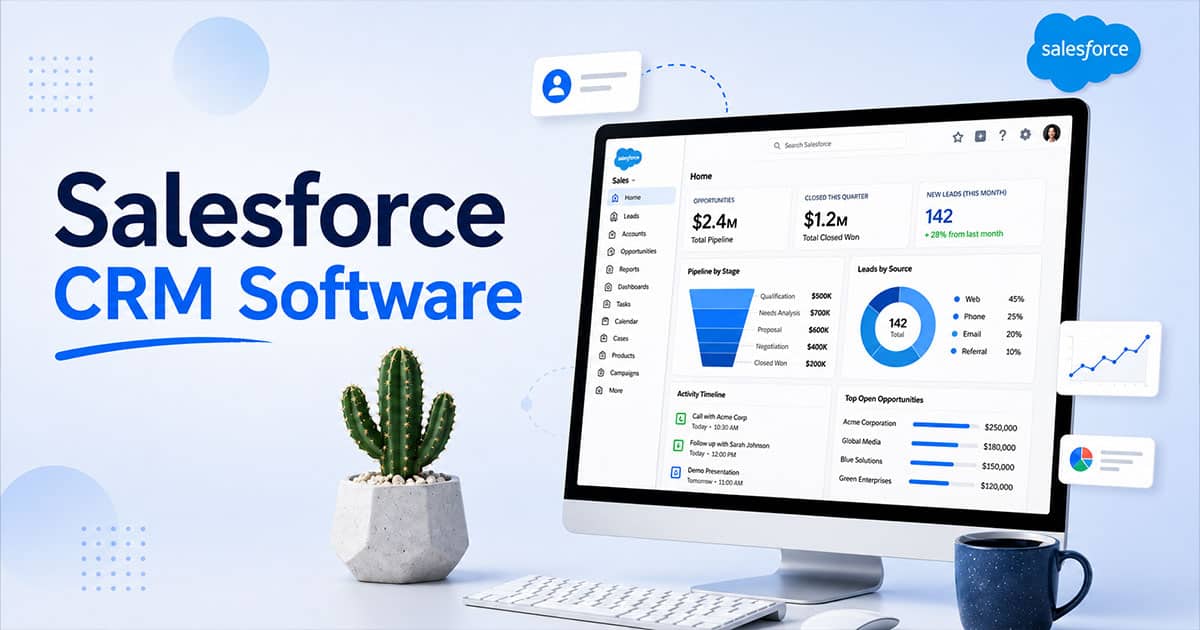
Picture a sales manager reviewing a dashboard showing pipeline coverage at 3.2x quota while a service agent views the same customer’s recent purchase history alongside an open case. Integrated collaboration tools facilitate real-time communication among teams, meaning everyone sees full context on every interaction.
Salesforce’s modules provide a unified view of customer interactions across different departments, facilitating better collaboration and data sharing. The core concepts are straightforward: objects like Accounts represent companies, records are individual instances such as a specific opportunity worth $50,000, and fields capture details you customize to match your business processes.
Automation flows handle record updates, email alerts, task creation, and approval routing when certain conditions are met, delivering many of the CRM automation benefits for sales and growth that teams look for. Integrations with email, calendars, and other systems sync data bidirectionally, so prospects and employees never deal with manual copy-paste busywork.
For Sales Teams
Sales leaders use Sales Cloud to manage leads through the entire pipeline with a real-time Kanban-style view, similar to how a visual sales pipeline improves deal clarity and forecasting. Lead tracking monitors potential customers from capture to close, while AI-powered lead scoring predicts the likelihood of lead conversion based on 100+ data points like website visits and email opens.
Concrete daily actions include logging calls with conversation transcripts, generating quotes in minutes via CPQ tools, and tracking deal health with risk scores, where an AI sales assistant for pipeline efficiency can further surface risks and priorities. Real-time dashboards allow tracking of deal health and revenue forecasting, helping managers coach their team effectively.
Email and calendar sync ensures Outlook or Gmail activities mirror Salesforce records automatically, similar to how a Sales Calendar CRM for high-performance teams connects schedules directly to deals. Reps get AI-suggested follow-ups and draft replies, freeing time to actually sell rather than manage admin work.
For Marketing Teams
Marketing Cloud connects campaigns to the same crm database that sales and service teams use. Data-driven segmentation allows for targeted marketing campaigns rather than generic messaging. You can build lists based on behavior like email opens, webinar attendance, or browsing history and past purchases.
Marketing automation can handle email campaigns, lead assignment, and workflows across channels, much like dedicated sales automation software that streamlines follow-ups and workflows. AI-driven personalization can tailor messages across different communication channels, ensuring prospects receive relevant content at the right moment.
When leads score above a threshold, they auto-route to sales with handoff notes ready. Campaign performance reporting ties directly to revenue, showing exactly which efforts influenced pipeline and helping marketing prove engagement and ROI.
For Service Teams
Support teams use Service Cloud to manage customer issues from email, chat, phone, and social in a single console, benefiting from many of the same sales collaboration CRM capabilities that unify teams around shared data. Routing rules direct high-priority cases from key accounts to dedicated queues within minutes.
Agents view knowledge articles, use macros for repetitive tasks, and receive AI-powered suggested replies that cut resolution time by 25% on average. The platform enables proactive customer service interactions because agents see sales history and open opportunities alongside support cases.
This context lets service reps spot upsell opportunities or flag renewal risks when usage patterns indicate trouble.
Core Features Of Salesforce CRM Software
Salesforce CRM software brings sales, service, marketing, and development into one connected ecosystem. It helps businesses work smarter, gain real-time insights, and adapt across industries with scalable, data-driven solutions.
Sales Cloud Capabilities
Sales Cloud empowers teams to work smarter by managing leads, opportunities, and pipelines in one place. With built in AI, it delivers actionable insights that help sales teams close more deals and improve forecasting accuracy by acting as a sales automation CRM for growing sales teams. The agentforce 360 platform connects data across industries, giving representatives a complete view of every customer interaction.
Managers can track performance through dashboards, while teams benefit from automation that reduces manual work. For example, sales reps can prioritize high-value prospects and streamline follow-ups, taking advantage of sales automation benefits for higher conversion rates. This helps organizations across industries increase conversion rates and maintain consistent growth.
Service Cloud Tools
Service Cloud helps support teams deliver faster and more personalized service. With built in AI and real-time insights, agents can resolve cases efficiently while maintaining context across channels. The agentforce 360 platform ensures customer data stays unified, helping teams work smarter across industries, including public sector organizations.
Features like knowledge bases and automation improve response times and reduce workload. For example, support teams can handle repetitive queries using AI-driven tools, while sales activity tracking software for smarter sales teams performs a similar role on the revenue side, allowing them to focus on complex issues. This leads to better customer satisfaction and stronger long-term relationships.
Experience Cloud Solutions
Experience Cloud allows businesses to create digital platforms such as portals, communities, and branded websites connected to CRM data. It supports industry specific solutions tailored for different industries, enabling organizations to deliver personalized experiences. The agentforce 360 platform ensures seamless data flow across systems.
Organizations can build customer portals or partner platforms with real-time insights. For example, a company can create a self-service portal where users track orders or access services, leveraging the same principles that make cloud CRM software for customer success so flexible. This improves engagement while helping businesses work smarter and manage interactions efficiently.
Marketing Cloud Automation
Marketing Cloud enables businesses to create targeted campaigns using built in AI and real-time insights. It helps marketers connect with audiences across industries through email, mobile, and social channels while automating sales tasks to keep teams focused and organized on the handoff and follow-up. The agentforce 360 platform ensures data-driven personalization at every touchpoint.
Automation tools allow teams to optimize campaigns and improve performance. For example, marketers can send personalized offers based on customer behavior, helping generate more deals and feed a lead management software process for tracking and converting leads. This approach strengthens engagement while delivering measurable results across campaigns.
AppExchange And Platform Flexibility
AppExchange provides access to industry-specific solutions, tools, and integrations that extend Salesforce capabilities. Businesses across industries, including the public sector, can find ready-made apps or customize their systems. The agentforce 360 platform supports seamless integration and scalability.
The Salesforce Platform also allows development of custom apps and workflows. For example, companies can build inventory management systems connected to CRM data, or design full experiences similar to those described in a complete guide to CRM software for modern sales teams. This flexibility helps organizations work smarter, adapt quickly, and maintain efficiency as their needs evolve.
Benefits Of Using Salesforce CRM Software
Salesforce CRM provides a 360-degree view of every customer, allowing teams to manage relationships and spot opportunities effectively. When everyone relies on the same database, you eliminate scattered spreadsheets and disconnected tools that kill productivity and unlock many of the ways CRM improves sales productivity.
Salesforce CRM helps companies achieve more productive sales teams by providing a single view of the customer, actionable analytics, and customer-centric automation, mirroring broader trends in how CRM adoption is changing modern sales teams. Reports show 38% of customers experience sales productivity gains post-adoption, with reps saving roughly 2 hours daily through workflow automation.
Better visibility into the pipeline helps leaders make confident decisions about hiring, investment, and strategy. Customers feel the difference through faster responses and more personalized experiences, supporting retention and revenue growth.
Scalability And Ecosystem
Salesforce supports organizations at every stage, from small teams needing basic deal tracking to enterprises running processes across multiple regions, especially when they know how to track deals from lead to close in a structured way. The broader world of certified partners, consultants, and developers provides implementation support and custom apps.
Training resources like Trailhead offer free learning paths, with millions certified through the program. User groups share practices and blueprints for common challenges. This ecosystem is a strength, though it also makes over-customization easy without strong governance and knowledge management.
Common Limitations And Challenges Of Salesforce CRM
Even leading crm tools come with tradeoffs worth understanding. Salesforce has a steep learning curve, which can be a significant challenge for new users and organizations implementing the system, especially if they do not follow a structured CRM implementation guide for successful deployment. Admins typically need 40-80 hours of training on objects, permissions, and automation.
Implementing Salesforce CRM requires a commitment to proper setup and training; without this, users may find it cumbersome and difficult to utilize effectively. Poor implementations create cluttered screens, duplicate data, and automation that mirrors bad processes rather than improving them, echoing many of the CRM implementation mistakes to avoid.
Salesforce can be perceived as expensive compared to simpler CRM solutions, which may deter some businesses from adopting it despite its extensive features. Costs include license tiers, add ons, implementation services, and ongoing administration overhead of 20-25% annually.
When Salesforce CRM Might Not Be The Best Fit
Very small businesses with basic needs might prefer simpler or cheaper tools, at least initially, including open source CRM platforms where budgets are tight and flexibility matters most. Organizations with extremely niche requirements and limited budgets may struggle to justify the investment without a clear roadmap.
Companies unwilling to adapt processes at all rarely benefit. Salesforce works best when teams embrace workflow refinement and connect existing systems thoughtfully. Before committing, examine your change readiness, data hygiene practices, and leadership support honestly.
Final Discussion
Salesforce CRM software delivers tremendous power for organizations ready to invest in proper implementation. The platform simplifies collaboration across departments and gives teams the advantage of unified customer context.
However, that same power demands thoughtful setup, ongoing training, and governance. Start with clear goals, create a focused scope, and measure results against baseline metrics to see real value from your CRM investment.
FAQ
Is Salesforce CRM Suitable For Small Businesses Or Only Large Enterprises?
Salesforce offers editions designed for small businesses, starting at $25 per user monthly with up to 10 users on Essentials. Even lighter versions require planning and internal ownership. Compare your expected growth and process needs over two to three years before selecting an edition.
How Long Does A Typical Salesforce CRM Implementation Take?
Timelines vary significantly. A focused sales team rollout might take two to six weeks, while multi-department, multi-region deployments run six to twelve months. Budget extra time for user feedback, data cleanup, and training beyond technical configuration.
What Skills Do We Need In House To Manage Salesforce Over Time?
At minimum, have one internal administrator who understands objects, fields, permissions, reports, and basic automation. Larger organizations add roles for data governance, integration management, and business analysis. Trailhead certifications help team members build these skills within a few months.
Can Salesforce CRM Integrate With Our Existing Tools And Databases?
Salesforce connects with common tools like email, calendars, marketing platforms, and finance systems through 1,000+ pre-built connectors or APIs. Complex legacy systems may require custom integration work or middleware. Map your current toolset and data flows before implementation so priorities stay clear.
How Do We Measure Success After Adopting Salesforce CRM Software?
Track adoption metrics like login frequency and record completeness alongside business outcomes like lead response time, win rates, and case resolution speed. Set baseline numbers before launch and review dashboards with frontline teams regularly to refine fields, workflows, and demand for training content.