Cross-selling and upselling both grow revenue from customers you already have, but they work in different ways. Cross-selling adds a related product to the sale. Upselling moves the customer to a higher-tier version of what they already picked. Mixing up the two costs you deals. A rep who pitches an upgrade when the customer just needs an add-on sounds pushy.
A rep who suggests an add-on when the customer is ready to upgrade leaves money on the table. Sales teams that get this right time each pitch to the moment in the deal, not just the highest price tag. Below, you'll find the exact differences between cross-selling and upselling, plus the signals that tell you which one to use next.
Cross Selling Vs Upselling: At A Glance
Dimension
Cross-Selling
Upselling
Sales Intent And Goal
Adds related or complementary products to widen the purchase
Moves the customer to a higher-priced version of the same product
Timing In The Sales Cycle
Usually offered right after the initial purchase
Usually surfaces later, once usage hits a ceiling
Impact On Revenue And Deal Size
Increases revenue through smaller add-on line items
Boosts revenue faster through a single higher-value upgrade
Customer Experience And Perception
Feels helpful when tied to real usage and builds strong customer relationships
Feels like a natural fit when it solves a limit the customer has actually hit
Pricing And Value Proposition
Stays low-cost relative to the original order
Carries a bigger price jump tied to added capability
What Is Cross-Selling?
Cross-selling means offering existing customers a related product alongside what they're already buying. A CRM buyer might get a suggestion for a reporting add-on or an integration that fits their workflow. The goal is added value, not a bigger bill.
Good cross selling techniques rely on timing and relevance, not guesswork. Recommendations that match real usage build customer satisfaction instead of annoyance. Satisfied customers buy more over time, which raises customer lifetime value without adding new leads to the pipeline, especially when supported by CRM automation benefits for sales and growth.
What Is Upselling?
Upselling means moving a customer to a higher tier of the product they already picked. A CRM buyer on a starter plan gets pointed toward a plan with more automation or higher usage limits. The upgrade should solve a real limit they've hit, not just add cost.
As a sales technique, upselling works best when it's tied to genuine need. Encouraging customers to upgrade at the right moment builds customer loyalty instead of resistance. Most teams run upselling and cross selling opportunities together, since a bigger plan often opens the door to add-ons too, lifting average order value across the deal. Well-structured upselling strategies to boost customer lifetime value make those upgrades feel like a natural next step instead of a hard sell.
Cross-Selling Vs Upselling: Key Differences
Cross-selling and upselling both grow deal size, but they pull different levers. Five dimensions set them apart: intent, timing, revenue impact, customer experience, and pricing. Knowing each helps reps quickly pick the right pitch next, especially when they rely on a solid foundation in how CRM helps sales teams manage leads.
Sales Intent And Goal
Cross selling aims to widen what a customer buys in one sitting. A rep suggests related or complementary products that pair naturally with the item already in the cart, instead of pushing something unrelated just to raise the invoice.
Upselling chases a different target. It points the customer toward higher priced alternatives inside the same product line, betting that more capacity or extra features solve a problem the base plan can't.
Cross selling refers to breadth across a purchase, while upselling narrows in on depth within one decision. Cross selling focuses on variety, upselling on scale. Both end at the same place: a bigger deal without a new lead.
Timing In The Sales Cycle
Timing separates these two tactics more than most reps realize. Cross-selling usually shows up right after the initial purchase, when the customer journey has already produced enough data to know what fits next.
Upselling tends to surface later, once usage patterns reveal a ceiling. A customer who outgrows a plan a few months after they purchase gives the rep a natural, low-pressure opening.
Effective cross selling requires paying attention to signals inside the existing customer base rather than guessing at launch. Reps who wait for the right moment close more often than reps who pitch everything before value has even landed, and CRM follow-up automation for better sales conversions helps surface those signals at the right time.
Impact On Revenue And Deal Size
Revenue impact is where the two tactics start to look similar on a spreadsheet but behave differently in practice. Cross-selling can increase revenue by adding smaller line items, which lifts total transaction value without changing the core deal.
Upselling moves the number differently. A single upgrade can boost revenue faster than several small add-ons, since the price jump applies to the whole contract instead of one accessory.
Both tactics build toward higher customer lifetime value over time. Customers who stay longer and buy more consistently produce a higher customer lifetime value than one-time buyers ever will, regardless of which tactic got them there first.
Customer Experience And Perception
How a customer feels about the pitch matters as much as the pitch itself. A well-timed suggestion for complementary products reads as helpful, while a mistimed upgrade offer can feel like a sales push.
Reps who identify complementary products based on actual usage build strong customer relationships instead of eroding them. That trust compounds, turning one-time buyers into repeat customers who return without a new campaign pulling them back.
Customer acquisition gets the first sale through the door, but perception decides what happens after. A customer who feels understood during a cross-sell or upsell conversation sticks around long after the invoice is paid, especially when teams use a sales collaboration CRM to align around the customer.
Pricing And Value Proposition
Pricing tells its own story about intent. Cross-selling usually stays cheap relative to the original order, since the goal is to round out a purchase, not double its cost.
Upselling carries a bigger price jump because it replaces the original item with a stronger version, asking the customer to pay more for more capability rather than more stuff.
Successful cross selling and effective cross selling strategies both suggest relevant products based on real usage data, not a generic script. Get the value proposition right, and the price difference stops feeling like a cost and starts feeling like an upgrade worth paying for, especially when backed by strong CRM adoption strategies to improve CRM ROI.
Cross-Selling Vs Upselling Examples
A CRM buyer signs up for the core plan, and a few weeks later gets a suggestion for a call-logging add-on that fits how their team already works. That's cross-selling in action, often delivered through post purchase follow ups once usage data shows what the customer actually needs. Sales representatives who wait for this signal, instead of pitching everything on day one, avoid the sales follow-up mistakes growing teams face and close more add-ons without feeling pushy.
Upselling shows up differently. A support team maxes out its ticket volume on a basic plan and gets moved to a tier built for that load. The upgrade solves a real limit, which is why it lands well instead of feeling like a hard sell.
This is why cross selling important to any growth motion built around new customers as well as an existing base. Done well, it lifts average order without needing a fresh marketing strategy. Done poorly, it can overwhelm customers with offers that don't fit their stage. Get the timing right, and both tactics strengthen brand loyalty and the broader business relationship, not just the invoice.
When To Cross-Sell Vs When To Upsell
Timing decides whether a cross-sell or upsell lands well or falls flat. These six moments show exactly when each move fits naturally into the deal cycle, not just where the price tag sits.
Right After A Deal Closes
The moment a deal closes is the best time to introduce a complementary product, while purchase history is still fresh and the customer remembers exactly why they bought.
A rep who offers a package deal here, instead of pushing an unrelated upgrade, builds repeat business early. This is also where multiple products naturally fit together, since the customer's short-term needs are still top of mind, and reps rarely need a hard sales pitch to make it land.
Usage Data Hits A Ceiling
When usage data shows a customer bumping against plan limits every week, upselling aims squarely at that pain instead of guessing at a generic sales pitch.
Moving that account to a premium plan solves a problem they already feel, which is why the offer rarely needs convincing. It also supports steady revenue growth, since the upgrade reflects real usage rather than a forecast built on hope. Teams that watch this signal convert more of these moments into an easy yes.
A Renewal Or Contract Review Is Coming Up
A renewal date puts both sides back at the table, which makes it a natural point to revisit the plan instead of waiting for the customer to raise it first. It also gives leaders a clean checkpoint for tracking deals from lead to close in a complete sales process.
Handled well, this conversation protects a company's reputation for fair pricing while opening the door to a higher tier. Customers who feel heard at renewal tend to become the ones driving repeat purchases for years, not just the next quarter.
A Support Ticket Reveals A Gap
A support ticket often surfaces a need the account team never pitched, since the customer is describing a real problem rather than reacting to a sales offer they didn't ask for.
Solving it with a complementary tool, instead of a workaround, protects a business's reputation for actually listening. Customers remember which vendor fixed the gap without turning the ticket into a sales conversation, and that memory outlasts the invoice long after it's paid.
The Customer Asks For More
Sometimes the customer just asks outright, wondering what else the plan can do or whether a bigger version exists. That's about as direct a signal as any rep will get, and it deserves a fast, specific answer.
Walking through the multiple benefits of the next tier, instead of just quoting a price, helps the customer decide with confidence. Answering directly here tends to shorten the whole conversation instead of stretching it into another call.
Budget Or Buying Season Lines Up
Budget cycles and seasonal buying windows create a narrow window when customers already have money set aside to spend. Catching that window beats waiting for them to come back later with a smaller budget.
A well-timed package deal or upgrade offer here rarely feels like a push, since the timing matches the customer's own planning cycle. Reps who track these windows close more without ever sounding like they're chasing a quota.
How A CRM Helps You Run Both
A CRM turns cross-sell and upsell timing into something reps can see instead of guess. The right signals sit right inside deal and usage data, waiting to be read, which is why CRM software for modern sales teams focuses so heavily on centralizing this information.
Spotting Cross-Sell Signals In Deal Data
Deal records show exactly what current customers already own, which makes it easy to spot complementary items they haven't added yet. A rep scanning a closed-won deal can purchase products into the conversation naturally, especially when they use smart CRM features to organize sales better that flag what pairs well with the original order.
This works best with a deep understanding of the account, not a generic add-on list. CRMs that surface usage alongside purchase history turn a cold guess into a relevant, well-timed suggestion the customer actually wants.
Spotting Upsell Signals In Deal Data
Usage fields tell a different story than purchase history alone. When an account keeps brushing against its limits, that pattern is the clearest cue to upsell before the customer starts shopping competitors for advanced features.
A CRM that tracks this across the customer base lets reps prioritize accounts closest to outgrowing their plan. Instead of pitching premium products at random, the rep works from a shortlist the data already built, significantly improving how CRM improves sales productivity for the team.
Cross-Selling And Upselling Best Practices
Good timing and a fitting offer matter more than any script. These three habits separate reps who close naturally from reps who chase a number.
Timing The Offer
The best moment to nudge customers rarely lines up with a quarterly quota push. It lines up with a signal in the data, such as a renewal date or a recent usage spike.
Take a previous example: an account that hit its ticket limit two weeks before renewal took the upgrade without hesitation, because the timing matched a problem they were already feeling. That's a good deal for both sides, not a forced one.
Personalizing The Pitch
A pitch built on a deep understanding of how the account actually works lands better than one built on a template. Referencing a wireless mouse add-on to a hardware reseller means nothing if their real gap lies elsewhere entirely.
Positive testimonials from similar accounts help here too, giving the pitch proof instead of just a claim. The more specific the reference, the less it sounds like a script, and it also supports smoother CRM adoption by sales teams because reps see clear, relevant examples in their own workflow.
Avoiding A Pushy Pitch
Upselling strategies that chase profit margins over fit tend to backfire fast, especially when the customer feels rushed into an expensive version they didn't ask for. That short-term win rarely survives the next renewal conversation.
The better approach is patient enough to foster long-term loyalty instead. An e-commerce site that waits for the right cart signal, rather than upselling on every checkout, keeps the pitch feeling like help instead of pressure, mirroring how CRM adoption is changing modern sales teams to prioritize relevance over volume.
Using Customer Data Instead Of Guesswork
Guesswork is where most weak pitches start. A rep working off memory or a hunch usually reaches for the same three add-ons regardless of what the account actually needs, instead of using email tracking CRM benefits and features to see which messages and offers actually land.
Deal and usage data remove that guesswork entirely. Purchase history, support tickets, and login frequency all point toward the same answer: what this specific account is close to needing next, not what sold well to someone else last quarter, and robust sales reporting in a CRM makes those patterns visible.
Reps who build the pitch from that data close faster, since the offer already matches a problem the customer recognizes. The conversation feels like a diagnosis, not a script, especially when teams rely on clear CRM notes and mentions best practices to keep context intact across every touch.
Training Reps On Both Techniques
Most reps default to whichever tactic they learned first, which means half the opportunities in their pipeline go untouched. A rep comfortable with upselling but shaky on cross-selling will miss add-on revenue sitting in plain sight.
Training that covers both, side by side, fixes this gap early. Reps learn to read the same signal two ways: a usage ceiling points toward an upgrade, while a workflow gap points toward a complementary tool.
Teams that train on both consistently see steadier results, since reps stop defaulting to one play and start matching the offer to the account in front of them, freeing up more time for selling through better sales time management tips for sales teams.
Conclusion
Cross-selling and upselling both grow revenue from customers you already have, but they solve different problems. Cross-selling rounds out a purchase with something that fits. Upselling moves the customer to a version built for where they're headed next. Neither works well as a script recited on every call.
The teams that get this right treat timing as the real skill, not the pitch itself. A renewal date, a usage ceiling, a support ticket, a customer asking outright; each moment points toward one tactic over the other. Read the signal correctly, and the offer stops feeling like a sell. It starts feeling like the CRM, and the rep behind it, actually paying attention.
FAQ
Can You Use Cross-Selling And Upselling Together?
Yes, and most strong revenue motions run both at once. A renewal conversation might include an upgrade to a higher tier alongside a complementary add-on that rounds out the account's setup. The two tactics don't compete for the same moment; they solve different problems side by side. Reps just need to read which signal is stronger before deciding which one leads the conversation.
Does Cross-Selling Work Better In B2B Or B2C?
Cross-selling works in both, but the mechanics differ. B2C leans on fast, low-stakes add-ons at checkout, driven by habit and convenience. B2B cross-selling moves slower and depends on account data, since the buyer needs a clear reason tied to their workflow. Neither is better outright, but B2B cross-selling typically requires more context before the pitch lands well.
How Do You Measure Cross-Sell And Upsell Success?
Track attach rate for cross-sells and upgrade rate for upsells, then follow both against retention over the next few renewal cycles. Revenue lift alone can be misleading if it comes with higher churn. The clearest signal is whether accounts that took the offer stick around longer and expand further than accounts that didn't.
What Is A Good Cross-Sell Or Upsell Acceptance Rate?
This varies heavily by industry and price point, so there's no single benchmark worth quoting as universal. What matters more is the trend within your own account base over time. A rate that climbs quarter over quarter usually means the timing and targeting are improving, while a flat or falling rate is worth investigating before pushing harder on volume.
Do Customers Get Annoyed By Cross-Sell Or Upsell Offers?
Only when the offer ignores context. A relevant suggestion tied to real usage rarely irritates anyone, since it reads as helpful rather than salesy. The annoyance shows up when timing is off or the pitch repeats after a clear no. Most complaints trace back to frequency and relevance, not the tactic itself.
LinkedIn social selling means using your profile, content, and conversations to build relationships that turn into sales, instead of relying on cold calls or mass emails. Salespeople who focus on social selling consistently outperform peers who skip it, and LinkedIn tracks this through the Social Selling Index, a score that measures how well you build your professional brand, find the right people, share insights, and build relationships on the platform.
Most B2B buyers already check a seller's LinkedIn profile before replying to any outreach. A strong LinkedIn social selling index signals credibility before the first message even lands. This article breaks down how social selling works, what separates it from cold outreach, and how to build a strategy that brings in qualified leads without feeling like a pitch.
What Is LinkedIn Social Selling?
LinkedIn social selling is the practice of building relationships with prospects through meaningful engagement instead of pushing sales pitches. Sales professionals use tools like Sales Navigator to find the right people, send targeted connection requests, and stay visible through comments and posts.
LinkedIn Sales Navigator makes this easier by surfacing decision-makers who match your ideal customer profile. Your LinkedIn SSI score reflects how consistently you're building relationships, sharing relevant content, and engaging with the right network instead of chasing volume.
How LinkedIn Supports B2B Lead Generation And Sales
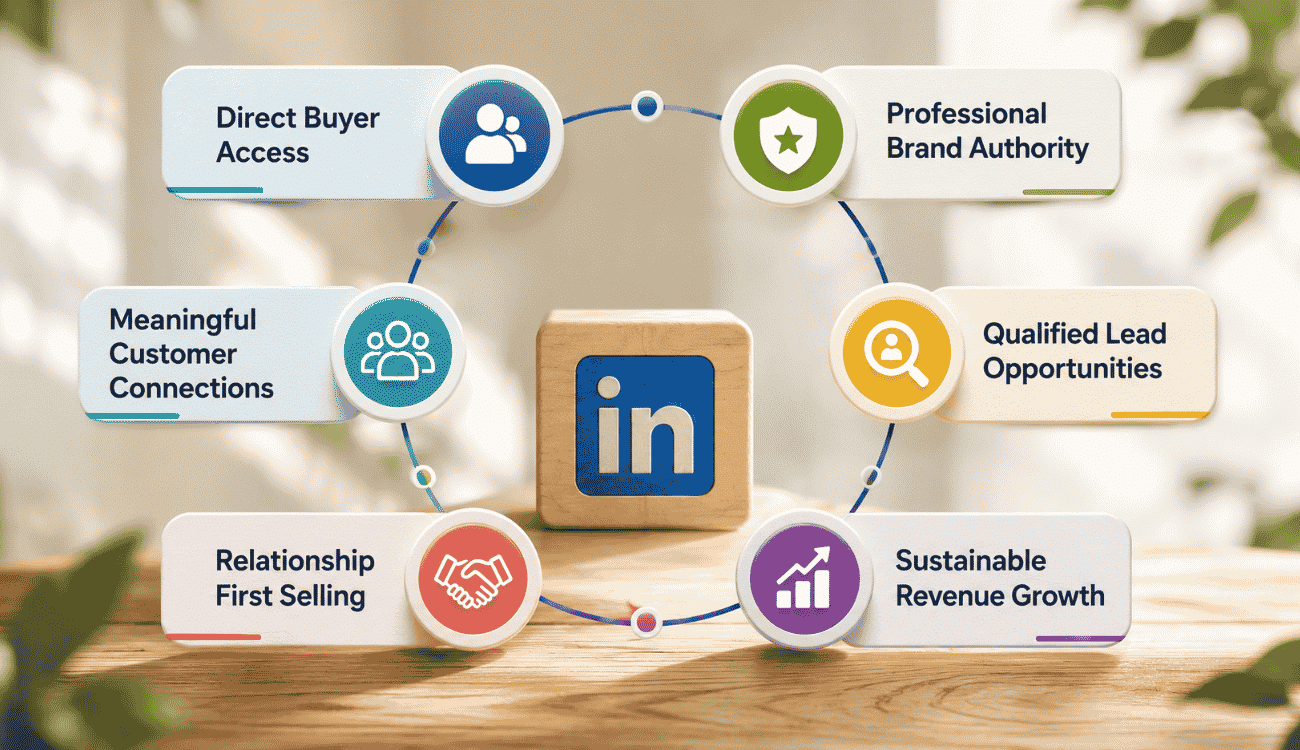
LinkedIn gives B2B teams direct access to decision-makers without gatekeepers or cold call scripts. It turns a sales rep's LinkedIn account into a trust-building asset that shapes how prospects respond before any pitch happens.
Direct Buyer Access
Most B2B buyers are already researching vendors on LinkedIn before a single call takes place. A senior account executive can message a target audience directly, without waiting on a gatekeeper or a warm intro from someone else on the team.
This direct access cuts weeks off a typical sales cycle. Instead of chasing contact information or hoping an email lands in the right inbox, sales reps reach the actual decision maker through a platform that buyer is already checking daily.
Professional Brand Authority
Your LinkedIn account works as a first impression for every prospect who checks it before replying. A strong personal brand tells buyers you understand their industry before you say a word about your product.
Social sellers who post valuable content regularly build authority faster than reps who only send pitches. Over time, this authority means prospects arrive at conversations already trusting your expertise, which shortens the time it takes to move from first message to real discussion.
Meaningful Customer Connections
Social selling replaces generic outreach with meaningful relationships built over time. Instead of sending one-off messages and moving on, reps stay present in a prospect's feed through comments, shares, and relevant replies.
Sales Navigator users can track this engagement and follow up when a prospect actually shows interest, not just when a quota deadline hits. That timing difference is often what separates a reply from a message that gets ignored.
Qualified Lead Opportunities
Joining groups relevant to your industry puts you in front of prospects who are already discussing the problems you solve. These conversations happen before any sales pitch, which means the interest is already there.
When you join LinkedIn groups and contribute real answers instead of generic comments, the leads that come from those conversations tend to be more qualified than names pulled from a cold list. Group members already trust each other, and that trust extends to active contributors.
Relationship First Selling
The Social Selling Index SSI exists because LinkedIn rewards relationship building over pitch volume. A high SSI score usually means a rep is engaging consistently across their network, not just sending connection requests and disappearing.
Buyers respond better to reps who show up before they ask for anything. This relationship-first approach takes longer to set up than a mass email blast, but it produces replies from people who actually want to talk.
Sustainable Revenue Growth
The Social Selling Index measures four things: building your professional brand, finding the right people, engaging with insights, and building relationships. Each one plays a role in whether a pipeline holds up past one good quarter.
Reps who score well across social media platforms and LinkedIn specifically tend to build pipelines that stay consistent over time. Instead of relying on one big push, they generate qualified leads on a rolling basis, which makes revenue easier to forecast.
How LinkedIn Social Selling Works
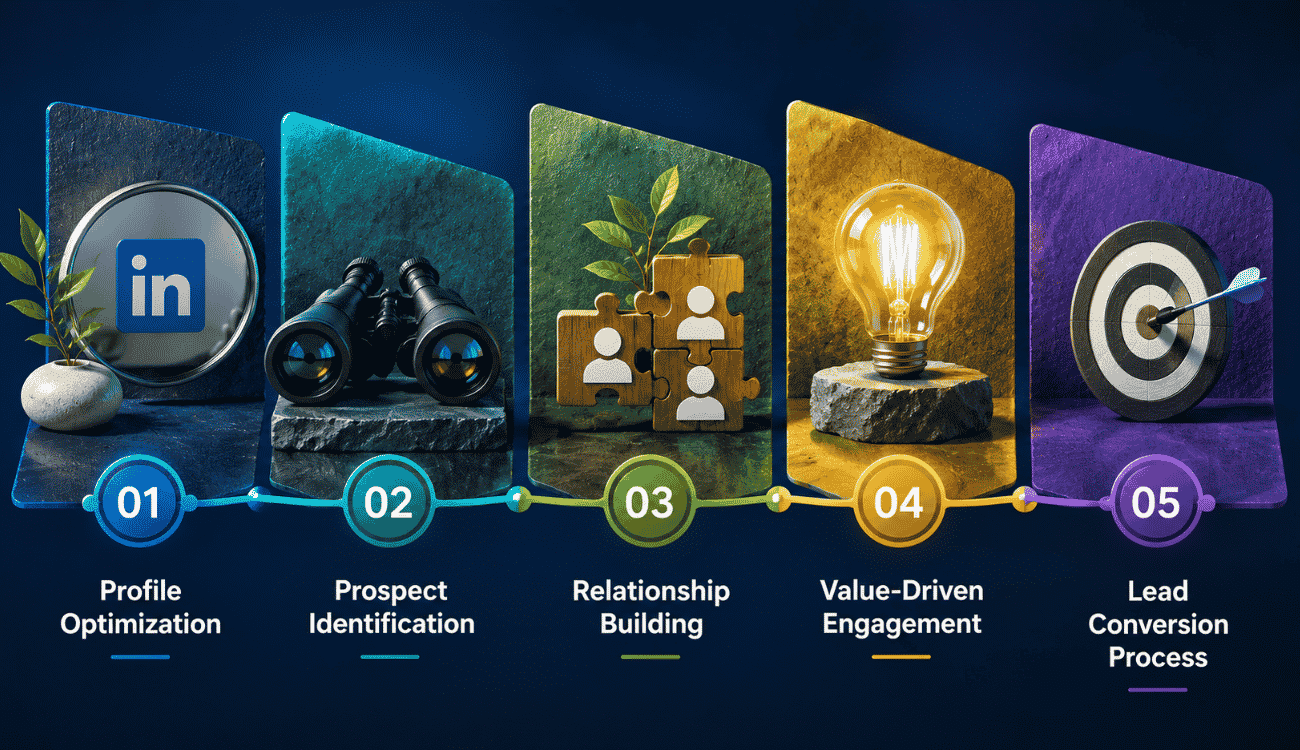
A social selling strategy follows a clear sequence, from setting up your profile to converting a warm lead into a customer. It works best as one part of a broader, structured B2B lead generation approach for high-quality leads. Unlike traditional selling, each step builds trust before any pitch happens, which changes how prospects respond.
Profile Optimization
Successful social sellers treat their profile as a landing page, not a resume. Every section should answer what a prospect wants to know: who you help, what problem you solve, and why your experience matters.
A clear job title, a summary written for your target buyer, and mentions of a past company or result build credibility fast. Social selling leaders keep this section updated, since it's often the first thing a prospect checks before responding to any message.
Prospect Identification
Finding the right people matters more than finding a lot of people. A strong LinkedIn network grows around quality connections, not volume, which keeps engagement rates high and outreach relevant.
Search filters based on industry, job title, and company size help narrow down who actually fits your offer. Joining LinkedIn groups tied to your niche also surfaces prospects who are already interested in the problems you solve, before you even send a message.
Relationship Building
Lead generation through social selling depends on relationships built before any ask. This means commenting on posts, replying to updates, and engaging with a prospect's content over weeks, not just sending a connection request and waiting.
A high SSI score usually reflects this consistency. Reps who show up regularly in a prospect's feed build familiarity, so by the time a conversation starts, it feels like a continuation, not a cold approach.
Value-Driven Engagement
Positioning yourself as a thought leader means sharing actionable insights instead of generic updates. Posts that solve a real problem or answer a common question get more engagement than posts that only promote a product.
This kind of content also works as a filter. Prospects who engage with useful posts are already showing interest, which makes the next outreach message easier to write and more likely to get a reply.
Lead Conversion Process
Once trust is built, moving a conversation toward a sales discussion feels natural instead of forced. The prospect already knows your background, has seen your content, and recognizes your name in their feed.
This is where social selling turns into pipeline. A warm conversation moves faster than a cold one, since most of the trust-building work happened before the first direct ask for a meeting or call.
LinkedIn Social Selling vs Cold Outreach
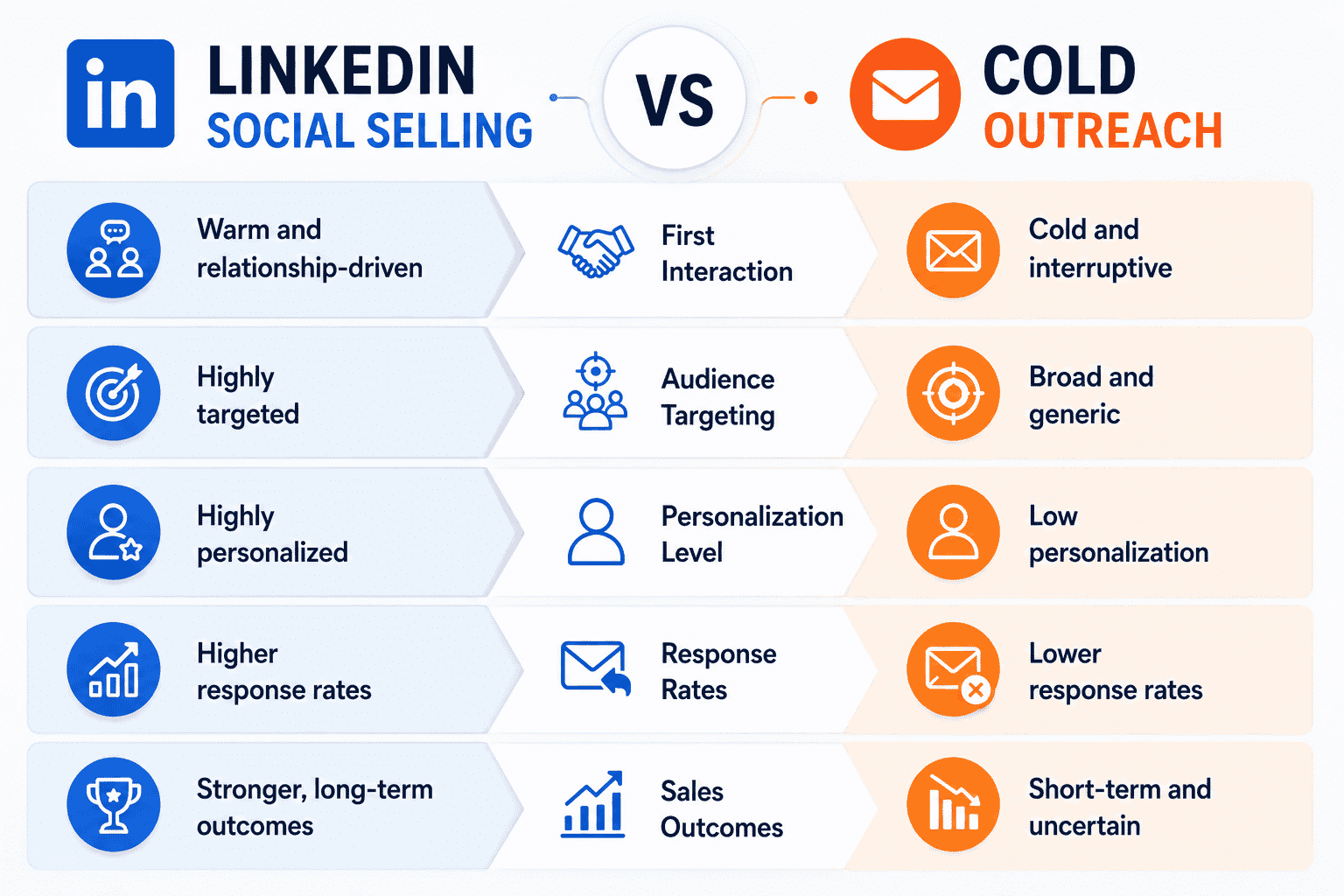
Social selling and cold outreach take different paths to the same goal: a closed deal. Understanding where they diverge helps sales teams choose the right approach within broader lead generation strategies that drive high-quality leads for each stage of the buyer's journey.
First Interaction
Cold outreach starts with a message a prospect has never asked for, often a cold call or a templated email sent to a purchased list. There's no context, no prior touchpoint, and no reason for the prospect to trust the sender yet.
Social selling starts differently. The first interaction might be a comment on a post, a reaction to shared content, or a connection request with a personal note. By the time a direct message goes out, the prospect already recognizes the name.
Audience Targeting
Cold outreach often relies on broad lists sorted by job title or industry, with little room to confirm real fit before reaching out. Volume becomes the strategy, since response rates are expected to stay low.
Social selling narrows the audience using signals like group activity, content engagement, and connection patterns. Reps target people who are already active around relevant topics, which means outreach goes to prospects more likely to have a real need.
Personalization Level
Cold messages are frequently templated, swapping in a name and company but keeping the rest identical across hundreds of sends. This scales fast but reads as generic to most recipients.
Social selling allows deeper personalization, since reps reference a prospect's recent post, shared connection, or specific role before ever pitching. That context takes more time per prospect but changes how the message lands.
Response Rates
Cold outreach typically sees lower response rates, since the message arrives with no prior relationship or context to justify a reply. Many messages get ignored or marked as spam before they're even read.
Social selling tends to generate stronger response rates because the groundwork happens before the ask. A prospect who has already engaged with a rep's content is more likely to respond to a direct message than a stranger.
Sales Outcomes
Cold outreach can still produce deals, especially at scale, but conversion often depends on sending high volumes to offset low engagement. The sales cycle can stretch longer since trust has to be built after the first contact.
Social selling tends to shorten the sales cycle once a conversation starts, since trust was already established through prior engagement. Deals sourced this way often come with fewer objections, since the prospect had time to evaluate the rep before talking.
Factor
Cold Outreach
LinkedIn Social Selling
First Interaction
Unsolicited message, no prior contact
Comment, reaction, or engagement before outreach
Audience Targeting
Broad lists, volume-based
Narrow, signal-based targeting
Personalization Level
Templated, minimal customization
Deep, context-driven personalization
Response Rates
Typically lower
Typically higher
Sales Outcomes
Longer cycle, higher volume needed
Shorter cycle, fewer objections
How To Build A LinkedIn Social Selling Strategy
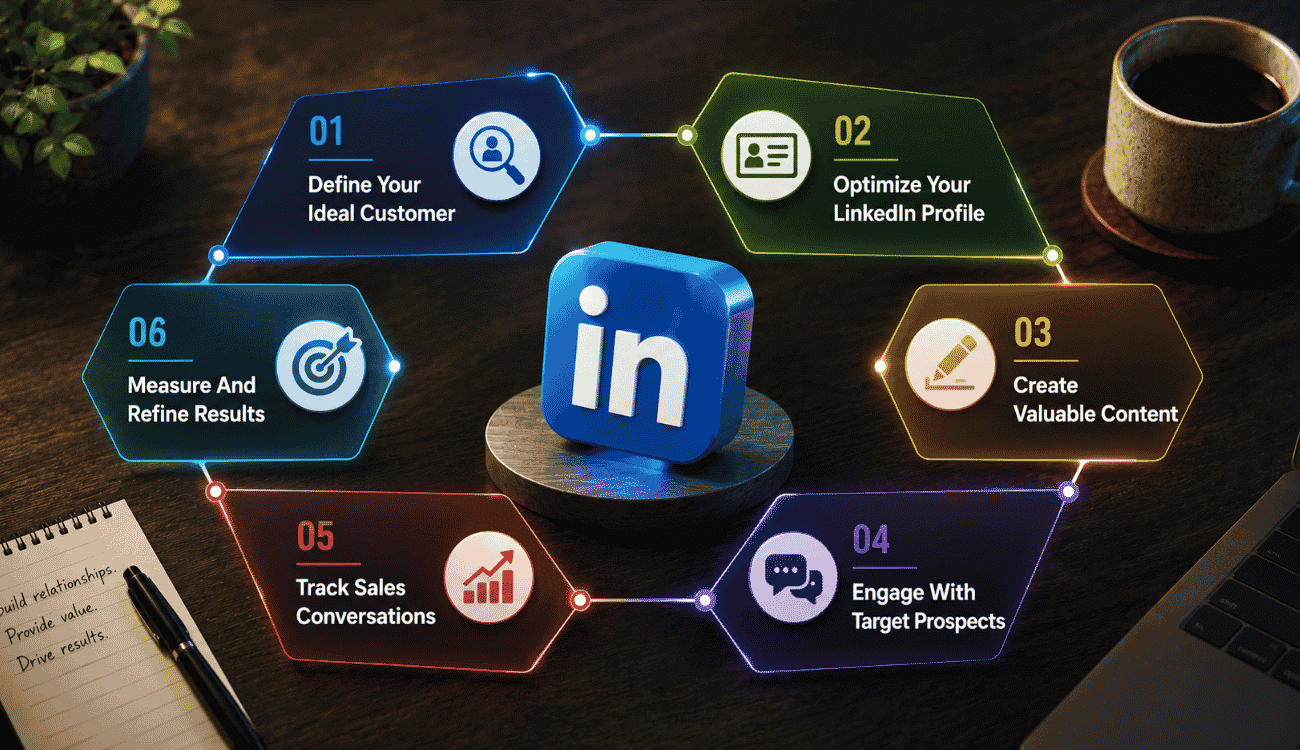
Building a working strategy means moving through clear steps, from defining who you sell to, all the way to measuring results. Pairing these steps with a structured CRM lead management process keeps every conversation organized and moving forward. Each stage feeds the next, so skipping one weakens the whole approach.
Define Your Ideal Customer
A strategy only works if you know exactly who you're targeting. Start by mapping out the decision makers most likely to buy, based on role, industry, and the service categories they typically need help with, then mirror that structure inside a contact management CRM for growing businesses.
Without this clarity, outreach turns into guesswork. Sales teams that define their potential customers upfront spend less time chasing unqualified leads and more time building strong relationships with people who actually fit the offer.
Optimize Your LinkedIn Profile
Your LinkedIn profile is often the first thing a prospect checks before responding to any message. It needs to build a strong online presence that signals credibility within seconds, just like a customer engagement CRM centralizes touchpoints to shape how buyers experience your brand.
This means a clear headline, a summary focused on the problems you solve, and visible proof of results. LinkedIn users scanning a profile decide quickly whether to engage further, so every section should earn that next click.
Create Valuable Content
Posting relevant content regularly positions you as someone worth following, not just another rep with a pitch. Valuable information shared consistently builds trust with your professional network over time and, when tracked inside a CRM built to improve sales productivity, makes it easier to see which efforts actually move deals forward.
This doesn't require constant posting. A steady rhythm of useful updates, industry takes, or answers to common questions works better than sporadic promotional posts that most prospects scroll past without engaging.
Engage With Target Prospects
Once your profile and content are in place, actively engage with the people you want to reach. Comment on their posts, respond to updates, and show up in their feed before sending any direct message, while using solid sales time management practices for sales teams so engagement doesn’t crowd out actual selling.
This step builds familiarity ahead of outreach. Prospects who see a rep engage genuinely, rather than dropping a lead gen form link immediately, are more likely to respond when a real conversation starts.
Recording who said what, what stage a conversation is at, and when to follow up keeps momentum going. This tracking step is often where social selling efforts either turn into pipeline or quietly stall out.
Measure And Refine Results
A strategy is only as good as the results it produces. Reviewing engagement, response rates, and your LinkedIn SSI regularly shows what's working and what needs adjusting, especially when tied to sales performance metrics for SaaS teams and structured sales reporting in a CRM that connects activity to revenue.
Measurable sales outcomes, not just activity, should guide any changes to the approach. Reps who refine based on actual data build stronger, more efficient strategies over time instead of repeating tactics that only feel productive.
Best Practices For Successful LinkedIn Social Selling
In a modern sales environment, small habits separate reps who convert consistently from those who don't. These best practices turn social selling activities into a repeatable system instead of random effort, especially when paired with a sales pipeline CRM for better visibility and performance.
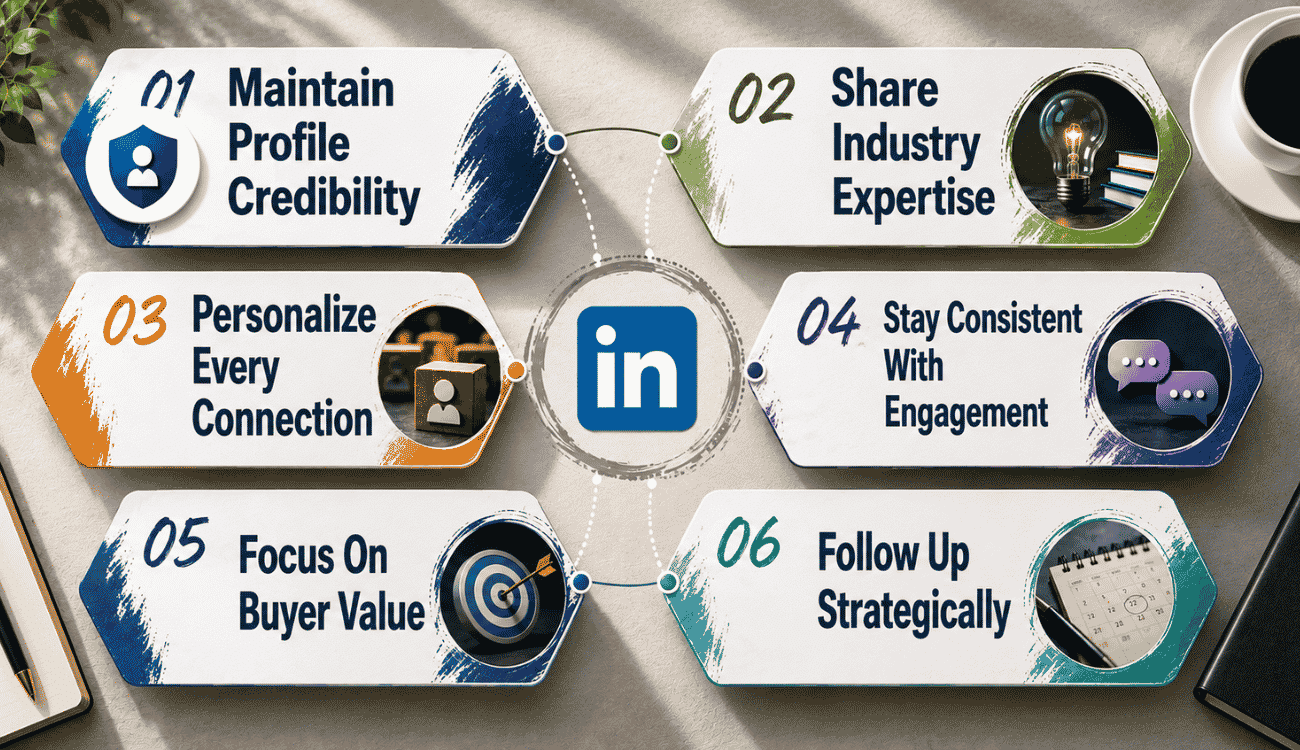
Maintain Profile Credibility
Your profile needs to reflect where you actually work and what you actually do. Keep your current company, role, and achievements updated, since outdated information makes potential buyers question your credibility before a conversation even starts; just as dynamic contact management for smarter relationship tracking keeps your CRM records accurate and trustworthy.
Credibility also comes from consistency across social platforms, not just LinkedIn. When your profile matches what prospects find elsewhere, it removes doubt and makes the next step, a message or a call, feel safer for them to take.
Share Industry Expertise
Publishing insights through LinkedIn Pulse or regular posts positions you as someone who understands the buyer's world, not just your own product. This builds authority before any pitch happens, and pairing that content with CRM automation for sales and growth ensures your best insights reach the right people at the right time.
Expertise shared consistently also supports building rapport at scale. Prospects who read useful posts over time start to trust the person behind them, which makes future outreach feel like a continuation of a relationship rather than a cold ask.
Personalize Every Connection
A generic connection request rarely gets accepted or remembered. Reference something specific, a shared group, a recent post, or a mutual connection, before asking someone to connect.
The same applies to first messages. A personalized message that references the prospect's role or recent activity performs far better than a templated pitch. This small effort at the start often decides whether a conversation continues or gets ignored.
Stay Consistent With Engagement
Set up a saved search to track new decision makers in your target market as they show up on LinkedIn. Checking this regularly keeps your outreach fresh instead of relying on one-time list building, and an integrated CRM calendar for modern sales teams helps you schedule consistent touchpoints and follow-ups.
Consistency also shows up on your SSI dashboard, which reflects how regularly you engage, not just how often you post. Reps who show up daily, even briefly, tend to build stronger networks than those who post occasionally and disappear.
Focus On Buyer Value
Every interaction should give the potential buyer something useful, whether that's an insight, an answer, or a relevant resource. Selling too early in the conversation tends to shut it down before it starts, so building in thoughtful sales workflow automation strategies can keep value-driven touches going without feeling robotic.
Meaningful conversations happen when the focus stays on the buyer's problem instead of your product. AI powered tools can help surface relevant content or timing, but the value still needs to come from understanding what the buyer actually needs.
Follow Up Strategically
Following up isn't about repeating the same message until someone answers. It means checking in with new information, a relevant update, or a genuine question tied to something they mentioned earlier, guided by the kind of sales visibility CRM insights that show which deals truly need attention.
Strategic follow-up respects the buyer's time while keeping the conversation alive. Reps who space out thoughtful check-ins, instead of sending repeated pings, tend to keep more prospects engaged through a longer sales cycle.
How CRM Helps You Manage LinkedIn Social Selling Efforts
Social selling generates conversations faster than most reps can track manually. A CRM turns scattered LinkedIn interactions into organized records, so nothing about the right prospects or key decision-makers gets lost between platforms. The right smart CRM features for organizing sales make this process far easier for busy teams.
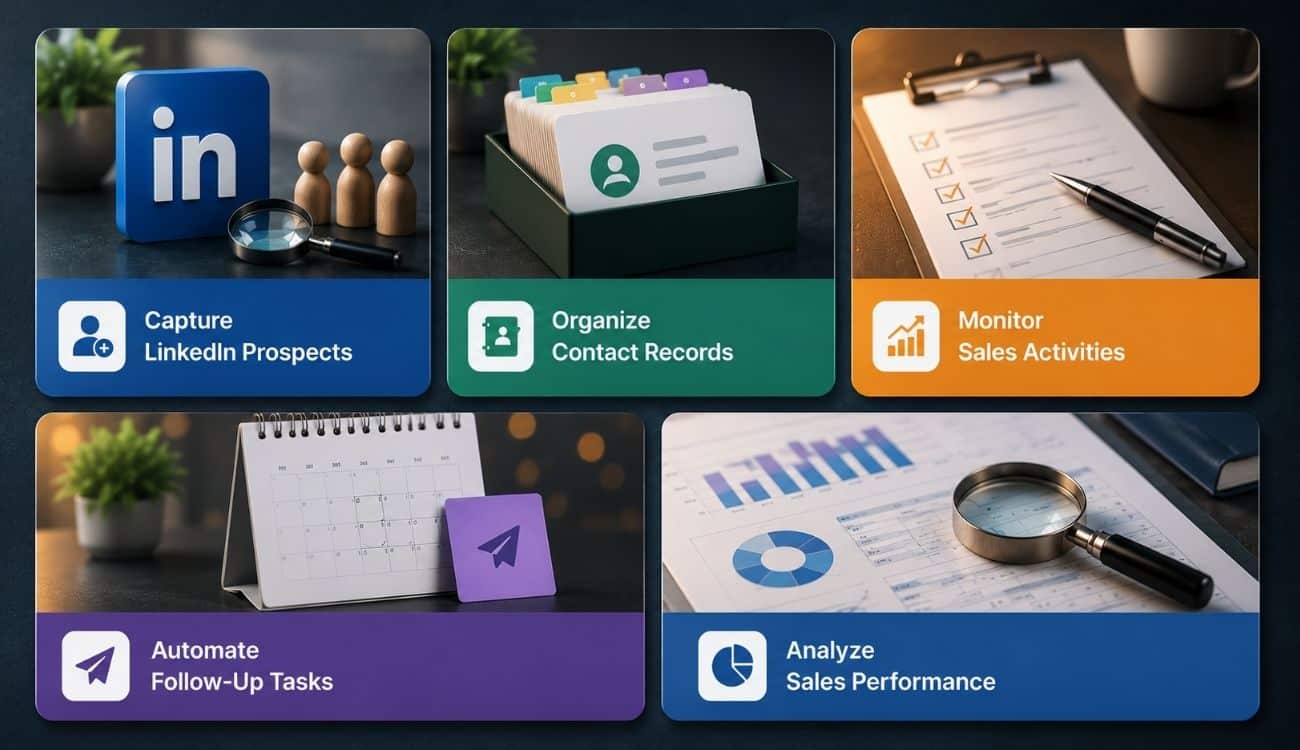
Capture LinkedIn Prospects
Once you start sending connection requests and building your network, prospects can pile up faster than memory allows. A CRM lets you log potential prospects as soon as a conversation starts, before details get forgotten.
Reps juggling multiple platforms as part of their tech stack benefit most from this habit. Capturing a lead right after a company page visit or a personalized note exchange keeps that context available for every future interaction.
Organize Contact Records
A complete profile in your CRM does more than store a name and job title. It holds message history, notes from past conversations, and context on where a prospect sits in the buying process.
Reaching out with no memory of prior contact is a common mistake this setup prevents. When every touchpoint lives in one record, follow-ups feel informed instead of repetitive, which keeps the relationship moving forward naturally.
Monitor Sales Activities
Tracking every comment, message, and reply across social selling activities gets difficult without a central system. A CRM shows exactly what's been done and what's still pending for each prospect, which is essential if you want to track deals from lead to close in a structured way.
Prioritizing the day around actual next steps, instead of guessing who needs attention, gets easier with that visibility. Managers also gain a clear view of activity levels across the team, without asking reps to report manually.
Automate Follow-Up Tasks
Manually remembering when to check back in with dozens of prospects isn't realistic. A CRM can flag follow-ups automatically, so a conversation never goes cold just because a rep got busy.
Some CRMs pair this with AI tools that suggest timing or flag prospects going quiet. Follow-up stays strategic rather than random this way, which matters more than sending frequent, unplanned messages.
Analyze Sales Performance
Reviewing which social selling efforts actually turn into pipeline requires data, not guesswork. A CRM tracks response rates, conversation-to-deal ratios, and which outreach patterns bring in the right prospects consistently—but only if you avoid common CRM implementation mistakes that derail results.
Individual wins matter less here than what this analysis shows reps and managers across the whole team. Over time, this turns social selling from a set of habits into a measurable, improvable part of the sales process.
Final Discussion
LinkedIn social selling works because it replaces cold calling with genuine connections built over time. Sharing long-form posts, engaging with past customers, and staying customer-focused consistently turns a profile into a trusted source prospects actually want to hear from.
The reps who win long-term treat this as a daily habit, not a campaign with a start and end date. AI features like message assist can speed up drafting replies, but the relationship building underneath still has to be real. Buyers notice the difference between a templated nudge and a message that shows actual attention.
Paired with a CRM that tracks every conversation, social selling stops being guesswork. It becomes a repeatable system that brings in qualified leads consistently, quarter after quarter.
Frequently Asked Questions
Can Small Businesses Benefit From LinkedIn Social Selling?
Yes. Small businesses often benefit more than larger teams, since they can build direct relationships with decision-makers without layers of approval slowing things down. A single founder or sales rep engaging consistently can compete with bigger competitors who rely on cold outreach at scale.
How Long Does LinkedIn Social Selling Take To Show Results?
Most reps see early signs, like higher response rates and more profile visits, within four to six weeks of consistent activity. Real pipeline impact usually takes two to three months, since trust builds gradually through repeated engagement rather than a single post or message.
Is LinkedIn Premium Required For Social Selling?
No. A free LinkedIn account supports the core activities: connecting, posting, commenting, and messaging. Sales Navigator, a paid add-on, makes prospecting faster with advanced filters and lead tracking, but it's not required to start building relationships and generating leads.
Can LinkedIn Social Selling Replace Cold Emailing?
It can reduce reliance on cold emailing but rarely replaces it completely. Social selling works best for warming up prospects before a direct ask, while cold email still serves high-volume outreach where personal engagement isn't practical for every contact on a list.
How Do You Measure LinkedIn Social Selling Success?
Track response rates, connection acceptance rates, and your Social Selling Index score as early indicators. For actual business impact, measure how many conversations convert into meetings, and how many of those meetings turn into pipeline your CRM can track through to a closed deal.
A company with 200 employees requests a demo. Another has 20. Most sales teams instinctively chase the larger account, but company size alone says very little about whether either prospect will become a profitable customer. Revenue, industry, technology stack, growth stage, buying process, and dozens of other factors often matter far more.
That is exactly why so many teams ask what is an ICP after months of chasing leads that never convert. An ideal customer profile ICP is not another marketing document. It is a practical framework that helps your sales team decide who deserves attention before time and budget disappear on the wrong accounts.
Unlike a buyer persona, which focuses on individual decision-makers, an ICP defines the companies that fit your business best. When your CRM captures that information correctly, marketing and sales efforts become more focused, qualification becomes faster, and every ideal customer is easier to identify long before the first sales call.
What Is An ICP?
An Ideal Customer Profile (ICP) is a clear description of the type of company that is most likely to benefit from your product and generate the highest customer lifetime value. It identifies characteristics such as company size, industry, revenue, business goals, and operational needs so sales and marketing teams can focus their sales efforts on accounts with the greatest potential while supporting long-term customer success and account based marketing. An ICP defines the ideal company to target, while a buyer persona focuses on the individual decision-makers within that company.
What Is ICP In Sales?
An Ideal Customer Profile (ICP) in sales is a detailed description of the type of company or customer most likely to benefit from your product or service while delivering the highest long-term value to your business. An ICP defines key characteristics such as industry, company size, annual revenue, location, technology stack, and business needs.
Sales and marketing teams use an ICP to identify high-value accounts, qualify leads more effectively, personalize outreach, and focus resources on prospects with the greatest potential, which is also the foundation of an effective account-based selling strategy. A well-defined ICP helps improve conversion rates, shorten sales cycles, lower customer acquisition costs, and support sustainable business growth.
Why Your ICP Breaks Down Outside The CRM
Many businesses spend weeks defining an ideal customer profile, only to save it as a presentation, spreadsheet, or internal document. After the kickoff meeting ends, the document rarely influences daily work. Sales teams continue to qualify leads based on instinct, while the CRM treats every new account the same because it has no way to recognize what an ideal customer actually looks like.
An ICP Document Cannot Guide Daily Sales Decisions
Creating an ideal customer profile is only the beginning. Problems start when the profile exists outside the tools that sales reps use every day. A document may describe your best customers in detail, but it cannot automatically influence lead qualification, opportunity scoring, or account prioritization.
Without structured CRM data, every new lead enters the same pipeline regardless of industry, company size, budget, or buying potential. Sales reps waste time reviewing accounts that have little chance of becoming long-term customers, while valuable customers often receive the same attention as poor-fit prospects. As a result, the sales process becomes slower, less predictable, and more expensive.
CRM Should Treat Your ICP As Data, Not Documentation
Many organizations think of an ideal customer profile as a strategic exercise. In reality, it should function as a data model inside your CRM.
Instead of storing an ICP as text, every characteristic should become searchable information. Industry, employee count, annual revenue, geography, technology stack, and business model should exist as CRM fields that can filter, score, and segment accounts automatically.
Once your CRM understands who your best customers are, it can identify similar opportunities at scale. Marketing teams can create targeted campaigns, customer success teams can prepare personalized onboarding, and sales productivity improves as strategies become based on measurable data instead of assumptions.
Missing CRM Data Creates Poor Customer Prioritization
A CRM without ICP data cannot distinguish high-value opportunities from low-value ones. Every account appears equally important until a sales rep manually researches it.
That approach creates several problems:
Longer sales cycles because every lead receives similar attention.
Inconsistent qualification across different sales reps.
Marketing teams attract customer segments that rarely convert.
Customer success teams inherit accounts that are unlikely to retain or expand.
Customer lifetime value declines because acquisition focuses on quantity instead of fit.
Many businesses assume they have a lead generation problem when the real issue is poor prioritization. The CRM simply lacks enough information to identify which prospects are most likely to deliver the most value.
Static Profiles Cannot Adapt To Changing Markets
Markets change constantly. New competitors emerge, customer expectations evolve, and industry trends shift throughout the year. An ideal customer profile stored in a document often becomes outdated without anyone noticing.
A CRM-driven ICP evolves alongside your business. As deals close, expand, or churn, new patterns appear in your customer data. You may discover that companies within a specific revenue range convert faster or that certain industries produce higher customer lifetime value than expected.
Because the information lives inside the CRM, your ideal customer profile becomes a living framework rather than a one-time project. Sales strategies improve continuously as new data reveals which customer segments create the most value for the business.
Operational ICPs Produce Better Business Outcomes
The strongest sales organizations do not treat an ideal customer profile as a document that sits in a shared folder. They build it directly into their CRM so every lead, account, and opportunity can be evaluated against the same criteria.
When the CRM recognizes your ideal customer profile as structured data, sales reps spend more time with the right prospects, marketing teams target audiences that closely resemble your best customers, and customer success teams inherit accounts with stronger long-term potential. The result is shorter sales cycles, better collaboration across departments, and a repeatable process for finding the customers who deliver the most value year after year.
The CRM Fields That Actually Define Your ICP
A good Ideal Customer Profile is not a long checklist that nobody updates. It is a small set of CRM fields that help your team qualify accounts, prioritize opportunities, and make better decisions every day. Every field should answer one simple question: Will this information help us identify customers who are more likely to buy and stay?
Many companies create dozens of ICP attributes, but only a handful ever influence the buying process. Too much data creates extra work, reduces sales efficiency, and leaves CRM records incomplete. Start with five or six fields that your team can maintain consistently.
Industry Or Vertical
Industry is often the first filter that separates strong opportunities from poor-fit accounts. Companies within the same sector usually face similar challenges, regulations, and buying behaviors, making it easier to personalize outreach and messaging.
Instead of broad categories, use specific values that reflect your actual target audience.
Good examples:
SaaS
Fintech
Healthcare Providers
Logistics
Manufacturing
Avoid:
Technology
Services
Business
Specific industries help marketing teams focus campaigns on relevant customer segments while allowing sales teams to tailor conversations around familiar pain points. Industry data also improves sales forecasting because patterns become easier to identify across similar businesses.
Employee Count Band
Company size often affects budgets, approval workflows, and purchasing priorities. Rather than storing an exact employee count, create predefined ranges that sales reps can select quickly.
Example values:
1 to 10 Employees
11 to 50 Employees
51 to 200 Employees
201 to 1,000 Employees
1,000+ Employees
Suppose your best-performing accounts are mid sized tech companies with between 50 and 200 employees. Every new account that falls within that range immediately becomes a higher-priority opportunity.
Employee bands also help distribute sales resources more effectively because enterprise accounts and small businesses usually require different sales approaches, and they make it easier to compare how different CRM options, such as in a Gain.io vs Pipedrive comparison, support your target segments.
Revenue Band
Annual revenue provides another strong indicator of buying potential. Companies with similar employee counts can have very different purchasing power, so revenue should complement company size rather than replace it.
Keep the options simple.
Example values:
Under $1 Million
$1 Million To $10 Million
$10 Million To $50 Million
$50 Million To $250 Million
More Than $250 Million
Revenue bands help qualify potential customers without forcing sales reps to estimate exact figures. Public databases, company reports, and platforms like LinkedIn Sales Navigator often provide enough information to populate this field.
When combined with company size, revenue creates a much clearer picture of your customer base and supports more accurate sales targeting, including when you evaluate tools in a Gain.io vs Zoho CRM comparison to support those segments.
Technology Stack
Not every business needs this field, but software companies often benefit from tracking the technologies prospects already use.
For example, a CRM platform might record whether a prospect currently uses:
Salesforce
Gain.io
HubSpot
Microsoft Dynamics
Zoho CRM
A customer support platform may track:
Shopify
WooCommerce
Magento
Knowing the existing technology stack helps sales teams personalize conversations, anticipate migration challenges, and position the product more effectively. It also allows marketing strategy to focus on integration-specific content and CRM-driven follow-up automation that attracts highly relevant sales prospects.
Whenever possible, update this field using current customer data, website technology lookups, or information gathered during discovery calls.
Geography
Location influences regulations, language, market maturity, pricing, and customer expectations. Even companies with global products often perform better in specific regions.
Rather than storing only countries, create geographic segments that match your go-to-market strategy.
Example values:
North America
United Kingdom
Australia
Southeast Asia
Middle East
Geographic data helps marketing teams localize campaigns while allowing sales teams to prioritize regions with stronger conversion rates. Over time, geography also becomes valuable for sales forecasting because regional performance trends become easier to measure, including in segments like retail teams using CRM tools to stay organized.
Buying Trigger Or Use Case
This field separates companies that merely fit your ICP from companies that are actively ready to buy.
Instead of asking why a company exists, record why it started evaluating solutions today.
Example values:
Replacing Legacy Software
Scaling Sales Operations
Expanding Customer Support
Hiring Rapidly
Opening New Locations
Preparing For Compliance
Buying triggers represent key buying signals that directly influence conversion probability. Two companies may have identical revenue, industry, and employee count, but the business actively replacing outdated software is far more likely to move forward than one simply researching options.
You can identify buying triggers through customer interviews, discovery calls, website forms, and conversations with existing customers. Another effective approach is to conduct customer interviews after successful implementations to understand what motivated the purchase in the first place.
Keep Your ICP Simple Enough To Use
More fields do not create a better ICP. They create more empty CRM records.
A practical framework with five or six consistently completed fields will almost always outperform a complex model with dozens of attributes. Your customer personas, current customer data, and feedback from existing customers should guide which fields deserve a place in the CRM. When every field supports better sales targeting, higher sales efficiency, smarter marketing strategy, and stronger decisions throughout the buying process, your ICP becomes something your team actually uses instead of another document stored in a shared folder.
How To Turn ICP Fields Into A Simple Lead Scoring Formula
An Ideal Customer Profile becomes far more useful when it moves beyond a detailed description and starts influencing how leads are prioritized. Instead of asking sales reps to review every account manually, assign points to the CRM fields that matter most. The final score helps identify the right customers faster and creates a consistent qualification process across the team.
The scoring model does not need to be complicated. In fact, simpler models that fit directly into your sales CRM workflow are easier to maintain and usually produce better adoption.
Assign Points To Your ICP Criteria
Start by giving each ICP field a score based on how strongly it matches your target customers.
ICP Field
Match Criteria
Score
Industry
Matches your primary industries
+2
Employee Count
Falls within your ideal range
+3
Revenue Band
Matches your preferred revenue range
+2
Technology Stack
Uses supported or integrated tools
+1
Lead Source
Referral or demo request
+2
Imagine a company with the following profile:
Industry: SaaS
Employee Count: 120
Revenue: $15 Million
Technology Stack: HubSpot
Lead Source: Demo Request
That account would receive:
Industry Match = +2
Employee Count Match = +3
Revenue Match = +2
Technology Stack Match = +1
Demo Request = +2
Total Score: 10
Rather than relying on opinions, the CRM now ranks the account based on measurable criteria.
Set A Qualification Threshold
A score becomes useful only when it triggers an action. Decide what score represents a qualified opportunity and apply the same rule across every lead.
For example:
7 or More Points: ICP-qualified and ready for immediate follow-up.
4 to 6 Points: Needs additional qualification before entering the main pipeline.
Below 4 Points: Low priority or nurture through marketing efforts.
Using a threshold removes guesswork from the qualification process. Every sales representative evaluates leads using the same standard, making it easier to align sales activities and improve consistency across the pipeline.
Refine Scores With Real Customer Data
Your first scoring model should never be your final one. Review closed deals, lost opportunities, customer feedback, and crm data every few months to understand which attributes actually predict success. You may discover that companies using a specific technology stack convert more often, or that referrals consistently outperform other acquisition channels, just as teams that adopted Gain.io in a sales acceleration case study saw faster cycles once their data was standardized.
Customer interviews, industry reports, and win-loss analysis can also reveal new buying patterns that deserve additional scoring weight. As your business evolves, your sales icp should evolve with it.
An ideal customer profile template is only a starting point. The real value comes from improving the scoring model as new insights become available.
Keep The Formula Easy To Maintain
Many companies overcomplicate lead scoring by adding dozens of rules, making the model difficult to understand and even harder to trust.
Focus only on attributes that consistently help you find sales prospects with a higher likelihood of becoming long-term customers. If a scoring rule rarely influences buying decisions, remove it.
A straightforward formula also helps new sales reps ramp up faster because qualification becomes part of the CRM instead of tribal knowledge shared by experienced team members.
Automate High-Scoring Leads
Once your scoring model is stable, let your CRM do the repetitive work. A lead with a score of 7 or higher can automatically move into a priority queue, notify an account executive, or trigger a follow-up task. Lower-scoring accounts can enter nurture campaigns until stronger buying signals appear.
Most modern CRM platforms, including Gain.io, support sales task automation and workflow automation that makes this process easier without requiring a complex setup. Instead of manually reviewing every new opportunity, your team can spend more time building relationships with the right customers, whether the prospect is an enterprise buyer or a small business owner searching for a solution that matches their needs.
How To Build A Live ICP Filter Instead Of A Static List
An Ideal Customer Profile should guide daily decisions, not collect dust in a slide deck. The easiest way to keep it useful is to turn it into a live CRM filter that updates automatically as new accounts enter your pipeline. Instead of reviewing a static document, your team works from the same real-time view every day.
Create A Shared ICP View
Start by creating a saved filter in your CRM using the fields you already defined.
For example, your filter could include:
Industry = SaaS or Fintech
Employee Count = 50 to 200
Annual Revenue = $10M to $50M
Geography = North America
ICP Score = 7 or Higher
Every company that matches those conditions automatically appears in the same view. As new records enter the CRM or existing data changes, the list updates without any manual work.
Unlike a spreadsheet, this approach helps your team identify companies that match your ideal profile the moment they qualify.
Give Every Team The Same Source Of Truth
One of the biggest problems with traditional ICP documents is interpretation. Marketing may focus on one set of company characteristics, while sales prioritizes something completely different.
A shared CRM view removes that confusion.
Sales representatives, marketers, and managers all work from the same filtered list of high value leads, using the same CRM-based lead management process. Everyone knows exactly who should receive outreach, personalized campaigns, or priority follow-up because the qualification criteria already exist inside the CRM.
That consistency creates better alignment around purchasing decisions and reduces time spent debating whether an account is a good fit.
Use The View To Prioritize Daily Work
A live ICP view is more than a reporting tool. It becomes part of your team's daily workflow.
A sales leader can review the filtered pipeline every morning to assign new accounts, monitor activity, and ensure high value leads receive immediate attention.
Marketing teams can also use the same view when targeting companies for campaigns, webinars, or account-based initiatives. Because both teams rely on identical qualification rules, outreach becomes more consistent throughout the customer journey.
Refresh Your ICP Every Quarter
No Ideal Customer Profile stays accurate forever. Markets change, customer needs evolve, and new opportunities emerge. Review your saved filter every quarter using closed-won deals, lost opportunities, and lead conversion rates to confirm your criteria still reflect your strongest customers.
You may discover that companies with different annual revenue ranges convert faster or that another industry consistently delivers better results. Updating the filter with real customer data keeps your ICP aligned with current buying behavior instead of outdated assumptions.
A live CRM view evolves alongside your business. Rather than maintaining another document that nobody revisits, you create a practical workspace that helps every team identify companies, focus on the right opportunities, and make better decisions every day, whether you are coordinating complex offer management with a client portal or helping real estate agents save time with CRM tools.
ICP Accounts Vs. ICP Contacts Inside Your CRM
One of the most common mistakes in CRM management is treating an account and a contact as the same thing. They serve different purposes, and understanding the key differences helps build a stronger sales process.
An account represents a company. It becomes an ICP account when it matches your clearly defined ICP based on factors like industry, company size, annual revenue, and geographic location. A contact represents the people within that company who influence or make purchasing decisions, such as decision-makers, managers, or end users.
A strong ICP helps your team identify the highest value accounts, but qualifying the company alone is not enough. Enterprise purchases often involve multiple stakeholders, and relying on a single champion can slow deals or reduce conversion rates if that person leaves the buying process.
Instead, connect several contacts to every qualified account. Include decision-makers, budget owners, technical evaluators, and daily users whenever possible. Rich customer data and dynamic contact management give sales, product teams, and marketing better visibility into the buying committee while improving lead generation and account planning.
Reaching multiple people within the same organization also reduces risk. If one conversation stalls, your team can continue engaging customers directly through other stakeholders. That approach strengthens relationships across your target market and creates more opportunities to move deals forward.
Common Mistakes Teams Make With ICP In CRM
A well-defined Ideal Customer Profile only creates value when it becomes part of your daily CRM workflow. Many businesses invest time in building an ICP, but small execution mistakes prevent it from improving qualification, pipeline management, or sales performance. Here are the most common CRM-specific mistakes to avoid.
Creating ICP Fields Without Making Them Required
Many CRM administrators add custom ICP fields but leave them optional. As a result, sales reps skip them when creating new accounts, and most records end up incomplete.
Missing industry, company size, revenue, or buying trigger data makes it difficult to qualify leads consistently. Before long, your CRM contains hundreds of accounts with blank fields, making filters, reports, and lead scoring unreliable.
If an ICP field is essential for qualification, make it a required part of the account creation or qualification process and ensure your contact management system keeps those details centralized and easy to update.
Building An ICP Once And Never Updating It
An ICP should never remain static. Customer preferences change, new markets emerge, and buying behavior evolves. Yet many companies continue using the same profile they created during their CRM implementation.
Review your closed-won and closed-lost opportunities every quarter. Look for patterns in industry, company size, annual revenue, deal value, and buying behavior. Those insights help refine your ICP using real customer data instead of assumptions made months or years ago, especially when your sales workflow inside the CRM is simple enough that startups and small teams can maintain it consistently with a CRM built for their needs.
Treating Lead Scores As Reports Instead Of Actions
A lead score has little value if nobody acts on it. Many teams spend time building a scoring formula but never connect it to the rest of the CRM workflow. High-scoring accounts appear in reports, but sales reps still work through every lead manually.
Instead, let the score trigger an action. Qualified accounts can move into a priority pipeline, notify the assigned account owner, create a follow-up task, or start an automated workflow. When scores drive action, they improve response time and help sales teams focus on the best opportunities first.
Allowing Sales And Marketing To Use Different ICPs
Another common mistake is maintaining separate ICP definitions across different tools. Marketing may target one audience inside its automation platform, while sales qualifies accounts using completely different criteria inside the CRM. The result is inconsistent lead quality, conflicting reports, and wasted effort.
Create one shared ICP framework that both teams use. Marketing campaigns, lead qualification, reporting, segmentation, and automation should all reference the same account attributes and scoring rules. When everyone works from a single CRM-based definition, collaboration improves, qualification becomes more consistent, and every department focuses on the same high-value accounts.
Final Discussion
An Ideal Customer Profile becomes truly valuable when it lives inside your CRM instead of a presentation or spreadsheet. Structured fields, practical lead scoring, shared filters, and regular updates help every team work from the same definition of a qualified account. As your business grows, continue refining your ICP using real customer data and closed-deal insights rather than assumptions. A CRM-powered ICP is not a one-time project. It is an evolving framework that helps sales, marketing, and customer success identify the right accounts faster, prioritize high-value opportunities, and build a more predictable revenue pipeline, especially when supported by an all-in-one CRM like Gain.io.
Frequently Asked Questions
What's The Difference Between An ICP And A Buyer Persona?
An Ideal Customer Profile (ICP) defines the type of company that is the best fit for your product or service. It focuses on firmographic details such as industry, company size, revenue, and location. A buyer persona, on the other hand, represents the individuals within that company, including their responsibilities, goals, challenges, and buying behavior. In simple terms, an ICP identifies the right business, while a buyer persona identifies the right people.
How Many ICPs Should A Company Have?
Most companies benefit from having one primary ICP and a few secondary profiles. If your business serves different industries or customer segments with distinct needs, creating two or three ICPs is reasonable. Too many ICPs can make lead qualification, marketing, and sales more complicated, especially if your CRM tools are not chosen to match how your team works.
How Often Should You Update Your ICP?
Review your ICP at least once every quarter or whenever your market, product, or customer base changes significantly. Analyze closed-won deals, lost opportunities, customer feedback, and CRM reports to identify patterns that may require adjustments to your targeting criteria.
Can A Small Business Have An ICP Without A Lot Of Data?
Yes. A small business can build an effective ICP using information from existing customers, sales conversations, customer interviews, and market research. Your ICP does not have to be perfect from day one. It should improve as you collect more customer data and gain a better understanding of your ideal accounts, especially when supported by CRM tools that help startups grow smarter.
What CRM Fields Are Essential For Tracking ICP?
Start with the fields that have the greatest impact on qualification. Industry, company size, annual revenue, geography, technology stack, buying trigger, and an ICP score are enough for most businesses, especially when supported by smart CRM features for sales teams. A small set of consistently maintained fields provides far more value than a complex CRM with incomplete records.
Every sales team wins some deals and loses others. The problem is that many teams move on too quickly without understanding why those outcomes happen. Sales win loss analysis helps businesses identify the factors behind every closed-won and closed-lost opportunity.
A structured win loss analysis gives your sales team valuable feedback about buyer decisions, competitor influence, pricing concerns, and gaps in the sales process. Instead of relying on assumptions, teams can use real customer feedback to improve sales performance and make better decisions.
Sales win loss analysis also provides actionable insights that help organizations refine messaging, strengthen qualification, and improve customer conversations. When teams understand why deals succeed or fail, they can adjust their sales process and focus on strategies that lead to better results. Over time, those improvements help sales teams win more deals and build consistent sales performance.
What Is Sales Win Loss Analysis
Sales win loss analysis is the process of reviewing won and lost opportunities to understand why buyers make their decisions. It examines the entire sales process, including buyer needs, objections, pricing, and competitor influence. Companies use customer feedback to identify the factors behind lost deals and successful outcomes.
The insights gained help sales and marketing teams improve competitive positioning, refine sales strategies, and strengthen competitive intelligence efforts. By understanding what influences buying decisions, organizations can improve win rates, address recurring issues, and make better decisions that support long-term revenue growth.
How To Calculate Sales Win Loss For Your CRM
Your win rate is the starting point for everything in win loss analysis. Before you can understand why deals are won or lost, you need an accurate number to work from.
Win Rate = (Deals Won / Total Opportunities) x 100
If your team closed 40 deals out of 160 opportunities last quarter, your win rate is 25%. That is your baseline.
But here is where most teams go wrong. HubSpot data from over 1,000 sales teams puts the average B2B win rate at 21% across all industries. If your number looks significantly higher than that, it is worth asking whether your pipeline is being qualified correctly or whether opportunities are being removed before they reach a closed stage. Inflated win rates are almost always a qualification problem, not a performance one.
Your CRM needs three things set up correctly before this number means anything, and consistent CRM adoption across modern sales teams is what makes that possible.
First, every opportunity must reach a closed stage. Deals that go quiet and get deleted without a closed-won or closed-lost status pollute your data. Salesforce research across 24 companies found that 50% of CRM data is inaccurate, and pipeline hygiene is the most common reason.
Second, you need a consistent definition of what counts as an opportunity. If one rep logs a discovery call as an opportunity and another waits until a proposal is sent, your win rate comparison across the team is meaningless.
Third, loss reasons must be structured. A dropdown that includes "bad timing," "no budget," and "went with competitor" gives you broad categories but no actionable insight. According to Clozd research, 85% of loss reasons logged in CRM do not reflect what buyers actually said. The rep fills in the closest answer after the fact, not the real one.
Once your CRM is tracking closed-won and closed-lost consistently, pull your win rate by rep, by deal size, and by lead source. These three cuts reveal more than the overall number ever will. A 25% win rate that hides a 40% win rate on inbound and 12% on outbound is telling you exactly where to focus.
Why Most Sales Teams Get It Wrong
Sales teams often review outcomes without understanding the real reasons behind them. Common mistakes during win loss analysis can limit valuable insights, reduce learning opportunities, and prevent teams from improving sales performance and winning more future deals.
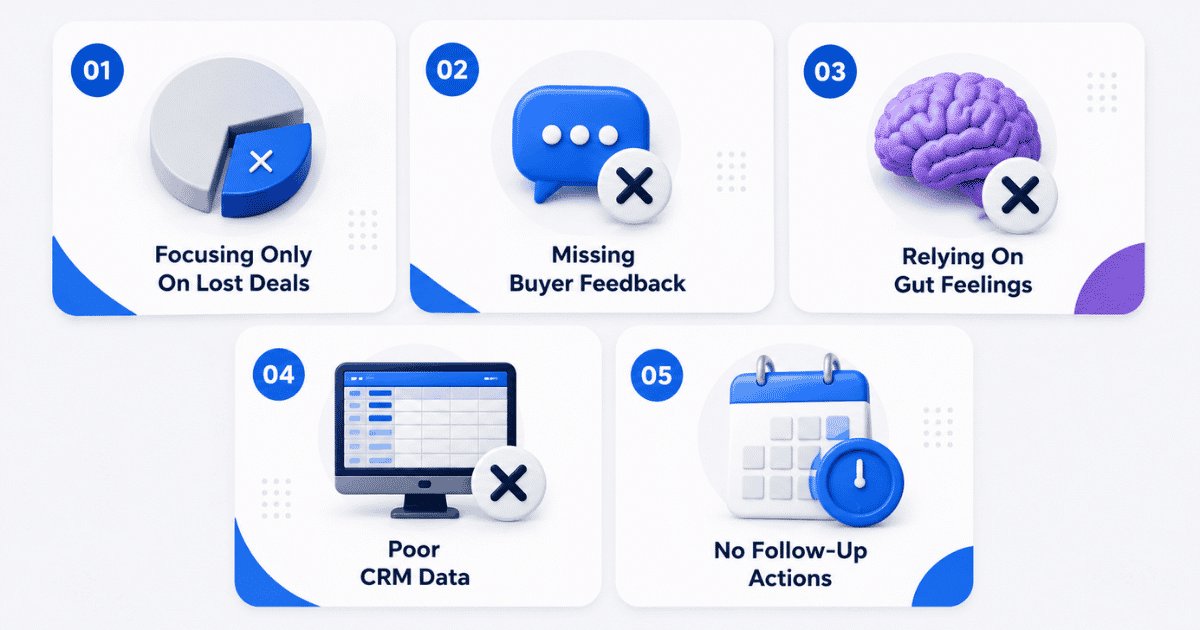
Focusing Only On Lost Deals
Many companies only investigate lost opportunities. Although reviewing losses is important, successful sales deals also contain valuable lessons. Winning customers often reveal strengths that can be repeated across the sales funnel. Examining both wins and losses helps teams identify patterns, understand buying behavior, and improve overall sales performance. Balanced win loss programs provide a clearer picture of what drives revenue growth.
Missing Buyer Feedback
Internal opinions rarely tell the full story. Direct buyer feedback explains why prospects moved forward, selected competitors, or decided not to buy. Without buyer feedback, companies may assume the wrong causes behind outcomes. Sales teams, marketing campaigns, and go to market teams can all benefit from hearing directly from customers. Honest conversations often uncover hidden objections, pricing concerns, and decision factors.
Relying On Gut Feelings
Assumptions can lead teams in the wrong direction. Sales leaders sometimes depend on personal opinions instead of evidence from customers and opportunities. Data-driven decisions help identify patterns that support better planning and stronger sales strategies. Reviewing actual outcomes allows teams to make informed improvements instead of reacting to isolated experiences.
Poor CRM Data
Incomplete or inaccurate CRM data creates major challenges during analysis. Missing fields, outdated records, and inconsistent information make it difficult to understand why sales deals succeed or fail. Reliable CRM data allows organizations to track trends, measure performance, and discover opportunities for improvement. Clean records also support stronger reporting and more accurate decision-making.
No Follow-Up Actions
Analysis alone does not improve results. Many organizations collect information but fail to act on the findings. Win loss programs should produce clear recommendations for sales, marketing campaigns, and customer-facing teams. Taking action on insights creates a competitive advantage and supports long-term growth. When teams apply lessons from previous opportunities, they reduce the risk of losing customers and improve results in future deals.
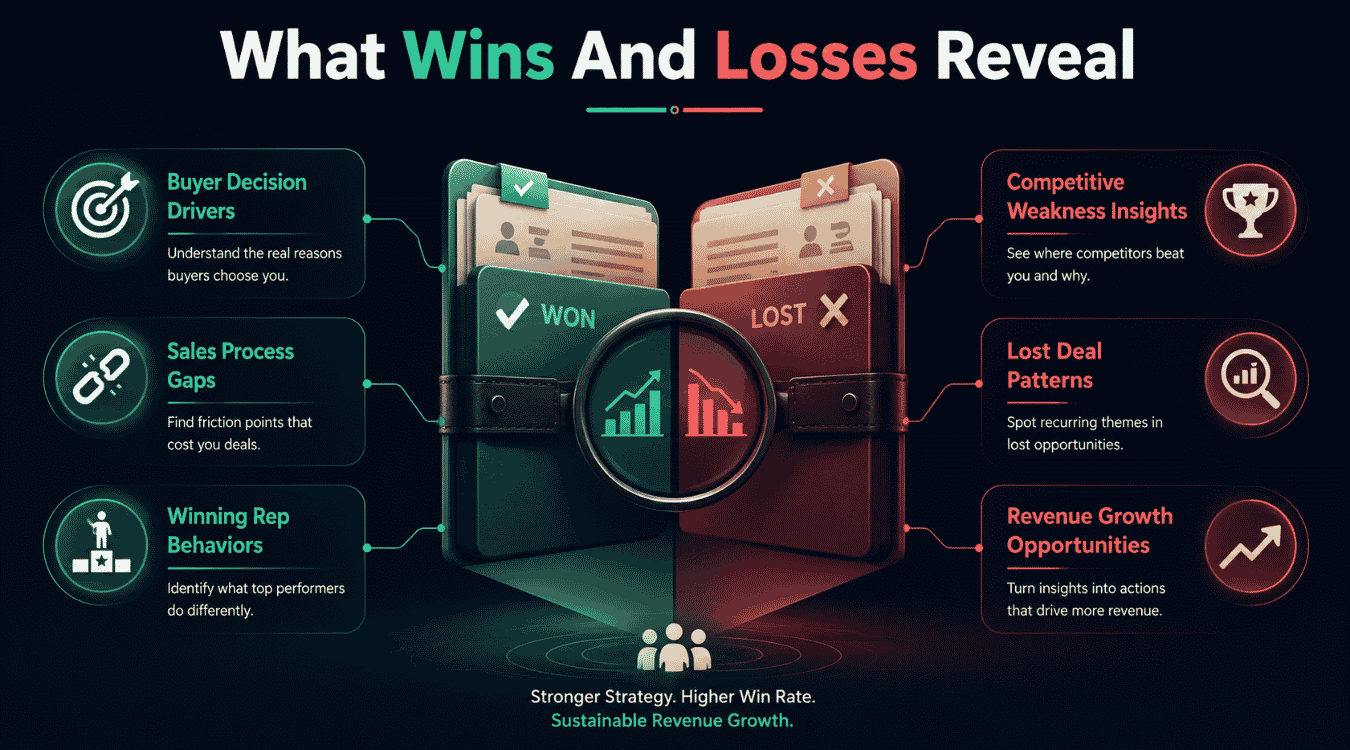
What You Gain By Reviewing Wins And Losses
A structured win loss process helps companies understand why deals succeed or fail. Reviewing both wins and lost opportunities provides valuable information that improves decision-making, strengthens team performance, and supports better business outcomes.
Buyer Decision Drivers
Understanding why buyers make decisions is one of the biggest benefits of win loss analysis. One on one conversations and win loss interviews reveal the factors that influence purchasing decisions, including pricing, product fit, service quality, and implementation concerns.
Collecting data directly from customers helps teams understand what buyers value most. Sales teams can then adjust messaging, qualification, and sales strategies to better align with customer expectations. Key stakeholders across the business can also use these insights to support future opportunities.
Competitive Weakness Insights
Win loss findings often uncover weaknesses in competitors. Buyers frequently share why they rejected another vendor, what concerns they had, or which limitations affected their decisions. This information provides valuable insights into competitive performance.
Sales teams can use those findings to improve positioning during future conversations. Marketing teams can highlight differentiators, while product teams can address feature gaps that buyers mention during evaluations. A thorough analysis of competitor weaknesses helps businesses create stronger market positioning.
Sales Process Gaps
Many lost opportunities occur because of problems within the sales process itself. Delayed follow-ups, poor qualification, inconsistent communication, or unclear value propositions can negatively affect closing deals.
Reviewing deal records helps teams identify where prospects drop out of the buying journey. Sales leaders can then improve workflows, coaching, and sales enablement programs. Addressing process issues leads to a better sales experience for prospects and increases overall efficiency.
Lost Deal Patterns
Individual losses may seem unrelated, but broader trends often emerge when reviewing multiple opportunities. Win-loss analysis helps teams identify recurring reasons for lost opportunities, such as pricing concerns, competitive advantages, implementation fears, or missing features.
Collecting data across multiple deals allows organizations to identify patterns that may otherwise remain hidden. Understanding those patterns helps sales leaders reduce future losses and improve qualification efforts. Cross-functional teams can also work together to solve common problems that repeatedly affect opportunities.
Winning Rep Behaviors
Top-performing sales representatives often follow behaviors that contribute to successful outcomes. Reviewing successful deals helps organizations understand how top performers manage conversations, handle objections, and guide prospects through the buying process.
Those findings can improve coaching programs and strengthen team performance across the organization. Sharing successful techniques allows other sales representatives to replicate proven approaches and improve their own results.
Revenue Growth Opportunities
The final benefit of win loss analysis is identifying opportunities for revenue growth. A thorough analysis of wins and losses helps organizations make better decisions across sales, marketing, product, and customer success teams.
Insights from win loss interviews help businesses improve competitive performance, address feature gaps, and refine strategies that support growth. When key stakeholders use those findings collectively, organizations become better at closing deals, improving the customer experience, and increasing long-term revenue.
Setting Up Your CRM For Win Loss Tracking
A well-structured CRM helps sales teams analyze wins and losses consistently. CRM software for modern sales teams provides the structure to do this at scale. Proper tracking provides key insights into buyer behavior, deal outcomes, and sales performance. Instead of relying on assumptions, teams can use accurate information to make data driven decisions and improve future results.
Find Out Standard Win And Loss Reasons
Standardized reasons create consistency across every opportunity. Avoiding common CRM implementation mistakes when you set these fields up ensures people actually use them. Sales teams should define categories such as pricing, product features, competitor selection, implementation concerns, budget limitations, or timing issues.
Clear categories help teams analyze wins and identify common causes behind losses. Consistent records also make it easier to compare opportunities, understand decision drivers, and identify trends across different markets and customer segments.
Track Competitors In Every Opportunity
Competitor information should be captured in every sales opportunity as part of disciplined sales deal tracking. Recording which vendors participated in the buying process provides a full picture of market competition and deal dynamics.
Tracking competitors helps organizations understand where they win and where they struggle. Over time, teams can glean insights about competitive strengths, weaknesses, pricing concerns, and positioning strategies. This information becomes especially valuable for large opportunities and enterprise deals where multiple vendors are often involved.
Capture Buyer Decision Factors
CRM records should include the reasons buyers made their final decisions. Strong CRM lead management practices make it easier to keep those insights connected to the right contacts and deals. Sales representatives can document information gathered from buyer interviews, follow-up conversations, and direct customer feedback.
Whenever possible, customer comments should be recorded in their own words rather than interpreted summaries. Capturing actual buyer feedback helps teams understand decision drivers, objections, and expectations. Those details often reveal important factors that may not appear in raw data alone.
Build Closed-Won And Closed-Lost Dashboards
Separate dashboards for won and lost opportunities make reporting more effective and turn raw outcomes into actionable sales KPIs for smarter revenue decisions. Teams can review deal size, sales cycles, competitor involvement, industries, and common reasons behind outcomes.
Dashboards help sales leaders turn insights into action by making important trends easier to identify. Reviewing both successful and unsuccessful opportunities helps organizations understand winning behaviors and recognize areas that require improvement.
Visual reporting also allows teams to monitor performance over time and quickly identify changes in buyer behavior.
Audit CRM Data Regularly
Regular CRM audits maintain data quality and improve reporting accuracy. Using smart CRM features to organize sales better also reduces the amount of cleanup required. Missing fields, outdated information, and inconsistent records can prevent teams from uncovering valuable insights.
Sales leaders should review opportunities regularly to verify competitor information, buyer feedback, decision reasons, and deal details. Clean data allows organizations to make better decisions and understand the true reasons behind outcomes.
When companies combine reliable data, buyer interviews, and structured reporting, they gain a deeper understanding of deal dynamics and can turn insights into actions that improve future sales performance.
How To Run A Win Loss Analysis
A win-loss analysis helps businesses understand why customers choose their solution or decide to buy from a competitor. Following a structured approach, similar to a complete sales process for tracking deals from lead to close, allows teams to gather meaningful information, improve sales performance, and turn insights into action. The goal is not only to review closed deals but also to create better outcomes for future sales opportunities.
Collect Deal Data
The first step is collecting information from closed deals. Sales activity tracking software makes this easier by automatically logging calls, emails, and meetings. Sales teams should review CRM records, opportunity notes, sales activities, proposal details, and competitor information. Important factors such as deal value, sales cycle length, objections, and outcomes provide useful context.
Accurate data helps teams understand purchasing decisions and creates a foundation for further analysis. Reviewing both won and lost opportunities allows organizations to identify strengths as well as areas that need improvement.
Interview Buyers
Speaking directly with customers provides valuable information that internal records often miss. Combining conversations with email tracking CRM insights can reveal how buyers engaged with your outreach over time. Buyer interviews help organizations understand why purchasing decisions were made and what factors influenced the outcome.
Questions may focus on pricing, product fit, customer experience, competitor comparisons, and the buying process. Honest feedback from customers often reveals concerns that sales teams never identified during the opportunity. Those conversations also help teams adjust messaging and improve future interactions.
Identify Patterns
After gathering information, teams should review the findings to identify common trends. Similar objections, repeated competitor mentions, product concerns, and sales challenges often appear across multiple opportunities and point to where sales productivity improvements will have the most impact.
Looking for patterns helps organizations understand which factors affect success rates. Sales leaders can identify strengths that contribute to wins while also uncovering issues that lead to losses. Product managers, marketing teams, and sales teams can all benefit from those findings.
Categorize Reasons
The next step is organizing the findings into clear categories. Common categories include pricing, product capabilities, service quality, implementation concerns, competitor advantages, and timing, and they should be shared across teams to support effective sales team collaboration.
Categorization makes large amounts of information easier to analyze. Teams can compare opportunities and understand which issues appear most frequently. This process also supports better go-to-market decisions by showing where improvements can have the greatest impact.
Share Findings
The final step is sharing the results across the organization. Strong sales visibility makes it easier for sales, marketing, product managers, and leadership teams to review the findings together and discuss possible improvements.
A win loss analysis only creates value when organizations turn insights into action. Teams can adjust messaging, improve processes, refine products, and strengthen customer experiences based on real feedback. Consistent analysis helps businesses improve future sales opportunities and supports long-term growth across the organization.
Win Loss Analysis By Deal Type
Different deal types often have different buying behaviors, decision criteria, and sales challenges, especially in environments with long sales cycles. Segmenting win loss analysis by deal type helps sales teams understand what drives success and what causes losses. A targeted review provides more accurate insights and supports better sales strategies.
New Business
New business opportunities focus on acquiring first-time customers. Buyers often evaluate several vendors before making a decision. Pricing, product fit, implementation support, and trust usually influence the outcome, and sales conversion rate benchmarks and tactics help you understand how well your process performs against those expectations.
Win loss analysis for new business deals helps teams understand why prospects choose one solution over another. Sales teams can identify common objections, improve messaging, and strengthen positioning during the early stages of the sales process.
Upsell Deals
Upsell opportunities involve existing customers who already use the product or service. Upselling strategies to boost customer lifetime value depend heavily on customer satisfaction, product adoption, and business value, which often influence the buying decision.
Analyzing upsell deals helps teams understand which products, services, or features create additional value for customers. Lost upsell opportunities may reveal concerns about pricing, product usage, or unmet expectations. Those insights help customer success and sales teams improve expansion strategies.
Enterprise Deals
Enterprise deals typically involve larger budgets, longer sales cycles, and multiple decision-makers, so maintaining a clear visual sales pipeline becomes critical. Procurement teams, executives, and department leaders often participate in the buying process.
Win loss analysis for enterprise opportunities focuses on factors such as stakeholder alignment, implementation concerns, security requirements, and business impact. Reviewing these deals helps organizations improve account strategies, sales coordination, and executive engagement.
SMB Deals
Small and medium-sized business deals usually move faster than enterprise opportunities. Buyers often prioritize affordability, ease of use, and quick implementation, and a visual sales pipeline that improves deal clarity helps keep those faster-moving deals organized.
Analyzing SMB deals helps teams understand what influences purchasing decisions in smaller organizations. Common factors may include pricing, product simplicity, customer support, and time to value. Sales teams can use those findings to improve qualification and accelerate decision-making.
Competitive Losses
Competitive losses occur when buyers select another vendor. Reviewing these opportunities helps businesses understand competitor strengths, market positioning, and buyer preferences, and often exposes where a poor CRM migration from Excel or messy data has made it hard to compete effectively.
Sales teams can identify recurring reasons behind losses, including pricing concerns, missing features, implementation issues, or stronger competitor messaging. Understanding competitive losses helps organizations improve positioning, refine value propositions, and increase future win rates.
How Often To Run Win Loss Analysis
The ideal frequency for win-loss analysis depends on your sales volume, deal complexity, and the number of closed opportunities. Running reviews on a consistent schedule helps sales teams identify trends, improve decision-making, and respond to changes in buyer behavior.
Business Situation
Recommended Frequency
Primary Goal
High-volume sales teams
Monthly
Identify trends and respond quickly to market changes
Mid-sized B2B sales teams
Quarterly
Measure win rates and analyze recurring patterns
Enterprise sales teams
After major deals
Review complex buying decisions and stakeholder feedback
Fast-growing companies
Monthly or Quarterly
Improve sales processes and adjust strategies
Annual business reviews
Yearly
Evaluate long-term performance and strategic changes
Enterprise teams often conduct win-loss analyses after major opportunities because each deal contains valuable insights. Maintaining a consistent review schedule helps sales leaders make informed decisions and continuously improve sales performance.
Final Discussion
Win loss analysis turns everyday sales activities into meaningful business insights. By comparing deals won versus lost, organizations gain a clearer understanding of customer decisions, competitive challenges, and sales effectiveness. Reliable win-loss data helps sales reps identify what works, what causes losses, and where improvements are needed.
Tracking the win loss ratio over time allows sales leaders to measure progress and make informed decisions. Teams that conduct a win-loss review regularly can improve sales execution, refine messaging, and strengthen customer conversations.
The real value comes from acting on the findings. Organizations that use insights from closed opportunities can coach sales reps more effectively and improve future outcomes. Consistent analysis helps teams make better decisions, increase win rates, and build a stronger sales process that supports long-term growth and sustainable revenue performance.
Frequently Asked Questions
Who Should Participate In A Win Loss Analysis?
Sales leaders, sales representatives, marketing teams, customer success teams, and product teams should participate in a win loss analysis. Involving multiple departments helps organizations understand deal outcomes from different perspectives.
What Questions Should You Ask During A Win Loss Interview?
Common questions include why the buyer made their decision, which factors influenced the purchase, what concerns existed during the buying process, and how competitors were evaluated.
Can Small Businesses Benefit From Win Loss Analysis?
Yes. Small businesses can use win loss analysis to understand customer needs, improve sales processes, and identify opportunities to increase win rates without requiring large teams or complex tools.
What Metrics Should You Track In Win Loss Analysis?
Important metrics include win rate, loss reasons, competitor involvement, sales cycle length, deal size, buyer objections, and customer feedback collected during the sales process.
What Tools Can Support Win Loss Analysis?
CRM platforms, customer feedback tools, survey software, reporting dashboards, and interview notes can all support win loss analysis by helping teams collect, organize, and review deal information
Accurate revenue predictions are critical for growing teams, yet many organizations still struggle with inconsistent forecasts, missed targets, and unreliable pipeline projections. AI sales forecasting accuracy has become a major focus for sales leaders because modern forecasting tools can analyze historical sales data, buyer behavior, pipeline activity, market trends, and CRM insights far beyond what traditional sales forecasting methods can handle.
Unlike manual forecasting that often relies on assumptions, AI sales forecasting software continuously evaluates data quality, deal progress, engagement signals, and historical data patterns to produce more accurate forecasts. As businesses scale, reliable sales forecasting software helps teams allocate resources, set realistic goals, and identify revenue risks before they affect performance.
Understanding how AI forecasting works and what factors influence forecast accuracy can help growing companies make smarter decisions and build a more predictable path to revenue growth.
What Is AI Sales Forecasting?
AI sales forecasting is the process of using artificial intelligence and machine learning to predict future revenue based on historical sales data, pipeline activity, customer interactions, and external factors such as market shifts. Unlike traditional forecasting methods that depend heavily on manual estimates from sales reps, sales forecasting AI analyzes large volumes of data to identify patterns, trends, and revenue risks.
Modern sales forecasting tools continuously evaluate sales performance, deal progress, and buying signals to generate more accurate forecasts. As a result, sales teams can make data-driven decisions, improve planning, allocate resources effectively, and respond faster to changing market conditions.
Importance Of Accurate AI Sales Forecasting Data
Accurate AI sales forecasting depends on more than advanced algorithms. High-quality data, consistent sales processes, and reliable forecasting methods are essential for generating predictions that teams can trust and act on confidently.
Better Data Leads To More Accurate Forecasts
AI powered sales forecasting systems rely on reliable data to identify patterns and predict future revenue. When CRM records contain outdated information, duplicate entries, or missing fields from manual data entry, forecast accuracy declines. Clean and consistent data allows AI tools to analyze customer behavior, pipeline movement, and deal progression more effectively, resulting in more accurate forecasts.
Reliable Forecasts Improve Resource Allocation
Growing companies must decide where to invest time, budget, and talent. Accurate predictions help leaders allocate resources to the right opportunities, hire at the right pace, and manage operational costs more efficiently. Reliable forecasts also reduce uncertainty and support strategic planning across sales, finance, and operations teams.
AI Helps Teams Respond To Market Trends Faster
Traditional methods often rely heavily on historical data and subjective judgment from sales teams. AI forecasting continuously evaluates market trends, customer interactions, and pipeline activity to identify changes as they occur. Faster insights allow businesses to adjust their sales strategy before market shifts impact revenue performance.
Strong Forecasting Supports Better Sales And Marketing Decisions
Accurately forecast sales outcomes requires alignment between sales and marketing efforts. Forecast data helps teams evaluate the impact of marketing campaigns, identify high-converting channels, and prioritize opportunities with the greatest revenue potential. Better visibility into future demand enables more informed decision-making throughout the sales forecasting process.
Reliable forecasting provides a clearer picture of future revenue and business performance. Sales leaders can track progress against targets, identify risks earlier, and improve forecasting process consistency across teams. When organizations combine AI forecasting with quality data and structured sales processes, they gain greater confidence in revenue planning and long-term growth projections.
How Does AI Boost Sales Forecasting
AI in sales forecasting helps businesses generate more accurate forecasts by analyzing large volumes of historical performance data, pipeline activity, customer interactions, and market signals. Unlike traditional sales forecasting methods that rely heavily on assumptions and manual judgment, an AI model continuously learns from clean historical sales data and compares predictions against actual sales outcomes. As new information enters the system, AI adjusts forecasts in real time and identifies patterns that humans may overlook. This deeper analysis helps sales teams predict revenue more accurately, identify risks earlier, and optimize sales strategies based on data rather than intuition. The result is a more reliable forecasting process that supports better planning and business growth.
How To Improve AI Sales Forecasting Accuracy
Accurate AI forecasts do not happen automatically. Even the most advanced AI forecasting tools depend on data quality, process consistency, and continuous optimization. Growing teams that focus on the following areas can create accurate forecasts and make better business decisions.
1. Build Forecasts On High-Quality CRM Data
AI models are only as reliable as the sales data they analyze. Missing close dates, duplicate records, outdated opportunities, and inconsistent pipeline updates can reduce forecast accuracy significantly. Sales operations leaders should establish CRM governance standards and require teams to maintain complete records, using CRM systems that improve sales productivity to make accurate data entry and updates easier for reps. High-quality data helps AI forecasting tools identify meaningful patterns, reduce human error, and generate more accurate predictions. Clean CRM data also improves demand forecasting and future sales projections.
2. Monitor Pipeline Health Instead Of Pipeline Size
Many teams focus on the total value of their pipeline, but pipeline health is often a stronger forecasting indicator. AI forecasting tools analyze deal velocity, buyer engagement, stalled opportunities, and stage progression to assess the likelihood of conversion. A large pipeline filled with inactive deals can create misleading forecasts. Regular pipeline reviews help teams identify risks earlier and improve the accuracy of future revenue predictions, especially when managers use a visual sales pipeline to improve deal clarity and spot bottlenecks quickly.
3. Combine Historical Data With Current Market Conditions
Historical performance provides valuable forecasting insights, but relying on past results alone can create blind spots. Market conditions, competitive activity, seasonal demand, and economic indicators often influence purchasing decisions, so teams should choose sales forecasting methods for accurate revenue planning that balance historical trends with current signals. Modern AI forecasting systems continuously evaluate both historical trends and real-time market signals. This combination allows organizations to create accurate forecasts that reflect current business realities rather than outdated assumptions.
4. Standardize Sales Processes Across The Team
Forecast accuracy often suffers when sales representatives follow different qualification methods, sales stages, or opportunity management practices. Consistent sales processes create cleaner data and improve model reliability. AI forecasting tools perform better when every opportunity follows the same workflow and reporting standards. Standardization also makes forecasting methods more predictable and easier to scale as the business grows.
5. Use AI Agents To Detect Forecast Risks Early
Modern AI agents can identify warning signs long before they appear in traditional forecasting reports. Reduced buyer engagement, prolonged sales cycle complexity, missed follow-ups, and declining deal momentum can all indicate future revenue risk, which an AI sales assistant for pipeline efficiency can flag early through real-time monitoring. Instead of waiting for quarterly reviews, teams can use AI-powered alerts to take corrective action earlier. Early intervention often improves both sales outcomes and forecast accuracy.
6. Measure Forecast Accuracy And Refine Models Continuously
Many organizations generate forecasts but never evaluate their accuracy. Comparing predictions against actual results helps teams identify weaknesses in their forecasting process. Sales leaders should track forecast variance, win rates, stage conversion rates, and forecast consistency over time, along with other sales performance metrics for SaaS teams that highlight where forecasts and execution diverge. Continuous analysis allows organizations to refine forecasting methods, improve AI model performance, optimize sales strategies, and produce increasingly reliable forecasts as market conditions evolve.
Challenges That Reduce AI Sales Forecast Accuracy
AI forecasting can improve revenue planning, but several challenges can reduce prediction accuracy. Identifying and addressing these issues is essential for building forecasts that sales leaders can trust and act on confidently.
Poor CRM Data Quality
AI forecasting models depend on accurate and complete data. Missing close dates, outdated opportunities, duplicate records, and inconsistent deal updates can distort predictions. When sales teams fail to maintain CRM hygiene, the system learns from flawed information and produces unreliable forecasts. Even advanced forecasting platforms cannot compensate for poor-quality data. Reliable forecasting starts with clean, standardized records across the entire sales pipeline.
Inconsistent Sales Processes Across Teams
Forecast accuracy often declines when different sales representatives follow different qualification criteria, sales stages, or reporting methods. One rep may update opportunities regularly, while another delays updates until deals progress further. Such inconsistencies create gaps in forecasting data and make it difficult for AI models to identify meaningful patterns. Standardized sales processes help ensure forecast inputs remain consistent and comparable.
Overreliance On Historical Data
Historical performance provides valuable forecasting insights, but past results do not always predict future outcomes. Market conditions, customer preferences, competitor activity, and industry changes can quickly alter buying behavior. Organizations that rely too heavily on historical trends may overlook emerging risks and opportunities. Accurate forecasting requires a balance between historical analysis and current market intelligence.
Limited Visibility Into Pipeline Health
Pipeline size alone does not indicate future revenue potential. Deals that remain inactive for extended periods, lack stakeholder engagement, or show declining momentum can create an inflated forecast. Without visibility into pipeline health, AI models may overestimate revenue opportunities, which is why sales visibility matters more than ever for aligning forecasts with what is actually happening in the field. Monitoring buyer activity, deal velocity, and engagement levels helps improve prediction accuracy and provides a more realistic view of future performance.
Human Bias And Forecast Manipulation
Human judgment still influences many forecasting processes. Sales representatives may overestimate deal probability, delay reporting risks, or adjust forecasts based on targets rather than actual conditions. Such behavior introduces bias into forecasting data and reduces model accuracy. AI can reduce some human bias, but it cannot eliminate inaccurate inputs. Organizations that combine AI forecasting with objective data governance and regular forecast reviews typically achieve more reliable results.
Best Ways To Implement AI Sales Forecasting
Effective AI sales forecasting requires more than deploying new technology. Organizations that combine quality data, structured processes, and AI-driven insights are far more likely to achieve accurate and actionable revenue forecasts.
Use High-Quality Customer And Sales Data
Every forecasting model depends on the quality of the information it analyzes. Incomplete CRM records, duplicate accounts, and outdated opportunities reduce forecast reliability. AI based predictive analytics performs best when customer data, deal history, and sales activities are consistently updated, and modern CRMs with smart CRM tools for sales teams make these updates far easier to maintain. Clean data helps forecasting systems identify patterns more accurately and generate stronger revenue forecasting insights.
Combine Historical Forecasting With Real-Time Signals
Historical forecasting provides valuable context, but it should not be the only source of prediction. Customer purchase history, current pipeline activity, buyer engagement, and market changes all influence future revenue. Modern AI systems evaluate both historical trends and real-time signals to provide a more complete forecasting picture. This approach helps organizations adapt more quickly to changing sales conditions.
Align Sales Processes Before Deploying AI
Forecasting accuracy often suffers when sales teams follow inconsistent qualification methods or opportunity stages. Standardized sales processes create cleaner data and improve model performance, as shown when teams implement sales acceleration with Gain.io to close deals faster by unifying pipeline stages and follow-up rules. Sales managers should establish clear pipeline definitions, reporting standards, and opportunity management practices before implementing AI forecasting tools, starting with a shared understanding of what a sales pipeline is and how to build one that works. Consistency across teams creates a stronger foundation for predictive analysis.
Integrate Forecasting Into Strategic Planning
Forecasts become more valuable when they influence business decisions. Organizations should use AI forecasting insights to support strategic planning, budgeting, hiring, territory management, and resource allocation. Revenue forecasts should not exist in isolation from business operations. Connecting forecasting outputs to decision-making processes helps teams act on insights rather than simply monitor them.
Continuously Review Forecast Performance
AI forecasting models require ongoing evaluation and improvement. Sales operations teams should regularly compare forecast predictions against actual results, identify sources of variance, and refine forecasting inputs. Customer behavior, market conditions, and sales strategies evolve over time. Continuous optimization ensures forecasting models remain relevant and capable of delivering valuable insights that support long-term business growth.
Future Trends In AI Sales Forecasting In 2026
AI sales forecasting is evolving rapidly as businesses seek faster, smarter, and more reliable ways to predict revenue. Several emerging trends are expected to shape the future of forecasting in 2026 and beyond.
AI Agents Will Take A Larger Role In Revenue Forecasting
Traditional forecasting often requires manual reviews and spreadsheet analysis. In 2026, AI agents are expected to automate many forecasting tasks by continuously monitoring pipeline activity, customer engagement, and deal progression. Instead of simply generating reports, AI agents will provide proactive recommendations, identify revenue risks, and suggest actions that improve forecast accuracy. Sales teams will spend less time collecting data and more time acting on insights.
Real-Time Market Intelligence Will Improve Forecast Accuracy
Future forecasting systems will move beyond internal CRM data and incorporate external signals such as market conditions, industry trends, competitor activity, and economic indicators, while drawing on sales pipeline CRM platforms to keep internal deal data accurate and up to date. AI models will analyze these factors alongside customer behavior to create more responsive forecasts. As market conditions change, forecasting platforms will adjust predictions automatically, helping businesses react faster to emerging opportunities and risks.
Predictive Analytics Will Become More Personalized
AI based predictive analytics will increasingly focus on customer-level forecasting rather than broad revenue projections. Advanced models will analyze customer purchase history, engagement patterns, buying preferences, and account activity to predict future purchasing behavior more accurately, especially when paired with robust sales pipeline management that tracks every stage of deal movement. This deeper level of analysis will help organizations identify expansion opportunities, improve retention strategies, and create more precise revenue forecasts.
Forecasting Will Become A Core Part Of Strategic Planning
Forecasting will no longer operate as a standalone sales function. Revenue forecasting insights will play a larger role in strategic planning across finance, operations, marketing, and executive leadership teams. Businesses will use AI-driven forecasts to guide hiring decisions, budget allocation, inventory planning, and growth initiatives. As forecasting accuracy improves, organizations will gain greater confidence in long-term business planning and decision-making.
How Gain.io Helps Teams Build More Accurate Sales Forecasts
Gain.io helps sales teams centralize customer information with an all-in-one CRM, manage opportunities, track deal progress, and maintain organized pipeline data in one place. Accurate sales forecasting depends heavily on data quality, and a CRM system plays a key role in keeping sales records consistent and up to date by helping sales teams manage leads more effectively. By providing visibility into customer interactions, sales activities, and pipeline movement, Gain.io helps teams build a stronger foundation for forecasting and offers a compelling alternative in the Gain.io vs Salesforce CRM comparison. Sales managers can review deal progress, monitor pipeline health, and identify potential revenue opportunities more effectively by applying proven sales deal tracking practices for modern teams. When combined with structured sales processes and reliable CRM data, Gain.io supports better decision-making, improved sales planning, and more informed revenue forecasting for growing teams.
FAQs
What Is The Difference Between AI Sales Forecasting And Traditional Forecasting?
Traditional forecasting relies heavily on manual estimates, spreadsheets, and sales rep judgment. AI sales forecasting analyzes large volumes of data, identifies patterns automatically, and adjusts predictions as new information becomes available. This approach helps businesses generate more accurate and data-driven revenue forecasts.
How Much Historical Data Is Needed For AI Sales Forecasting?
Most AI forecasting systems perform best when they have access to at least 12 to 24 months of historical sales data. Larger datasets provide more context about seasonality, buying patterns, and sales trends, allowing forecasting models to produce more reliable predictions.
Can AI Forecast Sales During Market Changes?
Yes. Modern AI forecasting platforms can evaluate real-time pipeline activity, customer behavior, market trends, and external business conditions alongside historical data. This allows forecasts to adapt more quickly to changing market conditions than traditional forecasting methods that rely primarily on past performance.
What Metrics Should Teams Track To Improve Forecast Accuracy?
Teams should monitor forecast variance, win rates, deal velocity, pipeline coverage, stage conversion rates, and sales cycle length, then use task management for sales teams to turn those insights into focused daily actions. Tracking these metrics helps identify forecasting weaknesses and provides insights that can improve both forecast reliability and overall sales performance, particularly when teams support those improvements with a simpler sales workflow in their CRM.
Is AI Sales Forecasting Suitable For Small And Growing Businesses?
Yes. Growing businesses often benefit significantly from AI forecasting because it helps improve planning, resource allocation, and revenue visibility, especially when paired with a structured B2B sales CRM for revenue teams that keeps deal data accurate. Even smaller sales teams can use forecasting insights to identify risks earlier, prioritize opportunities, and make more informed business decisions as they scale, especially when they automate sales tasks to stay focused and organized.
Managing client relationships becomes harder as an agency grows. Leads come from different channels, sales conversations happen across multiple touchpoints, and client information often ends up scattered. A CRM for agencies brings everything into one place. It helps teams track leads, manage contacts, automate follow-ups, and keep every client interaction organized.
The right CRM software does more than store customer data. It improves client management, supports sales pipeline visibility, and helps agencies build stronger customer relationships. Many platforms also offer workflow automation, reporting tools, and integrations with marketing and project management software.
In this guide, we compare the best CRM for agencies to help you find a solution that fits your team, streamlines operations, and supports long-term growth.
Why Agencies Need A CRM Platform
A growing agency needs more than spreadsheets and scattered notes. Client data, sales tracking, and project management become harder as teams expand. A modern agency CRM keeps everything in one place. It helps sales teams, account managers, and marketing teams stay aligned with smart CRM tools designed for sales teams. The right CRM software also improves client satisfaction, supports business growth, and helps agencies build stronger client relationships over time.
Client Management Challenges
Many agencies struggle with disconnected client communication and scattered customer data. Sales and marketing efforts often rely on multiple tools that do not work well together. As a result, teams miss follow-ups, lose track of deals, and waste time on manual updates.
A CRM for agencies solves this problem by centralizing client communication, contact management, and lead management. Every interaction stays connected to a client account. Teams can track leads, monitor client campaigns, and manage multiple clients without switching between systems. Better visibility leads to stronger client retention and smoother relationship management.
Agency Growth And Scalability
Growth creates new challenges for digital marketing agencies. More clients mean more sales processes, marketing campaigns, and project management tasks. Without a structured CRM system, scaling becomes difficult and errors become common.
The biggest advantage of a CRM platform is visibility. Teams can view client data, sales performance, task management activities, and ongoing client communication from a single dashboard. Customizable dashboards and advanced reporting make it easier to measure results and spot opportunities.
Many CRM tools also include marketing automation, email marketing automation, and integration capabilities with Google Workspace, project management tools, and communication platforms. Automated workflows can send welcome emails, assign tasks, and even convert a closed deal into an active project. Research shows that 80% of customers are more likely to make another purchase after a positive experience, which makes consistent client management a major advantage for agencies.
How We Selected The Best CRM For Agencies
Every agency has different needs. Some focus on lead management, while others need strong project management and client communication tools. To find the best CRM for agencies, we reviewed the features that matter most for daily operations, business growth, and client satisfaction. We also considered ease of use, scalability, reporting capabilities, and overall value.
Ease Of Use
A CRM tool should make work easier, not harder. Teams need quick access to client data, sales tracking, and task management without spending weeks on training, especially for modern sales teams relying on CRM software. A clean interface helps account managers and sales teams stay productive from day one.
The best CRM software offers simple navigation and customizable dashboards. Team members can track deals, manage leads, and update records with minimal effort. Easy adoption also reduces resistance during the initial setup phase. That leads to faster results and smoother sales and marketing processes.
Client And Contact Management
Strong client management sits at the center of every agency CRM. Agencies handle multiple clients, campaigns, and ongoing conversations every day. Without a central system, important details can get lost.
A quality CRM platform centralizes client communication, contact management, and customer data. Teams can view centralized contact information, emails, notes, tasks, and project updates from one place. Better visibility improves client relationships and helps customer service teams respond faster. It also supports stronger client retention over time.
Sales Pipeline Management
Sales growth depends on clear visibility. Agencies need to know where every opportunity stands and what actions come next. Visual sales pipeline software makes that process much easier.
Manual tasks consume valuable time. Follow-up emails, status updates, and task assignments can quickly overwhelm busy teams. Automation tools help reduce that workload.
The best CRM for marketing agencies includes workflow automation that automates repetitive tasks across sales and marketing efforts. Automated workflows can send welcome emails, assign tasks, and trigger follow-ups when deal stages change. Some platforms even convert a won opportunity into an active project. This creates smoother marketing and sales processes while reducing manual updates.
Reporting And Analytics
Good decisions require reliable data. Agencies need clear insights into sales performance, client campaigns, and overall business health. Basic reports often fail to provide the level of detail agencies need.
Advanced reporting and analytics help agencies measure results more effectively. Customizable dashboards show sales metrics, campaign performance, and pipeline trends in real time, helping teams get more from their CRM with a simpler sales workflow. Client-facing reports can demonstrate campaign ROI and support stronger client relationships. Client profitability reports also compare revenue against labor costs to identify the most valuable accounts.
Integrations And Scalability
Most agencies rely on several existing tools every day. Email platforms, project management tools, collaboration tools, and marketing automation tools with CRM email integration all play a role in daily operations.
A modern agency CRM should connect with Google Workspace, email marketing platforms, communication software, and other business systems, ideally as a CRM with built-in email integration. Strong integration capabilities reduce duplicate work and improve data accuracy. Scalability matters as well. The right CRM software should support new team members, multiple service lines, and growing client portfolios without requiring a platform change.
Pricing And Overall Value
Price matters, but value matters more. A lower-cost CRM solution may lack key features that growing agencies need. Higher-priced platforms can deliver a stronger return when they improve efficiency and client management.
We compared pricing plans alongside core CRM features, automation capabilities, reporting capabilities, and scalability. Gain.io offers a free trial for 14 days and a single plan that costs $9.50 per seat per month. HubSpot offers a free CRM tier for small teams. Zoho CRM plans start at around €14 per user per month, making it a popular option for budget-conscious agencies. Agencies should focus on long-term value rather than monthly cost alone when selecting the right CRM, often using a Gain.io vs HubSpot CRM comparison as part of their evaluation.
7 Best CRM For Agencies To Manage Clients And Grow Faster
Choosing the right CRM for agencies can have a major impact on client relationships, sales performance, and business growth. The platforms below offer different strengths, from marketing automation and sales pipeline management to client communication and project collaboration, making it easier to find the right fit for your agency.
Let's start with:
1. HubSpot CRM
HubSpot CRM is one of the most popular CRM platforms for agencies of all sizes. It combines contact management, sales pipeline management, marketing automation, and customer service tools in one ecosystem, and many teams compare it using a guide when choosing a platform. The platform is easy to use and offers a free CRM plan, which makes it attractive for growing agencies. Teams can manage client relationships, track deals, automate follow-ups, and keep sales and marketing efforts aligned from a single dashboard.
Key Features
Contact and company management with complete client history
Visual sales pipeline and deal tracking
Email marketing automation and lead nurturing
Customizable dashboards and reporting tools
Integration with Google Workspace, Slack, and hundreds of third-party apps
Pros
Generous free plan
User-friendly interface
Strong marketing automation tools
Large integration marketplace
Cons
Advanced features require higher-tier plans
Costs increase quickly as teams grow
Some customization limits on lower plans
Pricing
HubSpot CRM offers a free plan for individuals and small teams. Paid plans start at around $20 per month for Starter Customer Platform when billed monthly. Annual billing provides discounts on some plans. Enterprise-level plans can exceed several hundred dollars per month depending on users and features.
Best For
HubSpot CRM is best for marketing agencies, digital marketing agencies, and growing service businesses that want a balance of CRM software, marketing automation, sales management, and customer relationship management without a steep learning curve, though some may evaluate a comparison before deciding. It works especially well for teams that rely on inbound marketing and lead generation.
2. Gain.io
Gain.io is a modern all-in-one CRM for agencies that need client management, sales tracking, and collaboration tools in one place. Unlike many CRM platforms that focus only on sales, Gain.io combines contact management, offer management, a shared inbox, and client communication features. The platform keeps client data organized and helps teams manage deals without switching between multiple tools. Its affordable pricing also makes it attractive for small and mid-sized agencies.
Key Features
Contact management with complete client records
Visual sales pipeline management
Shared inbox for centralized client communication
Offer management with a client portal
Gmail, Outlook, calendar, and email integrations
Pros
Agency-focused feature set
Affordable pricing
Shared inbox included
Easy setup and migration assistance
Cons
Single pricing plan only
14-day trial limited to 10 users
Pricing
Gain.io offers a single plan priced at $9.50 per seat per month. The plan includes contact management, sales pipeline management, offer management, shared inbox access, email integrations, custom fields, custom deal stages, and priority support. A 14-day free trial is available.
Best For
Gain.io is best for agencies that want a simple CRM solution without paying enterprise-level prices. It works well for client management, sales pipeline management, ongoing client communication, and team collaboration. Small agencies and mid-sized agencies can get strong value from its agency-focused features.
3. Pipedrive
Pipedrive is a sales-focused CRM tool known for its visual pipeline management. It helps agencies manage leads, track deals, and improve sales performance with minimal complexity. The platform is easy to learn and offers strong automation capabilities. Many agencies use it to streamline sales and marketing processes while maintaining visibility across the sales pipeline, although some compare it with a Gain.io vs Pipedrive CRM guide to decide which better fits their workflow.
Key Features
Visual sales pipeline management
Lead and deal tracking
Workflow automation
Sales forecasting tools
Email integration and activity tracking
Pros
Easy to use
Excellent pipeline visibility
Strong automation features
Good reporting capabilities
Cons
Limited marketing automation
No free plan
Advanced features cost extra
Pricing
Pipedrive plans start at approximately $24 per user per month with monthly billing. Annual billing lowers costs to around $14 per user per month on entry-level plans. Higher tiers unlock advanced reporting, automation tools, and forecasting features.
Best For
Pipedrive is best for agencies that prioritize sales pipeline CRM to improve sales management and lead management. Teams that need a clear sales process, sales forecasting, and pipeline management without enterprise-level complexity will find it a strong fit.
4. Zoho CRM
Zoho CRM offers one of the most complete feature sets at an affordable price. The platform combines customer relationship management, marketing automation, sales tracking, and advanced reporting. Agencies can manage client relationships, automate workflows, and connect multiple business tools from a single CRM system using email, calendar, and contact integration software. Its flexibility makes it popular among growing agencies.
Key Features
Contact and lead management
Workflow automation
Sales forecasting and analytics
Email marketing integrations
Customizable dashboards and reports
Pros
Competitive pricing
Extensive customization options
Strong automation capabilities
Large integration library
Cons
Interface can feel crowded
Learning curve for new users
Advanced setup requires time
Pricing
Zoho CRM offers a free plan for up to three users. Paid plans start at €20 per user per month with monthly billing or €14 per user per month with annual billing. Enterprise and Ultimate plans add advanced reporting and AI features, which some teams may compare against a streamlined Zoho CRM alternative.
Best For
Zoho CRM is best for agencies that need advanced features without paying enterprise software prices. It suits marketing agencies, digital marketing agencies, and businesses that rely heavily on workflow automation and detailed reporting, though some may choose a streamlined alternative to Zoho CRM.
5. Salesforce
Salesforce is the leading CRM platform for large agencies and enterprise organizations, though mid-sized teams may look for a simpler Salesforce CRM alternative. The platform delivers advanced sales management, customer relationship management, analytics, and automation tools. Agencies can customize nearly every aspect of the system. It is one of the most powerful CRM solutions available today.
Key Features
Enterprise-grade sales pipeline management
Advanced workflow automation
AI-powered forecasting and insights
Extensive integration capabilities
Custom reporting and dashboards
Pros
Highly scalable
Powerful customization
Strong analytics tools
Extensive app ecosystem
Cons
Expensive for small agencies
Steep learning curve
Complex implementation process
Pricing
Salesforce Starter Suite begins at approximately $25 per user per month. Pro Suite starts around $100 per user per month. Annual contracts are common for larger deployments. Additional costs may apply for advanced automation and AI features.
Best For
Salesforce is best for large agencies with complex sales processes and multiple service lines. Organizations that require advanced reporting, deep customization, and enterprise-level scalability will benefit most from the platform, while others may prefer a simpler CRM alternative to Salesforce.
6. Monday CRM
Monday CRM combines CRM functionality with project management tools. Agencies can manage leads, track deals with dedicated sales pipeline management tools, organize projects, and collaborate with teams from a single workspace. Its visual interface is easy to understand and works well for client-facing operations. The platform also supports workflow automation and customizable workflows.
Key Features
Visual sales pipeline management
Project and task management
Workflow automation
Team collaboration tools
Custom dashboards and reporting
Pros
Easy-to-use interface
Strong project management features
Flexible workflows
Good collaboration tools
Cons
Limited CRM depth compared to Salesforce
Reporting varies by plan
Costs increase with team size
Pricing
Monday CRM costs $20 per user per month with monthly billing. Annual billing can reduce costs to around $12 per user per month. Higher plans unlock advanced reporting, automation, and forecasting features.
Best For
Monday CRM is best for agencies that want CRM software and project management tools in one platform. It works especially well for teams that manage client projects and need strong collaboration across departments supported by integrated email, calendar, and contact tools.
7. Freshsales
Freshsales is a modern CRM platform built for sales teams and growing businesses that want to use CRM to manage leads more effectively. The software combines contact management, sales automation, communication tools, and AI-powered insights. Agencies can manage leads, track customer interactions, and automate routine tasks. Its simple interface helps teams become productive quickly.
Key Features
Lead and contact management
AI-powered sales insights
Workflow automation
Built-in email and phone tools
Sales forecasting and reporting
Pros
Free plan available
Built-in communication tools
Strong automation features
Easy setup process
Cons
Limited customization options
Advanced features require higher plans
Smaller integration marketplace
Pricing
Freshsales offers a free plan for small teams. Paid plans start at approximately $11 per user per month with monthly billing. Annual billing can lower entry-level pricing. Premium plans include advanced automation, forecasting, and reporting capabilities.
Best For
Freshsales is best for agencies that need a balance of affordability and functionality. It suits teams that want automation tools, lead management, sales tracking, and customer relationship management without the complexity of larger enterprise platforms, especially startups and small sales teams choosing their first CRM.
Best CRM For Agencies Comparison Table
A side-by-side comparison makes it easier to spot the right CRM software for your agency. Some platforms focus on marketing automation, while others prioritize client management, sales pipeline management, or project collaboration. The tables below compare the most important features, pricing, and use cases to help you make a confident decision.
Feature Comparison At A Glance
A feature comparison helps you quickly identify which CRM platform aligns with your agency's workflow. Focus on the tools your team uses daily, such as client management, sales tracking, automation, reporting, and collaboration.
Feature
HubSpot CRM
Gain.io
Pipedrive
Zoho CRM
Salesforce
Monday CRM
Freshsales
Contact Management
✓
✓
✓
✓
✓
✓
✓
Sales Pipeline Management
✓
✓
✓
✓
✓
✓
✓
Lead Management
✓
✓
✓
✓
✓
✓
✓
Email Integration
✓
✓
✓
✓
✓
✓
✓
Custom Fields
✓
✓
✓
✓
✓
✓
✓
Custom Deal Stages
✓
✓
✓
✓
✓
✓
✓
Shared Inbox
✗
✓
✗
✗
✗
✗
✗
Client Portal
✗
✓
✗
✗
✗
✗
✗
Offer Management
✗
✓
✗
✗
✗
✗
✗
Sales Forecasting
✓
✓
✓
✓
✓
✓
✓
Advanced Reporting
✓
✓
✓
✓
✓
✓
✓
Task Management
Limited
✓
✗
Limited
Limited
✓
Limited
Pricing Comparison
Pricing can vary significantly between CRM platforms. Comparing monthly and annual costs side by side helps agencies balance budget, features, scalability, and long-term value before making a decision.
CRM Platform
Starting Price
Monthly Billing
Annual Billing
HubSpot CRM
Free
From $20/month
From $15/month
Gain.io
$9.50/seat/month
$9.50/seat/month
$9.50/seat/month
Pipedrive
From $24/user/month
From $24/user/month
From $14/user/month
Zoho CRM
From €20/user/month
From €20/user/month
From €14/user/month
Salesforce
From $25/user/month
From $25/user/month
Annual Plans Available
Monday CRM
From $15/user/month
From $15/user/month
From $12/user/month
Freshsales
Free
From $11/user/month
Lower Annual Rates
Best Use Cases Compared
Every CRM serves a different purpose. Some excel at marketing automation, while others focus on client communication, project management, or sales pipeline management, so it’s important to choose CRM tools that fit your workflow. This comparison highlights where each platform performs best.
CRM
Best Use Case
HubSpot CRM
Agencies that need CRM software, marketing automation, and sales tools in one platform
Gain.io
Agencies that want client management, offer management, client portals, shared inboxes, and sales tracking at an affordable price
Pipedrive
Sales-focused agencies that prioritize pipeline management and lead tracking
Zoho CRM
Growing agencies that need advanced features and workflow automation without enterprise pricing
Salesforce
Large agencies with complex sales processes, large teams, and advanced customization needs
Monday CRM
Agencies that need CRM software and project management tools in the same workspace
Freshsales
Small agencies looking for affordable sales automation and customer relationship management
For agencies that primarily manage client relationships, proposals, offers, and ongoing client communication, Gain.io delivers one of the most agency-focused feature sets in this comparison, including offer management with a client portal. HubSpot CRM remains a strong all-around platform, while Salesforce leads the enterprise market. The best choice depends on your agency's size, workflow requirements, and long-term growth plans.
Essential Features Of A CRM For Agencies
Not every CRM platform is built for agency workflows. The right CRM software should help manage client relationships, organize sales and marketing processes, improve collaboration, and support long-term business growth. Here are the features that matter most when evaluating a CRM for agencies.
Client Relationship Management
A CRM for agencies should make client management simple and organized. Every client interaction, email, note, and task should be easy to find. Strong customer relationship management helps account managers provide a better experience and maintain ongoing client communication.
A centralized CRM system stores all client data in one place. Teams can use dynamic contact management to access customer data, review past conversations, and track project updates without searching through multiple tools. Better visibility helps manage contacts better and strengthen client relationships and improve client retention over time.
Modern CRM platforms include visual sales pipeline management and sales tracking features. Teams can monitor deal stages, forecast revenue, and identify bottlenecks in the sales process. A visual sales pipeline improves deal clarity and helps sales teams focus on high-value opportunities and improve overall sales performance.
Workflow Automation
Manual work slows teams down. Repetitive tasks such as follow-up emails, task assignments, and status updates can consume hours every week. Workflow automation helps reduce that workload.
The best CRM software includes automation tools that streamline sales and marketing efforts. Automated workflows can trigger email follow-ups, assign tasks, and update records when deal stages change. This reduces manual updates, improves consistency, and allows teams to focus on client campaigns and business growth.
Team Collaboration Tools
Agency success depends on teamwork. Sales teams, marketing teams, customer service teams, and account managers often work on the same client accounts. Notes and activity tracking, and other collaboration tools keep everyone aligned.
Agencies need data to make better decisions. Basic reports are useful, but customizable dashboards provide deeper insights into sales performance, client management, and marketing efforts.
Advanced reporting features help agencies track deals, measure campaign results, and monitor sales pipeline health and performance. Client-facing reports can also demonstrate campaign ROI and strengthen client trust. Custom dashboards allow teams to focus on the metrics that matter most to their goals.
Third-Party Integrations
Most agencies use several platforms every day. Email marketing tools, project management tools, communication apps, and marketing automation platforms all play a role in daily operations.
Strong integration capabilities connect your CRM solution with existing tools such as Google Workspace, email marketing platforms, and collaboration software through unified email, calendar, and contact integration. Seamless integrations improve data accuracy, reduce duplicate work, and create a more connected workflow across the entire business.
How To Choose The Right CRM For Your Agency
A CRM can improve client management, sales performance, and team efficiency. However, the wrong platform can create extra work and increase costs. A structured evaluation process helps agencies choose a CRM solution that supports current needs and future growth.
Set Clear Goals
Every CRM project should start with clear objectives. Agency leaders, account managers, sales teams, and marketing teams should agree on what success looks like. A shared vision helps avoid confusion later.
Align stakeholders on CRM goals before implementation and choose CRM tools that fit your workflow. Some agencies focus on lead management, while others prioritize client communication, project management, or marketing automation. A methodical evaluation process prevents costly CRM mistakes and helps teams choose the right CRM software for their workflows.
Plan For Growth
A CRM platform should fit today's needs and tomorrow's goals. Small teams may only need core CRM features today, but future growth can create new requirements.
Consider team size, client volume, and multiple service lines when evaluating options, especially if you run a startup or small sales team that needs a simple CRM. A scalable CRM system can support more users, larger sales pipelines, and growing customer data without major disruptions. The right CRM grows alongside your agency and reduces the need for future software migrations, especially when you choose CRM tools that fit your workflow.
Review Integration Needs
Most agencies already use email marketing tools, project management tools, communication platforms, and file-sharing software. A CRM should connect with those existing tools to create a smoother workflow.
Native integrations reduce manual work and improve data accuracy, particularly when using a CRM with email integration. Strong integration capabilities allow agencies to centralize client communication and connect marketing campaigns with sales and marketing processes. Popular integrations often include Google Workspace, email marketing platforms, calendars, and collaboration tools.
Evaluate Costs And Value
Price matters, but long-term value matters more. The cheapest CRM software may lack advanced features that improve client satisfaction and business growth.
Compare pricing plans alongside workflow automation, reporting capabilities, customization options, and support quality. Agencies should also consider time savings and productivity gains. CRM automation can often deliver a stronger return on investment than a lower-priced alternative.
Test Before Full Deployment
A successful CRM implementation requires preparation. Start by documenting current workflows and auditing existing customer data. Clean records help create a smoother migration and improve reporting accuracy.
Pilot the CRM with a smaller group before rolling it out across the entire agency to validate that it supports modern sales team workflows and processes. After launch, review CRM metrics and user feedback regularly. A 30-day review helps identify issues early and refine the CRM setup. Continuous improvements ensure the platform continues to support client management, sales tracking, and agency growth effectively.
Common Mistakes To Avoid When Choosing A CRM
A CRM can improve client management and sales performance, but only when the platform matches your agency's needs. Many agencies rush the selection process and face adoption issues later. Avoiding a few common mistakes can save time, money, and frustration.
Price Over Value
Budget matters, but price should not be the only factor. A low-cost CRM tool may look attractive at first. However, missing features can create extra work for sales teams, account managers, and customer service teams.
Look beyond monthly pricing plans. Compare workflow automation, reporting capabilities, integration capabilities, and client management features. A CRM platform that improves efficiency and client satisfaction often delivers a better return than a cheaper solution with limited functionality. Long-term value should always outweigh short-term savings.
Poor Team Adoption
A CRM system only works when people use it. Complex interfaces and confusing workflows often lead to poor adoption, so agencies should understand CRM adoption challenges, mistakes, and best practices. Team members may return to spreadsheets or other existing tools instead of using the CRM solution.
Ease of use should be a priority during evaluation. Sales teams, marketing teams, and account managers should test the platform before launch to ensure task management and deal execution workflows are intuitive. A pilot program with a smaller group helps identify usability issues early. Strong adoption improves data quality, client communication, and overall sales and marketing processes.
Limited Growth Planning
Many agencies choose a CRM that fits their current size but not their future goals. Growth can quickly expose limitations in user capacity, reporting tools, and automation features.
A scalable CRM supports business growth without requiring a complete platform change and should provide robust sales pipeline management for growing teams. Consider future client volume, multiple service lines, and larger sales pipelines. Agencies should also evaluate advanced features such as capacity planning, utilization tracking, resource management, and task management for sales teams to improve deal execution. These tools help teams maintain productivity as workloads increase.
Feature Overload
More features do not always mean a better CRM. Some agencies invest in enterprise platforms packed with tools they never use. This often leads to higher costs and a longer implementation process.
Start by documenting current workflows and identifying real business needs. Focus on core CRM features that support client relationships, lead management, sales tracking, and project management. A CRM should solve actual problems, not add unnecessary complexity. The right CRM software balances functionality with usability and long-term value for modern sales teams that depend on clear processes and automation. Built-in time tracking logs billable and non-billable hours against client accounts.
How Gain.io Helps Agencies Manage Clients And Scale Faster
Gain.io is built to help agencies keep client management and sales processes organized, enabling teams to get more from their CRM with a simpler sales workflow. Instead of switching between multiple tools, teams can manage contacts, track deals, monitor activities, and handle client communication from a single CRM platform. The system also includes a shared inbox, offer management, custom deal stages, and a client portal that support smoother agency workflows.
The platform helps agencies centralize client data, improve sales tracking with dedicated sales pipeline management, and maintain better visibility across the sales pipeline. Gmail and Outlook integrations make communication easier, while email, calendar, and contact integration and reminders help account managers stay on top of follow-ups and client meetings. Gain.io also offers migration assistance, priority support, and smart CRM tools for sales teams, which can simplify CRM implementation for growing teams. At $9.50 per seat per month, it delivers a strong balance of functionality, simplicity, and affordability for agencies that need a practical CRM solution.
FAQs
Can A CRM For Agencies Improve Client Retention?
Yes, a CRM for agencies helps centralize client communication, customer data, and account history. Better visibility allows teams to deliver a more consistent experience, strengthen client relationships, and improve long-term client retention.
Do Small Agencies Need A Dedicated CRM Platform?
Yes, small agencies can benefit from a CRM platform early on. A CRM tool helps manage leads, track deals, organize client data, and automate routine tasks before growth creates operational challenges.
What Is The Difference Between A CRM And Project Management Software?
A CRM system focuses on customer relationship management, lead management, sales pipeline management, and client communication. Project management tools focus on task management, project delivery, deadlines, and team coordination after work begins.
Can A CRM Help Agencies Track Revenue And Business Performance?
Yes, most modern CRM software includes reporting capabilities, customizable dashboards, sales forecasting, and sales tracking features. Agencies can monitor pipeline performance, revenue trends, and client activity from a single platform.
Which CRM Features Matter Most For Growing Agencies?
The most important features include contact management, workflow automation, sales pipeline management, advanced reporting, integration capabilities, and collaboration tools. These core CRM features help agencies support business growth while improving efficiency and client satisfaction.
Contains information related to marketing campaigns of the user. These are shared with Google AdWords / Google Ads when the Google Ads and Google Analytics accounts are linked together.
90 days
__utma
ID used to identify users and sessions
2 years after last activity
__utmt
Used to monitor number of Google Analytics server requests
10 minutes
__utmb
Used to distinguish new sessions and visits. This cookie is set when the GA.js javascript library is loaded and there is no existing __utmb cookie. The cookie is updated every time data is sent to the Google Analytics server.
30 minutes after last activity
__utmc
Used only with old Urchin versions of Google Analytics and not with GA.js. Was used to distinguish between new sessions and visits at the end of a session.
End of session (browser)
__utmz
Contains information about the traffic source or campaign that directed user to the website. The cookie is set when the GA.js javascript is loaded and updated when data is sent to the Google Anaytics server
6 months after last activity
__utmv
Contains custom information set by the web developer via the _setCustomVar method in Google Analytics. This cookie is updated every time new data is sent to the Google Analytics server.
2 years after last activity
__utmx
Used to determine whether a user is included in an A / B or Multivariate test.
18 months
_ga
ID used to identify users
2 years
_gali
Used by Google Analytics to determine which links on a page are being clicked
30 seconds
_ga_
ID used to identify users
2 years
_gid
ID used to identify users for 24 hours after last activity
24 hours
_gat
Used to monitor number of Google Analytics server requests when using Google Tag Manager
1 minute
PostHog is used to collect anonymous usage statistics and product interaction data to help improve website performance and user experience.