Choosing a CRM sounds simple at first. Most platforms promise better sales, stronger customer relationships, and faster team performance. But once you start comparing tools, everything begins to look the same. Features overlap. Pricing gets confusing. Sales demos hide the real problems. One wrong decision can waste time, money, and months of team effort.
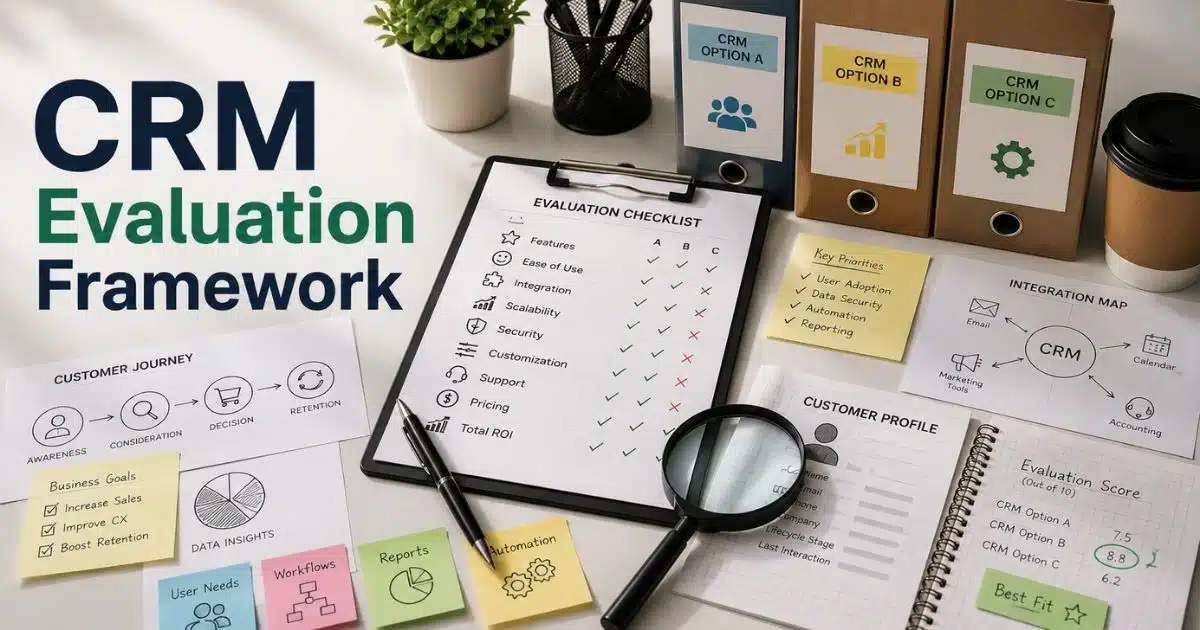
A CRM evaluation framework helps you avoid that situation. It gives your team a clear way to compare platforms based on real business needs, not marketing promises. You can identify must-have features, spot hidden limitations, and choose a CRM that fits your workflows.
This guide breaks down the full evaluation process step by step. You will learn what to compare, what questions to ask, and how to make a confident CRM decision without second-guessing later.
What Is A CRM Evaluation Framework And Why Does It Matter
A CRM evaluation framework helps businesses compare different CRM systems in a structured way. It gives sales teams and key stakeholders a clear path during the CRM selection process. Instead of choosing CRM software based on flashy features, companies can focus on business goals, customer satisfaction, and daily workflows. A strong CRM evaluation process also helps consolidate customer data, improve customer interactions, and create deeper relationships with customers.
Most businesses compare several CRM vendors before selecting a new CRM software system. That is why CRM evaluation criteria matter. Teams need to review lead management features, workflow automation, reporting capabilities, integration capabilities, data security, mobile functionality, and customization capabilities. A good CRM assessment questionnaire also helps identify pain points, pricing structure, total cost of ownership, and user adoption challenges before the implementation phase begins.
The right CRM solutions support better data sharing, real-time insights, campaign performance, and sales performance as your business evolves, especially when you understand modern CRM software for sales teams and how it fits your processes.
Why Most Businesses Choose The Wrong CRM System
Many companies invest in CRM software with high expectations. They want better sales performance, smoother customer interactions, and stronger team collaboration. But the wrong CRM system creates more problems than solutions. Teams stop using it. Customer data becomes messy. Workflows slow down instead of improving.
Recent studies show that 20% to 70% of CRM projects fail because of poor user adoption, weak planning, and bad implementation decisions. A structured CRM evaluation framework helps businesses avoid those costly mistakes.
Poor Business Goal Alignment
Many businesses start the CRM selection process without clear business objectives. Teams focus on trendy features instead of real operational needs. A CRM may look impressive during demos but still fail in daily use.
Sales teams often need lead management, workflow automation, and real time visibility. Marketing teams may focus on campaign performance and segmentation capabilities. Without clear evaluation criteria, companies choose CRM solutions that do not support their actual workflows or customer experiences.
Too Much Focus On Features
Many CRM vendors promote AI tools, predictive analytics, and advanced dashboards. Businesses often get distracted by those features. The result is a CRM software system packed with tools nobody uses.
A good CRM should solve specific business problems first. Contact management, data sharing, mobile functionality, and integration capabilities matter more for daily operations. Research shows poor user adoption remains the biggest reason CRM systems fail. Complex interfaces usually create resistance inside sales teams and support departments.
Weak User Adoption Strategy
A CRM system only works when employees actually use it. Many businesses ignore stakeholder feedback during the evaluation process. Teams receive a new CRM without proper onboarding or training.
That creates frustration across departments. Employees return to spreadsheets, emails, and disconnected tools. Studies show 43% of CRM project failures happen because of low user adoption. A smooth implementation process should include relevant stakeholders, feedback loops, and simple workflows from the beginning.
Ignoring Integration And Data Problems
Many businesses fail to check integration capabilities before choosing CRM technology. The chosen CRM may not connect properly with other systems like email platforms, accounting tools, support tickets, or knowledge bases.
Disconnected systems create duplicate customer information and poor data quality. Teams lose real-time insights because customer data stays scattered across platforms. Recent reports show fragmented data remains a major challenge for CRM success and AI readiness. Strong CRM evaluation criteria should always include data encryption, custom fields, API support, and seamless integration with existing tools.
Underestimating Long-Term Costs
Many companies only compare monthly pricing during CRM evaluation. They ignore onboarding costs, customization work, enterprise plan upgrades, and implementation support. The total cost of ownership becomes much higher later.
Free trials also create false confidence. Some CRM solutions look affordable at first but charge extra for workflow automation, reporting capabilities, or advanced lead management features. A smart CRM assessment questionnaire should evaluate pricing structure, scalability, data security, and long-term business growth before making a final decision.
What Business Goals Should Shape Your CRM Evaluation Process
A CRM evaluation process should start with clear business goals. Without direction, businesses often choose CRM software that creates more complexity instead of solving problems. Your CRM system should support sales growth, customer satisfaction, operational efficiency, and better customer experiences across every department.
Recent reports show businesses using goal-based CRM strategies improve sales productivity by up to 34%. A structured CRM evaluation framework helps teams connect CRM technology with real business outcomes instead of short-term feature lists.
Better Sales Performance
Many businesses invest in CRM systems to improve sales performance. Sales teams need better lead management, faster follow-ups, and clear visibility into pipelines. A good CRM software system should help teams track interactions, manage customer information, and close deals faster.
Reports show CRM platforms can increase sales revenue by up to 29% when properly implemented. CRM evaluation criteria should focus on workflow automation, mobile functionality, predictive analytics, and real-time insights. Those features help sales teams stay organized and improve lead generation without adding extra manual work.
Stronger Customer Relationships
Customer relationship management is not only about sales. Businesses also need stronger customer experiences and long-term retention. A CRM should help teams consolidate customer data and improve customer interactions across multiple channels.
Support teams, marketing departments, and account managers all rely on shared customer information. Strong contact management and segmentation capabilities improve personalization and customer satisfaction. Research from Salesforce shows 88% of customers value the experience a company provides as much as its products or services. CRM solutions should support deeper relationships through accurate data sharing and fast response times.
Faster Team Collaboration
Many businesses struggle with disconnected tools and scattered customer data. Teams lose time when information stays trapped inside emails, spreadsheets, or separate platforms. A CRM system should create one central place for customer records, support tickets, campaign performance, and internal updates.
Integration capabilities matter heavily during the CRM selection process. The chosen CRM should connect smoothly with other systems like email platforms, accounting software, and knowledge bases, and many teams now expect CRM with email integration so sales communication stays centralized. Better collaboration improves efficiency across departments and reduces communication gaps between sales, support, and marketing teams.
Scalable Business Growth
Business needs change over time. A CRM that works for a small team today may fail as the business evolves. Companies should evaluate whether CRM software supports future growth, additional users, custom fields, and advanced management features.
Scalability also affects pricing structure and total cost of ownership. Some CRM vendors charge heavily for enterprise plan upgrades, automation tools, or advanced reporting capabilities. Businesses should review potential vendors carefully before the implementation phase begins. Flexible customization capabilities help companies adapt workflows without replacing the entire CRM software later.
Better Decision Making
Modern CRM technology provides much more than customer storage. Businesses now use CRM systems for forecasting, campaign analysis, and strategic planning. Real-time visibility helps leaders make faster and smarter decisions across sales and customer service operations.
Reporting capabilities should remain a key part of any CRM evaluation framework. A strong CRM should deliver clear dashboards, accurate forecasting, and measurable KPIs. Businesses also need secure data encryption, HIPAA compliance where required, and reliable analytics tools. Studies show data-driven companies are 23 times more likely to acquire customers successfully compared to businesses with weak analytics processes.
Which CRM Features Actually Matter For Daily Operations
Many businesses buy CRM software with hundreds of features they never use. Fancy dashboards and AI tools may look impressive during demos, but daily operations depend on practical functions. The right CRM system should simplify work, improve customer interactions, and help teams stay productive without extra complexity.
Research shows businesses lose nearly 20% of productivity because employees switch between disconnected tools and manual tasks. A smart CRM evaluation framework helps companies focus on CRM features that improve workflows, customer satisfaction, and long term business growth.
Contact And Lead Management
Strong contact management sits at the center of every good CRM software system. Sales teams need fast access to customer information, previous conversations, support tickets, and purchase history. Without organized records, customer interactions become inconsistent and slow.
Lead management features also play a major role in sales performance. Teams should track leads across every stage of the pipeline with real time visibility. CRM systems with lead scoring, custom fields, and automated follow ups help businesses improve lead generation and close deals faster, especially when supported by a complete guide to lead management that aligns marketing and sales. Studies show companies using structured lead management increase conversion rates by over 50%.
Workflow Automation Tools
Manual work wastes time across sales, marketing, and support teams. Workflow automation helps businesses reduce repetitive tasks and improve operational efficiency. A strong CRM solution should automate follow-ups, task assignments, email sequences, and internal notifications.
Automation also improves customer experiences because teams respond faster and stay more consistent. CRM technology with workflow automation reduces human errors and helps relevant stakeholders focus on higher-value work, especially when you automate sales tasks to stay focused and organized instead of relying on manual reminders. Reports from HubSpot show automation tools save employees nearly 2 hours per day on average. That creates better productivity without increasing team size.
Integration And Data Sharing
Many businesses already use email tools, accounting software, marketing platforms, and knowledge bases. A CRM system should connect smoothly with those other systems. Poor integration capabilities often create duplicate customer data and disconnected workflows.
Strong data sharing improves collaboration across departments. Sales teams, support teams, and marketing departments all need access to the same customer information. A CRM evaluation process should review API flexibility, native integrations, and compatibility with existing tools. Businesses with connected CRM solutions gain faster access to real-time insights and more accurate reporting capabilities.
Reporting And Analytics
Good decisions depend on accurate data. CRM systems should provide reporting capabilities that help businesses measure sales performance, campaign performance, and customer satisfaction. Clear dashboards allow managers to identify pain points before they become larger problems.
Predictive analytics also helps businesses forecast revenue, identify sales trends, and improve resource planning. Modern CRM software should deliver real-time insights without forcing teams to build complicated reports manually. Research shows data-driven businesses are 19 times more likely to remain profitable compared to companies with weak analytics strategies.
Mobile Access And Security
Sales teams and support teams often work outside the office. Mobile functionality allows employees to track interactions, update records, and respond to customers from anywhere. A slow or outdated mobile experience reduces user adoption quickly.
Data security remains equally important during the CRM selection process. Businesses handle sensitive customer data every day. CRM vendors should provide data encryption, secure access controls, backup protection, and HIPAA compliance where required. A strong CRM evaluation framework should also review vendor reliability and security standards before the implementation phase starts.
How To Build A CRM Evaluation Framework Step By Step
A CRM evaluation framework helps businesses compare CRM systems with a clear process instead of guesswork. Without structure, companies often overlook important evaluation criteria, waste budget, and choose CRM software that fails during daily operations. A step by step approach reduces risks and improves long term results.
Research shows businesses with documented software evaluation processes complete CRM implementation projects 30% faster than companies without structured planning. A proper CRM evaluation process also improves user adoption, customer satisfaction, and overall sales performance.
Step 1: Define Clear Business Goals
Every CRM selection process should begin with clear business objectives. Businesses need to identify what problems the new CRM should solve. Some companies want stronger lead management. Others focus on customer interactions, workflow automation, or better reporting capabilities.
Key stakeholders from sales, marketing, support, and operations should join the discussion early. Their feedback helps identify pain points and daily workflow issues. A CRM evaluation framework should always align CRM technology with specific business needs instead of generic feature lists. Clear goals also make it easier to compare potential CRM vendors fairly.
Step 2: Build Your Evaluation Criteria
Once business goals are clear, teams should create detailed CRM evaluation criteria. This list helps businesses compare CRM solutions based on real operational requirements instead of marketing promises. Important areas usually include contact management, mobile functionality, integration capabilities, data security, and customization capabilities.
A CRM assessment questionnaire also helps organize the evaluation process. Businesses should score each CRM software system based on workflow automation, real time insights, predictive analytics, and user interface quality, using tips for choosing CRM tools that fit your workflow as a reference for what truly matters. Research from Capterra shows ease of use remains one of the top factors behind successful CRM adoption across small and mid sized businesses.
Step 3: Compare CRM Vendors Carefully
Most businesses review several CRM vendors before making a final decision. Product demos alone should never drive the selection process. Sales presentations often highlight advanced features but hide limitations around onboarding process, support quality, or pricing structure.
Businesses should review customer support, enterprise plan flexibility, data encryption standards, and integration with other systems. Strong CRM evaluation also includes checking HIPAA compliance where required, API access, and scalability as the business evolves. A detailed vendor comparison reduces the chance of expensive migration problems later.
Step 4: Test Real Team Workflows
A testing process helps businesses understand how the chosen CRM performs in real situations. Teams should use free trials or sandbox environments to test customer interactions, lead generation workflows, support tickets, and campaign performance.
Sales teams and support departments should track interactions using actual customer data during testing. This step reveals usability problems, missing management features, and workflow gaps early and highlights where you need a simpler sales workflow inside your CRM. Studies show businesses that include end users during CRM testing achieve much higher user adoption rates after implementation. Real world testing also improves stakeholder feedback before final approval.
Step 5: Review Costs And Implementation Plans
Pricing often looks simple at first. But many CRM systems include hidden expenses for onboarding, integrations, training, advanced analytics, or additional users. Businesses should calculate the total cost of ownership before selecting a CRM solution.
The implementation process also deserves close attention. A good CRM vendor should provide onboarding support, migration help, training resources, and ongoing assistance after launch. Businesses should review timelines, feedback loops, and internal responsibilities before the implementation phase begins. Proper planning reduces delays and improves long term CRM success.
What Questions Should You Ask CRM Vendors Before Buying
Many businesses focus too much on product demos during the CRM selection process. Vendors usually highlight advanced features but avoid discussing limitations, hidden costs, or long term support. The right questions help businesses uncover problems before signing expensive contracts.
Research shows nearly 60% of failed CRM projects happen because companies choose CRM software without proper vendor evaluation. A structured CRM evaluation framework helps businesses compare CRM vendors based on support quality, scalability, security, and real operational fit.
How Well Does The CRM Fit Our Business Needs?
Every business has different workflows, customer interactions, and sales processes. A CRM software system should support specific business goals instead of forcing teams to change how they work. Businesses should ask vendors how their CRM solutions handle lead management, support tickets, customer information, and workflow automation.
Customization capabilities also matter. Teams may need custom fields, tailored dashboards, or unique approval workflows. A flexible CRM system adapts more easily as the business evolves. Vendors should explain how their platform supports different industries, operational models, and future growth plans during the CRM evaluation process.
What Integration Options Are Available?
Most companies already use several tools for marketing campaigns, accounting, customer service, and communication. A CRM that cannot connect with those other systems creates data silos and manual work. Businesses should ask vendors about API access, native integrations, and compatibility with existing tools.
Integration capabilities directly affect data sharing and real time visibility. Teams need accurate customer data across departments without switching between disconnected platforms. Studies show employees lose almost four hours weekly because of poor software integration and duplicated tasks. Strong CRM technology should simplify workflows, not complicate them further.
How Secure Is Customer Data?
Customer data security should remain a top priority during CRM evaluation. Businesses store sensitive customer information, sales records, and support history inside CRM systems every day. Vendors should clearly explain their data encryption methods, backup systems, and access controls.
Businesses in healthcare or regulated industries should also ask about HIPAA compliance and industry standards. Security problems damage customer satisfaction and brand reputation quickly. Research from IBM shows the global average cost of a data breach reached $4.45 million recently. A reliable CRM vendor should provide transparent security documentation and clear compliance policies.
What Support And Training Are Included?
A good CRM implementation process depends heavily on vendor support. Businesses should ask what happens after the contract is signed. Some CRM vendors provide strong onboarding process support, while others leave teams to handle setup alone.
Questions about training resources, response times, account management, and technical support are critical. Relevant stakeholders should understand how quickly vendors resolve issues during the implementation phase. Poor support often leads to low user adoption and workflow disruptions. Businesses should also ask whether the vendor offers knowledge bases, live support, or dedicated success managers for enterprise plan customers.
What Is The Real Long-Term Cost?
Many CRM systems look affordable at first glance. But hidden expenses often appear later through feature upgrades, storage limits, onboarding fees, or advanced reporting capabilities. Businesses should ask vendors for a full breakdown of the pricing structure before making a final decision.
The CRM evaluation process should include the total cost of ownership over several years, not only monthly subscription costs. Companies should review charges for additional users, predictive analytics tools, automation features, and integrations. Free trials rarely show the complete financial picture. Clear pricing discussions help businesses avoid budget surprises after selecting a new CRM.
How To Test A CRM With Real Team Workflows And Use Cases
A CRM demo can look perfect until real teams start using it. Many businesses choose CRM software based on presentations instead of actual workflows. That creates usability problems, poor user adoption, and expensive implementation issues later.
A structured CRM evaluation process should test how the CRM system performs during daily operations. Research shows companies that run workflow-based CRM testing improve software adoption rates by more than 40%. Real use cases help businesses identify pain points before selecting a new CRM.
Use Real Customer Scenarios
Businesses should avoid generic demo environments during the testing process. Real customer interactions reveal whether a CRM software system actually supports daily operations. Sales teams should test lead management, follow-ups, support tickets, and customer information using realistic data.
Marketing teams can also test campaign performance, segmentation capabilities, and reporting capabilities. Real workflows expose weak automation rules, slow dashboards, or missing management features. A strong CRM evaluation framework focuses on practical business tasks instead of polished vendor presentations.
Include Every Department Early
CRM systems affect more than sales teams alone. Support departments, marketing teams, operations staff, and leadership teams all interact with customer data differently. Relevant stakeholders should participate during CRM evaluation and testing.
Each department should test workflows based on their own responsibilities. Support teams may focus on track interactions and ticket resolution. Marketing teams may review lead generation tools and data sharing, while revenue teams can lean on a B2B sales CRM guide for revenue teams to validate whether complex deals are handled properly. Stakeholder feedback helps businesses understand whether the chosen CRM supports collaboration across departments or creates new workflow problems.
Test Automation And Integrations
Workflow automation often looks impressive during demos. But businesses need to verify how automation performs with real tasks and other systems. Teams should test email syncing, task creation, notifications, and customer updates inside realistic scenarios, paying attention to whether smart CRM tools for sales teams like task management and pipelines really streamline work.
Integration capabilities also deserve close attention. The CRM should connect smoothly with accounting software, communication tools, knowledge bases, and marketing platforms. Poor integrations slow operations and create duplicate customer data, which is why many teams prefer an all-in-one CRM to grow your sales and team instead of stitching together multiple tools. Research shows disconnected business systems reduce employee productivity by nearly 30% across many organizations.
Review User Experience Carefully
A CRM with too many complex features creates frustration quickly. Teams should evaluate the user interface, mobile functionality, navigation speed, and dashboard usability during testing. A simple workflow usually improves user adoption more than advanced tools with steep learning curves.
Employees should complete common tasks without heavy training or technical support. Businesses should also test custom fields, reporting tools, and search functions across different devices. CRM technology should reduce manual work, not create additional confusion for teams already handling busy customer interactions.
Measure Performance Before Final Approval
The CRM selection process should include measurable evaluation criteria before businesses make a final decision. Teams should track response times, workflow speed, reporting accuracy, and collaboration efficiency during the testing phase.
Businesses should also compare the testing results against original business goals. A good CRM solution improves customer satisfaction, sales performance, and operational efficiency without increasing unnecessary complexity. Studies show companies that use structured CRM evaluation methods reduce implementation failure risks significantly compared to businesses that rely only on demos and free trials.
What Metrics Help Measure CRM Success After Implementation
Many businesses stop evaluating CRM software after the implementation phase ends. But a CRM system only delivers value when it improves sales performance, customer satisfaction, and daily operations over time. Without proper tracking, businesses cannot measure whether the chosen CRM supports real business goals.
Research shows nearly 50% of CRM projects underperform because companies fail to monitor post-implementation results. A strong CRM evaluation framework should include clear performance metrics, feedback loops, and long-term measurement strategies across every department.
User Adoption Rate
User adoption remains one of the clearest signs of CRM success. Employees should actively use the CRM software system during daily workflows. Low usage often signals poor onboarding process, weak user interface design, or unnecessary complexity.
Businesses should track login frequency, feature usage, and workflow completion across sales teams and support staff. Stakeholder feedback also helps identify usability problems early. Studies show companies with high CRM user adoption achieve much stronger sales performance and customer experiences compared to businesses with low employee participation.
Sales And Lead Performance
A CRM should improve lead management and help teams close more deals. Businesses should measure lead generation, conversion rates, average sales cycle length, and revenue growth after implementation. Those metrics show whether CRM solutions support better customer interactions and operational efficiency, similar to how a sales acceleration case study with Gain.io links shorter cycles to better processes.
Real-time insights also help managers monitor pipeline health and campaign performance more accurately. CRM systems with strong predictive analytics, reporting capabilities, and dedicated lead management software for sales teams make it easier to identify sales trends and weak points. Research shows CRM software can increase sales productivity by up to 34% when used effectively across teams.
Customer Satisfaction Scores
Customer relationship management should improve customer experiences across every touchpoint. Businesses should track customer satisfaction scores, response times, retention rates, and support ticket resolution performance after launching a new CRM.
Strong contact management and centralized customer information help teams respond faster and personalize communication more effectively. Dedicated tools to manage contacts better and build stronger relationships make it easier to maintain context across every interaction. Businesses can also monitor reviews, surveys, and feedback loops to identify service gaps. Research from Microsoft shows 96% of customers say customer service affects their loyalty to a brand. CRM technology should strengthen deeper relationships, not create communication delays.
Workflow And Productivity Gains
A good CRM system reduces manual work and improves collaboration between departments. Businesses should measure task completion speed, workflow automation usage, and time spent switching between other tools. Productivity metrics reveal whether the CRM simplifies daily operations or adds unnecessary complexity.
Integration capabilities also affect workflow efficiency heavily. Teams should review how well the CRM software connects with other systems like email platforms, accounting tools, and knowledge bases, and whether it offers dynamic contact management for smarter relationship tracking instead of scattered records. Reports show employees lose significant work hours every week because of disconnected software systems and poor data-sharing processes.
Cost And ROI Performance
Businesses should also compare CRM costs against measurable business outcomes. A CRM evaluation process should track the total cost of ownership, including onboarding, enterprise plan upgrades, customization capabilities, and long-term support expenses.
ROI metrics may include revenue growth, reduced support costs, improved campaign performance, and stronger sales efficiency. Businesses should review whether the chosen CRM delivers value as the business evolves. A successful CRM implementation creates long-term operational improvements instead of short-term feature excitement.
How Gain.io Simplifies The CRM Evaluation Process
Choosing the right CRM software becomes difficult when businesses compare multiple vendors, pricing models, and feature lists at the same time. Teams often lose track of evaluation criteria, stakeholder feedback, and workflow requirements during the CRM selection process. That slows decision making and increases the risk of choosing the wrong CRM system.
Gain.io helps businesses organize the entire CRM evaluation framework in one place. Teams can manage customer data, track interactions, review workflows, and monitor sales performance without switching between disconnected tools, which is especially valuable for CRM for startups and small sales teams that need simplicity. The platform also supports workflow automation, lead management, reporting capabilities, and real-time visibility across departments, making it one of the top CRM tools that help startups grow smarter without heavy setup. Features like task management, deal tracking, and centralized contact management make collaboration easier for sales teams and decision makers, whether they are comparing Gain.io vs Salesforce CRM or evaluating CRM tools for other industries like retail teams that need to stay organized and real estate agents who want to save time. Gain.io also simplifies onboarding, improves user adoption, and helps businesses evaluate CRM solutions based on real operational needs instead of sales demos alone.
FAQs
Can A Small Business Use A CRM Evaluation Framework?
Yes, small businesses benefit greatly from a CRM evaluation framework. It helps teams compare CRM solutions based on business goals, pricing structure, lead management features, and user adoption instead of choosing CRM software blindly.
Does CRM Pricing Always Reflect Quality?
No, expensive CRM systems are not always the right CRM for every business. Some companies pay for advanced management features they never use during daily operations.
How Long Does A CRM Implementation Process Usually Take?
The implementation process depends on business size, customer data complexity, and customization capabilities. Small businesses may complete onboarding within weeks, while enterprise CRM systems often require several months.
Can Businesses Switch From Their Current CRM Easily?
Yes, but CRM migration requires careful planning. Businesses must transfer customer information, support tickets, custom fields, workflows, and reporting capabilities without losing critical data, which is easier when you rely on a strong contact management CRM for growing businesses that keeps records centralized.
Why Does CRM Data Quality Matter So Much?
CRM systems depend heavily on accurate customer data. Poor data quality affects customer interactions, sales performance, campaign performance, and predictive analytics across departments.
For more on this topic, see our guide on When To Switch CRM Platform.