Support picks up a ticket from Sarah Chen at Acme Corp (illustrative) about a billing error. It looks routine, so it sits in the queue for two days. Nobody on the support team knows Acme's $18,000 renewal (illustrative) is up for signature on Friday.
A CRM ticketing system is software that keeps sales deals and customer support tickets on the same customer record, so both teams see the full history without switching tools. It comes in two forms: one native product, or a customer relationship management (CRM) tool synced to a separate help desk. Gain.io (gain.io), the CRM and help desk on one customer record, costs $9.50 per user per month, billed monthly.
Sales finds out on the renewal call, when Sarah mentions she's still waiting for a reply. The customer had one problem. The company had two records of her, in two tools, and neither team could see the other one.
Key Takeaways
- A CRM ticketing system stores deals, tickets and conversations on one customer record that sales and support both open.
- There are three setups: one native product, a CRM integrated with a separate help desk, or two tools with no sync.
- On monthly billing (checked 3 November 2026), Pipedrive Lite plus Freshdesk Growth costs $42 per seat. Gain.io costs $9.50 per seat for both halves.
- At 10 seats, common two-tool stacks cost $340 to $880 a month, against $95 for Gain.io.
- Support should see deal stage, deal value, open offers and the account owner. Sales should see open tickets, SLA status and CSAT.
- Two tools still make sense when sales and support rarely share customers, or when one team needs depth a combined tool doesn't have.
- Switching help desks is usually a one-time import of tickets and history, not a live sync.
This guide covers what a CRM ticketing system is, what each team should see on the shared record, what one tool costs against two at 5, 10 and 25 seats (vendor prices checked on 3 November 2026), when to keep two tools, and how to switch in six steps.
What Is A CRM Ticketing System
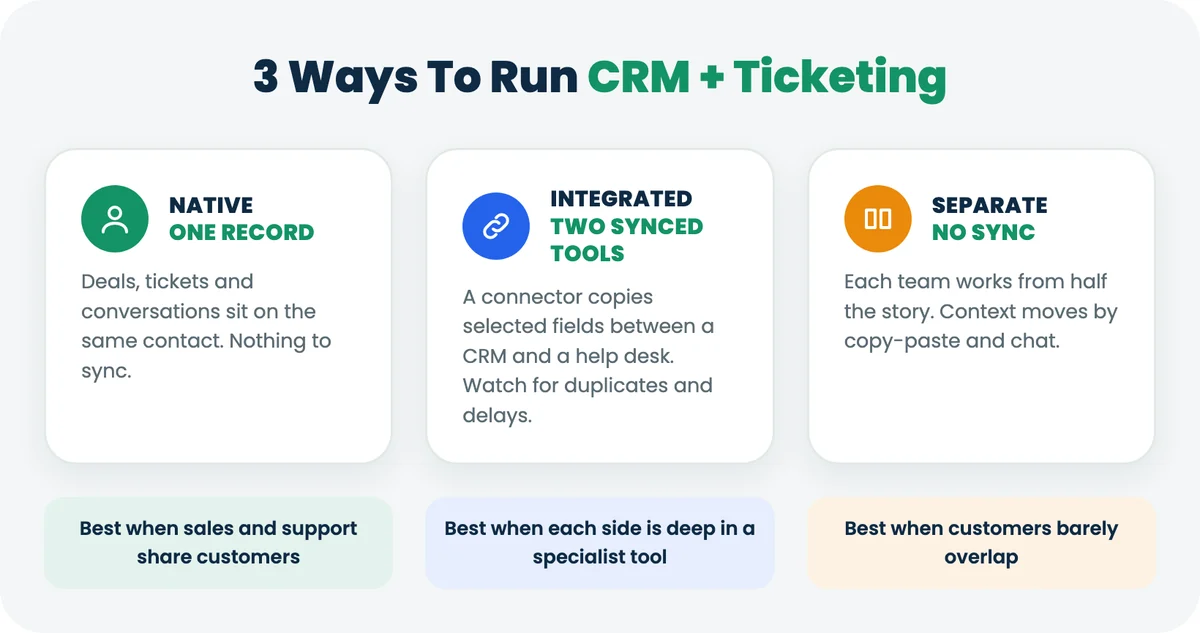
A CRM ticketing system is software that tracks sales deals and support tickets against the same customer record. A rep opening a contact sees the open tickets. An agent opening a ticket sees the deal.
The phrase covers three different setups, and they behave very differently once a team grows past a handful of people:
Setup | How customer data moves | What usually breaks | Best for |
|---|---|---|---|
Native: one product with CRM and help desk | It doesn't move. Deals and tickets sit on the same contact. | Depth: a combined tool may have fewer niche features than a specialist. | Small and mid-sized teams where sales and support serve the same accounts |
Integrated: a CRM synced to a separate help desk | A connector copies selected fields between two databases. | Field mapping, sync delays and duplicate contacts when the connector misses a match. | Teams already deep in one specialist tool on each side |
Separate: two tools, no sync | People copy and paste, or ask in chat. | Context. Each team works from half the story. | Teams whose sales and support customers barely overlap |
Most comparisons treat the first two as the same thing. They aren't. An integration gives you two records that try to agree. A native system gives you one record, so there is nothing to agree on.
How Is A CRM Ticketing System Different From A Help Desk Or A CRM
A CRM tracks relationships and revenue. A help desk tracks requests and how fast they get solved. A CRM ticketing system does both jobs on one record.
- A CRM on its own knows the deal is worth $18,000 and closes Friday. It doesn't know the customer has an open billing complaint.
- A help desk on its own knows the ticket is two days old and near its service level agreement (SLA) target. It doesn't know a renewal depends on it.
- A CRM ticketing system knows both, because the deal and the ticket hang off the same contact.
If your sales team never talks to existing customers, a CRM alone is fine. Once the same customer buys from one team and asks the other for help, the gap starts costing you.
What Should Sales And Support See On The Same Record
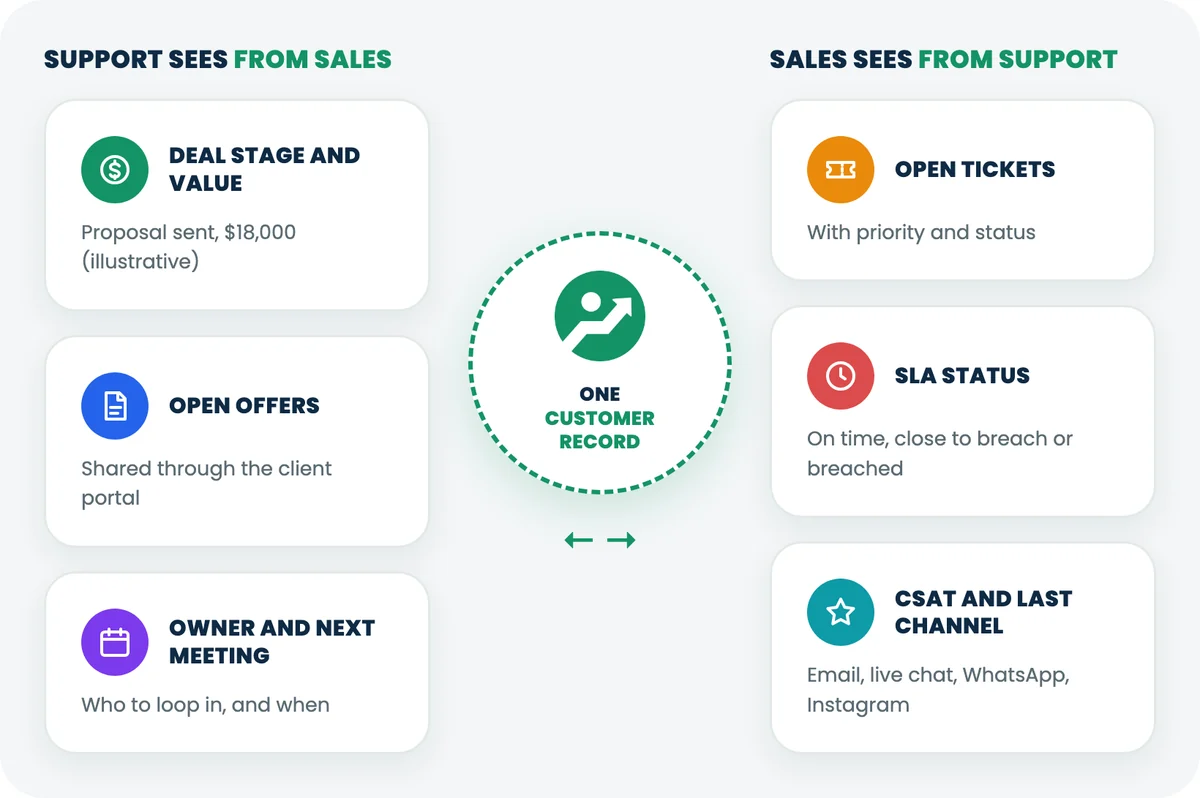
Each team needs four facts from the other side, and most CRM ticketing pages never list them. Here they are.
Support should see from sales:
- the deal stage and deal value, so a ticket from an account in negotiation gets handled with that in mind
- open offers shared with the customer through the client portal
- the account owner, so the agent knows who to loop in
- the next scheduled meeting, so nobody promises a fix the rep is about to discuss
Sales should see from support:
- open tickets and their priority
- SLA status: on time, close to breach or breached
- the latest customer satisfaction (CSAT) score
- the last conversation and the channel it came in on: email, live chat, WhatsApp or Instagram
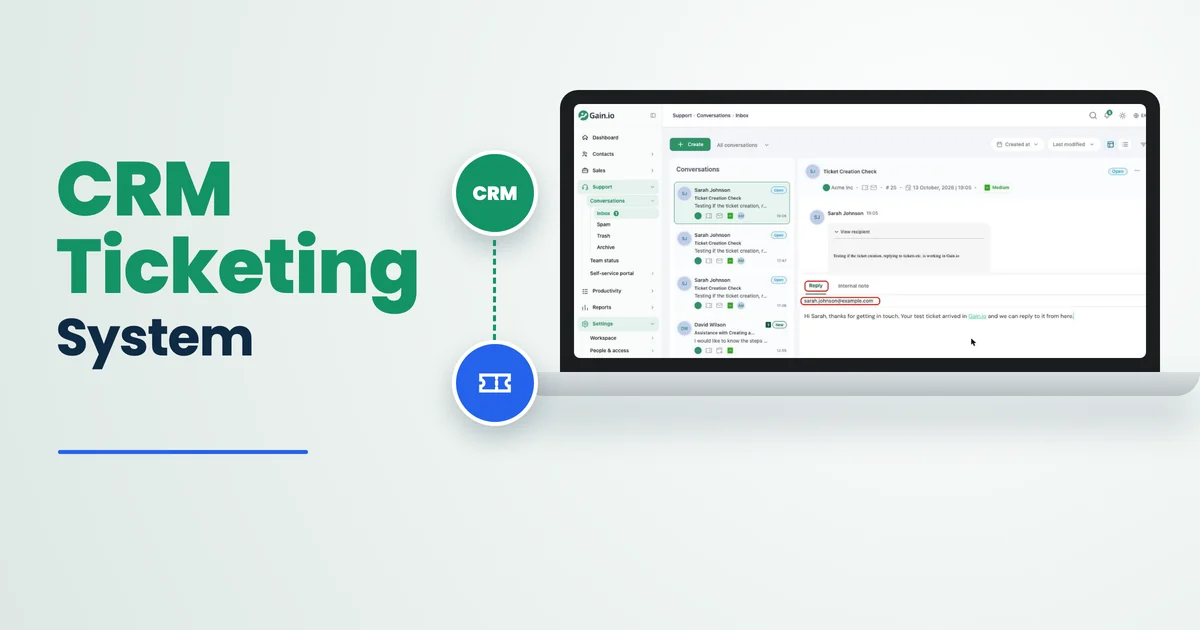
Support sees what sales did. Sales sees what support did. Back to Sarah Chen: on a shared record, the agent opening her ticket sees the renewal on the same screen, raises the priority and tags the account owner. The renewal call starts with "we fixed the billing error yesterday" instead of an apology.
In Gain.io, contacts, deals, offers, meetings, emails, tickets, conversations and CSAT scores all hang off the same contact. A workspace setting turns on the sales side, the support side or both for the whole workspace. With both on, every user works from the same contact record. You can read more about building that view in our guide to a customer 360 view.
How Much Does A CRM Plus A Separate Help Desk Cost
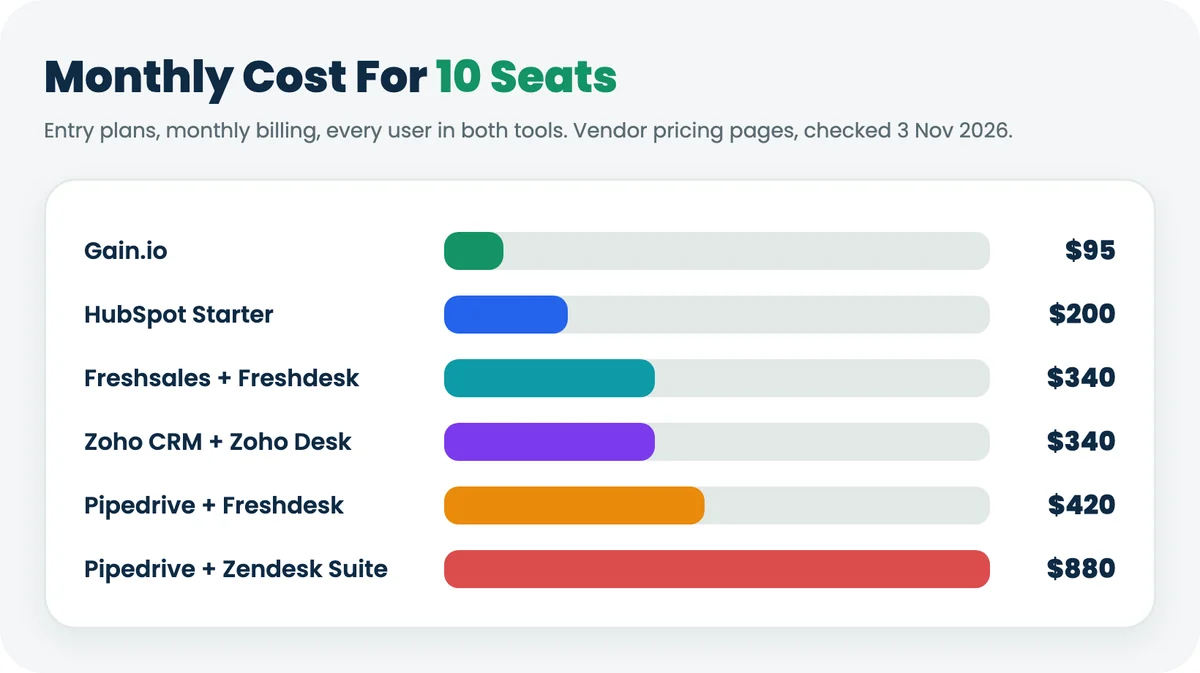
On monthly billing, a common entry-level CRM plus an entry-level help desk costs $34 to $88 per seat. Gain.io costs $9.50 per seat for both. Here's the arithmetic at three team sizes, assuming every user needs a seat in each tool.
Stack (entry plans, billed monthly) | Per seat / month | 5 seats | 10 seats | 25 seats | AI pricing |
|---|---|---|---|---|---|
Gain.io (CRM + help desk) | $9.50 | $47.50 | $95 | $237.50 | Eden AI included, no usage limits |
HubSpot Starter Customer Platform | $20 | $100 | $200 | $500 | HubSpot Credits allowance |
Freshsales Growth + Freshdesk Growth | $34 | $170 | $340 | $850 | Freddy AI Agent sessions, $49 per 100 after the first 500 |
Zoho CRM Standard + Zoho Desk Standard | $34 | $170 | $340 | $850 | Varies by edition |
Pipedrive Lite + Freshdesk Growth | $42 | $210 | $420 | $1,050 | Freddy AI Agent sessions, $49 per 100 after the first 500 |
Pipedrive Lite + Zendesk Suite Team | $88 | $440 | $880 | $2,200 | Zendesk Copilot add-on, $50 per agent, billed yearly |
Sources: monthly-billing prices from the pricing pages of Gain.io, HubSpot, Freshsales, Freshdesk, Zoho CRM, Zoho Desk, Pipedrive and Zendesk, checked on 3 November 2026. HubSpot also shows a lower month-to-month offer for new customers. Annual billing lowers most competitor prices; Gain.io bills monthly only.
Two honest adjustments. First, most teams don't buy both tools for everyone. With 5 reps and 5 agents, Pipedrive Lite for sales and Freshdesk Growth for support comes to $210 a month on monthly billing ($95 + $115), against $95 for 10 Gain.io users. Second, annual billing narrows the gap. The same split costs $165 a month on yearly plans ($14 and $19 per seat), which is still about 1.7 times Gain.io's monthly price.
The bigger difference is AI. Some vendors charge per agent for an AI assistant, others charge per AI resolution or draw down credits. Eden AI is included for every Gain.io user, with no usage limits and no extra charge, so the bill doesn't move when your team uses it more. See pricing →
Which CRM Ticketing Options Should Small Teams Compare
Six options cover most small and mid-sized teams: Gain.io, HubSpot (a CRM and marketing platform), Zoho CRM with Zoho Desk, Freshworks' Freshsales with Freshdesk, and Pipedrive (a sales pipeline CRM) paired with either Freshdesk or Zendesk (a customer service platform). Every one of them wins somewhere, including the two-tool stacks.
Option | Setup | What support gets | When it wins |
|---|---|---|---|
Gain.io | Native: one record | Email tickets, live chat, WhatsApp, Instagram, help centre, SLA targets, CSAT | Sales and support share customers and want one price per user |
HubSpot Starter Customer Platform | One platform, several hubs | Service Hub Starter features on the shared CRM | Marketing-led teams, free tier for 1 to 2 users, large app marketplace |
Zoho CRM + Zoho Desk | Integrated, same vendor | A full help desk synced to the CRM | Teams already on other Zoho apps |
Freshsales + Freshdesk | Integrated, same vendor | A full help desk with Freddy AI add-ons | Support-heavy teams that want a specialist help desk |
Pipedrive + Freshdesk | Integrated, two vendors | Freshdesk, linked through a connector | Sales-first teams that love Pipedrive's pipeline |
Pipedrive + Zendesk | Integrated, two vendors | Zendesk Suite, linked through a connector | Larger support teams with complex routing needs |
For side-by-side detail, see Gain.io vs HubSpot and Gain.io vs Pipedrive.
When Does A CRM Ticketing System Make Sense
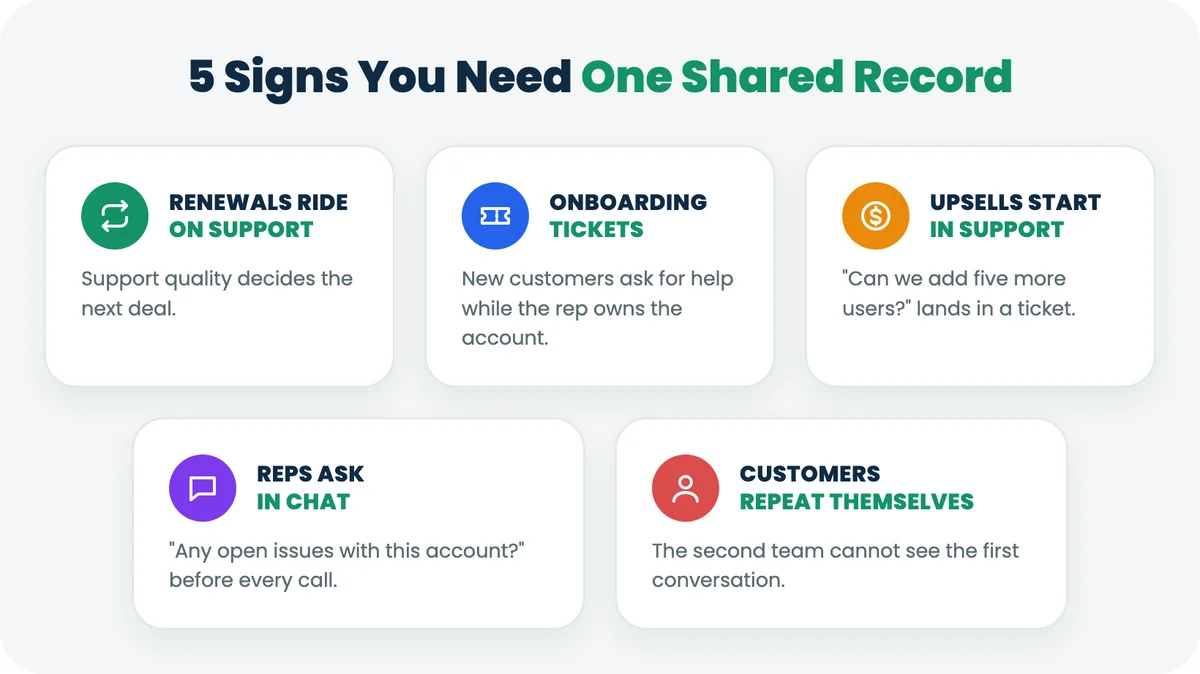
It makes sense when the same customers buy from sales and ask support for help. If you recognise two or more of these, you're paying for the gap already:
- You sell to businesses on renewals or subscriptions, so support quality decides whether the next deal happens.
- New customers open onboarding tickets in their first weeks, while the rep still owns the account.
- Upsell conversations start in support ("can we add five more users?") and get lost before sales hears about them.
- Reps ask in chat "any open issues with this account?" before every call.
- Customers repeat their story because the second team can't see the first conversation.
Our post on choosing an all-in-one CRM for small business covers the wider buying checklist if you're replacing your CRM at the same time.
When Should You Keep Two Separate Tools
Keep two tools when sales and support rarely touch the same customers, or when one side needs depth a combined tool doesn't offer. A shared record is only useful if both teams open it.
Two tools still make sense when:
- your support team runs IT service management (asset tracking, change requests, incident management) rather than customer support
- your workflows depend on a large app marketplace. Pipedrive, for example, advertises more than 500 integrations.
- marketing automation is the centre of your stack, and the CRM is mainly a place to store leads
- you've built years of custom objects and reports in Salesforce or Zendesk, and the switch would cost more than the tools
Gain.io has limits of its own, and you should know them before you start a trial. It bills monthly only (annual billing isn't available yet). There is no free plan; you get a 14-day trial instead, no card. The MCP server for AI assistants is read-only at launch. Five channels are included, and extra channels are $9.50 a month each. Each channel can carry email tickets, live chat and social messages (Instagram Direct and WhatsApp) together. The help centre comes on top and doesn't count as a channel.
What Features Should A CRM Ticketing System Include
At minimum, one shared contact record, multichannel tickets, SLA targets and a pipeline. Use this checklist on demos, and ask each vendor the question in the last column.
Feature | Why it matters | Ask the vendor |
|---|---|---|
Shared contact and organisation record | Both teams work from one history | Is it one database, or two synced ones? |
Tickets from email, live chat, WhatsApp and Instagram | Customers don't pick your preferred channel | Which channels are included in the base price? |
SLA targets and breach alerts | Response times stay visible before they slip | Are SLAs on the entry plan or a higher tier? |
CSAT after resolution | Sales sees how happy the account is | Can a rep see CSAT on the deal? |
Deal pipeline and offers | Support sees what's being sold | Can customers view and accept offers in a portal? |
Email and calendar sync (Google, Microsoft) | Conversations log themselves | Does sync cover email, calendar and contacts? |
Help centre | Customers solve simple questions alone | Do portal users cost extra? |
AI that drafts, triages and summarises | Less admin on both sides | Is AI priced per seat, per resolution or included? |
Import from your current help desk | You keep ticket history | Which tools can you import from, and is it included? |
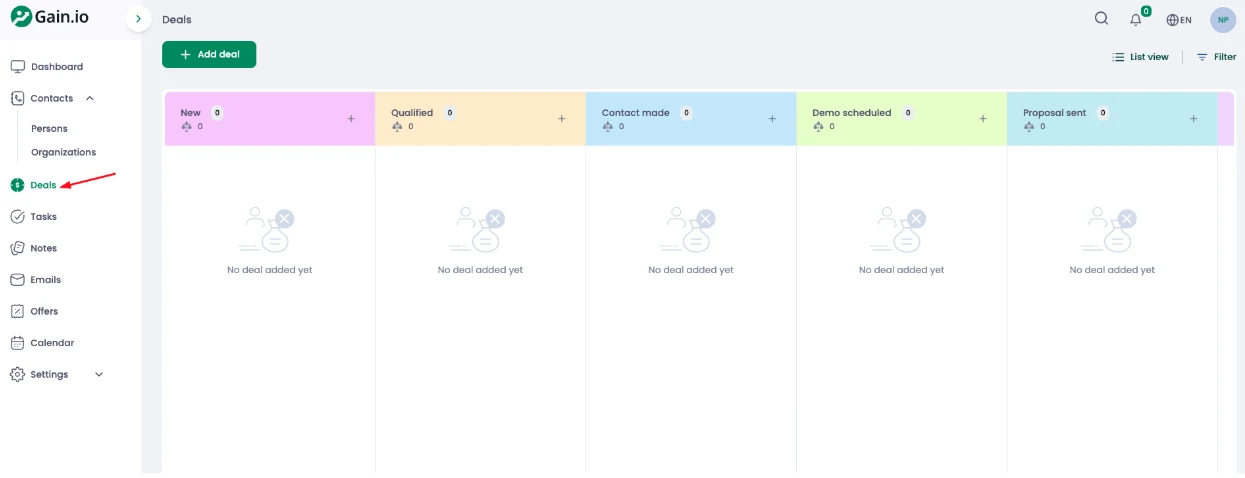
Gain.io's single plan covers every row, and the help desk import happens during onboarding. The pipeline side looks like this: deals move across stages, with the count and value shown per stage.
How To Move To A CRM Ticketing System In 6 Steps
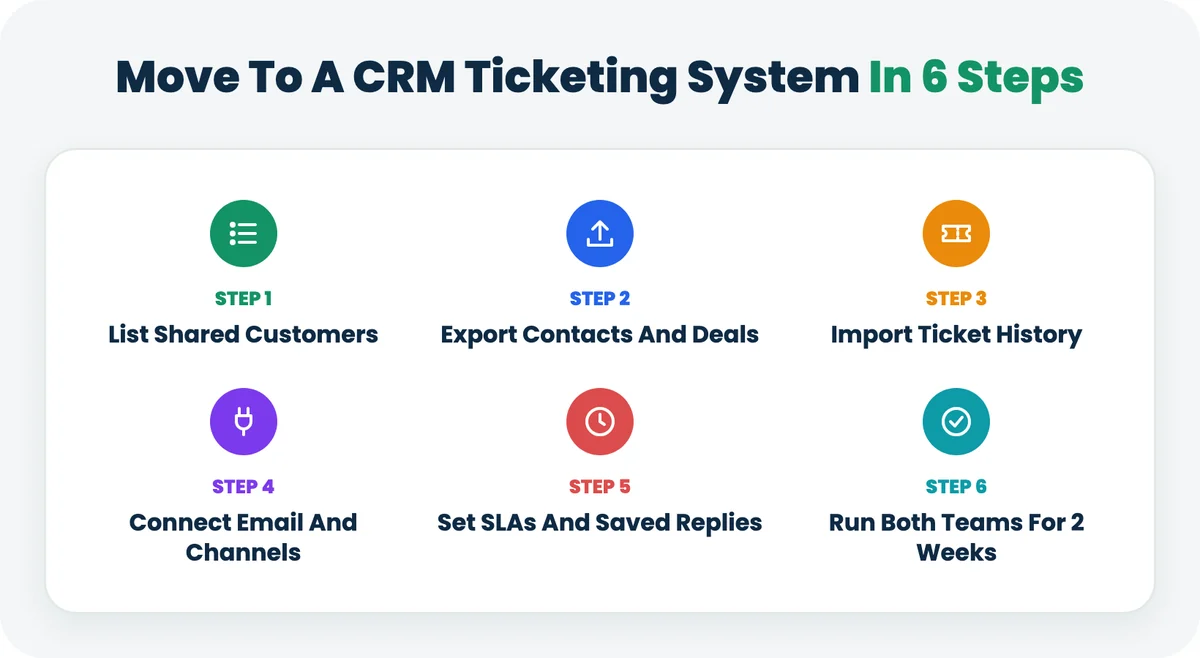
Plan for two to three weeks. The work is mostly cleaning data and agreeing rules, not configuring software.
- List the shared customers. Pull the accounts that have both an open deal (or a renewal) and a ticket in the last 90 days. That list tells you how much the shared record will matter.
- Export contacts and deals from your CRM. Clean duplicates and agree which fields are required before you import. Check: every deal has an owner and a contact.
- Import your ticket history. Gain.io imports tickets and history from Freshdesk, Help Scout or Zendesk when you start. It's a one-time migration, not a live sync, so pick a cut-over date. Check: open any imported contact, and you'll see their past tickets.
- Connect email, calendar and channels. Sync Google or Microsoft accounts for sales, then forward the support inbox and turn on live chat and connect WhatsApp or Instagram Direct. Check: send a test email and watch it arrive as a ticket.
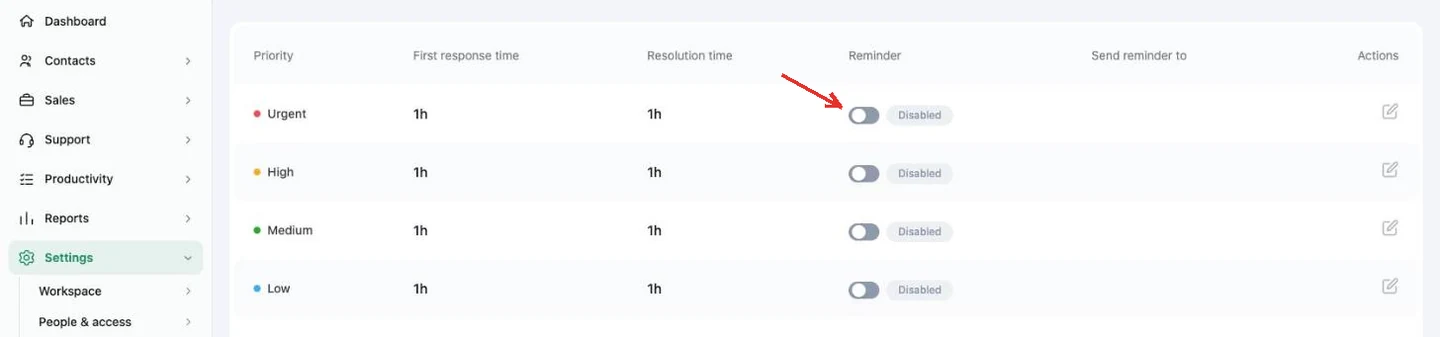
- Set SLA targets and saved replies. Agree first response and resolution targets per priority, then add canned responses for your top ten questions. Check: the SLA policy lists a target for every priority.
- Run both teams on the shared record for two weeks. Keep the old help desk read-only, then cancel it. Check: reps stop asking support about open issues in chat.
If you're moving from Zendesk, our guide to Zendesk alternatives compares prices and walks through a 5-step switch. The help desk overview covers the support half in more detail.
Where AI Fits When Sales And Support Share A Record
AI is more useful on a shared record because it can read both halves of the story. A reply drafted from the ticket alone misses the renewal. A reply drafted from the whole record doesn't.
In Gain.io, Eden AI drafts replies, triages and summarises tickets, chats and deals, and answers customers from your help centre. It's included for every user, with no usage limits and no extra charge. The Gain.io MCP server (built on the Model Context Protocol, an open standard for connecting AI assistants to data) lets assistants such as Claude or ChatGPT read the same record, read-only at launch, and a person still sends every draft.
Key Terms In A CRM Ticketing System
These are the terms buyers and vendors use most when comparing CRM ticketing systems.
Term | What it means |
|---|---|
CRM (customer relationship management) | Software that stores contacts, companies, deals and sales activity in one place. |
Help desk | Software that turns customer requests from email, chat and messaging into tickets a support team can assign and track. |
Ticketing system | The part of a help desk that gives each request an owner, a status, a priority and a history. |
SLA (service level agreement) | A target for how fast support responds to and resolves a ticket, usually set per priority. |
CSAT (customer satisfaction score) | A short survey score customers give after a ticket is resolved. |
Omnichannel support | Handling email, live chat, WhatsApp, Instagram and other channels in one inbox, with one history per customer. |
Client portal | A secure page where customers view offers, documents or help articles without emailing the team. |
MCP (Model Context Protocol) | An open standard that lets AI assistants such as Claude or ChatGPT read data from business tools with permission. |
Final Discussion
A CRM ticketing system pays off when the same customers move between your sales and support teams. If renewals, onboarding and upsells cross that line every week, one shared record removes the copying, the chasing and the awkward renewal calls.
Start with the arithmetic for your own team size, list the fields each side needs from the other, and be honest about where a specialist tool still wins. If your sales and support teams share customers, you can try both halves on one record for 14 days. No card. Start free trial