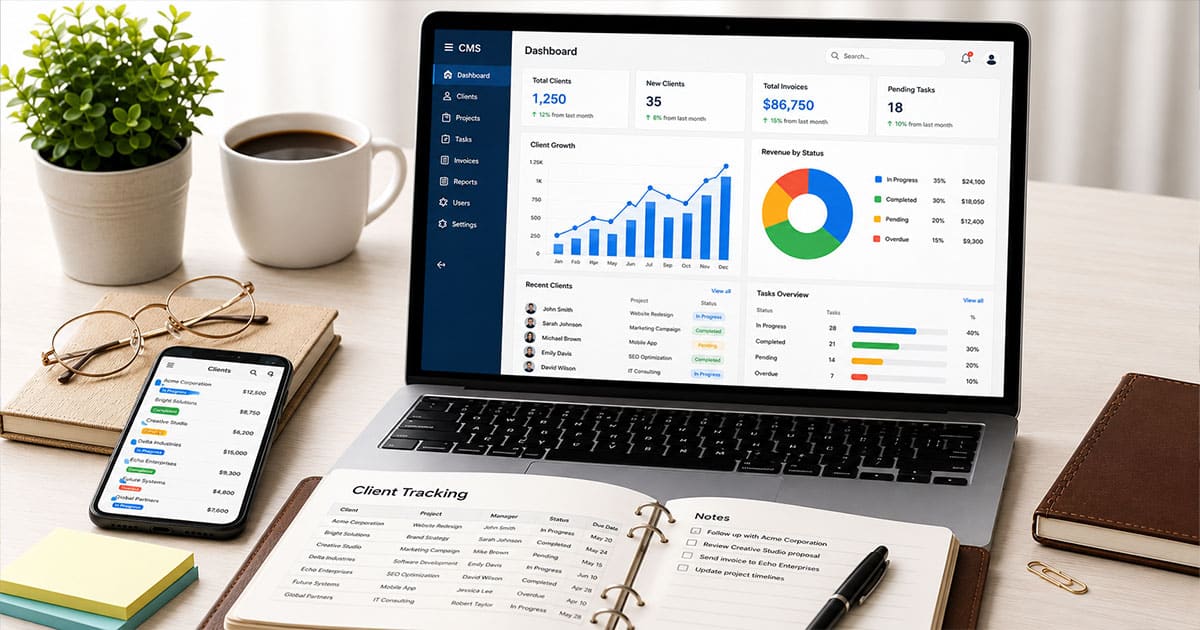
Managing clients in 2026 demands more than scattered spreadsheets and endless email chains. Your sales teams need visibility into every interaction, every approval, and every milestone across the client lifecycle. That is where client tracking software comes in.
The global CRM software market now reaches $128 billion, growing at 14.6% CAGR since 2023. This surge reflects a simple truth: businesses using dedicated client management software report 29% faster deal closures and 34% higher sales productivity. The old way of juggling multiple tools simply cannot keep up with rising client expectations for speed and transparency.
This guide walks you through what client tracking software is, why it matters for growth, the features worth paying for, and how to pick the right tool for your team.
What Is Client Tracking Software?
Client tracking software serves as your system of record for every interaction, deliverable, and approval across the client lifecycle. Think of it as command central for managing clients from onboarding through renewal and beyond.
This type of tracking software replaces scattered spreadsheets, email chains, and chat logs with a single, searchable workspace for each client account. Instead of digging through old messages to find who approved what in March 2025, you open one dashboard and see everything. Client data, contact management details, past campaigns, contracts, and approval timelines all live in one place.
Unlike generic databases, client tracking tools handle day-to-day operations that matter to your exact sales process. Campaign approvals, content delivery, reporting, and renewals become streamlined rather than chaotic.
Consider a digital agency tracking Q2 2026 campaign assets. With proper client tracking software, they upload creative briefs, assign due dates, route materials for client sign-off via in-app feedback, and archive approved versions. All visible in one dashboard. Search time drops from hours to minutes, and client communication stays crystal clear.
Why Client Tracking Software Is Essential For Growth
Client expectations for speed and transparency have risen sharply. Around 80% of agencies report demands for instant updates on project status. Your prospects and loyal clients expect personalized interactions based on their history with you.
Disorganized tracking creates real costs that hurt your bottom line. Missed deadlines affect 42% of projects. Forgotten approvals cause 25% rework. Duplicated efforts waste 20% of team time. These numbers add up to last-minute fire drills before launches, strained client relationships, and lost revenue.
Common scenarios play out across agencies, consultancies, and in-house teams. Multiple tools and channels create confusion about which version is final. Someone asks in Slack, another responds in email, and a third updates a Google Drive folder. Nobody knows where to look, and customer interactions become frustrating for everyone involved.
Proper client tracking tools reduce context-switching and help new team members ramp faster. Industry data shows new hires get productive 50% quicker when centralized history exists. Automated dashboards cut reporting prep time by 70%. Tools with health metrics predict churn 3-6 months early, boosting retention by 15-20%.
Teams using strong client management report 28% more upsell revenue through interaction insights. When you see the full picture of client behavior, you spot opportunities that would otherwise slip away, especially when you rely on modern CRM software built for sales teams.
Must Have Features In Client Tracking Software
Not every team needs enterprise-scale bells and whistles. A freelancer has different requirements than a 100-person agency. However, certain core features separate effective tools from glorified contact lists, starting with centralized contact management to strengthen relationships. Let us walk through what matters most for your client management processes.
Centralized Client Profiles And History
A complete client profile in 2026 contains contact details, roles, documents, brand guidelines, past campaigns, contracts, and approval history. This is your one source of truth that eliminates hunting through old emails.
Picture a marketing team opening a client record. They see every past deliverable, comment thread, and decision point. When a colleague asks about who signed off on a specific asset from last quarter, the answer takes seconds to find, not hours.
Centralize client data properly and you reduce data silos by up to 80%. Audit trails log all changes, which proves vital for compliance and accountability. No more “who changed this?” mysteries.
Task, Project, And Milestone Tracking
Visibility matters at both the individual client level and across your entire portfolio. Filters for month, owner, and status help project management stay clean and organized.
Think about tracking a website redesign from discovery workshop in May 2026 through content creation, design phases, QA testing, and launch. Each milestone has clear ownership and deadlines. Progress tracking becomes visual rather than buried in scattered to-do lists.
Recurring workflows for monthly content calendars or regular reports should be easy to templatize. Set them up once, reuse them across client projects. Teams using this approach cut project overrun risks by 35%.
Client Communication And Collaboration
Modern client tracking software logs emails, comments, and in-app discussions so your whole team sees the latest decisions. No more “did anyone respond to that client question?” confusion.
In-context feedback on files, visuals, or copy prevents long back-and-forth threads. Clients leave comments directly on the asset rather than writing a separate email that gets buried. Approved messages, tone of voice notes, and meeting summaries live alongside the related task.
Real-time collaboration speeds decisions by 40% compared to email-only workflows. Your sales pipeline moves faster when customer interactions stay organized and accessible, particularly when you use CRM with integrated email communication.
File, Version, And Approval Management
Version control prevents releasing the wrong file. The tool should clearly mark “v1, v2, Final Approved June 10, 2026” along with who approved it and when.
Structured approval flows define who reviews first and who has final sign-off. Automated reminders keep these steps moving without manual nudging. Consider managing social media graphics that require legal review followed by brand approval before scheduling. Without clear version tracking, the wrong asset gets published.
Teams report 90% fewer wrong-file releases after implementing proper approval management. That statistic alone justifies the investment for most businesses.
Reporting, Analytics, And Client Health
Client health metrics give you early warning signals. Track response times, on-time delivery rates, open tasks, and satisfaction trends over time. Customizable dashboards let managers compare clients or campaigns at a glance.
Health scores powered by AI predict risks before they become crises. Low engagement flags potential churn months in advance, giving you time to intervene. Teams using these metrics see retention lift of 15-20%.
Connect reporting to practical decisions. If one account shows declining health scores, reallocate team capacity or start a conversation about scope. Data driven decisions beat gut feelings.
Integrations And Automations
Your client tracking tool needs to play nicely with Google Workspace, Microsoft 365, Slack, and whatever creative tools your team uses. Seamless integration eliminates duplicate data entry and keeps information flowing.
Automation handles repetitive tasks that eat up your day. Notify a client when a draft is ready. Nudge them when feedback is late. Update statuses automatically after approval. Assign tasks based on project stage, or use sales task automation to stay focused and organized.
Imagine auto-posting approved content to social platforms once the right stakeholders have signed off. No manual handoffs, no forgotten posts. Teams save 15+ hours weekly through proper automation. That is time your sales teams can spend on activities that close deals.
How To Choose The Right Client Tracking Software For Your Team
You do not need to chase every feature on the market. The goal is finding a tool that fits how your team already works, then improving from there, following proven tips for choosing CRM tools that fit your workflow. Around 75% of failed software adoptions stem from poor workflow alignment, not missing features.
Map Your Current Client Workflows
Start by documenting how things work today. How does a new client come in? How are briefs shared? How does content get approved? How do you report results?
This mapping reveals bottlenecks. Maybe approvals get delayed in email. Perhaps confusion over which file is final causes rework. A creative agency might map their process from signed contract through first campaign launch and discover three places where client information gets lost.
Write it down, even roughly. You cannot fix what you cannot see.
Identify Non-Negotiable Features
Define 5-7 features you cannot compromise on. Structured approvals, content versioning, and multi-brand support might be critical for an agency. A solo consultant might prioritize simplicity and contact management above all else, much like real estate agents using CRM tools to save time and stay organized.
Security and permissions matter more than many teams realize. Who sees what? Can clients access only their own materials? Role-based access protects sensitive client information and builds trust.
The key features for freelancers, agencies, and in-house teams differ significantly. Small businesses might need simple CRM for startups and small sales teams with basic crm capabilities and a free plan available for testing. Larger organizations require customizable sales stages, premium support, and complex workflow options.
Evaluate Ease Of Use And Adoption
A tool only works if the whole team uses it daily. Intuitive design and low training overhead make or break adoption.
Picture a new account manager joining in July 2026. Can they understand active client projects within their first hour in the tool? If the learning curve takes weeks, adoption will suffer.
Consider client-side ease of use too. Many platforms invite clients to review and approve directly. When clients find the system confusing, they default to email, and you lose the benefits of centralization.
Consider Scalability And Pricing
Plan for growth over the next 12-24 months, not just your current situation, and keep upcoming CRM trends for 2026 and beyond in mind. Entry-level pricing typically runs $10-25 per user month, with paid plans scaling to $50+ for advanced AI and automation features.
Think about a team doubling clients from 15 to 30. Can your tool handle that growth without replatforming? Unlimited storage, additional user seats, and workflow complexity all factor in.
Paid plans start at various price points. Some platforms offer a free plan for basic needs, while custom pricing handles enterprise requirements. Match your budget to your growth trajectory.
Run A Time-Bound Pilot
Before rolling out across your whole portfolio, run a focused 30-60 day pilot with two or three representative clients. Choose accounts that represent different workflow types.
Track specific metrics during the pilot. Time saved on repetitive tasks. Number of missed follow-ups. Approval turnaround times. Customer satisfaction feedback. Compare these against your pre-pilot baseline to see whether a simpler sales workflow inside your CRM is truly improving results.
Include your clients in the evaluation. Ask them directly about the new experience. Their honest responses reveal whether the tool improves client service or adds friction.
Common Mistakes Teams Make With Client Tracking Software
Even the best client management tools become useless if bad habits take hold. Around 68% of teams underutilize their software due to avoidable mistakes. Here is how to sidestep the most common pitfalls.
Trying To Rebuild Every Process At Once
Teams often attempt to replicate every existing spreadsheet and legacy workflow on day one. This overwhelms users and kills adoption before it starts, especially when they try to mirror the entire sales strategy and entire sales cycle without simplification.
Take a phased approach instead. Start with client intake and approval processes. Get those running smoothly before adding reporting dashboards, project tracking, or workflow automation. A 3-month rollout cuts resistance by 60% compared to trying everything at once.
Roll out content approvals first. After a few months of success, expand to CRM-powered lead management for sales teams, automate repetitive tasks, and strengthen sales tracking capabilities. Build momentum gradually while reducing manual data entry and improving consistency.
Leaving Data In Multiple Places
Half-using the software creates the worst outcome. Some files live in the platform while others stay buried in email or shared drives. Nobody knows where to look, and the confusion you wanted to eliminate persists. This also weakens visibility into sales data and slows down decision-making for most sales teams.
Set clear rules. If something needs client review, it lives in the client tracking tool. Period. Enforce this through internal guidelines that everyone follows. Teams maintaining hybrid systems see 30% more data errors than those fully committed to one comprehensive crm approach with dynamic contact management for smarter relationship tracking.
Centralization also helps field sales teams stay aligned, ensuring access to the same information across devices, especially when they rely on sales activity tracking software for smarter teams. When data stays unified, teams can act faster and with more confidence.
Skipping Client Education
Your clients need simple onboarding too. Where do they click? How do they leave feedback? How can they see what is due next?
Dedicate 10 minutes during your kickoff call to walk through the basics. Send a quick start guide afterward. When clients understand the tool, approvals speed up 50% and confusion drops dramatically.
Frame this education as a benefit to them. They get clearer visibility, fewer emails, and faster turnaround on their requests, along with better transparency into sales deal tracking across your pipeline. You can also introduce features like accept online payments within the same system to simplify transactions. Offer a simple fallback path initially, like allowing email replies that your team adds into the system while habits form.
Not Measuring Impact
Many teams never quantify improvements after implementing new software. This makes it harder to justify the investment or refine processes over time. It also limits the ability to build predictive lead scoring models or improve future outcomes.
Track metrics before and after rollout. Average approval time per asset. Number of “where is this at?” messages. Sales cycle length improvements. If approval time drops from 5 days to 2 days, you have concrete proof of value across the entire sales cycle.
Keep this measurement lightweight. Pick 3-4 metrics and review them monthly. Use insights to refine workflow automation, improve efficiency, and strengthen your overall sales strategy.
How Gain.io Powers Client Tracking, Approvals, And Content Workflows
We built Gain.io as an all-in-one CRM to grow your sales and team specifically to simplify client collaboration and tracking for sales teams, marketing agencies, and growing businesses. Our user friendly platform focuses on the workflows that matter most: managing your visual sales pipeline, tracking client interactions, and moving deals forward without unnecessary complexity.
Gain.io creates dedicated workspaces for each client where teams plan content calendars, upload assets, collect feedback, and secure approvals in one place. Visual timelines show exactly where each project stands, similar to how a well-structured sales pipeline makes deal progress easy to follow. Asset status labels eliminate guessing about what needs attention next.
Version history records who approved what and when, creating accountability without extra effort. Our automated task assignments route content to the right stakeholders in the right order. Reminders go out automatically until decisions are made. No more chasing approvals through email.
We integrate with the tools your team already uses, keeping content publishing and collaboration connected to the same client record, while our smart CRM features for sales teams keep everything organized. Marketing automation features help automate routine tasks that slow you down.
One marketing team came to us, drowning in chaotic email threads and missed deadlines. After moving into Gain.io, they cut approval times in half and regained hours previously spent searching for feedback, mirroring how our sales acceleration case study shows faster deal cycles. Their team performance improved while their stress levels dropped.
Our approach prioritizes operational simplicity. We help you manage projects and client onboarding without the overhead of complex sales processes or bloated feature lists. Whether you need powerful sales tracking, a sales pipeline CRM to improve visibility and performance, or just a better way to complete tasks on time, Gain.io delivers.
Frequently Asked Questions
How Long Does It Take To Implement Client Tracking Software?
Implementation timelines vary based on your situation. Solo consultants and small teams can get started in a few days. Larger agencies with many clients and complex workflows should plan for 4-6 weeks. The timeline depends on how organized your current data is and how many workflows need rebuilding. A phased rollout where critical accounts move first prevents overwhelming your team and ensures you track progress along the way.
Can I Migrate Existing Spreadsheets And Files Into A New Tool?
Most modern platforms let you import CSV files for contacts, tasks, and projects. You can then link or upload existing documents to the appropriate client records. Before importing, clean your column names, remove duplicates, and standardize client names. Test the import with a small subset of accounts before migrating everything. This prevents confusion and saves time fixing errors later.
How Do I Convince Clients To Use A New System For Approvals?
Frame the change as a benefit to them. They get clearer visibility into project status, fewer emails cluttering their inbox, and faster turnaround on their requests. Share one short explainer video or offer a live walk-through during your first call. Be available for questions during the first couple of weeks. For hesitant clients, offer a simple fallback path initially where email replies are acceptable while they build new habits.
Is Client Tracking Software Secure Enough For Sensitive Information?
Reputable tools offer encryption in transit and at rest, granular permissions, and detailed access logs. Ask vendors for documentation about compliance standards and data residency if those matter to your industry, and compare options like Gain.io vs Salesforce CRM to match security needs with usability. Implement role-based access from the start. Limit who can see financial documents, contracts, or other sensitive customer data. These basic practices protect both your business and your client relationships.
How Often Should We Review And Update Our Client Tracking Setup?
A light quarterly review keeps your setup running smoothly. Remove outdated fields, archive inactive projects, and refine workflows based on how your team works in practice versus how you imagined they would work. Involve at least one person from account management, operations, and leadership in these reviews. Keeping the setup lean and relevant drives higher adoption and smoother daily use, especially if your platform already aligns with best practices from a B2B sales CRM guide for revenue teams. Your forecast revenue accuracy and save time metrics will reflect the improvement.