Most sales teams without a sales pipeline template lose deals for the same reason. Leads slip through the cracks. Someone forgets a follow-up. A hot prospect sits untouched for a week. Nobody knows which deals are close to closing.
A sales pipeline template fixes that. It gives every deal a clear home, from first contact to signed contract. You can see where each opportunity stands, what needs to happen next, and where your revenue is likely coming from.
A good template can save your reps hours of guesswork every week. Grab the free sales pipeline template, then learn the key stages, the fields worth tracking, and the best practices that keep your pipeline clean, accurate, and useful for your team.
What Is A Sales Pipeline Template?
A sales pipeline template is a ready-made framework that gives you a visual representation of your sales process. It shows every stage a potential customer moves through, from first contact to closed deal. Instead of building a sales pipeline from scratch, you plug in your stages, deals, and key details.
Unlike a sales funnel, which tracks how many prospective customers drop off, a pipeline template tracks what your team needs to do next. It helps you spot stuck deals, shorten your sales cycle, and forecast revenue with more confidence. It also keeps your sales strategy consistent across the whole team.
Free Sales Pipeline Template
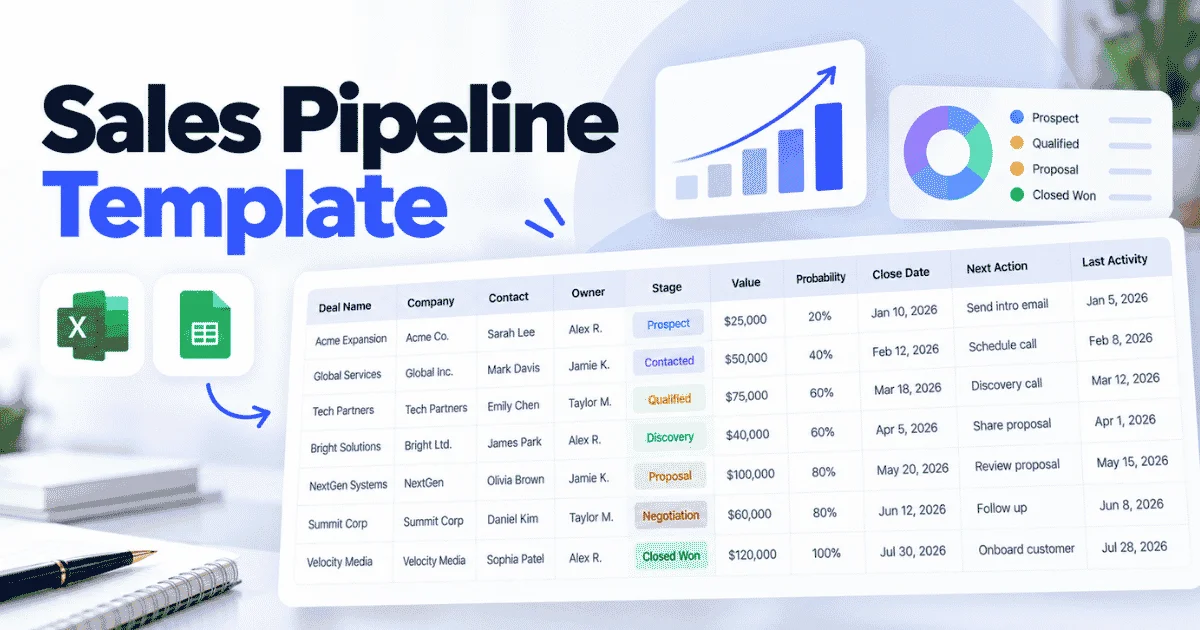
Here's a free sales pipeline template you can copy straight into Excel or Google Sheets. It covers the fields most teams need to track sales leads from first contact to closed deal. Just paste the columns into row one and start adding your deals.
Deal Name | Company | Contact | Owner | Stage | Value | Probability | Close Date | Next Action | Last Activity |
|---|---|---|---|---|---|---|---|---|---|
Annual CRM Plan | Brightline Ltd | Sarah Carter | Rahim | Proposal Sent | $12,000 | 60% | 15 Nov 2026 | Follow-up call | 22 Oct 2026 |
Onboarding Package | Nordic Foods | Erik Olsen | Nadia | Qualified | $4,500 | 30% | 30 Nov 2026 | Send demo link | 20 Oct 2026 |
What Each Column Means
Column | What It Tracks |
|---|---|
Deal Name | A short label for the opportunity so anyone can spot it fast. |
Company | The business you're selling to. |
Contact | The main person you're talking to at that company. |
Owner | The sales rep responsible for moving the deal forward. |
Stage | Where the deal sits right now, such as New Lead, Qualified, Proposal Sent, or Closed Won. |
Value | The expected revenue if the deal closes. |
Probability | Your honest estimate of the chance this deal closes. |
Close Date | When you expect the deal to be signed. |
Next Action | The very next step, like a call, email, or demo. |
Last Activity | The date of your most recent touchpoint. It helps you catch deals going cold. |
Using It in Excel or Google Sheets
The template works the same in both tools. In Google Sheets, you get easy sharing and real-time edits for the whole team. In Excel, you get stronger offline use and advanced formulas. In either one, add a dropdown to the Stage column so everyone uses the same labels. You can also multiply Value by Probability in a new column to get a weighted forecast.
How to Customize the Template
No two sales processes look the same, so treat this as a starting point. A few easy tweaks:
- Add a Lead Status column if your team handles a lot of new leads. Labels like Hot, Warm, or Cold help reps prioritize before a deal is qualified.
- Add a Source column to see which lead generation channels bring the best deals, such as ads, referrals, or events.
- Rename your stages to match how you actually sell. A SaaS team might use Trial Started, while an agency might use Discovery Call.
- Remove what you don't use. If your deals close in one call, you may not need Probability at all.
Most free sales pipeline templates fail because teams stop updating them. Keep yours simple, review it weekly, and it will stay useful. Once your free sales pipeline outgrows a spreadsheet, that's usually the sign to move into a CRM.
What Should A Sales Pipeline Template Include?
A sales pipeline template should include deal details, stage and status, value, probability, next actions, and ownership. Each field helps your sales team make faster, smarter decisions and keeps sales pipeline management on track.
Deal And Contact Information
Deal and contact details are the foundation of every row. Without a clear deal name, company, and contact person, sales team members waste time asking who's who. That confusion slows deals down and makes your team look disorganized to buyers.
Good contact data also protects the relationship. If a rep leaves or a deal gets reassigned, the next person knows exactly who to call. Nothing gets lost in the handoff. It supports account management later too, since you already know the key decision-makers inside each company.
Sales Stage And Status
The stage shows where a deal sits in your process. The status shows whether it's actually moving. You need both. Stages alone can hide trouble. A deal can sit in "Proposal Sent" for weeks, and without a status field, nobody notices until it's too late.
Labels like active, stalled, or at risk help you catch problems early. Over time, this data also reveals where deals tend to get stuck. That insight is gold. It shows you exactly which step in your sales process needs fixing first.
Deal Value And Expected Close Date
Deal size helps your sales team prioritize. A rep juggling ten small deals and one large one needs to know where their time pays off the most. Without a value field, every deal looks equally important, and that's rarely the case.
The expected close date adds urgency. It shows which deals need attention this week and which can wait. Together, deal size and close date give leadership clear pipeline visibility into revenue timing, not just revenue totals. That makes planning hiring, budgets, and targets much easier.
Probability And Forecast Data
Not every deal will close, and your forecast should reflect that. Probability lets you weight each deal by its real chance of winning. A $20,000 deal at 25% counts as $5,000 in your forecast. This simple math keeps your projections honest and realistic.
Forecast data gets more valuable over time. When you compare predictions with actual results, patterns start to show. You'll see which reps are too optimistic and which stages truly predict wins. That feedback helps your whole sales team forecast with more confidence every quarter.
Next Action And Follow-Up Date
This is the field that keeps deals alive. Most lost deals don't die from a clear "no." They die from silence. A rep gets busy, a follow-up slips, and the buyer moves on to a competitor who stayed in touch.
A clear next action and follow-up date make sure every deal has a planned step. No deal should ever sit without one. This also removes guesswork for everyone. Anyone opening the template can see what should happen next, even if the close date is still months away.
Activity, Notes, And Ownership
Ownership creates accountability. When every deal has one named owner, nothing falls between two people. Sales team members know exactly what they're responsible for, and managers know who to ask when a deal stalls. Shared ownership usually means no ownership at all.
Activity logs and notes add the context numbers can't. They capture objections, budget talks, and small details that make the next conversation go better. They also help managers coach reps, because the full deal history lives in one place instead of someone's personal inbox.
Which Sales Pipeline Stages Should You Use?
Most teams use six main stages: Prospect, Contacted, Qualified, Discovery, Proposal and Negotiation, and Closed Won or Closed Lost. Clear exit criteria for each stage help sales reps move deals forward with confidence.
Prospect
A prospect is anyone who might need what you sell but hasn't heard from you yet. These prospects usually come from lead lists, inbound forms, referrals, or events. At this stage, your goal is simple: confirm they're worth reaching out to.
Don't fill this stage with every name you find. A bloated list hides good opportunities and wastes precious time for your sales reps. Exit criteria: the prospect fits your ideal customer profile, and you have a valid contact name, role, and email or phone number.
Contacted
This stage starts once a rep reaches out for the first time. That could be a cold email, a LinkedIn message, or a phone call. The deal stays here while you wait for a reply, which can take several follow-ups.
Tracking this stage shows how well your outreach actually works. If most deals stall here, your messaging probably needs work. Try a new angle or channel. Exit criteria: the prospect has responded with interest and agreed to a short intro call or meeting to learn more.
Qualified
Not every interested prospect is a good fit. Qualification is where sales reps check whether the deal is worth real time and effort. Many teams use a simple framework like BANT, which looks at budget, authority, need, and timeline.
Skipping this step is one of the most common pipeline mistakes. It fills later pipeline stages with deals that were never going to close. It saves everyone time later. Exit criteria: the buyer has a real problem you solve, a budget range, decision-making access, and a rough timeline.
Discovery
Discovery is where you dig deeper into the buyer's world. Sales reps ask questions about current tools, pain points, goals, and who else is involved in the decision. Listen more than you talk. The better your discovery, the easier the proposal becomes.
This stage often includes a demo or a working session. It's your chance to show value, not just features. Tailor it to what you learned. Exit criteria: you understand the buyer's needs, success metrics, and decision process, and all key stakeholders have been identified.
Proposal And Negotiation
Here, you send a formal proposal with pricing, scope, and terms. Then negotiation begins. The buyer may push back on price, ask for changes, or bring in procurement and legal teams. This stage can move fast or drag on for weeks.
Stay close to the buyer during this phase. Silence usually signals doubt, not progress. Check in often and answer every objection quickly. Exit criteria: both sides agree on final pricing and terms, and the buyer has either signed the contract or clearly declined the offer.
Closed Won Or Closed Lost
Every deal ends here. Closed Won means the contract is signed and the customer is ready to onboard. Closed Lost means the buyer said no, went silent for good, or chose a competitor. Both outcomes are useful data.
Always record why a deal was lost. Those reasons make managing sales pipeline stages much smarter over time. Every closed deal, won or lost, should teach you something. Exit criteria: for a won deal, the handoff to onboarding is complete. For a lost deal, the loss reason is logged and reviewed.
How Do You Build A Sales Pipeline Template?
To build a sales pipeline template, define your sales process, choose the right fields, assign ownership, add next actions, and create a review process. These five steps help any team stay organized.
Define Your Sales Process
Start by mapping how your team actually sells today, not how you wish it worked. Write down every step a deal goes through, from first contact to signed contract. Talk to your reps. They know where deals really slow down.
Next, turn those steps into clear stages and connect them to your sales goals. If your goal is 20 new customers a quarter, you need enough deals in each stage to hit it. Keep the process simple. Five to seven stages work well for most teams.
Choose The Right Pipeline Fields
Once your stages are set, decide what information each deal needs. Start with the core essentials: deal name, company, contact, owner, stage, value, probability, and close date. These fields cover the basics of pipeline management without overwhelming your team.
Then ask one question for every extra field: will someone actually use this? If not, leave it out. Too many columns make updates slow, and slow updates get skipped. Create your template in Excel or Google Sheets first, then test it with real deals for two weeks.
Assign Deal Ownership
Every deal needs one clear owner. That sales representative is responsible for moving it forward, updating the template, and handling follow ups. When two people share a deal, each assumes the other is on it, and nothing really happens.
Add an Owner column and make it required. Set simple rules for handoffs too. For example, if a deal moves from sales to account management, update the owner the same day. Clear ownership makes it easy to spot who is overloaded and who has room for more.
Add Follow-Up And Next Actions
A deal without a next step is a deal at risk. Add a Next Action column and a Follow-Up Date column to your template. Every entry should be one actionable task, such as "Send pricing" or "Book demo," not a vague note like "Check in."
These fields help reps prioritize tasks first thing each morning. Sort by follow-up date, and the day's plan is ready. Overdue dates flag deals that need attention fast. Actionable tasks also make handoffs easier, since anyone can see what comes next.
Create A Pipeline Review Process
A template only works if people keep it updated. Set a weekly pipeline review, ideally at the same time each week. Keep it short, around 30 minutes. Walk through deals by stage and flag anything that hasn't moved in two weeks.
During each review, ask three questions: Is the stage accurate? Is the close date still realistic? What's the next step? This simple process helps your team stay organized and catch problems early. Over time, it also shows which habits help you hit your sales goals.
How Do You Forecast Sales From A Pipeline?
To forecast revenue from a pipeline, track six key metrics: total value, weighted value, coverage, close dates, deal velocity, and stalled deals. Together, they turn raw pipeline data into accurate forecasting.
Calculate Total Pipeline Value
Total pipeline value is the sum of every open deal in your pipeline. It shows the maximum revenue you could earn if every deal closed. Include only active deals, not closed ones. The formula is simple: Total Pipeline Value = Sum of all open deal values.
Say your team has 10 open deals with a combined value of $200,000. That's your total pipeline value. That number looks exciting, but it's not a forecast. Not every deal will close, so use this figure as a starting point, not a promise.
Calculate Weighted Pipeline Value
Weighted pipeline value adjusts each deal by its chance of closing. It gives you a far more realistic view of incoming revenue. The formula: Weighted Value = Deal Value × Probability. Add up every weighted deal to get your total.
Here's how it works. Using the same pipeline, imagine $50,000 sits in Proposal at 60%, $80,000 in Discovery at 30%, and $70,000 in Qualified at 10%. That's $30,000 + $24,000 + $7,000, giving you a weighted pipeline of $61,000. That's the number you can actually plan around.
Estimate Pipeline Coverage
Pipeline coverage tells you whether you have enough deals to hit your target. It compares your total pipeline to your revenue goal. The formula: Pipeline Coverage = Total Pipeline Value ÷ Revenue Target.
If your quarterly target is $80,000 and your pipeline holds $200,000, your coverage is 2.5x. Most teams aim for 3x to 4x, depending on their conversion rates. In this example, the weighted $61,000 also falls short of the goal. Low coverage is an early warning. It means you need more deals now, not next month.
Track Expected Close Dates
Close dates show when revenue will actually land. Timing matters as much as value. A $200,000 pipeline means little if most deals won't close until next year. Group deals by expected close month to see your forecast over time, not just in total.
For example, if $40,000 of weighted value closes in October and $21,000 in November, you know what each month should bring. Track how often close dates slip. If reps push dates repeatedly, your forecast is too optimistic and needs adjusting before you report it.
Monitor Deal Velocity
Deal velocity measures how fast revenue moves through your pipeline. It combines your key sales performance numbers into one figure. The formula: Sales Velocity = (Number of Deals × Average Deal Size × Win Rate) ÷ Sales Cycle Length.
With 10 deals, a $20,000 average size, a 25% win rate, and a 50-day cycle, your velocity is $1,000 per day. It's a quick way to track progress across the pipeline. Watch this number monthly. If it drops, deals are slowing down, and future revenue will likely fall short.
Identify Stalled Opportunities
Stalled deals quietly damage accurate forecasting. They sit in your pipeline, inflate your numbers, and make revenue look healthier than it is. A good rule: if a deal hasn't moved stages or had activity in 30 days, flag it.
Use your Last Activity column to spot these deals fast. Then decide quickly: push for a clear next step or remove the deal. Say two Discovery deals worth $30,000 have gone silent. Removing them drops your weighted pipeline by $9,000, giving you a far more honest forecast.
How Do You Keep A Sales Pipeline Accurate?
An accurate pipeline depends on good hygiene. Update stages, review close dates, track next actions, remove stale deals, and review pipeline health often. Clean data helps your team focus on real opportunities.
Update Deal Stages Regularly
A pipeline goes stale fast when stages aren't updated. A deal that moved to Proposal last week but still shows Qualified gives managers the wrong picture. Multiply that across a whole team, and your forecast stops matching reality.
Ask salespeople to update the stage and status right after every meaningful buyer interaction. Don't wait for Friday. Use your exit criteria as the rule, not gut feeling. This simple habit keeps everyone honest. If a deal hasn't met the criteria, it stays put, even if the call felt great.
Set And Review Close Dates
Outdated close dates are one of the biggest threats to pipeline accuracy. Reps often set a date early and never touch it again. Weeks later, that date has passed, but the deal still sits in the forecast like nothing happened.
Base every close date on buyer actions, not hope. If the buyer hasn't confirmed a decision timeline, the date is a guess. Review close dates weekly and flag any deal pushed more than twice. Repeated delays usually mean the buyer's business case is weak or unclear.
Track The Next Sales Action
Missing next actions are a quiet pipeline killer. A deal with no planned step isn't really being worked. It's just sitting there, waiting. Over time, these deals age out, and nobody notices until the buyer has already moved on.
Make the Next Action field required for every open deal. Pair it with a date and a priority level, such as high, medium, or low. This helps salespeople focus on what matters today. Good pipeline software can also send automatic reminders when a next step is overdue.
Remove Stale And Lost Deals
Deal aging is a clear warning sign. If a deal sits in one stage twice as long as your average, its chances of closing drop fast. Yet many teams keep these deals open because removing them feels like admitting defeat.
Set a clear rule. If a deal has no activity in 30 days and no response after three follow-ups, close it as lost. Log the reason. A smaller, honest pipeline beats a big, inflated one. It also shows whether you need more deals at the top.
Review Pipeline Health
Regular reviews keep small problems from becoming big ones. Once a month, step back and look at your pipeline health as a whole. Check stage conversion rates, average deal age, and how many deals are missing key fields.
These checks show how your team works in practice, not just on paper. Managers can spot reps who need coaching and stages where deals pile up. A clean pipeline makes it easier to manage resources, set realistic targets, and plan business growth for the next quarter with confidence.
Sales Pipeline Template Vs CRM And How Gain.io Helps
A spreadsheet template works well for simple tracking, but a CRM connects deals, contacts, activity, and follow-ups in one place. The right choice depends on your team size, deal volume, and sales goals.
Capability | Spreadsheet Template | CRM |
|---|---|---|
Deal Tracking | Yes | Yes |
Pipeline Stages | Yes | Yes |
Forecasting | Basic | Advanced |
Contact History | Limited | Connected |
Activity Tracking | Manual | Automated |
Follow-Ups | Manual | Automated |
Multiple Users | Limited | Yes |
Reporting | Basic | Advanced |
Customer Context | Fragmented | Centralized |
Pipeline Automation | Limited | Yes |
When A Spreadsheet Remains Practical
A spreadsheet is a smart starting point for small teams. If you have one or two reps and fewer than 30 open deals, a template in Excel or Google Sheets covers the basics. It's free, fast to set up, and easy to change.
It also works well when your sales process is still taking shape. You can test stages, fields, and exit criteria without committing to new tools. Once the process feels stable, you'll know exactly what you need from a CRM.
When A CRM Becomes More Suitable
A CRM makes sense once the spreadsheet starts slowing you down. Common signs include missed follow-ups, duplicate leads, and reps editing the same file at once. If you spend more time updating rows than selling, it's time to switch.
Growth is another trigger. More reps, more sales opportunities, and longer deal cycles need connected data. A CRM links every email, note, and task to the right deal. It also supports account management after the sale, which a spreadsheet was never built to handle.
How Gain.io Helps
Gain.io gives growing teams a simple way to move beyond spreadsheets. Its visual board view lets you drag deals between stages, while multiple views help each rep work the way they prefer. You can see every deal, contact, and next step at a glance.
It also brings your workflows together. Tasks, notes, activity tracking, and email and calendar integration all sit in one place, so customer context never gets lost. Teams across every industry, from SaaS to real estate, use it to track leads, stay on top of follow-ups, and hit their sales goals with less manual work.
Final Discussion
A sales pipeline template gives your team a clear, simple way to track every deal. With the right stages, fields, and exit criteria, you always know where each opportunity stands and what needs to happen next. That clarity leads to better follow-ups and more honest forecasts. It also helps every rep focus on the right deals each day.
Start with the free template, keep it updated, and review it every week. Small habits like logging activity and removing stale deals make a big difference over time. When your team grows and the spreadsheet starts holding you back, a CRM like Gain.io can take over. It keeps your deals, contacts, and tasks connected, so your pipeline stays accurate as you scale.