A 10-person team tries HubSpot's free CRM in January. Only 2 of them can use it, because the free plan covers 2 users. By June, the support lead wants SLA targets and a help centre, and both sit on Service Hub Professional. That's $100 per seat per month on an annual commitment, plus a one-time $1,500 onboarding fee.
HubSpot CRM is free for up to 2 users. Paid Starter seats list at $20 per seat per month, and Sales Hub or Service Hub Professional seats at $100 plus a one-time $1,500 onboarding fee (HubSpot pricing pages, 15 November 2026). A 10-person team pays $2,400 a year on Starter and $15,000 in year one on Professional. This guide is from Gain.io (gain.io), the CRM and help desk on one customer record.
None of that is hidden. HubSpot CRM pricing is all on HubSpot's own pages. But the numbers sit on different pages, behind different seat types, and the figure in big type isn't the one you'll pay after the first discount. This guide puts them in one place and works out what a 10-person sales and support team really pays.
Key Takeaways
- HubSpot CRM pricing starts at $0 for up to 2 users. Paid Starter seats list at $20 per seat per month, with a $7 price shown for new customers only (HubSpot pricing pages, 15 November 2026).
- Sales Hub Professional and Service Hub Professional list at $100 per seat per month, need an annual commitment and add a required one-time onboarding fee of $1,500 each.
- Enterprise seats start at $150 per seat per month, with a required one-time onboarding fee of $3,500.
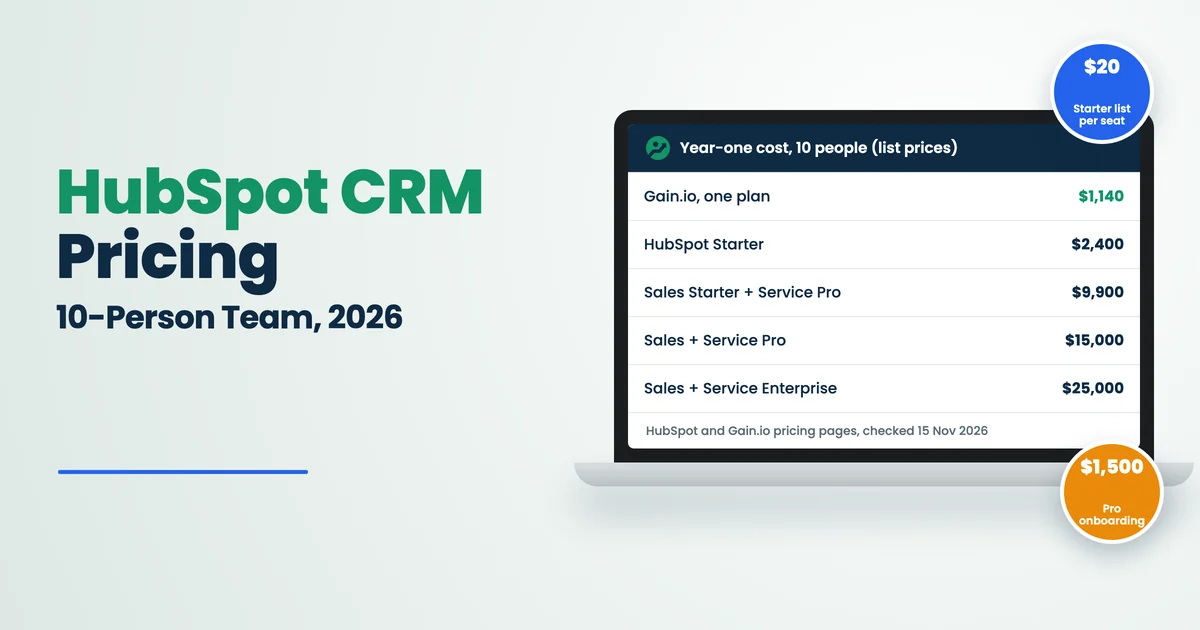
- At list prices, a 10-person team pays $2,400 a year on Starter and $15,000 in year one on Sales Hub and Service Hub Professional. The same team pays $1,140 a year on Gain.io.
- SLAs, a knowledge base, CSAT surveys, WhatsApp and sequences all start on Professional, so the jump from Starter is where most small teams feel the price.
- AI agents run on HubSpot Credits. The customer agent uses 50 credits per resolved conversation, and extra credits cost $0.01 each.
This guide covers what each HubSpot plan costs in 2026, what the free CRM includes, how Sales Hub and Service Hub are priced, how Core, Sales and Service seats work, the Starter Customer Platform, a worked cost for 10 people over three years, the costs that don't show on the plan cards, and when a combined CRM and help desk costs less. Every HubSpot price was read on HubSpot's own pages on 15 November 2026.
HubSpot CRM Pricing In 2026 At A Glance
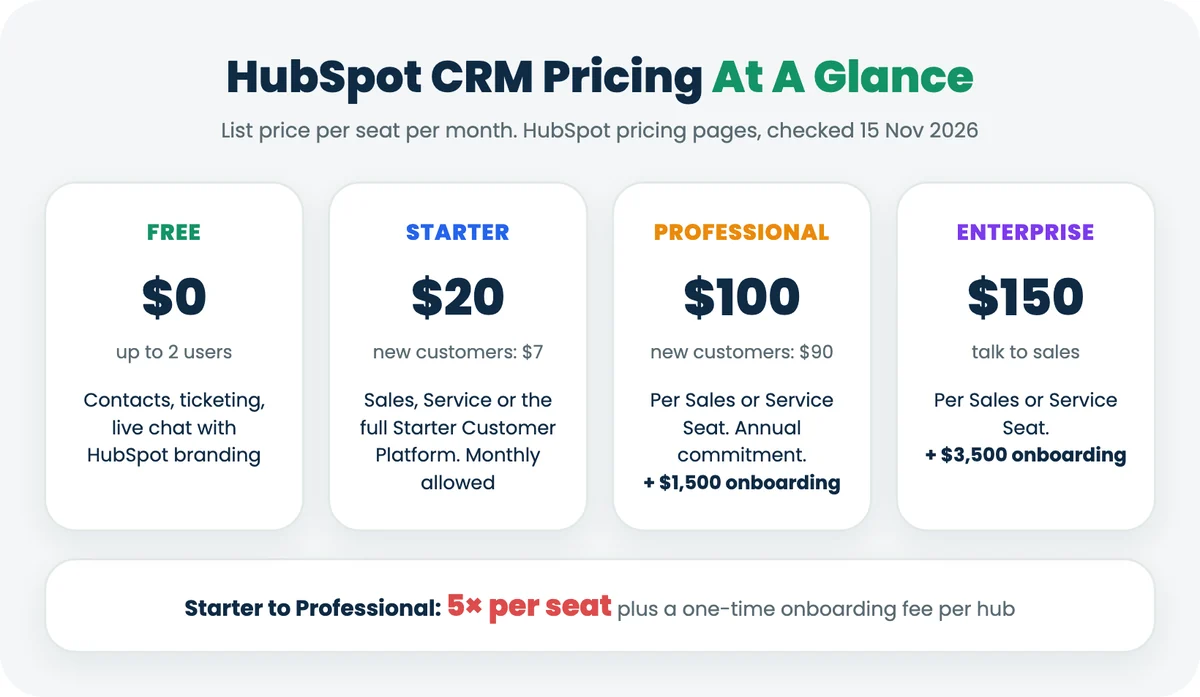
HubSpot (a customer platform for marketing, sales and customer service) sells its CRM in four tiers. Smart CRM is the shared database underneath. Sales Hub and Service Hub are the sales and support products on top of it. You pay per seat, and the seat type decides which features each person can use.
Plan | List price per seat / month | New-customer price | One-time onboarding | Commitment |
|---|---|---|---|---|
Free | $0, up to 2 users | $0 | None | None, no card |
Starter (Sales, Service or the full Starter Customer Platform) | $20 | $7 | None listed | Monthly allowed |
Sales Hub or Service Hub Professional | $100 | $90 | $1,500, required | Annual, even when paid monthly |
Sales Hub or Service Hub Enterprise | $150 | Not shown | $3,500, required | Talk to sales |
Smart CRM Professional / Enterprise | $50 / $75 | $45 / not shown | Not listed on the card | Annual for Professional |
The plan cards show a large discounted figure next to a struck-through list price, with the note "Discounts available for new customers only." The pages don't say how long the discount lasts, so this guide models costs at list price and shows the discount separately. Sources: HubSpot Sales Hub pricing, Service Hub pricing and Smart CRM pricing, checked 15 November 2026. For how this compares with other tools, see our CRM comparison for small businesses.
Is HubSpot CRM Really Free
Yes, for up to 2 users, with no credit card. The free tools include contacts, ticketing, live chat and 1-to-1 email, but with tight limits and HubSpot branding.
- Users: up to 2. A third person means a paid plan.
- Branding: live chat and 1-to-1 email carry HubSpot branding until you pay.
- Templates and snippets: 3 email templates and 3 canned snippets per account, against 10,000 templates and 5,000 snippets on Starter.
- Reporting: 10 dashboards with 50 reports each.
- Meetings: 1 personal meeting link.
For a founder and one salesperson, that's a real free CRM. For a team of 10, it's a trial with no end date and a 2-seat cap. If you only need somewhere to keep contacts and deals for now, our free CRM template for Excel and Google Sheets and the guide to spreadsheet CRM vs modern CRM cover the $0 route.
HubSpot Sales Hub Pricing: Starter, Professional And Enterprise
Sales Hub Starter lists at $20 per seat per month. Professional lists at $100 and Enterprise at $150, and both higher tiers add a required onboarding fee. The step from Starter to Professional is where the core sales tools arrive.
Sales Hub feature | Starter ($20) | Professional ($100) | Enterprise ($150) |
|---|---|---|---|
Pipelines | Up to 15 per account | Up to 100 | Up to 350 |
Sales automation | Up to 50 workflows, restricted triggers and actions | Up to 300 customisable workflows | Up to 1,000 workflows |
Sequences | Not included | 500 email sends per user per day | 1,000 email sends per user per day |
Forecasting | Not included | Default and custom | Adds team hierarchies |
Custom reporting | Not included | Up to 100 custom reports | Up to 500 custom reports |
Calling minutes | 500 | 3,000 | 12,000 |
HubSpot Credits included | 500 a month | 3,000 a month | 5,000 a month |
If your reps live in email sequences and the forecast, Starter won't hold them for long. If they mainly log calls, move deals and book meetings, it can. Our guides to sales pipeline management, automated follow-ups and the best sales pipeline software help you decide which of those tools your team will actually use.
HubSpot Service Hub Pricing: What Support Teams Pay
Service Hub uses the same price points: $20 for Starter, $100 for Professional and $150 for Enterprise per seat per month at list price. The difference is how much a support team needs from Professional.
Service Hub feature | Starter ($20) | Professional ($100) | Enterprise ($150) |
|---|---|---|---|
Ticketing and live chat | Included, branding removed | Included | Included |
SLAs | Not included | Included | Adds conditional SLAs |
Knowledge base | Not included | 1 knowledge base, up to 2,000 articles | 25 knowledge bases, up to 10,000 articles |
CSAT, NPS and CES surveys | Not included | Included | Included |
WhatsApp integration | Not included | Up to 1,000 messages a month | Up to 1,000 messages a month |
Help Desk Workspace and customer agent | Not included | Included | Included |
Skill-based routing | Not included | Not included | Included |
Service level agreement (SLA) targets, a help centre and customer satisfaction (CSAT) scores are basics for most support teams, and all three start on Professional. A 4-person support team that needs them pays $400 a month in Service Seats before onboarding. If you're still choosing targets, start with SLA response time vs resolution time and the SLA management software guide.
How HubSpot Seats Work: Core, Sales, Service And View-Only
A HubSpot seat is a paid user licence, and the seat type sets what that person can do. HubSpot's Product & Services Catalog lists four types.
Seat type | What it gives | Starter | Professional | Enterprise |
|---|---|---|---|---|
Core Seat | Core access to every product you've bought, Breeze Assistant and Smart CRM | $20 | $50 | $75 |
Sales Seat | Full Sales Hub, including Core Seat access | Not available | $100 | $150 |
Service Seat | Full Service Hub, including Core Seat access | Not available | $100 | $150 |
View-Only Seat | See data without making changes | Free | Free | Free |
One rule catches small teams out. If you mix tiers, for example Sales Hub Starter with Service Hub Professional, every Core Seat is priced at the highest tier you own. Your sales reps' $20 seats become $50 seats the day support upgrades. Source: HubSpot Product & Services Catalog, checked 15 November 2026.
View-only seats help managers and finance people who only read reports. Everyone who updates a deal or answers a ticket needs a paid seat. To see how seat count drives the bill over time, try the CRM ROI calculator.
The HubSpot Starter Customer Platform And Bundle Pricing
The Starter Customer Platform bundles Marketing Hub, Sales Hub, Service Hub, Content Hub and Data Hub Starter for the same price as one Starter hub: $20 per seat per month at list, or $7 for new customers. It includes 1,000 marketing contacts and 500 HubSpot Credits a month.
The higher bundles are priced per account, not per seat:
- Professional Customer Platform: $1,450 a month at list ($1,300 for new customers), including 6 seats, 2,000 marketing contacts and 5,000 credits. Additional Core Seats start at $45 a month.
- Enterprise Customer Platform: from $4,700 a month, including 8 seats and 10,000 marketing contacts. Additional Core Seats start at $75 a month.
The bundle card doesn't say which seat types the included seats are, or what onboarding the Professional bundle needs, so ask sales before you compare it with single hubs. At Starter, the bundle costs the same per seat as one hub, so there's no saving in buying Sales Hub and Service Hub Starter separately. Our guide to all-in-one CRM for small business covers when one platform beats a stack. Source: HubSpot Customer Platform pricing, checked 15 November 2026.
What A 10-Person Team Really Pays For HubSpot
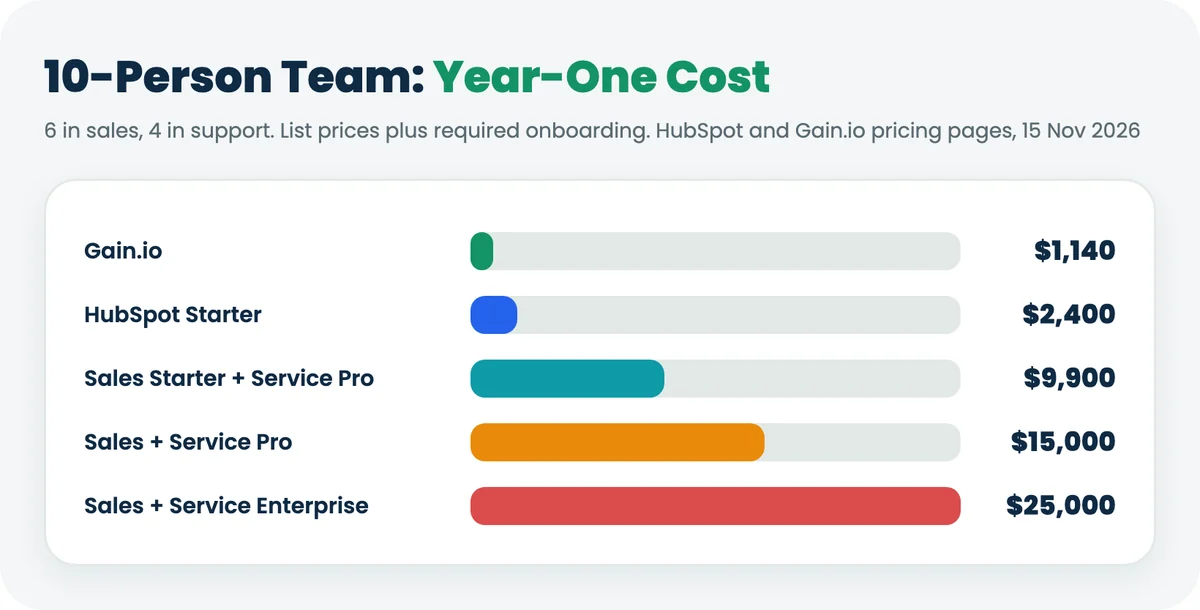
Take a 10-person team: 6 people in sales and 4 in support. Here's what each realistic HubSpot setup costs at list price, with onboarding in year one.
Setup (10 people) | Monthly maths | Year 1 | 2 years | 3 years |
|---|---|---|---|---|
HubSpot Starter (all 10 on Starter) | 10 × $20 = $200 | $2,400 | $4,800 | $7,200 |
Sales Hub Starter + Service Hub Professional (support needs SLAs) | 4 Service Seats × $100 + 6 Core Seats × $50 = $700 | $9,900 | $18,300 | $26,700 |
Sales Hub + Service Hub Professional | 6 Sales Seats × $100 + 4 Service Seats × $100 = $1,000 | $15,000 | $27,000 | $39,000 |
Sales Hub + Service Hub Enterprise | 10 × $150 = $1,500 | $25,000 | $43,000 | $61,000 |
Gain.io (CRM and help desk, one plan) | 10 × $9.50 = $95 | $1,140 | $2,280 | $3,420 |
How the year-one figures work: the mixed setup is $700 × 12 = $8,400 plus $1,500 Service Hub onboarding. Full Professional is $1,000 × 12 = $12,000 plus $1,500 for each hub. Enterprise is $1,500 × 12 = $18,000 plus $3,500 for each hub. Onboarding is a one-time fee, so years 2 and 3 add only the seats. If HubSpot quotes one combined onboarding fee for two hubs, take $1,500 or $3,500 off year one.
The new-customer prices change year one, not the pattern. All 10 on Starter at $7 is $840 for the first year, which is less than Gain.io's $1,140. Full Professional at $90 is $10,800 plus $3,000 onboarding. Once the discount ends, the list price applies. For the full cost of running sales and support in two tools instead of one, see the worked numbers in CRM with a ticketing system.
The Hidden Costs In A HubSpot Bill
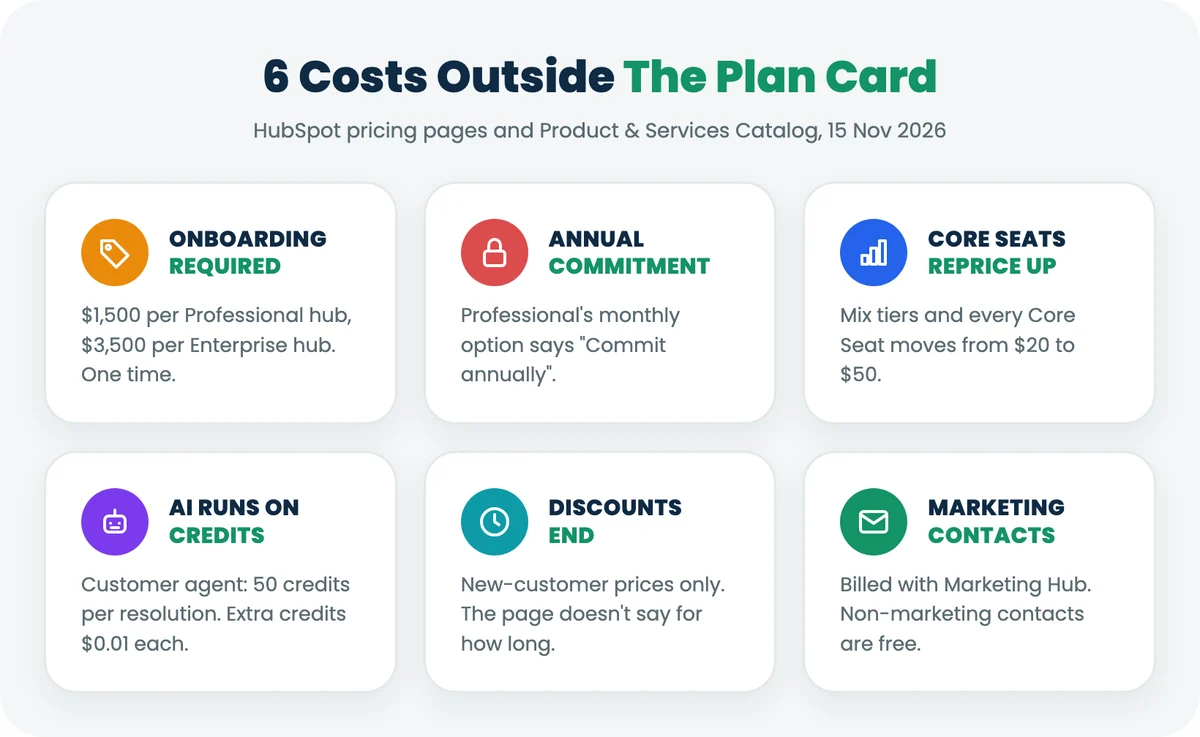
The seat price is the start of the bill, not the end. Six costs sit outside the plan card.
- Required onboarding. $1,500 for each Professional hub and $3,500 for each Enterprise hub. Marketing Hub Professional onboarding is $3,000, and Enterprise is $7,000.
- Annual commitment. Professional's "Pay Monthly" option says "Commit annually". You can spread payments, but you can't leave after month two.
- Tier ratchet on Core Seats. Upgrade one hub to Professional, and every Core Seat reprices from $20 to $50.
- HubSpot Credits. AI agents spend credits. The customer agent uses 50 credits per resolved text conversation. Professional includes 3,000 credits a month, enough for 60 resolutions if nothing else uses them. Extra credits are $0.01 each, so 1,000 resolutions a month cost (50,000 − 3,000) × $0.01 = $470. Unused credits don't roll over.
- Discounts for new customers only. Budget on the struck-through list price, because the page doesn't say when the discount ends.
- Marketing contacts. If you add Marketing Hub, you pay for marketing contacts. Non-marketing contacts in the CRM are free.
Credits are where AI costs move with volume. Gain.io's Eden AI drafts replies, triages tickets and summarises tickets, chats and deals with no usage limits and no extra charge, which makes the AI line on the bill $0. Our guides to AI help desk software and reducing customer service costs show where that matters. Source for credit rates: HubSpot Product & Services Catalog, checked 15 November 2026.
Where The Starter To Professional Jump Hits
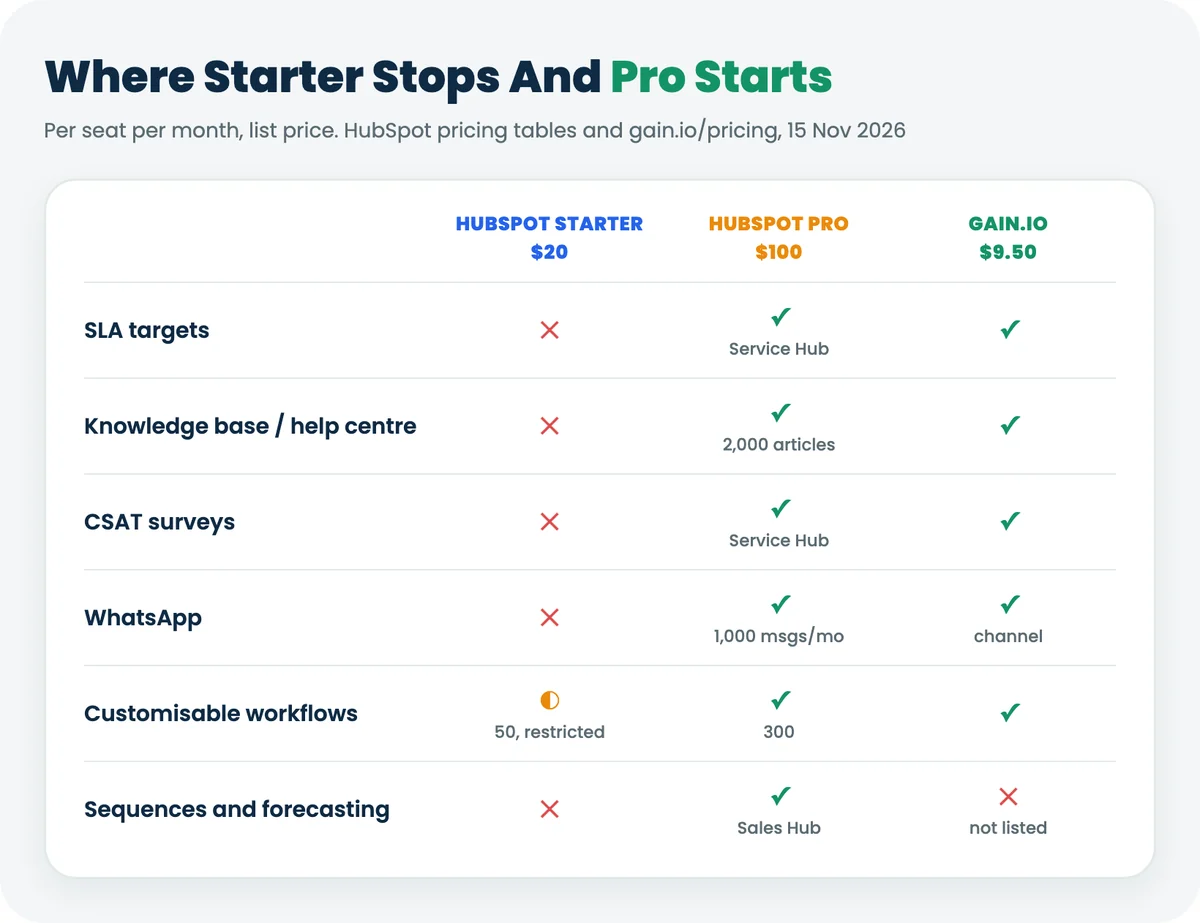
Starter to Professional is a 5× jump per seat, from $20 to $100, plus onboarding. Teams rarely make it for ten features. They make it for one, usually from this list:
Feature | Who needs it | HubSpot tier | Gain.io |
|---|---|---|---|
SLA targets and breach alerts | Support | Service Hub Professional | Included |
Help centre / knowledge base | Support | Service Hub Professional | Included |
CSAT surveys | Support | Service Hub Professional | Included |
Support | Service Hub Professional (1,000 messages a month) | Included as a channel | |
Customisable workflows | Both | Professional (Starter: 50 workflows, restricted) | Included |
Sequences and forecasting | Sales | Sales Hub Professional | Not listed on the pricing page |
The last row matters. If your sales team runs on multi-step email sequences and team forecasts, HubSpot Professional has tools Gain.io's pricing page doesn't list. If your blocker is SLAs, a help centre or CSAT, you're paying $100 a seat for features other tools put in the base plan. The CRM features list and our guide to sales workflow automation help you sort must-haves from nice-to-haves.
When HubSpot Is Worth The Money
HubSpot is worth its price when you'll use the platform beyond sales and support. It fits best in four situations.
- Marketing runs on the same platform. Email marketing, forms, ads and marketing automation sit next to the CRM, and the Starter Customer Platform bundles them at the same per-seat price as one Starter hub.
- Sales depends on sequences and forecasting. Both start on Sales Hub Professional and come with the seat.
- You need a large integration catalogue. HubSpot lists 2,000+ integrations on its pricing pages.
- You're 1 or 2 people. The free CRM is a real product at that size.
It's a harder sell when sales and support are the only teams using it, and when support needs SLAs and a help centre on day one. That's when you pay Professional prices for basics. Our pieces on Salesforce vs a simple CRM and simple CRM vs enterprise CRM cover the same trade-off with other vendors.
When A Combined CRM And Help Desk Costs Less
If your team needs a CRM and a help desk, and doesn't need marketing automation, a tool built for exactly that costs less. Gain.io (a CRM and help desk on one customer record) is one plan at $9.50 per user per month, billed monthly. Every user gets every feature. There's no sales edition and no support edition.
- Sales: contacts and organisations, a deal pipeline, offers with a client portal, meeting booking and Gmail or Microsoft email and calendar sync.
- Support: email ticketing, live chat, WhatsApp and Instagram, a help centre, SLA targets with breach alerts and CSAT, with 5 support channels included.
- Across both: tasks, notes, workflows, reporting, iOS and Android apps, Eden AI with no usage limits, and an MCP server that's read-only at launch.
For the 10-person team above, that's $95 a month and $1,140 a year, with no onboarding fee on the pricing page and no annual commitment. It's what HubSpot charges for one Professional seat for about 11 months, so the gap compounds as the team grows. Gain.io's pricing page doesn't list multi-step sales sequences, team forecasting or marketing email, so if those decide your choice, HubSpot is the better fit.
For a feature-by-feature view, see Gain.io vs HubSpot. If you're weighing other CRMs, compare Gain.io vs Pipedrive, Gain.io vs Zoho and Gain.io vs Salesforce, or read why sales and support should share one record in customer 360 view. You can see the full plan on the Gain.io pricing page, along with the CRM and help desk pages.
How To Estimate Your HubSpot Bill In 5 Steps
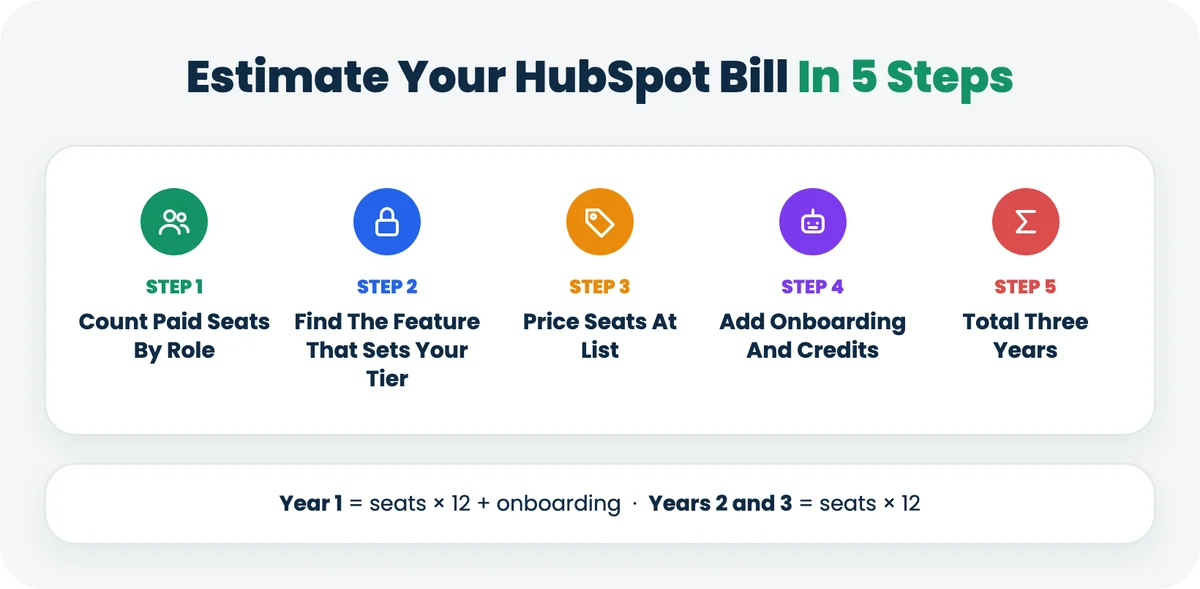
- Count paid seats by role. List everyone who edits a deal or answers a ticket. People who only read reports can use free view-only seats.
- Find the feature that sets your tier. For each team, name the one feature you can't work without, such as SLAs, sequences or a help centre, and check which tier includes it.
- Price the seats at list. Use the struck-through price, not the new-customer price. Remember that mixed tiers reprice every Core Seat at the highest tier.
- Add onboarding and credits. Add $1,500 for each Professional hub or $3,500 for each Enterprise hub. If you plan to use the customer agent, multiply expected resolutions by 50 credits and price the excess at $0.01.
- Total three years. Year 1 is seats plus onboarding. Years 2 and 3 are seats only. Compare that total, not the monthly figure, with any alternative.
Run the same five steps for any CRM you shortlist. The CRM buying checklist and choosing a CRM for small business guide cover the rest of the evaluation, and CRM data migration covers the move once you've picked.
Key Terms In HubSpot Pricing
Term | Meaning |
|---|---|
Smart CRM | HubSpot's shared customer database that every hub runs on. |
Sales Hub | HubSpot's sales software: pipelines, sequences, forecasting and sales automation. |
Service Hub | HubSpot's customer service software: ticketing, SLAs, knowledge base and surveys. |
Starter Customer Platform | A bundle of every HubSpot hub at Starter level, priced per seat like a single Starter hub. |
Core Seat | A paid HubSpot user seat with core access to all purchased products, priced by your highest tier. |
Sales Seat and Service Seat | Paid seats that give full Sales Hub or Service Hub Professional or Enterprise features. |
HubSpot Credits | Monthly units that AI agents and some automations spend; extra credits cost $0.01 each. |
Breeze Assistant | HubSpot's built-in AI assistant, included with Core Seats. |
Final Discussion
HubSpot CRM pricing is fair for what it covers and easy to underestimate. The free CRM is real for 2 people. Starter is good value at $20 a seat for a team that only needs the basics. The cost moves when one team needs one Professional feature, because that brings $100 seats, an annual commitment, onboarding and a Core Seat reprice for everyone else.
For a 10-person sales and support team, the honest range at list price, below Enterprise, is $2,400 to $15,000 in year one, depending on whether support needs SLAs and a help centre. Work out which feature sets your tier before you look at the monthly figure, and budget on list price, not the new-customer discount.
If your team needs a CRM and a help desk on one record without the Professional jump, Gain.io costs $9.50 per user per month, billed monthly, with a 14-day trial and no card. Start from the pricing page.