At 8:40 on a Tuesday, Sarah Chen at Acme Corp (both illustrative) logs her third support ticket about a CSV export that keeps failing. At 9:05, the account's sales rep sends her a template: "Just checking in on the proposal. Any thoughts?" The rep did everything the playbook said. Nobody told the rep about the tickets.
A sales follow-up email template is a reusable message for the moment after a call, demo, proposal or silence. Below are 15 by situation, each with subject lines, timing and why it works. Send the first follow-up within one business day, space later ones 3 to 7 days apart, and check the account's open support tickets first. Gain.io (gain.io), the CRM and help desk on one customer record, shows both on one contact.
The template wasn't the problem. The timing was, and the missing context. Sales follow-up email templates save real time, but only when they match the moment the buyer is in, including what's happening with your support team. Below are 15 templates sorted by situation, each with subject lines, a short email, why it works and when to send the next one.
Key Takeaways
- A sales follow-up email works when it does one job: recap the conversation, add one new thing, or ask for one decision.
- Send the first follow-up within one business day of a call, demo or proposal, while the details are fresh for both sides.
- After no reply, space follow-ups 3 to 7 days apart and stop after 3 or 4 unanswered emails with a clear break-up message.
- Subject lines of 3 to 7 words that name the topic, such as "Acme pricing: next step", tell the buyer why to open; "Checking in" doesn't.
- Check the account for open support tickets before any sales follow-up. A pitch sent during an unresolved problem reads as if nobody is listening.
- Keep each template between 60 and 125 words with placeholders, and change at least one line per send so it reads as written for that buyer.
- Templates fail on escalated complaints and large multi-stakeholder deals. Write those emails from scratch.
This guide covers which template fits which situation, what makes a follow-up work, the support-ticket check, the 15 templates in five groups, follow-up timing, a 6-step routine in your CRM (customer relationship management software) and when not to use a template.
Which Sales Follow-Up Email Template Fits Your Situation
Match the template to the last thing that happened with the buyer: a call, a proposal, silence, a stalled deal or a support issue. The table gives you the template number, when to send it and a subject line to start from.
# | Situation | Send it | Example subject line |
|---|---|---|---|
1 | After a discovery call | Same day or next business day | [Company] and [your company]: notes and next step |
2 | After a product demo | Within 1 business day | The two things you asked about |
3 | Inbound enquiry from a web form or live chat | Within 1 business hour if you can | Your question about [topic] |
4 | After a trade show, webinar or networking event | 1 to 2 days after | Good to meet you at [event] |
5 | After sending a proposal or offer | 2 to 3 business days after | Your [company] offer: any questions |
6 | The buyer pushes back on price | Within 1 business day of the objection | Options on the [plan] price |
7 | An offer is about to expire | 3 to 5 days before expiry | Your offer expires on [date] |
8 | First nudge after no response | 3 business days after your last email | Re: [original subject] |
9 | Second follow-up that adds something new | 7 days after Template 8 | One idea for [their goal] |
10 | Break-up email | 14 days after Template 9 | Should I close your file? |
11 | Your contact goes quiet mid-deal | After 10 or more days of silence in an active stage | Who else should see this? |
12 | Reopening a closed-lost deal | When the reason they said no has changed | [Reason] has changed since we spoke |
13 | Trial or sign-up with no meeting booked | Day 2 or 3 of the trial | 15 minutes to set up [use case] |
14 | The account has an open support ticket | Instead of the planned sales email, after support's latest reply | Your [issue] ticket: where it stands |
15 | Renewal or upsell after a resolved issue | 7 or more days after the ticket closes well | Since the [issue] fix |
The timings are Gain.io's recommended starting points, not measured benchmarks. Adjust them to your sales cycle.
What Makes A Sales Follow-Up Email Work
A follow-up email works when the buyer can see in five seconds why it's in their inbox and what you want them to do. That comes down to five parts, kept under about 125 words.
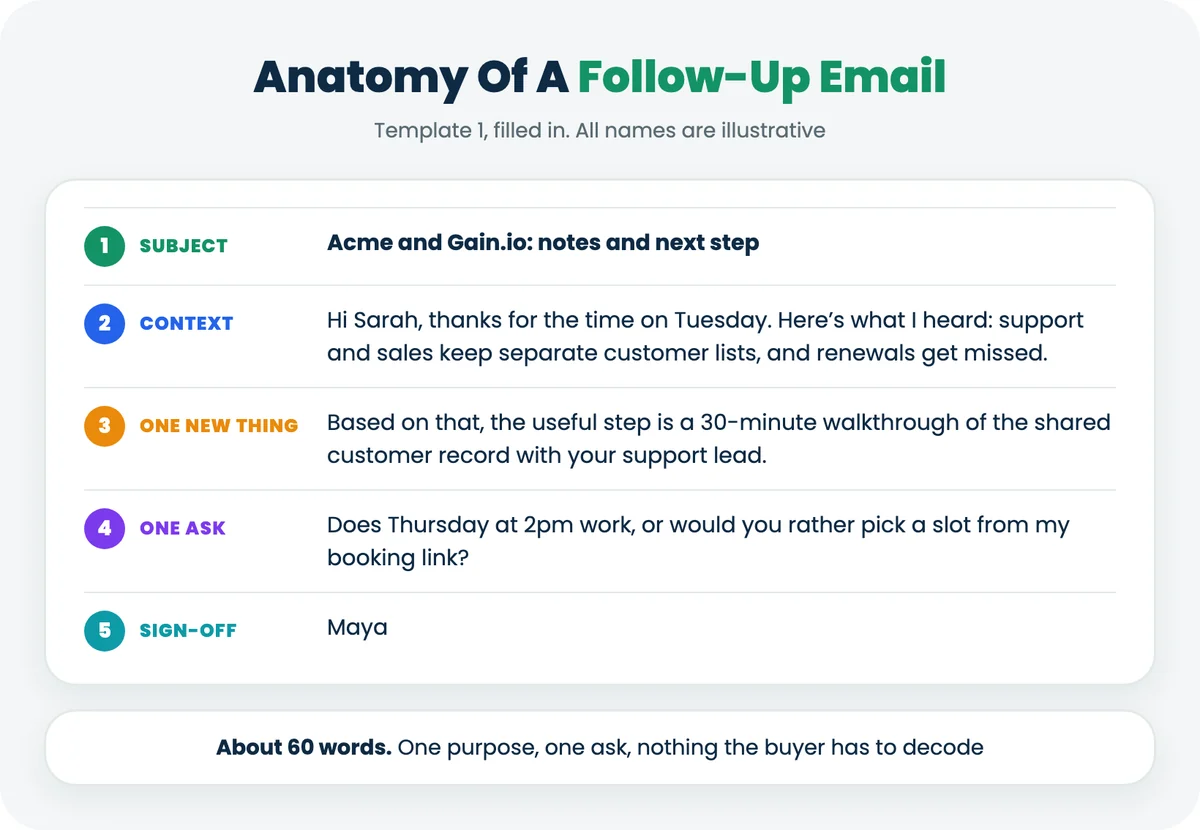
- A subject line that names the topic. "Acme rollout: notes from Tuesday" beats "Following up" because the buyer knows what's inside before opening it.
- A context line. One sentence that connects this email to the last conversation, in the buyer's words where you can.
- One new thing. A recap, an answer, a short case, a price option. If the email adds nothing, it's a reminder, and reminders get ignored.
- One ask. A yes or no question, a time slot or a booking link. Two asks give the buyer a reason to answer neither.
- A plain sign-off. Your name and one way to reach you. Skip the four-line signature banner.
Every template below follows that shape. For what to cut, see the follow-up mistakes that cost replies.
Why Check Support Tickets Before You Send A Sales Follow-Up
Check because the buyer reads your email in the context of their last experience with your company. If that experience is an open, unresolved support ticket, a cheerful "any thoughts on the proposal?" tells them sales and support don't talk.
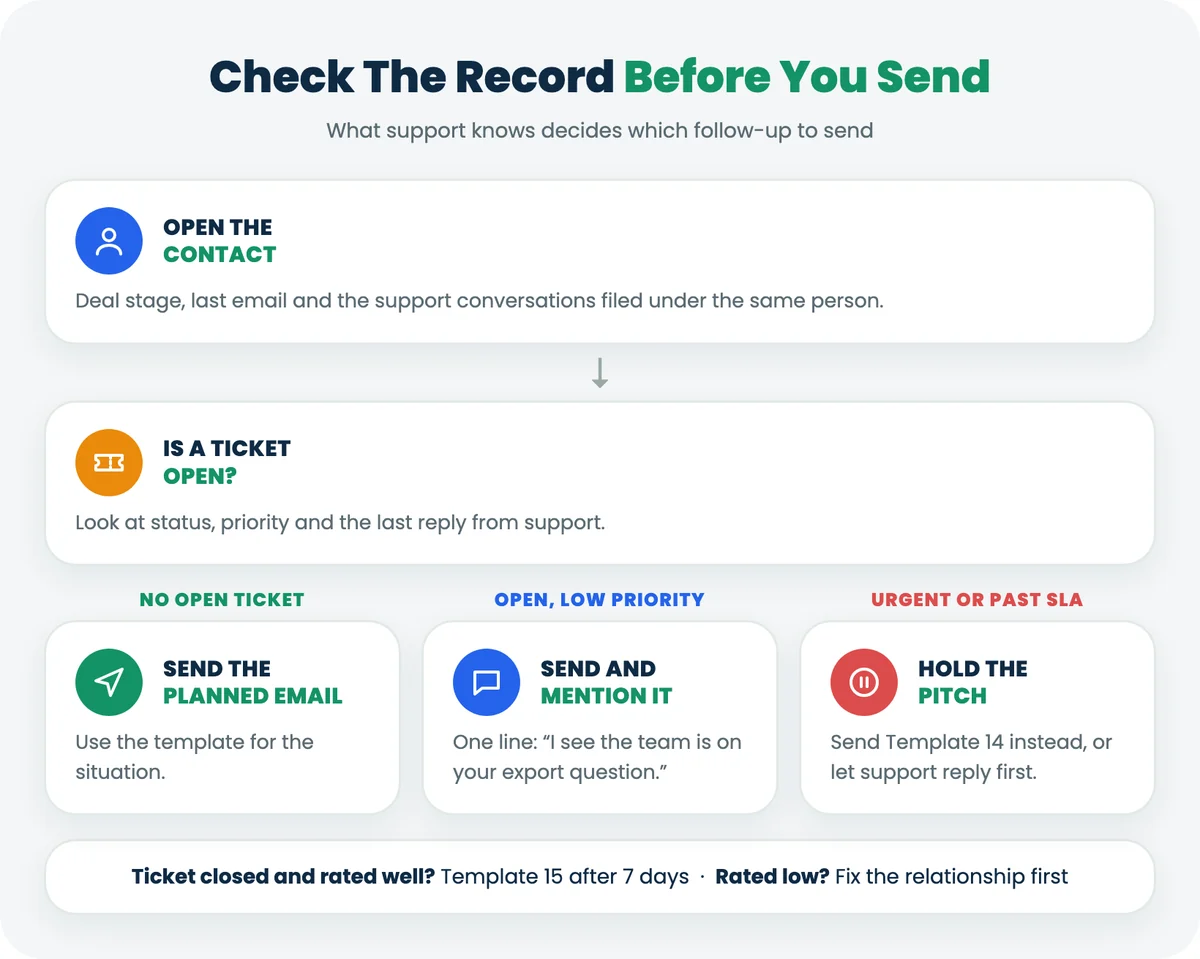
It's a quick check when the information is on the same record. Look at three things: is a ticket open, how urgent is it, and how did the last one end. Then use this table.
What the customer record shows | What to do with the follow-up |
|---|---|
No support tickets in the last 30 days | Send the planned follow-up |
A ticket is open, low priority, and support has replied | Send it, and mention the ticket in one line ("I see the team is on your export question") |
A ticket is open, high priority or past its SLA (service level agreement) target | Hold the sales email. Send Template 14, or let support's reply land first |
A ticket closed in the last 7 days and the customer rated it well | A good moment for Template 15 |
A ticket closed but the CSAT (customer satisfaction) rating was low | Fix the relationship first. No upsell this week |
This is where a CRM with a ticketing system earns its keep. In Gain.io, sales and support work on the same contact: deals sit on the record and support conversations are filed under the same person, so a rep sees an open ticket without asking anyone. If the thread is long, Eden AI, Gain.io's built-in assistant, can summarise the ticket before you write. If your sales and support data live in two tools, the full customer view guide covers what to connect.
Follow-Up Email Templates After A Call, Demo Or Event
These four go out after you've spoken or met. Send them fast, because the buyer's memory of the conversation fades by the day, and recap in their words, not yours.
Template 1: After A Discovery Call
Send it when: the same day as the call, or the next business day at the latest.
Check first: any open ticket on the account if they're already a customer, and who else was on the call.
Subject lines:
- [Company] and [your company]: notes and next step
- Notes from our call on [day]
- What you told us about [problem]
The email:
Hi [First name],
Thanks for the time on [day]. Here's what I heard: [problem in their words], it's costing [team] about [impact they mentioned], and you want it fixed before [deadline].
Based on that, the next useful step is a 30-minute walkthrough of [the part that solves it] with [other stakeholder]. Does [day and time] work, or would you rather pick a slot here: [booking link]?
[Your name]
Why it works: the recap proves you listened, and quoting their numbers keeps the problem theirs, not your pitch. One next step with a specific time is easier to accept than "let me know".
If there's no reply: send Template 8 after 3 business days. For a stronger first call, prepare with these discovery call questions.
Template 2: After A Product Demo
Send it when: within one business day of the demo.
Check first: which features they reacted to (your call notes) and whether a trial account already exists.
Subject lines:
- The two things you asked about
- [Company] demo: recap and recording
- Next step after [day]'s demo
The email:
Hi [First name],
Two parts of [day]'s demo got the most questions: [feature 1] for [their use case] and [feature 2] for [their use case]. I've put short answers to both below, plus the recording: [link].
[One-line answer to question 1.] [One-line answer to question 2.]
If it would help [stakeholder] see it, I can run a 20-minute version for them. Pick any time that suits here: [booking link].
[Your name]
Why it works: it skips the full feature recap and goes straight to the two things they cared about. Offering a short session for another stakeholder moves the deal toward the people who sign.
If there's no reply: Template 8 after 3 business days. Our guide on how to run a sales demo covers the call itself.
Template 3: After An Inbound Enquiry From A Web Form Or Live Chat
Send it when: within the hour if you can, while the buyer is still thinking about the question they asked.
Check first: the chat transcript or form answers, so you don't ask what they've already told you.
Subject lines:
- Your question about [topic]
- Re: your chat about [topic]
- [Topic]: a straight answer
The email:
Hi [First name],
You asked [their question] on our [website chat or form] earlier. The short answer is [direct answer in one or two sentences].
Teams like yours usually want to know [the next obvious question] too, so here's that: [answer or link].
If it's easier to talk it through, here's my calendar: [booking link]. Otherwise, reply here and I'll answer by email.
[Your name]
Why it works: it answers first and sells second. Giving them the choice of email or a call respects how they chose to reach you.
If there's no reply: Template 8 after 3 business days.
Template 4: After A Trade Show, Webinar Or Networking Event
Send it when: one to two days after the event, once the post-event inbox flood has passed.
Check first: your notes from the conversation. If you have none, say where you met and keep it short.
Subject lines:
- Good to meet you at [event]
- The [topic] question from [event]
- [Event]: the link I promised
The email:
Hi [First name],
Good to meet you at [event]. You mentioned [the problem or project they talked about], so here's the [resource or example] I said I'd send: [link].
If [problem] is on this quarter's list, I'd be glad to show you how [similar team] approached it. Would a 20-minute call next week be useful?
[Your name]
Why it works: it ties the email to a real moment and delivers on a promise before asking for anything.
If there's no reply: Template 9 after 7 days. A first nudge rarely adds much after a short event conversation.
Follow-Up Email Templates After A Proposal Or Offer
Once the buyer has a price in front of them, your follow-up should make it easier to say yes, or easier to tell you what's in the way. Don't ask "any thoughts?" Ask about something specific.
Template 5: After Sending A Proposal Or Offer
Send it when: two to three business days after the proposal goes out.
Check first: the offer's status on the deal, and any open ticket if they're an existing customer.
Subject lines:
- Your [company] offer: any questions
- [Company] proposal: one thing to confirm
- Next step on the [plan] offer
The email:
Hi [First name],
The offer for [company] is here: [offer link]. Two things usually come up at this stage: [common question, such as implementation time] and [second common question]. Short answers: [answer 1]. [Answer 2.]
Is there anything in the offer you'd want changed before you share it with [decision maker]? Happy to adjust the [scope or start date] if that helps.
[Your name]
Why it works: it answers the questions buyers ask at the proposal stage before they ask them, and invites changes instead of a yes or no.
If there's no reply: Template 8 after 3 business days. In Gain.io, you can build the offer from a template or a PDF and publish it to a client portal, so the link in this email goes to the offer itself and its status stays on the deal.
Template 6: When The Buyer Pushes Back On Price
Send it when: within one business day of the objection, whether it came by email or on a call.
Check first: what they compared you with, and whether the objection is budget, value or timing.
Subject lines:
- Options on the [plan] price
- Re: budget for [project]
- Three ways to make [plan] fit
The email:
Hi [First name],
Thanks for being straight about the price. Here are three options that change the number without changing what you're trying to fix:
1. Start with [smaller scope or fewer seats] at [price] and add the rest when [trigger]. 2. Move the start date to [date] so it lands in next quarter's budget. 3. Keep the full scope at [price] and drop [lower-priority item].
Which of these is closest to workable?
[Your name]
Why it works: it treats the objection as a constraint to solve, not an argument to win, and asks the buyer to pick instead of to defend their budget.
If there's no reply: a phone call after 3 business days. Price conversations stall faster over email.
Template 7: Before An Offer Expires
Send it when: three to five days before the expiry date on the offer.
Check first: that the expiry is real. Never invent a deadline.
Subject lines:
- Your offer expires on [date]
- [Company] offer: [number] days left
- Extend or let it lapse?
The email:
Hi [First name],
A quick note: the offer for [company] expires on [date]. After that, [what changes: the price, the start date or the reserved onboarding slot].
If you need more time, tell me and I'll reissue it with a new date. If the timing's wrong altogether, that's fine too. I'd just like to know so I can plan on our side.
[Your name]
Why it works: the deadline is factual and the email offers an easy way out, which often gets a reply when nothing else has. For the paperwork side, see our guide to sales contract management.
If there's no reply: let the offer expire, then send Template 10 a week later.
Follow-Up Email Templates When A Prospect Stops Replying
Silence usually means you're not the priority this week, not a no. These three templates are the follow-up emails to send after no response, in order: a short nudge, a useful addition, then a polite close. Silent deals that sit untouched are how pipelines fill up with stalled deals.
Template 8: First Nudge After No Response
Send it when: three business days after your last email, as a reply in the same thread.
Check first: whether they replied somewhere else, such as a support chat or a different inbox.
Subject lines:
- Re: [original subject] (reply in the thread)
- Quick one on [topic]
The email:
Hi [First name],
Bumping this up in case it got buried. The one thing I need from you is [the ask, such as a yes or no on Thursday at 2pm].
[Your name]
Why it works: replying in the thread keeps the original context one scroll away, and restating the single ask makes it a 5-second reply.
If there's no reply: Template 9 after 7 days.
Template 9: Second Follow-Up That Adds Something New
Send it when: seven days after Template 8, as a new email with a new subject line.
Check first: any news on their side (a launch, a hire, a funding round) that gives you a reason to write.
Subject lines:
- One idea for [their goal]
- How [similar team] handled [problem]
- Saw the news about [their event]
The email:
Hi [First name],
I know [project] isn't the only thing on your desk. One thing that might help either way: [a short, specific idea, resource or example tied to their problem].
If [project] is still on the list, I'm happy to pick it up again. If it's moved down, just say so and I'll check back in [month].
[Your name]
Why it works: it gives them something useful whether or not they buy, and offers a no-pressure way to say "not now".
If there's no reply: try a phone call or a message to a second contact (Template 11), then Template 10 after 14 days.
Template 10: The Break-Up Email
Send it when: 14 days after Template 9, and only once.
Check first: that no one else at the company is in an active conversation with your team.
Subject lines:
- Should I close your file?
- Closing the loop on [topic]
- Last note from me on [project]
The email:
Hi [First name],
I haven't heard back, so I'll assume [project] isn't a priority right now and stop following up.
If I've got that wrong, a one-word reply is enough and I'll pick it up again. Otherwise, thanks for your time, and good luck with [their goal].
[Your name]
Why it works: it's honest and final, and it lets the buyer correct you with almost no effort. It also lets you mark the deal Lost and keep your pipeline numbers honest.
If there's no reply: close the deal as Lost with a reason, and set a task to revisit in 60 to 90 days.
Follow-Up Email Templates For Stalled Or Lost Deals
A stalled deal needs a different person, a different reason or a smaller next step. These three templates give you each.
Template 11: When Your Contact Goes Quiet Mid-Deal
Send it when: after 10 or more days of silence on a deal in an active stage, such as Proposal or Negotiation.
Check first: whether your contact has changed role or left. Write to them first, not around them.
Subject lines:
- Who else should see this?
- Is [project] still with you?
- [Company] and [project]: right person?
The email:
Hi [First name],
We've been quiet on [project] for a couple of weeks, which usually means it's moved to someone else's desk or down the list.
Is there someone else I should be talking to, or a better time to pick it up? Either answer helps.
[Your name]
Why it works: it names what's probably happening without blame and asks a question that's easy to answer. Long silences are normal in a long sales cycle; this email finds out whether yours is one.
If there's no reply: Template 10 after 14 days.
Template 12: Reopening A Closed-Lost Deal When Timing Changes
Send it when: the reason they said no has changed: a new budget year, a new hire, a contract with another vendor ending, or a feature they wanted now exists.
Check first: the Lost reason on the deal. If you didn't record one, start doing that today.
Subject lines:
- [Reason] has changed since we spoke
- Revisiting [project] for [quarter]
- You asked about [feature] in [month]
The email:
Hi [First name],
When we spoke in [month], [project] didn't go ahead because [their reason]. [What has changed: the feature now exists, their contract renews in March, the new budget year has started.]
If that changes the picture, I can send an updated offer in a day. If not, no problem, and I won't keep asking.
[Your name]
Why it works: it proves you remembered why they said no and gives one concrete reason to look again. A regular win-loss analysis tells you which Lost reasons are worth revisiting.
If there's no reply: leave it. One reopening email per trigger is enough.
Template 13: Trial Or Sign-Up With No Meeting Booked
Send it when: day 2 or 3 of a trial, if they haven't booked a call.
Check first: what they've set up so far, and whether they've opened a support ticket or chat.
Subject lines:
- 15 minutes to set up [use case]
- Stuck on [step]?
- Your [product] trial: one quick win
The email:
Hi [First name],
You started a trial on [day]. Most teams get the most out of the first week once [key setup step] is done, and it takes about [time] with someone who's done it before.
Want me to do it with you? Pick 15 minutes here: [booking link]. If you've got it covered, ignore this and enjoy the trial.
[Your name]
Why it works: it offers practical help instead of a sales call, and makes booking a single click.
If there's no reply: one more email at the midpoint of the trial with a different setup tip, then let the trial run.
Follow-Up Email Templates For Customers With Support History
Existing customers are where a careless template does the most damage, because they've already had a reason to contact support. These two templates use what support knows instead of ignoring it.
Template 14: When The Account Has An Open Support Ticket
Send it when: instead of the sales follow-up you'd planned, after support has sent its latest update.
Check first: the ticket's status, priority and last reply, so you don't promise what support hasn't.
Subject lines:
- Your [issue] ticket: where it stands
- [Issue]: I'm following it too
- Before we talk about [renewal or project]
The email:
Hi [First name],
I saw your team raised [issue] on [day]. [Support agent] is on it, and the latest update is [status in plain words].
I'm keeping our conversation about [renewal or project] on hold until that's sorted. It isn't the right time to talk about anything else. If the issue is getting in the way of something urgent, reply here and I'll make sure the right person sees it today.
[Your name]
Why it works: it shows sales and support talk to each other, and it pauses the pitch on purpose. When the ticket closes, you've earned the next conversation instead of interrupting the wrong one.
If there's no reply: no follow-up. Wait for the ticket to close, then use Template 15 or your original email.
Template 15: Renewal Or Upsell Follow-Up After A Resolved Issue
Send it when: 7 or more days after the ticket closes, and only if the customer rated the fix well or said thanks.
Check first: the satisfaction rating on the closed ticket and whether any other ticket has opened since.
Subject lines:
- Since the [issue] fix
- [Company] renewal: a quick look ahead
- One idea now [issue] is sorted
The email:
Hi [First name],
Glad [issue] is sorted, and thanks for your patience while the team worked on it.
Your renewal comes up on [date]. Before then, it's worth a 20-minute look at [the add-on, plan or change that fits what they told support or sales]. From the tickets and our last call, [their team] is now [the change you've noticed, such as handling more requests or adding users].
Would [day] work for a quick review? [booking link]
[Your name]
Why it works: it closes the support loop before opening a sales one, and grounds the upsell in what the customer has been doing. Our guide to upselling strategies covers the offer itself, and a quarterly business review is a good home for this conversation with larger accounts.
If there's no reply: Template 8 after 3 business days, then hand it to the account owner's renewal plan.
How Often Should You Send Sales Follow-Up Emails
Send the first follow-up within one business day, then space the next ones 3, 7 and 14 days apart, and stop after 3 or 4 unanswered emails. Wider gaps after each silence keep you visible without crowding the inbox.
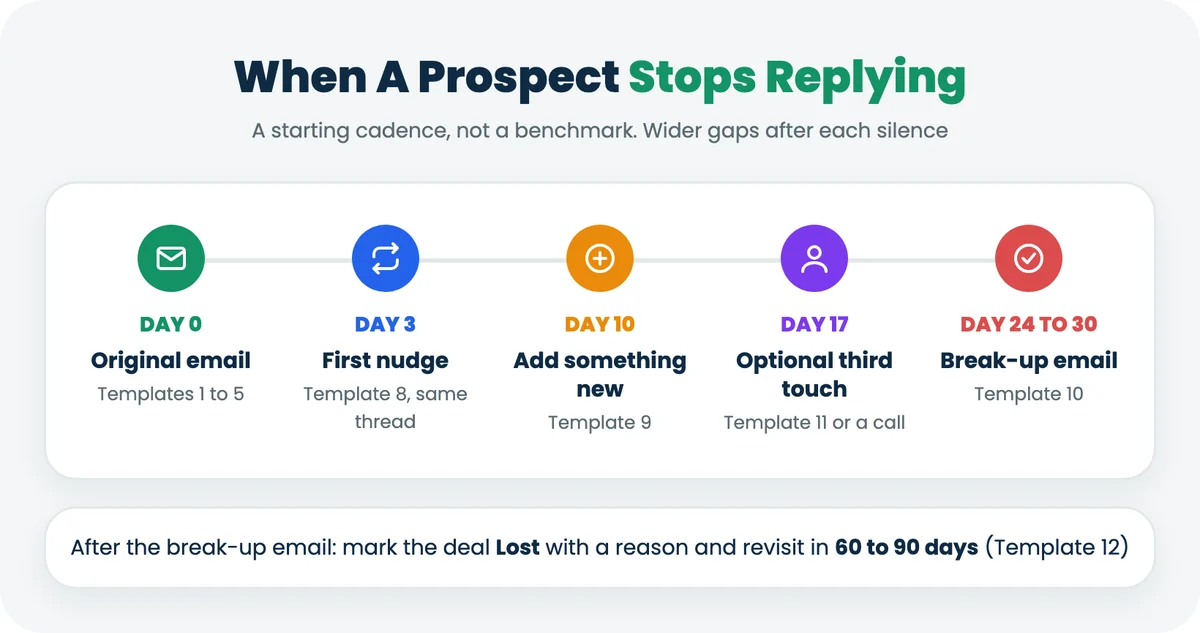
Step | When | Template | Purpose |
|---|---|---|---|
Original email | Day 0 | 1, 2, 3, 4 or 5 | Recap and one next step |
First nudge | Day 3 (business days) | 8 | Short reminder in the same thread |
Second follow-up | Day 10 | 9 | Add one new, useful thing |
Third touch (optional) | Day 17 | 11, or a phone call | Ask whether someone else owns this |
Break-up | Day 24 to 30 | 10 | Permission to close the file |
Reopen | 60 to 90 days later, or on a trigger | 12 | Only when something has changed |
Treat this as a starting cadence, not a rule. Shorten it for inbound leads and small deals. Stretch it for enterprise deals with a buying committee, where a multi-touch approach across email, phone and meetings beats more emails. If you want the cadence to run without manual reminders, our guide on how to automate follow-ups covers the options.
How To Run Your Follow-Ups From The CRM In 6 Steps
Templates only help if each follow-up has a date and an owner. This routine works in any CRM that holds both the email and the task. Here's how it runs in Gain.io.
- Connect your inbox. Connect a Google or Microsoft account so email, calendar and contacts sync with the CRM. Your sent follow-ups then sit on the contact, not just in your mailbox.
- Open the contact before you write. Check the deal stage, the last email and any support conversation filed under the same person. Use the ticket table above to decide whether to send, soften or hold.
- Pick the template by the last thing that happened and paste it into Compose email. Fill every [placeholder] and change at least one sentence.
- Label it Follow up. Gain.io's email labels include Follow up, so you can later filter every pending follow-up by label, person or date (Gain.io Help Center: email management).
- Create a task with a due date on the deal for the next follow-up, using the day from the cadence table, and set a reminder (Gain.io Help Center: create a task).
- Log the outcome. Move the deal stage, add a note, or mark the deal Lost after the break-up email so the pipeline reflects reality.
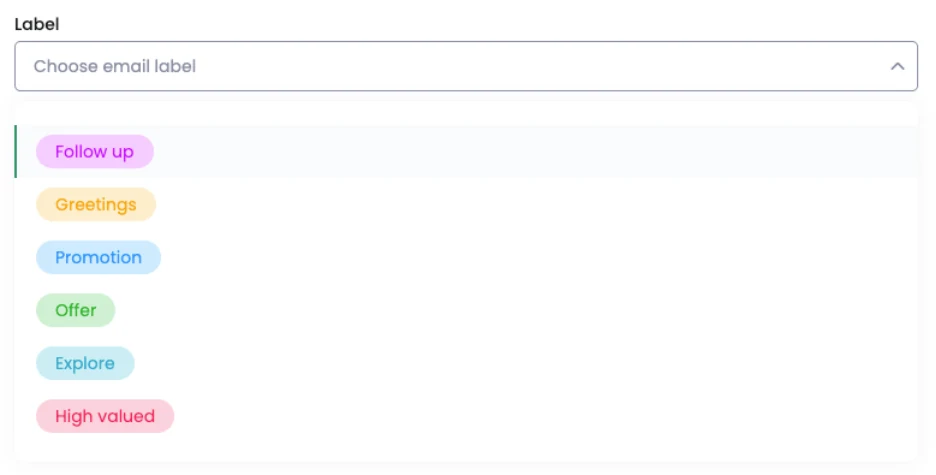
Once labelled, every follow-up can be filtered by contact, organisation or date. Filter by Follow up and this week, and anything without a reply gets the next template.
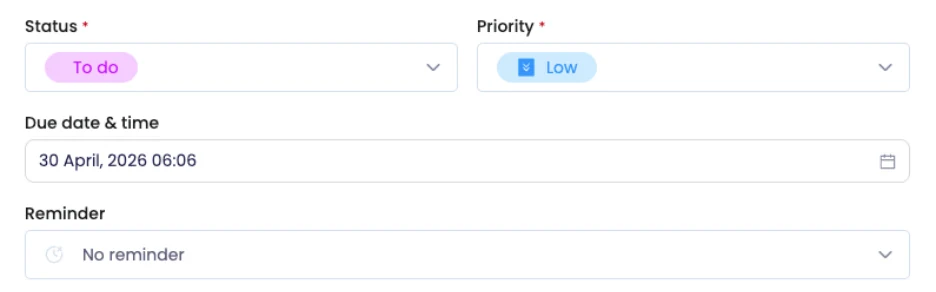
The task keeps the cadence honest: link it to the deal and the next follow-up shows up in your tasks and calendar on the right day. More in our guides to sales task management, Gmail CRM integration and CRM with email integration.
When A Template Is The Wrong Choice
Write from scratch when the stakes or the emotions are high. A template saves a few minutes. A tone-deaf email on the wrong deal can cost the deal.
- The customer has an escalated complaint or has threatened to cancel.
- The deal involves a buying committee, legal review or a custom contract.
- The buyer has already said no twice. A third template reads as not listening.
- You're writing to a senior executive you've never met. Research one specific thing and lead with it.
There's also a limit on the tool side. Gain.io sends follow-ups from your connected Gmail or Microsoft inbox, keeps them on the contact, and reminds you with tasks and calendar reminders. Automated email sequences, scheduled sending and saved email templates for sales emails are not documented in the Gain.io help centre as of 19 Nov 2026. If your team runs multi-step sequences that send on their own with A/B testing, a dedicated sales engagement tool fits that job, usually alongside a CRM.
Key Terms In Sales Follow-Up Emails
Term | Meaning |
|---|---|
Sales follow-up email | An email sent after a first contact, call, demo or proposal to move a deal to its next step. |
Follow-up cadence | The planned spacing and number of follow-ups for one prospect. |
Break-up email | A last, polite email that asks permission to stop following up. |
Trigger event | A change on the buyer's side, such as funding, a new hire or a renewal date, that gives a reason to reach out. |
Placeholder | A bracketed field such as [First name] that you replace before sending. |
Deal stage | Where an opportunity sits in your pipeline, such as Proposal or Negotiation. |
Open ticket | A customer support request that hasn't been resolved yet. |
SLA (service level agreement) | The response or resolution time a support team commits to. |
CSAT (customer satisfaction score) | A rating a customer gives after a support interaction. |
Client portal | A shared page where the buyer views and accepts an offer. |
Final Discussion
A good sales follow-up email is short, specific and sent at the right moment. The 15 templates above cover the moments that come up most: after a call, after a proposal, after silence, on a stalled deal and with an existing customer. Pick by situation, fill the placeholders, and change one line so it sounds like you.
The step most templates skip is the one that matters most with existing customers: look at what support knows before you hit send. An open ticket changes what the right email is, and sometimes the right email is no sales email at all. If your pipeline still lives in a spreadsheet, our free CRM template keeps support requests next to deals for the same reason.
If your sales and support teams share customers, you can try both halves on one record for 14 days. Gain.io costs $9.50 per user per month, billed monthly, with no credit card for the trial. Start from the pricing page.